A Phone Stand Makes Video Calls Easier to Sit Through
Lamicall’s Adjustable Cell Phone Stand is the most versatile desk option, pairing a weighted base with a wide tilt range. UGREEN’s Phone Stand Holder is the sturdier metal alternative. Anker’s MagGo Magnetic Phone Stand suits a MagSafe compatible iPhone best.
Lamicall’s Adjustable Cell Phone Stand is the safest default choice. UGREEN’s Phone Stand Holder offers a more solid metal build, and Anker’s MagGo Magnetic Phone Stand suits a magnetic iPhone setup.
A phone stand seems trivial until it tips backwards under a screen tap or blocks the charging port needed every night. We compared base weight and footprint, adjustment ranges, tolerance for thick cases, port clearance and magnetic holding force, then weighed those against what owners report about long term joint stiffness and desk scratching.
The top picks, ranked
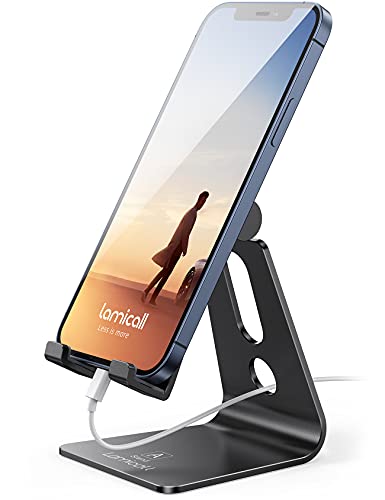
Lamicall Adjustable Cell Phone Stand
A wide aluminium base and low centre of gravity keep this planted while typing on the screen, where lighter stands fail. Its hinge moves through a broad angle range and holds position rather than creeping. Owners report silicone pads protect both phone and desk surface over years of use.
Pros
- Very stable under screen taps
- Holds set angle without creeping
- Charging cable passes through the base
Cons
- Does not fold flat for travel
- Fixed height, tilt only
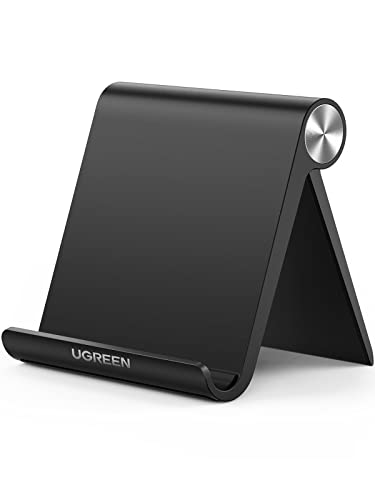
UGREEN Phone Stand Holder
Heavier aluminium construction resists the flex felt in lighter stands, and the arm supports thicker phones with cases still fitted. Small tablets work as well as phones, making it a reasonable single stand for a mixed desk. An open front leaves the port fully accessible for charging while docked.
Pros
- Noticeably rigid with no flex
- Handles tablets as well as phones
- Full port access while docked
Cons
- Heavier than folding alternatives
- Limited height adjustment

Nulaxy Phone Stand
A classic wedge shape with a deep cradle sounds basic but works because nothing loosens or creeps over time. Thick cases and rugged covers that slimmer arms reject fit easily here. Its fixed angle suits desk viewing well, though a higher angle would help more for video calls.
Pros
- Nothing to loosen or adjust
- Takes thick protective cases
- Works in both orientations
Cons
- Fixed angle only
- Low height for video calls
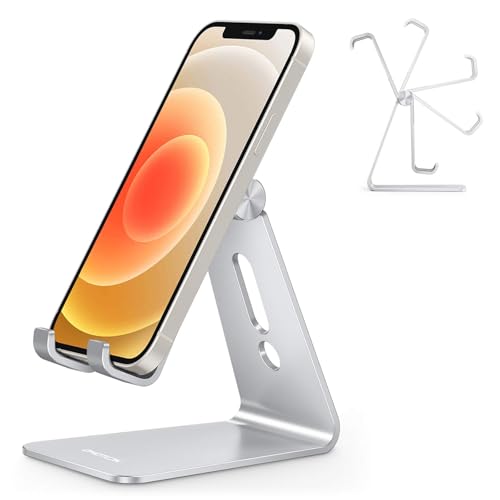
OMOTON Desktop Cell Phone Stand
A stripped down aluminium cradle nearly disappears on a desk, useful when the phone acts as a reference display beside a monitor. Its narrow footprint takes up very little space. No adjustment exists, so the listing angle is exactly what arrives.
Pros
- Takes almost no desk space
- Clean unobtrusive appearance
- Well finished for the price
Cons
- No adjustment at all
- Too small for tablets

Anker MagGo Magnetic Phone Stand
Snapping the phone on with one hand is a genuine daily convenience, and the magnetic array holds firmly enough that a screen tap does not shift it. Rotating between portrait and landscape needs no unmounting. Only a MagSafe compatible iPhone or a case carrying a magnet ring works here, so check compatibility before ordering.
Pros
- One handed snap on and off
- Rotates without unmounting
- Holds firm under screen taps
Cons
- Requires a magnetic phone or case
- No use for most Android handsets

Twelve South HiRise 3 Deluxe
This raises the phone to a proper eye level rather than leaving it flat on the desk, and a pad for a watch and earbuds means one plinth handles the whole set. Cable routing gets designed in rather than left as an afterthought. Considerably more expensive than a plain stand, it only makes sense charging multiple devices in one place.
Pros
- Consolidates several chargers in one spot
- Genuine eye level height
- Cables routed out of sight
Cons
- Significantly more expensive than a simple stand
- You supply the charging cables
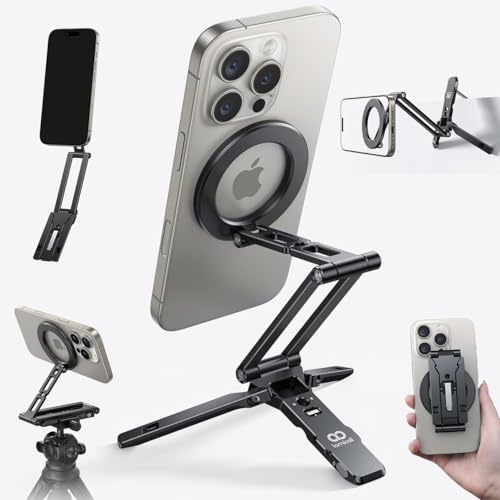
Peak Design Mobile Tripod
A credit card sized plate unfolds into a proper tripod with a ball head, a different tool from a desk stand and far more useful for filming or video calls on the move. Magnetic attachment works with Peak Design cases and MagSafe compatible phones. As a static desk stand it trades some stability for pocketability.
Pros
- Folds small enough for a pocket
- Ball head allows precise angles
- Works away from the desk
Cons
- Less stable than a weighted desk stand
- Needs a magnetic phone or case
The lineup, side by side
| # | Model | Material | Best for | Score | Price |
|---|---|---|---|---|---|
| 1 | Lamicall Adjustable Cell Phone Stand | Aluminium alloy with silicone pads | Best overall | 9.4 | Check price |
| 2 | UGREEN Phone Stand Holder | Solid aluminium alloy | Best build quality | 9.2 | Check price |
| 3 | Nulaxy Phone Stand | Aluminium with silicone lining | Best budget | 9.0 | Check price |
| 4 | OMOTON Desktop Cell Phone Stand | Aluminium alloy | Best minimal design | 8.8 | Check price |
| 5 | Anker MagGo Magnetic Phone Stand | Magnetic array | Best for MagSafe iPhones | 8.6 | Check price |
| 6 | Twelve South HiRise 3 Deluxe | Raised multi device stand | Best for a tidy desk | 8.3 | Check price |
| 7 | Peak Design Mobile Tripod | Folding tripod with ball head | Best for video | 8.0 | Check price |
Before you buy
What makes a phone stand stable Tipping backwards under a screen tap is the classic failure of a cheap stand. Preventing that needs a base extending behind the phone’s centre of gravity, plus enough mass to resist the push. Aluminium stands with a wide flat foot, like the Lamicall and UGREEN designs, handle this far better than folding plastic stands with a narrow footprint.
Will a phone stand fit my case Listings quote a supported phone size, but a rugged case can add several millimetres a narrow cradle will not accept. Cradle style stands such as the Nulaxy design swallow thick cases easily, while slim arm designs run tighter. Magnetic stands face the opposite problem, since a thick non magnetic case weakens the hold to the point of being unusable.
Can I charge my phone while it sits on a stand A stand blocking the charging port turns into a nightly obstacle. Look for an open channel or a raised cradle letting a cable run underneath. Wireless and magnetic stands sidestep this entirely, though only when the phone supports the standard and the case does not interfere.
Which stand suits video calls best A low desk stand works fine for glancing at notifications while working. Video calls need more height, since a low stand points the camera up at an unflattering angle. A raised design like the Twelve South HiRise 3 Deluxe or a small tripod produces a far better result, and filming benefits from an adjustable head for framing control.
Common questions
Will a phone stand work with a thick case on?
Cradle style stands generally accept thick cases without issue. Slim arm stands can run tight, and magnetic stands often fail entirely with a thick case unless it carries a built in magnet ring.
Do magnetic phone stands work with Android phones?
Only if the phone or case carries a compatible magnet array. Some recent Android handsets support the Qi2 magnetic standard, and adhesive magnet rings work for the rest, though they can interfere with wireless charging alignment.
Can I charge my phone while it is on a stand?
Most stands here leave the port accessible through an open base channel. For cable free charging, a magnetic wireless charging stand works better than a passive holder, since a plain magnetic stand like the base MagGo model holds but does not power the phone.
What angle is best for a desk phone stand?
Around 45 to 60 degrees from horizontal suits glancing at a phone beside a keyboard. Video calls work better at a steeper, taller position that puts the camera closer to eye level.
Will a phone stand scratch my desk?
Any decent stand carries silicone or rubber pads on the base. Grit trapped underneath causes most scratching risk, so wipe the pads occasionally. Metal stands without pads will mark a soft wood finish over time.
Are folding travel phone stands worth carrying?
For anyone working from cafes or hotels, yes. The Peak Design Mobile Tripod folds to pocket size and doubles as a camera support. A heavier fixed model suits a stand living on one desk permanently, and it usually costs less too.
Can these phone stands hold a tablet?
The UGREEN and Lamicall models rate for small tablets, though a full size tablet needs a dedicated tablet stand with a wider base. Phone specific stands like the OMOTON will tip under a tablet’s weight.
Does raising a phone stand help with neck strain?
Reducing the downward head tilt that causes strain works within limits, and yes, raising the phone helps. A raised stand at eye level makes the biggest difference, the main argument for taller designs over low desk cradles.
Phone stand vs tripod, which should I buy?
A weighted desk stand like the Lamicall stays more stable for daily desk use and typing on the screen. A tripod like the Peak Design Mobile Tripod adds portability and framing control for filming away from the desk.
Best phone stand for video calls?
Height matters most for calls, so the Twelve South HiRise 3 Deluxe or a raised tripod position the camera closer to eye level than a low desk wedge. A steeper angle also avoids the unflattering upward nostril view.
Our pick
Lamicall’s Adjustable Cell Phone Stand earns the top ranking because it stays put during actual use, which separates a useful stand from a frustrating one. Choose UGREEN’s Phone Stand Holder for more metal and tablet support, and Anker’s MagGo Magnetic Phone Stand if an iPhone snaps on and one handed docking matters.


