Gaming Microphones That Keep Your Voice Clear on Stream
The Shure MV7+ leads our rankings for its dynamic capsule and dual USB plus XLR output, which keeps noisy rooms under control. The HyperX QuadCast S is the strongest all round pick for streamers who want built in shock mounting and tap to mute, while the FIFINE AmpliGame A6T covers entry level setups.
If you want one microphone that makes voice chat and stream audio sound deliberate rather than accidental, the Shure MV7+ is the pick, with the HyperX QuadCast S close behind for plug and play streaming and the FIFINE AmpliGame A6T as the low cost entry point.
Gaming microphones are tricky because most gaming rooms are the worst possible recording spaces, full of fan noise, mechanical keyboards and bare walls. We compared published specifications, polar pattern behaviour, mounting hardware and the controls each mic puts on the body, then weighted the ranking toward mics that stay clean without acoustic treatment.
Our top picks

Shure MV7+
The MV7+ pairs a dynamic capsule with a tight cardioid pattern, which is exactly what an untreated gaming room needs. It runs over USB C for simple setups and over XLR when you add an interface later, and owners report that keyboard clatter and PC fans sit far back once you speak close to the grille. Onboard digital popper stopper and real time denoiser handle the rest.
Pros
- Dynamic capsule rejects room noise better than most condensers
- USB and XLR outputs mean it grows with your setup
- Built in denoiser and popper stopper reduce post processing
Cons
- Needs close mic technique to sound full
- No desk stand included in most listings

HyperX QuadCast S
The QuadCast S is built around live streaming convenience, with a tap to mute top plate, a gain dial underneath and an internal shock mount that absorbs desk bumps. Four selectable polar patterns cover solo commentary, two person interviews and room capture. Owners report the RGB lighting doubles as a clear at a glance mute indicator during long sessions.
Pros
- Tap to mute and visible mute indicator suit live use
- Four patterns cover most recording situations
- Shock mount and stand included in the box
Cons
- Condenser design picks up more room noise than a dynamic
- Takes up noticeable desk space

Elgato Wave:3
The Wave:3 makes most sense inside an Elgato setup, where its Wave Link software lets you route game audio, chat and mic to separate channels without a hardware mixer. A clipguard circuit catches sudden shouts that would otherwise distort. Based on specifications it is a straightforward cardioid condenser, with the real advantage sitting in the routing software.
Pros
- Multichannel routing without buying a mixer
- Clipguard prevents distortion on loud reactions
- Compact footprint for small desks
Cons
- Best value only if you use the Elgato ecosystem
- Cardioid condenser still hears a loud keyboard

Logitech for Creators Blue Yeti
The Yeti stays popular because it does a lot for the money and needs no drivers. Four pattern modes let one mic handle solo streams, guest interviews and podcast style recordings, and the headphone jack gives zero latency monitoring. Owners report it is sensitive enough that a boom arm and a quieter keyboard make a noticeable difference.
Pros
- Four patterns make it flexible for guests and podcasts
- No drivers or interface required
- Widely supported with plenty of setup guides
Cons
- Heavy desk stand transmits vibration without a shock mount
- Picks up room reflections in bare rooms

Rode NT-USB Mini
The NT-USB Mini strips things back to one cardioid pattern, one gain dial and a headphone jack, which is all many players need. A magnetic desk stand keeps it stable and lets you lift the mic off in a second, and the internal pop filter handles plosives at normal speaking distance. Based on specifications it is the tidiest option here for cramped setups.
Pros
- Very small footprint on a crowded desk
- Magnetic base is quick to attach and detach
- Built in pop filter and monitoring jack
Cons
- Only one polar pattern
- No mute button on the body
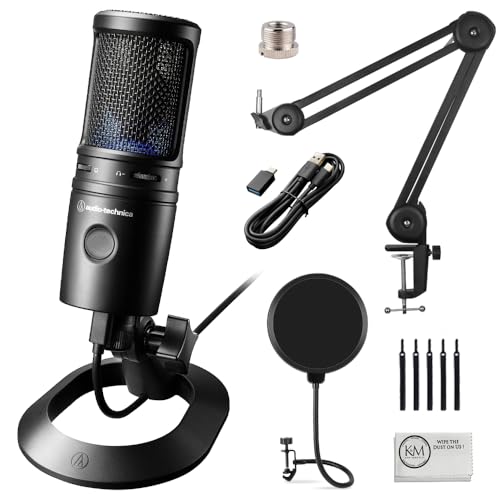
Audio-Technica AT2020USB-X
This is the USB version of a studio staple, and it sounds more neutral than most gaming branded mics, which helps if you also record voiceover or music. Controls stay simple, with a mute touch pad, mix control and headphone volume. Owners report it rewards a boom arm and a pop filter more than it rewards sitting on the supplied tripod.
Pros
- Neutral tone suits voiceover as well as gaming
- Touch mute is silent to operate
- Solid metal build
Cons
- Supplied tripod is short for seated use
- Sensitive to room echo

FIFINE AmpliGame A6T
The A6T covers the basics that matter for a first mic, with a cardioid condenser, a tap to mute pad, a gain dial and a headphone jack for monitoring. RGB lighting is decorative but the mute indicator is genuinely useful mid game. Based on specifications it is a clear step up from a headset boom mic without demanding a boom arm or interface.
Pros
- Clear upgrade over a headset microphone
- Tap to mute with visible indicator
- Comes ready to use with its own stand
Cons
- Plastic build feels less solid than pricier rivals
- Room noise rejection trails dynamic mics
Compared at a glance
| # | Model | Capsule type | Best for | Score | Price |
|---|---|---|---|---|---|
| 1 | Shure MV7+ | Dynamic | Best overall | 9.4 | Check price |
| 2 | HyperX QuadCast S | Condenser, three capsules | Best for streamers | 9.2 | Check price |
| 3 | Elgato Wave:3 | Condenser | Best for mixing and hotkeys | 9.0 | Check price |
| 4 | Logitech for Creators Blue Yeti | Condenser, three capsules | Best value | 8.8 | Check price |
| 5 | Rode NT-USB Mini | Condenser | Best for small desks | 8.6 | Check price |
| 6 | Audio-Technica AT2020USB-X | Condenser | Best for voice recording | 8.3 | Check price |
| 7 | FIFINE AmpliGame A6T | Condenser | Best budget | 8.0 | Check price |
How to pick the right one
Dynamic or condenser for a gaming room This is the decision that matters most. Condenser mics are more sensitive and capture more detail, which is flattering in a treated room and unhelpful in a room with a mechanical keyboard, a gaming PC and hard walls. Dynamic mics like the Shure MV7+ need you to speak closer but reject far more of what is happening behind you. If you cannot control your room, pick dynamic and sit close.
Polar patterns you will actually use Most gamers use cardioid and nothing else, because it listens forward and ignores the sides and rear. Bidirectional is useful for a face to face interview, omni for capturing a whole table and stereo for room ambience or instruments. Multi pattern mics are worth it only if those situations are real for you, otherwise a single cardioid pattern keeps setup simpler and cheaper.
Mounting matters more than people expect A mic sitting on a desk stand hears every keystroke and mouse thump travelling through the desk. A boom arm plus a shock mount removes most of that and lets you position the capsule near your mouth without hunching. Check the thread size before buying an arm, since many mics use 5/8 inch threads and ship with a 3/8 inch adapter that is easy to lose.
Controls, monitoring and mute Onboard gain lets you fix a quiet or clipping signal without alt tabbing out of a match. A headphone jack with zero latency monitoring tells you immediately if the mic is muted, blocked or clipping. A physical mute that makes no click is the feature owners report using most, because it lets you cough, drink or answer the door without editing it out later.
Questions worth asking
Is a USB microphone good enough for streaming?
For the vast majority of streamers, yes. Modern USB mics have the same capsules as their analogue counterparts and skip the cost of an interface. XLR only becomes necessary when you need multiple microphones, long cable runs or hardware processing.
Why does my microphone pick up my keyboard?
Usually a combination of a sensitive condenser capsule, a mic that is too far from your mouth and a stand that conducts desk vibration. Move closer, drop the gain, and mount the mic on a boom arm with a shock mount before blaming the microphone itself.
Do I need a pop filter?
If you are within a hand span of the capsule, a pop filter or foam windscreen makes plosive sounds on p and b much less harsh. Several mics here include internal filtering, but an external filter still helps when you speak close.
What is the difference between cardioid and omnidirectional?
Cardioid listens mainly in front of the mic and rejects sound from behind, which suits one person at a desk. Omnidirectional listens equally in all directions, which is useful for group recording and unhelpful in a noisy room.
Should I buy a boom arm at the same time?
It is the single most valuable accessory for a desk microphone. A boom arm frees desk space, positions the capsule consistently and isolates the mic from typing vibration. Confirm the arm’s weight rating and thread size against your chosen mic.
Can one microphone handle gaming, podcasting and music?
A neutral cardioid condenser like the AT2020USB-X or a dynamic like the MV7+ covers voice work well. Music recording benefits from XLR and an interface, which is why the dual output design of the MV7+ is popular with people who expect their needs to change.
Does RGB lighting affect audio quality?
No. Lighting is cosmetic, though many mics tie the lighting to mute status, which is genuinely useful because you can see at a glance whether you are live without watching your streaming software.
How close should I sit to the microphone?
For dynamic mics, roughly a hand width or closer, since they are designed for close work. For condensers, around a forearm’s length usually balances detail and room noise. Adjust gain after you settle on distance, not before.
The bottom line
The Shure MV7+ is the microphone we would buy for an untreated gaming room, because a dynamic capsule solves the noise problem that software fixes only partly. Streamers who want tap to mute, four patterns and a shock mount in one box will be happier with the HyperX QuadCast S. If this is your first upgrade from a headset boom, the FIFINE AmpliGame A6T delivers most of the improvement for very little outlay.


