Handheld Gimbals Compared for Smooth Video on the Move
DJI’s RS 4 balances quickest and covers most mirrorless payloads, making it the strongest all-around pick. Osmo Mobile 6 wins for phone shooters who want a pocketable rig with tracking. Zhiyun Crane 4 suits heavier setups thanks to its built-in fill light and six-kilogram payload rating.
DJI’s RS 4 handles the widest range of mirrorless cameras and balances in minutes rather than fifteen. Reach for the Osmo Mobile 6 when the camera is a phone and pocket size matters most. Heavier rigs with lenses and monitors point toward the Zhiyun Crane 4, which rates for six kilograms and folds in a light source.
Gimbal shopping gets confusing because payload numbers assume a perfectly balanced load, and a monitor or microphone can push a rig past what the motors handle smoothly. We compared published payload ratings, battery runtime claims and axis lock designs, then weighed what owners report after weeks of real shoots to match each model to the use case it fits best.
The top picks, ranked

DJI RS 4
RS 4 balances a mirrorless body and lens combo in under two minutes thanks to automatic axis locks. Teflon-coated arms cut friction during setup, and the vertical shooting mode skips the extra bracket other gimbals need. Owners report the battery covers a full day of shooting between charges.
Pros
- Automatic axis locks speed up balancing
- Vertical mode built in, no bracket needed
- Battery lasts a full shooting day
Cons
- Adds real weight during long handheld sessions
- Follow-focus and monitor accessories cost extra

DJI RS 4 Pro
RS 4 Pro raises payload capacity to roughly four and a half kilograms, enough for a cinema camera with a cage attached. Carbon fiber arms keep the added strength from adding much weight. Extra ports support follow-focus motors, external monitors and wireless video systems that heavier productions rely on.
Pros
- Handles cinema cameras the standard RS 4 cannot
- Carbon fiber arms limit added weight
- Ports for focus motors, monitors and video links
Cons
- Costs more once accessories are added
- More gimbal than a bare mirrorless body needs
DJI Osmo Mobile 6
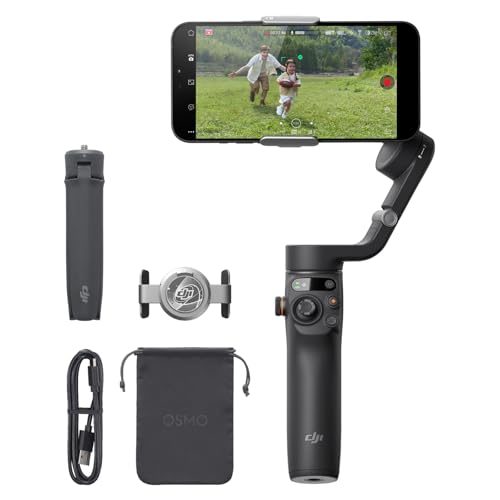
Osmo Mobile 6 folds flat enough for a jacket pocket, then unfolds an extension rod for overhead angles. A magnetic clamp mounts a phone in seconds, no fiddly clips involved. Its tracking module follows a subject on supported phones without keeping the DJI app open.
Pros
- Folds small enough to carry daily
- Magnetic clamp mounts a phone instantly
- Extension rod adds high and low angles
Cons
- Works with phones only, no camera support
- Some tracking features need the DJI app open

Zhiyun Crane 4
Crane 4 mounts a bi-colour fill light directly on the arm, cutting one item from a run-and-gun kit. Payload tops out around six kilograms, well above most phone and small-camera rigs. Sling mode grip lowers the handle for ground-level angles without straining a wrist.
Pros
- Built-in fill light removes a separate lamp
- Six-kilogram payload suits larger lenses
- Sling grip eases low-angle shooting
Cons
- Bulkier to pack than DJI’s camera gimbals
- App feels less refined than DJI’s software

Zhiyun Smooth 5S
Smooth 5S runs stronger motors than most phone gimbals, so a large phone with a clip-on lens does not strain them. Physical dials handle zoom, focus and mode switching without opening an app. Some bundles add a magnetic fill light for interview setups.
Pros
- Motors handle big phones with added lenses
- Physical controls skip constant app use
- Twelve-hour battery outlasts many rivals
Cons
- Does not fold as flat as smaller rivals
- Adds noticeable weight over a session

Hohem iSteady M6
iSteady M6 pairs a detachable fill light with an AI tracker that works without the phone app running. A rotating touchscreen lets a solo creator check framing while filming themselves. Owners report the tracker keeps up during walking shots better than expected at this level.
Pros
- AI tracker functions without the app open
- Rotating screen helps solo framing checks
- Strong value against premium rivals
Cons
- Build quality trails DJI’s hardware
- Firmware updates arrive less often

FeiyuTech SCORP Mini 2
SCORP Mini 2 sits between phone and full camera gimbals, taking action cameras, phones and compact mirrorless bodies on one plate. A built-in touchscreen sets modes without pairing an app. Owners report it packs down well for trips but favors lighter lens choices over long zooms.
Pros
- Fits phones, action cams and small cameras alike
- Touchscreen removes app dependence
- Folds flat for travel bags
Cons
- Struggles once a large zoom lens is attached
- Fewer accessories exist than for DJI or Zhiyun
The lineup, side by side
| # | Model | Payload | Best for | Score | Price |
|---|---|---|---|---|---|
| 1 | DJI RS 4 | Rated for about three kilograms | Best overall | 9.4 | Check price |
| 2 | DJI RS 4 Pro | Rated for about four and a half kilograms | Best for heavy rigs | 9.1 | Check price |
| 3 | DJI Osmo Mobile 6 | Most smartphones via magnetic clamp | Best for phones | 8.9 | Check price |
| 4 | Zhiyun Crane 4 | Rated for about six kilograms | Best for built-in lighting | 8.7 | Check price |
| 5 | Zhiyun Smooth 5S | Large phones plus attached lenses | Best value for large phones | 8.5 | Check price |
| 6 | Hohem iSteady M6 | Smartphones via magnetic clamp | Best for solo creators | 8.2 | Check price |
| 7 | FeiyuTech SCORP Mini 2 | Suits compact mirrorless bodies and phones | Best compact travel gimbal | 8.0 | Check price |
What to look for
How much payload does a gimbal actually need? Payload ratings describe a perfectly balanced load, not real-world extras. Add a lens, a microphone and a monitor, and the total climbs past the number on the box. Weigh the complete rig first, then leave meaningful headroom below the rated maximum. A front-heavy lens shifts the balance point forward, which causes more wobble than raw weight alone.
Why does balancing a gimbal take practice? Motors should hold a level camera steady with the power switched off. Skipping proper balance forces the motors to fight gravity, which drains the battery and can trigger overheating. Work through tilt, roll and pan in that order, then mark each plate position with tape. DJI’s automatic axis locks on the RS 4 cut this process down to roughly a minute.
Phone gimbal or camera gimbal, which one fits the shoot? Phone gimbals fold smaller and add tracking features a camera body leaves to software. Camera gimbals carry real weight and connect to follow-focus motors for manual lens control. Built-in phone stabilisation has improved enough that a phone gimbal earns its keep through tracking and sweeping moves rather than shake removal alone.
Which gimbal modes and accessories are worth using? Pan follow, lock and full follow cover almost every shot a gimbal is asked to do. A spare quick-release plate and a wrist strap solve the two most common on-set headaches. Camera gimbals benefit from a record trigger cable that starts and stops footage from the handle. Follow-focus motors add real control but also add setup time before each shoot.
Common questions
Do I still need a gimbal if my camera already has stabilisation?
Walking shots benefit from both systems working together. In-body stabilisation absorbs small vibrations, but it cannot smooth the up-and-down motion of footsteps. A gimbal corrects that larger movement, so pairing the two gives the cleanest result.
How much payload headroom should a gimbal have?
Stay comfortably under the rated maximum rather than at it. Manufacturers quote figures for a balanced load, and a microphone or monitor shifts the centre of gravity as well as adding weight. Rigs near their limit benefit from stepping up to the RS 4 Pro.
Which gimbal works best for smartphone video?
Osmo Mobile 6 suits most phones and adds tracking without extra weight. Larger phones with a clip-on lens do better on the Smooth 5S, since its motors handle the added mass. Both outperform a phone’s built-in stabilisation for moving shots.
How long does it take to balance a camera gimbal?
First attempts run ten to fifteen minutes per lens. Once plate positions are marked, repeat setups drop to a minute or two. Noting the scale markings on the arms saves the most time on future shoots.
Can a gimbal replace a tripod for photography?
Not entirely, though it helps with handheld long exposures and motion time-lapses. Tripods still win for static stills where nothing should move. Gimbals shine when a photographer wants a slow, controlled camera move built into the shot.
Do gimbals handle heavy zoom lenses?
Only up to their rated payload, and only if the balance point is reachable. Long lenses push weight forward, which can require a separate lens support. Heavier zooms fit better on the Crane 4 or the RS 4 Pro than on a phone-sized gimbal.
How long do gimbal batteries typically last?
Camera gimbals in this comparison quote around twelve to thirteen hours. Phone gimbals range from six to twelve hours depending on the model. A poorly balanced rig drains the battery faster since the motors work continuously to compensate.
Is a built-in light on a gimbal worth having?
For vlogging and interviews, yes, since it removes one item from the bag and stays pointed at the subject. It will not replace a full lighting setup for scripted work. Run-and-gun creators get the most use from the Crane 4 and the iSteady M6.
What is the difference between a two-axis and a three-axis gimbal?
Three-axis gimbals correct pan, tilt and roll, covering walking and turning shots. Two-axis designs only manage tilt and roll, so panning motion still looks rough. Every model in this comparison uses three axes for that reason.
The verdict
RS 4 remains the gimbal most mirrorless shooters should try first, balancing quickly and holding steady through walking shots without draining fast. Step up to the RS 4 Pro once cages, monitors and follow-focus motors join the rig. Shooting mostly on a phone points toward the Osmo Mobile 6, since portability wins over raw payload for that use case.


