Audio Cables Compared for Clarity and Long Term Durability
AudioQuest Evergreen leads for solid-core RCA construction and a quiet noise floor, Amazon Basics covers everyday aux connections at reasonable cost, and Mediabridge’s Toslink cable handles digital home theater audio without electrical interference. Connector type, shielding, and conductor material separate the rest.
AudioQuest Evergreen stands apart for its solid conductor cores and tight connector fit. Amazon Basics and Anker cover tighter budgets, while Mediabridge handles optical home theater needs. Each pick below serves a distinct connection type, from analog RCA to digital Toslink.
Connector shapes, shielding quality, and conductor gauge all affect sound differently, which makes picking the right cable confusing. We compared listed specifications, shielding construction, connector plating, and owner feedback on durability to find cables that hold a stable connection without adding noise.
The best picks, ranked

AudioQuest Evergreen RCA Audio Cable
Solid long-grain copper conductors replace the stranded wire found in cheaper RCA cables, which reduces signal smearing. Cold-welded connectors keep contact resistance low at the plug. Owners report a quieter noise floor when pairing this with turntables and receivers.
Pros
- Low-noise solid-core conductors
- Cold-welded connector construction
- Multiple length options for different setups
Cons
- Costs more than basic RCA cables
- Limited to analog stereo connections
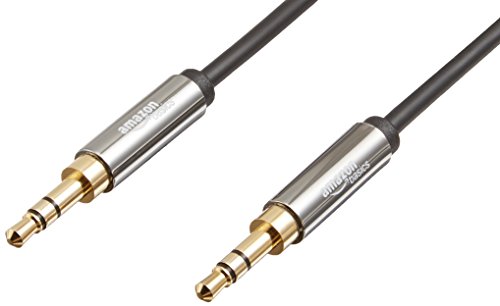
Amazon Basics 3.5mm Aux Audio Cable
A standard 3.5mm jack on each end connects phones, laptops, and tablets to speakers or car stereos. Gold-plated connectors resist corrosion over years of use. Nylon braiding on select lengths keeps the cable from tangling inside a bag.
Pros
- Affordable for everyday use
- Gold-plated tips resist corrosion
- Widely compatible with aux-in devices
Cons
- No digital audio support
- Basic shielding compared to premium cables
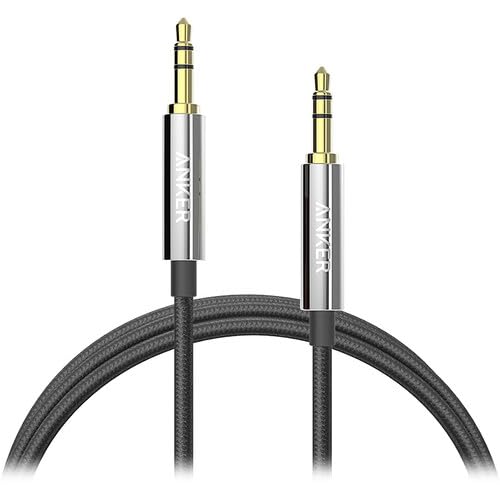
Anker 3.5mm to 3.5mm Aux Cable
A nylon-braided jacket on this aux cable is rated for repeated bending without fraying. Its slim connector housing fits most phone cases without removal. A lifetime warranty backs the build against wear.
Pros
- Slim housing fits most phone cases
- Braided jacket resists fraying
- Backed by lifetime warranty
Cons
- Aux-only, no optical or RCA option
- Shorter length limits placement flexibility

Mediabridge ULTRA Series Toslink Optical Cable
Light, not electrical signal, carries digital audio between soundbars, receivers, and game consoles through this Toslink cable. That design keeps it immune to electromagnetic interference near power cables. A metal connector housing adds durability at the plug.
Pros
- Immune to electromagnetic interference
- Supports Dolby Digital and DTS passthrough
- Durable metal connector housing
Cons
- Only works with optical-equipped devices
- More fragile fiber core than copper cables

Monoprice Premier Series XLR Cable
Balanced signal travels between microphones, mixers, and audio interfaces through this XLR cable. Twisted-pair copper conductors cancel hum picked up over longer runs. Nickel-plated connectors lock securely into standard XLR ports.
Pros
- Balanced design cancels hum on long runs
- Secure locking XLR connectors
- Available in long lengths for stage use
Cons
- Overkill for casual home listening
- Bulkier than consumer audio cables

Cable Matters 2-Pack RCA to RCA Cable
Two cables in this set connect turntables, receivers, and amplifiers through standard RCA jacks. PVC-coated conductors stay flexible enough for tight cabinet spaces. Color-coded connectors make left and right channel hookup straightforward.
Pros
- Two cables cover a full stereo pair
- Color-coded ends simplify setup
- Flexible jacket fits tight spaces
Cons
- Basic stranded conductors, not solid core
- No optical or digital option

UGREEN 3.5mm to 2 RCA Cable
A single 3.5mm headphone jack splits into two RCA plugs for stereo input on this cable. Aluminum connector shells add durability at the plug ends. Phones, tablets, and laptops without built-in RCA outputs all work with it.
Pros
- Bridges phone audio to RCA-only stereos
- Durable aluminum connector shells
- Reasonable length for typical setups
Cons
- Single-ended design limits use to source-to-stereo
- Not suited for balanced pro-audio setups
What matters most
Matching the connector to your gear RCA, aux, Toslink, and XLR aren’t interchangeable across formats. RCA suits stereo receivers and turntables, 3.5mm aux covers phones and portable speakers, Toslink handles digital optical audio, and XLR carries balanced signal for microphones and studio interfaces. Checking the input ports on both devices before buying avoids a mismatched purchase.
Why conductor material and shielding matter Solid-core copper carries signal with less distortion than thin stranded wire, especially over longer runs. Foil wrap or braided mesh shielding blocks electromagnetic interference from power cables and nearby appliances. Cheaper cables often skip shielding entirely, which can introduce a faint hum near routers or dimmer switches.
Which audio cable works best for a home theater setup Soundbars, game consoles, and AV receivers frequently rely on optical Toslink connections to pass multichannel digital audio like Dolby Digital. A metal-shelled optical cable resists cracking at the connector better than an all-plastic one. Length matters too, since routing behind a TV console often needs more slack than a straight desktop run allows.
Is an XLR cable worth it for home recording XLR cables dominate studio and stage setups because their balanced design cancels hum over long cable runs. Twisted-pair conductors inside the jacket make that noise cancellation work. Anyone recording vocals or connecting a mixer to an audio interface benefits from a locking XLR connector that won’t slip loose mid-session.
Side by side
| # | Model | Connector | Best for | Score | Price |
|---|---|---|---|---|---|
| 1 | AudioQuest Evergreen RCA Audio Cable | RCA to RCA | Best overall | 9.4 | Check price |
| 2 | Amazon Basics 3.5mm Aux Audio Cable | 3.5mm TRS to TRS | Best value | 9.2 | Check price |
| 3 | Anker 3.5mm to 3.5mm Aux Cable | 3.5mm TRS | Best budget | 9.0 | Check price |
| 4 | Mediabridge ULTRA Series Toslink Optical Cable | Toslink optical | Best for home theater setups | 8.8 | Check price |
| 5 | Monoprice Premier Series XLR Cable | XLR male to female | Best for studio recording | 8.6 | Check price |
| 6 | Cable Matters 2-Pack RCA to RCA Cable | RCA to RCA | Best for turntable and receiver setups | 8.3 | Check price |
| 7 | UGREEN 3.5mm to 2 RCA Cable | 3.5mm to 2x RCA | Best for connecting phones to home stereos | 8.0 | Check price |
Good to know
What’s the difference between RCA and aux cables?
RCA cables use two separate plugs for left and right stereo channels, common on receivers and turntables. Aux cables use a single 3.5mm plug carrying both channels, common on phones and portable speakers.
Does a more expensive audio cable actually sound better?
Beyond a basic quality threshold, differences become subtle for most listeners. Solid-core conductors and better shielding reduce noise on longer runs, which matters more near electrical interference.
Can I use an optical cable instead of RCA for a soundbar?
Only if both the TV and soundbar have Toslink optical ports. Optical carries digital multichannel audio while RCA carries analog stereo, so the two aren’t directly interchangeable without an adapter.
What length audio cable do I need for a home theater setup?
Measure the actual run behind furniture rather than a straight line, since cables routed around a TV stand often need extra slack. Lengths from 6 to 15 feet cover most living room setups.
Is an XLR cable worth it for home recording?
Yes, if the microphone or audio interface has XLR inputs. Balanced design cancels hum that unbalanced cables pick up over distance, which matters even in short home studio runs.
Aux cable vs Bluetooth for car audio, which is better?
Aux cables deliver a consistent signal without compression or pairing delays. Bluetooth adds convenience but can introduce slight audio compression depending on the codec used.
Why does my audio cable make a humming noise?
Hum often comes from poor shielding picking up interference near power adapters, dimmer switches, or fluorescent lighting. Rerouting the cable away from power cords or switching to a shielded cable usually resolves it.
Can I use a 3.5mm to RCA cable to connect my phone to an old stereo?
Yes. Cables like the UGREEN 3.5mm to 2 RCA connect a phone’s headphone jack directly to RCA stereo inputs, a common fix for stereos without Bluetooth or USB input.
What is a balanced audio cable and do I need one?
Balanced cables, like XLR, use an extra conductor to cancel noise picked up along the run. Home listening setups rarely need this, but studio and stage gear benefit from it on longer cable lengths.
How often do audio cables need replacing?
A well-built cable can last years if the jacket stays intact and connectors don’t corrode. Crackling, intermittent sound, or visible fraying at the plug are the usual signs it’s time to swap it out.
Final word
AudioQuest Evergreen delivers the cleanest signal for analog stereo setups, while Amazon Basics covers everyday phone and speaker connections without overspending. For digital audio or studio recording, Mediabridge’s Toslink and Monoprice’s XLR cables fill those specific gaps well.