7 Baby Monitors Worth Considering for a New Nursery
Infant Optics DXR-8 Pro leads overall, pairing a closed radio link with swappable lenses. Nanit Pro is the strongest Wi-Fi choice, streaming 1080p from an overhead mount to your phone. Eufy SpaceView Pro wins on battery, holding out through a full night on one charge.
Infant Optics DXR-8 Pro fits most nurseries, because its feed never crosses your router. Pick Nanit Pro when checking in from outside the house matters. Eufy SpaceView Pro runs longest between charges if the parent unit lives away from a socket.
Monitors split into two families, and that split drives nearly every other difference. Dedicated units carry their own screen on a private radio link; Wi-Fi cameras stream to an app and stop when the router does. We compared published specifications, connection types, screen sizes and lens options, then weighed owner feedback on range through walls and overnight battery behaviour.
The shortlist, ranked

Infant Optics DXR-8 Pro
Audio and video travel over a closed radio link here, never touching your router or an account. Swappable lenses switch the camera between a wide nursery view and a tight crib framing, which no rival at this level offers. Night vision holds edge detail on the 5 inch screen instead of blooming into white.
Pros
- Feed stays entirely off your home network
- Lenses swap for wide or close framing
- Parent screen works without a phone
Cons
- No viewing from outside the house
- Ships with a single camera

Nanit Pro Smart Baby Monitor
Mounted above the crib, this camera looks straight down, showing the whole sleep surface rather than a side angle through the bars. Video runs at 1080p to the app, so a grandparent or a parent at work can check in. Sleep summaries and the fuller analytics sit behind a subscription tier.
Pros
- Overhead angle frames the entire crib
- Check in from anywhere with a signal
- Sharp 1080p feed day and night
Cons
- Goes dark if the router drops out
- Fuller feature set needs a subscription
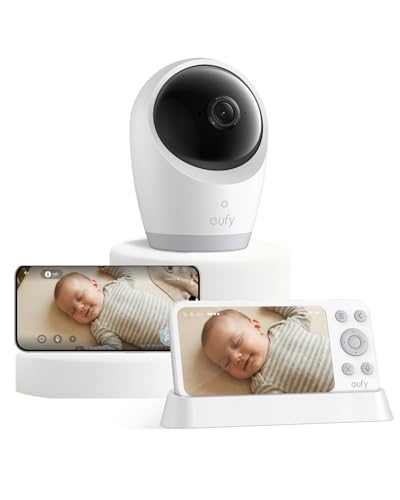
Eufy SpaceView Pro Baby Monitor
Battery is the headline: the parent unit stretches through a night on one charge, so no cable trails across the bedside table. A 5 inch panel stays legible at arm’s length in a dark room. An included wide angle lens covers a larger nursery without repositioning the camera.
Pros
- Runs overnight without recharging
- Large screen stays readable in the dark
- Wide lens covers a bigger room
Cons
- No smartphone viewing at all
- Parent unit is bulkier than rivals

Babysense HD S2 Video Baby Monitor
Split screen is the reason to choose this one, placing two camera feeds side by side on an HD panel. Families with a toddler in one room and a newborn in another stop cycling between views. Running both feeds at once drains the parent unit faster than a single camera does.
Pros
- Two rooms visible at the same time
- HD panel is sharper than standard units
- Nothing routed through your Wi-Fi
Cons
- Extra cameras are sold separately
- Split view shortens battery runtime

Motorola VM75 Video Baby Monitor
Remote pan, tilt and zoom sweep a wide arc, keeping a mobile toddler in frame without anyone standing up. Room temperature reads out on screen next to lullaby playback and two way talk. Menu layout feels dated, though every function works once you know where it lives.
Pros
- Wide remote pan and zoom range
- Temperature shows on the parent screen
- Clear infrared night view
Cons
- Menu design feels dated
- Range drops through thick masonry

HelloBaby HB65 Baby Monitor
Core features arrive without an app, an account or a monthly charge: colour screen, remote pan and tilt, two way talk and lullabies. Resolution trails the HD units, which shows most in infrared at night. As a first monitor bought before you know what you actually need, it covers the ground.
Pros
- No app or account to set up
- Camera pans and tilts from the parent unit
- Least expensive route to a dedicated screen
Cons
- Lower resolution than the HD models
- Range suffers in larger homes

VTech VM819 Video Baby Monitor
Pairing happens out of the box, and almost nothing else needs configuring. A fixed lens, automatic infrared switching and two way audio handle the basics without menus to learn. Its parent unit is compact enough to slip into a dressing gown pocket while you move around the house.
Pros
- Working within minutes of unboxing
- Compact parent unit carries easily
- Connection holds steady room to room
Cons
- Fixed lens cannot pan or zoom
- Feature list is deliberately basic
How they compare
| # | Model | Connection | Best for | Score | Price |
|---|---|---|---|---|---|
| 1 | Infant Optics DXR-8 Pro | Private radio, non Wi-Fi | Best overall | 9.4 | Check price |
| 2 | Nanit Pro Smart Baby Monitor | Wi-Fi, app based | Best for remote viewing | 9.2 | Check price |
| 3 | Eufy SpaceView Pro Baby Monitor | Private radio, non Wi-Fi | Best battery life | 9.0 | Check price |
| 4 | Babysense HD S2 Video Baby Monitor | Private radio, non Wi-Fi | Best for two children | 8.8 | Check price |
| 5 | Motorola VM75 Video Baby Monitor | Private radio, non Wi-Fi | Best for a large nursery | 8.6 | Check price |
| 6 | HelloBaby HB65 Baby Monitor | Private radio, non Wi-Fi | Best budget | 8.3 | Check price |
| 7 | VTech VM819 Video Baby Monitor | Private radio, non Wi-Fi | Best simple setup | 8.0 | Check price |
What matters most
What should you look for in a baby monitor? Four specifications carry most of the decision: connection type, screen size, parent unit battery and lens flexibility. Connection determines whether the monitor keeps working during an internet outage. Screen size decides whether you can read the feed from bed without squinting. Battery runtime decides whether a cable has to reach the bedside. Lens options matter once a baby starts moving around a cot, because a fixed narrow view loses them at the edges.
Wi-Fi baby monitor vs private radio: which should you buy? Private radio monitors pair directly with their own screen, so no account, password or router sits in the path. They keep running when broadband fails, and nothing about the nursery leaves the house. Wi-Fi cameras trade that closed loop for remote access, letting you watch from an office or a restaurant, usually with recording and analytics attached. Use a strong unique password and keep the app patched if you go that route. Homes with unreliable broadband are better served by a dedicated unit.
How far do baby monitors actually reach? Quoted figures such as 1000 ft assume open ground with nothing in between. Plasterboard costs a little range, brick and concrete cost much more, and a floor between the units cuts it further. What matters more than the headline number is behaviour at the edge: a good monitor warns you clearly when it loses the camera and reconnects on its own. Test the far corners of your home in the return window rather than trusting the box.
Where should a baby monitor camera go in the nursery? Mount the camera and route every cable at least three feet from the sleep surface, since a reachable cord is a strangulation hazard. Wall mounting keeps wires out of the cot entirely and gives a better angle than a shelf. Follow the manufacturer instructions and recognised safe sleep guidance rather than improvising a position. No monitor substitutes for adult supervision, and none of these devices is a medical instrument.
Questions worth asking
Do I need a Wi-Fi baby monitor?
Not for most homes. A dedicated unit on a private link works without internet and keeps the feed off your network. Wi-Fi models earn their place when you genuinely want to watch from outside the house.
Are baby monitors safe to use?
They are widely used aids, not medical devices, and they do not replace safe sleep practices or adult supervision. Follow the manufacturer instructions and keep the camera plus every cord well clear of the cot.
How far should a baby monitor be from the crib?
Keep the camera and all cabling at least three feet from the sleep surface. Wall mounting is the tidiest way to achieve that, since it removes any dangling cable a baby could reach.
Can a baby monitor be hacked?
Any internet connected camera carries some exposure, which a strong unique password and current firmware reduce substantially. Private radio monitors never join your network, which is why many parents choose them for a nursery.
Which baby monitor works for two children?
Look for multi camera support with split screen or scanning, as offered by the Babysense HD S2. Check how many cameras the parent unit accepts before buying additional units.
How long does a baby monitor battery last overnight?
Runtime swings from a few hours to a full night depending on screen brightness and whether audio only mode is available. Leaving the display on all night drains it fastest, so prioritise battery or keep the unit docked.
What is the best baby monitor for a large house?
Range and reconnection behaviour matter more than resolution once walls stack up. A model with an out of range alarm, or a Wi-Fi camera on a mesh network, handles distance better than a basic unit.
Do baby monitors track breathing or heart rate?
Models on this list are audio and video monitors only. Any wellness or sleep feature is informational, not diagnostic, and health concerns belong with a paediatrician rather than an app.
Is a video baby monitor better than an audio one?
Video tells you whether a noise means a baby is awake, stuck or simply shuffling, which saves needless trips to the nursery. Audio units cost less and use less battery. Most parents find the visual check worth the extra outlay in the first year.
Our take
Infant Optics DXR-8 Pro suits the widest range of households, combining a closed connection with lens flexibility no rival matches. Nanit Pro is the better buy when remote viewing genuinely matters to your routine, and Eufy SpaceView Pro solves the overnight charging problem. Whichever you pick, camera placement and safe sleep guidance come before any feature list.