Budget Gaming Monitors That Deliver Big Performance
The AOC 24G2SP is the top budget pick for most gamers. It offers a 165Hz refresh rate and 1ms response time at a price that undercuts rivals. Its main limitation is the lack of built-in speakers, but that is a minor tradeoff for the performance.
Finding a gaming monitor that balances price and performance can be tough. Budget models often cut corners, but several standout options deliver smooth gameplay without breaking the bank.
We compared the latest budget gaming monitors to help you choose. Our focus is on refresh rate, response time, and overall value, so you can enjoy competitive gaming without overspending.
What we recommend

AOC 24G2SP 24 inch FHD 165Hz Gaming Monitor
The AOC 24G2SP delivers a 165Hz refresh rate and 1ms response time, making it a favorite among budget gamers. Its IPS panel provides vibrant colors and wide viewing angles, while the adjustable stand adds ergonomic comfort. With FreeSync support, screen tearing is minimized during fast action.
Pros
- High refresh rate for smooth gameplay
- Accurate colors out of the box
- Fully adjustable stand
Cons
- No built-in speakers
- Only FHD resolution

Sceptre 24 inch Professional Thin 75Hz 1080p LED Monitor 2x HDMI VGA Built-in Speakers
For those on a tight budget, the Sceptre 24 inch offers a 75Hz refresh rate and 1080p resolution at an unbeatable price. It includes built-in speakers and multiple connectivity options. While not ideal for competitive esports, it is great for casual gaming and everyday use.
Pros
- Very affordable
- Built-in speakers
- Slim bezel design
Cons
- Lower refresh rate
- Limited ergonomics

ASUS TUF Gaming VG249Q1A 23.8 inch 165Hz Gaming Monitor
The ASUS TUF Gaming VG249Q1A is built for fast-paced esports. It features a 165Hz refresh rate and 0.5ms response time, ensuring minimal motion blur. The monitor is also certified for G-Sync compatibility, providing tear-free gameplay with NVIDIA graphics cards.
Pros
- Extremely fast response time
- G-Sync compatible
- Great build quality
Cons
- Stand is not height adjustable
- No USB ports

Acer Nitro KG241Y Sbiip 23.8 Inches Full HD 1920 x 1080 VA 165Hz Gaming Monitor
The Acer Nitro KG241Y offers a 165Hz refresh rate and 1ms response time on a VA panel, which delivers deep blacks and high contrast. This makes it a good choice for gamers who enjoy dark, atmospheric titles. It also supports AMD FreeSync Premium for smooth gameplay.
Pros
- High contrast ratio
- 165Hz refresh rate
- FreeSync Premium support
Cons
- Viewing angles not as wide as IPS
- Colors may require calibration

MSI Optix G242 24 inch 144Hz 1ms Full HD Gaming Monitor
The MSI Optix G242 is a solid choice for console gamers, offering a 144Hz refresh rate and 1ms response time. It has a super narrow bezel design ideal for multi-monitor setups. The monitor also features a wide color gamut, making colors pop in games.
Pros
- Slim bezels for multi-monitor
- Good color reproduction
- 144Hz refresh rate
Cons
- Stand tilt only
- No built-in speakers

LG 24GN600-B UltraGear 24 inch 144Hz Gaming Monitor
The LG 24GN600-B combines a sleek design with gaming performance. It offers a 144Hz refresh rate and 1ms response time on an IPS panel. The monitor supports FreeSync and features Dynamic Action Sync for reduced input lag. Its circular stand adds a modern touch to any desk.
Pros
- Attractive design
- Accurate colors
- Low input lag
Cons
- No height adjustment
- Limited OSD controls
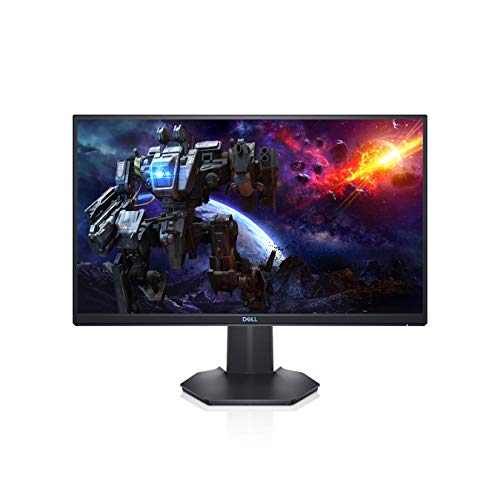
Dell S2421HGF 24 inch FHD 144Hz Gaming Monitor
The Dell S2421HGF offers a balance between gaming and productivity. It features a 144Hz refresh rate and 1ms response time on a TN panel, which is fast but has narrower viewing angles. The monitor includes a fully adjustable stand and multiple ports, making it versatile for work and play.
Pros
- Height adjustable stand
- USB hub included
- Good for tight budgets
Cons
- TN panel color accuracy
- Viewing angles limited
The lineup, side by side
| # | Model | Refresh Rate | Best for | Score | Price |
|---|---|---|---|---|---|
| 1 | AOC 24G2SP 24 inch FHD 165Hz Gaming Monitor | 165Hz | Best Overall Budget Gaming Monitor | 9.4 | Check price |
| 2 | Sceptre 24 inch Professional Thin 75Hz 1080p LED Monitor 2x HDMI VGA Built-in Speakers | 75Hz | Best Ultra Budget Option | 8.2 | Check price |
| 3 | ASUS TUF Gaming VG249Q1A 23.8 inch 165Hz Gaming Monitor | 165Hz | Best for Esports Enthusiasts | 9.0 | Check price |
| 4 | Acer Nitro KG241Y Sbiip 23.8 Inches Full HD 1920 x 1080 VA 165Hz Gaming Monitor | 165Hz | Best for Immersive Gaming | 8.8 | Check price |
| 5 | MSI Optix G242 24 inch 144Hz 1ms Full HD Gaming Monitor | 144Hz | Best for Console Gamers | 8.6 | Check price |
| 6 | LG 24GN600-B UltraGear 24 inch 144Hz Gaming Monitor | 144Hz | Best Design | 8.4 | Check price |
| 7 | Dell S2421HGF 24 inch FHD 144Hz Gaming Monitor | 144Hz | Best for Mixed Use | 8.3 | Check price |
What to look for
heading paragraph
heading paragraph
heading paragraph
heading paragraph
Questions worth asking
question
answer
question
answer
question
answer
question
answer
question
answer
question
answer
question
answer
question
answer
Final word
If you want the best all-around budget gaming monitor, choose the AOC 24G2SP. It offers a winning combination of speed, color accuracy, and ergonomics. For the lowest price, the Sceptre is a great entry-level option. For esports players, the ASUS TUF VG249Q1A provides an edge with its 0.5ms response time. Remember to check your GPU’s adaptive sync technology and pick a monitor that supports it for the smoothest experience.


