Taming Cord Clutter With a Cable Management Box
The D-Line Cable Management Box Large is our top pick for its roomy interior and cable exit slots on every side. The Bluelounge CableBox offers the cleanest look for a living room, while the YECAYE Cable Management Box is the easiest way to tidy a small desk without spending much.
If you want one box that swallows a power strip, a charging brick and a tangle of cords, the D-Line Cable Management Box Large handles the most hardware with the fewest compromises. The Bluelounge CableBox is the better looking option for open shelving, and the YECAYE box covers basic desk tidying.
Cable boxes look interchangeable in listings, which is exactly why people end up returning them. The real differences are internal length, whether the cable slots line up with where your outlets sit, and how much air can move around a warm power adapter. We compared published dimensions, materials, ventilation design and owner feedback about heat and lid fit to rank these seven.
The shortlist, ranked

D-Line Cable Management Box Large
D-Line builds this box around a full size surge protector rather than a slim travel strip, so most people can close the lid on the first try. Cable openings on both ends and the rear mean you rarely have to route a cord backwards. The matte finish hides dust better than gloss plastic, which matters on a shelf you see every day.
Pros
- Generous interior swallows bulky adapters
- Multiple exit points suit awkward outlet placement
- Sturdy walls do not flex when stacked on
Cons
- Large footprint is obvious on a small desk
- No mounting holes for wall or under desk use

Bluelounge CableBox
Bluelounge designed the original of this category and it still looks the most deliberate on a media console. The rounded shell and soft touch finish read as furniture rather than as a plastic bin. Interior room is good for a standard strip, though very wide bricks can crowd the corners.
Pros
- Best looking box of the group in a lounge
- Rubber feet keep it planted on hard floors
- Rounded edges are safer around kids
Cons
- Tighter inside than the D-Line large box
- Soft finish can pick up marks over time
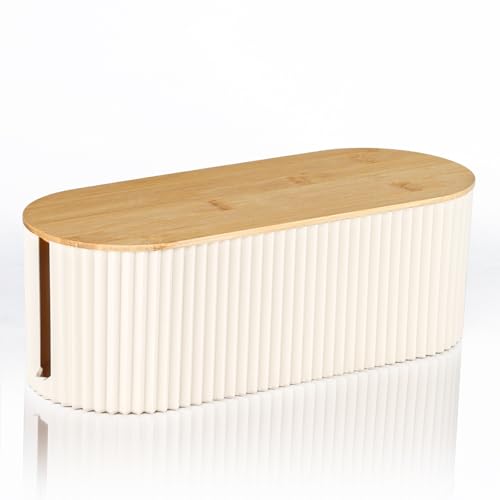
Baskiss Cable Management Box
Baskiss puts ventilation slots along the sides rather than relying only on the cable openings, which owners report keeps adapters running cooler in enclosed cabinets. The lid sits flush and stays put when you nudge the box with a foot. Assembly is tool free and takes a minute.
Pros
- Extra venting suits closed cabinets
- Lid stays seated when knocked
- Textured top hides fingerprints
Cons
- Vent slots let a little more dust in
- Plain styling next to the Bluelounge

YECAYE Cable Management Box
This is the box most people should start with for a home office desk. It is sized for a six outlet strip and a couple of small bricks, and the low profile tucks under a desk leg without becoming a shin hazard. Build quality is a step below the D-Line but perfectly solid for indoor use.
Pros
- Good size for a single desk setup
- Low profile stays out of the way
- Simple to open when you swap a charger
Cons
- Walls flex if you press hard
- Not deep enough for oversized bricks

SimpleCord Cable Management Box
The deeper body here gives you room to stand a modem or a small router alongside the power strip instead of buying a second box. Wider end openings accept coax and Ethernet without pinching. Owners report the extra depth also helps with the chunky wall warts that come with mesh nodes.
Pros
- Fits network gear alongside the strip
- Wide slots accept thick coax cables
- Rigid shell holds shape when full
Cons
- Bulky on an open shelf
- Heavier to move once loaded

JOTO Cable Management Box
JOTO keeps things basic, which is fine if all you want is to stop looking at a power strip on the carpet. It is lighter than the rest of this group and easiest to reposition while you are still deciding where things live. Expect thinner walls and a looser lid fit than the premium boxes.
Pros
- Easiest box to reposition
- Covers the basics with no fuss
- Neutral colours blend into most rooms
Cons
- Thinner walls than rivals
- Lid can shift if bumped

Kootek Cable Management Box
Kootek sells this as a tidy up kit rather than a single box, so you get sleeves and ties alongside the shell. That combination suits a rental where you want cords off the skirting board and bundled on the way to the wall. The box itself is compact, so measure your strip before ordering.
Pros
- Bundled accessories finish the whole run
- Small footprint suits tight rooms
- Good starter kit for renters
Cons
- Too small for full size surge protectors
- Included ties are basic quality
What to look for
Measure the strip before the box Almost every disappointed owner bought a box shorter than their surge protector. Measure the strip end to end, then add room for the plug bodies already in it, because chunky adapters add width you will not see in a product photo. If you are close to the limit, size up. A box that closes with effort will eventually crack around the lid lip.
Ventilation matters more in cabinets A power strip in an open room sheds heat easily, so a plain box is fine. Inside a closed media cabinet the air barely moves, and that is where vented designs earn their place. Based on specifications, boxes with side slots move noticeably more air than sealed shells. Avoid stacking anything on top of a loaded box, whatever design you choose.
Match cable exits to your outlet position The most common mistake is buying a box with end openings only, then discovering the wall socket sits behind the middle of the box. Rear openings solve that, and they let the box sit flush against the skirting board. Sketch where your cords enter and leave before you decide, since a two minute check saves a return.
Look and feel are part of the job A cable box is furniture as much as it is hardware, because it sits in plain view. Matte finishes hide dust and fingerprints better than gloss, and rounded shells read as intentional rather than industrial. If the box will live in a lounge, spend a little more on finish. If it is going under a desk, function wins and nobody will see it.
Compared at a glance
| # | Model | Interior length | Best for | Score | Price |
|---|---|---|---|---|---|
| 1 | D-Line Cable Management Box Large | Fits most full size power strips | Best overall | 9.4 | Check price |
| 2 | Bluelounge CableBox | Fire resistant plastic shell | Best for living rooms | 9.2 | Check price |
| 3 | Baskiss Cable Management Box | ABS plastic with vent slots | Best for airflow | 9.0 | Check price |
| 4 | YECAYE Cable Management Box | Six outlet strip plus small adapters | Best value | 8.8 | Check price |
| 5 | SimpleCord Cable Management Box | Extra deep interior | Best for router and modem | 8.6 | Check price |
| 6 | JOTO Cable Management Box | Lightweight ABS | Best budget | 8.3 | Check price |
| 7 | Kootek Cable Management Box | Box plus sleeves and ties | Best for a small apartment | 8.0 | Check price |
Common questions
Are cable management boxes a fire risk?
Reputable boxes use flame retardant plastic and leave cable openings that allow some airflow, so normal household loads are fine. Problems come from overloading a strip or covering a box with blankets. Keep the box clear, do not daisy chain strips, and choose a vented model if it lives in a sealed cabinet.
Will a power brick fit inside?
Most laptop and console bricks fit in the larger boxes such as the D-Line large or the SimpleCord, but they crowd smaller shells. Bricks also run warm, so give them room rather than wedging them in. If you have several, a bigger box or a second one is safer than forcing the lid shut.
Do these boxes stop pets chewing cables?
They help by hiding the tempting loose loops, which is often enough for a curious cat. A determined puppy can still reach cords entering and leaving the box, so pair it with a cable sleeve for the exposed runs. No box is a substitute for supervision with a persistent chewer.
Can I mount one under a desk?
Some owners screw a box to the underside of a desk, but most models in this group have no mounting points, so it needs adhesive brackets or a custom shelf. If under desk mounting is your goal, look for a box that advertises mounting holes or use a dedicated under desk tray instead.
What size box do I need for a router?
Routers need airflow and their antennas need a clear line, so a full enclosure is not ideal. A deep box like the SimpleCord can hold a modem or a small node, but expect a modest drop in signal. Wired gear such as a modem or switch is a safer candidate for enclosure than a wireless access point.
Are wooden cable boxes better than plastic?
Wood looks warmer in a living room, but it is heavier, usually more expensive and no better at handling heat. Plastic boxes are lighter, easier to clean and typically use flame retardant material. The choice is mostly about how the box fits the room rather than performance.
How do I keep dust out?
Dust arrives through cable openings no matter what you buy, so plan to lift the lid and wipe it out once or twice a year. Boxes with fewer, smaller openings collect less, and keeping the box off carpet reduces the amount that gets stirred up. A quick vacuum around the exits helps between cleanings.
Is one big box better than two small ones?
Two smaller boxes are often more practical, because they let you split gear across the room and keep runs short. One large box is tidier to look at and easier to clean out. If your outlets are on opposite walls, two boxes will always beat stretching extension leads across the floor.
The verdict
For most homes the D-Line Cable Management Box Large is the safest choice, since it fits full size surge protectors and gives you cable exits wherever you need them. Pick the Bluelounge CableBox if the box has to look good in a living room, and the YECAYE if you just want a tidy desk without overthinking it.