Standing Desk Converters for Small Home Offices
The Vari Pro Plus 36 is the strongest overall converter thanks to its spring assisted lift and stable two tier surface. FlexiSpot M2B offers nearly the same experience for less, and the VIVO DESK-V000K is the budget option that still handles dual monitors.
The Vari Pro Plus 36 is our overall pick because the spring assisted lift and wide two tier surface make standing transitions effortless. FlexiSpot’s M2B covers the same ground for less money, and the VIVO DESK-V000K is the value entry that still supports two monitors.
Converters are trickier to choose than full standing desks because they must balance a heavy monitor load on top of an existing desk without wobbling or eating the whole surface. We compared lift mechanisms, height ranges, stated weight capacities and footprint dimensions, along with what owners report about stability and shipping damage.
The shortlist, ranked

Vari Pro Plus 36 Standing Desk Converter
The Pro Plus 36 arrives fully assembled, which removes the single most common frustration in this category. Its spring assisted lift moves straight up and down rather than arcing forward, so the monitor stays in the same relative position whether you sit or stand. The two tier layout puts the keyboard at a sensible drop below the display surface.
Pros
- No assembly required
- Straight vertical lift path
- Very stable at full height
Cons
- Heavy to move once placed
- Takes significant desk depth

FlexiSpot M2B Standing Desk Converter
FlexiSpot’s M2B delivers a very similar experience to the premium options with a gas spring lift and a removable keyboard tray that can be dropped if you prefer a single level surface. The X frame holds steady with a dual monitor load, and height adjustment happens in one motion with side handles. It ships assembled, which is worth more than it sounds.
Pros
- Removable keyboard tray adds flexibility
- Smooth one motion height change
- Ships pre assembled
Cons
- X frame arcs slightly forward
- Handles need a firm squeeze

VIVO DESK-V000K Height Adjustable Standing Desk Converter
VIVO built its reputation on affordable monitor mounts and this converter follows the same logic, offering a solid two tier surface and gas spring assist at a genuinely low price. It handles a monitor and laptop combination comfortably and adjusts through a wide range of heights. Finish quality is a step below the premium options, but the core function is intact.
Pros
- Very affordable for the size
- Wide height adjustment range
- Handles dual monitor setups
Cons
- Finish is basic
- Some flex at maximum height
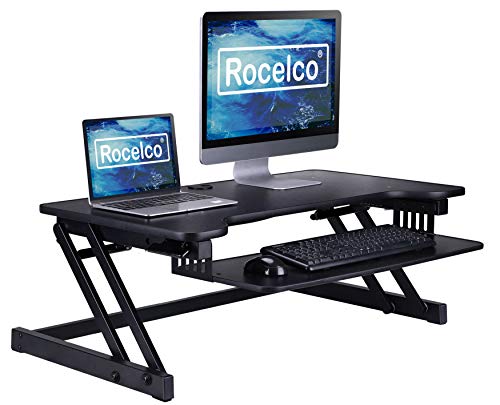
Rocelco DADR Deluxe Standing Desk Converter
Rocelco’s deluxe model reaches higher than most converters, which matters if you are over six feet and find rival units top out just short of comfortable. The gas spring handles a heavy load and the surface is deep enough for a keyboard and mouse plus notepad. An optional monitor arm mounts directly, freeing the deck for paperwork.
Pros
- Higher maximum height than most
- Strong weight capacity
- Monitor arm compatible
Cons
- Large footprint on smaller desks
- Assembly needed for arm accessories

Ergotron WorkFit-T Sit Stand Desktop Workstation
Ergotron’s Constant Force lift technology is the most refined mechanism in this roundup, moving with one finger and stopping exactly where you release it. The single surface design means no separate keyboard tray, which some people prefer and others miss. Build quality is commercial grade and it stays completely still while typing at full height.
Pros
- Exceptionally smooth adjustment
- No wobble while typing
- Commercial grade construction
Cons
- Single tier raises keyboard height
- Premium pricing
FEZIBO Standing Desk Converter
FEZIBO’s converter targets desks where a 36 inch unit simply will not fit, using a narrower surface and a lighter frame. It suits a laptop plus a single monitor rather than a full dual screen workstation. For a home office corner or a shared table it is often the only converter that physically works.
Pros
- Fits desks too small for rivals
- Light enough to reposition
- Affordable
Cons
- Lower weight capacity
- Limited room for peripherals

Seville Classics AIRLIFT Sit Stand Desk Converter
The AIRLIFT is a pneumatic converter aimed at laptop and single monitor users rather than heavy multi screen setups. Adjustment is quick with a squeeze handle and the surface finish resists scuffing from a laptop being slid on and off daily. It is a straightforward option for a home office that mostly runs on one machine.
Pros
- Quick pneumatic adjustment
- Durable surface finish
- Good fit for laptop workflows
Cons
- Not suited to heavy monitor loads
- Some assembly required
How to choose
Measure your desk before anything else Converters need both width and depth, and the depth requirement surprises people because the unit must sit far enough back that the keyboard tray does not overhang. Measure your usable surface, subtract anything permanently in place, and compare against the footprint dimensions in the listing. A 36 inch converter on a 40 inch desk leaves almost no room for anything else.
Understand the lift path Z lift and X frame mechanisms arc forward as they rise, which moves your monitor closer to your face at standing height and can push a keyboard tray past the desk edge. Straight vertical lifts, sometimes called parallel or post lifts, keep everything in the same plane. If your desk sits against a wall or you are short on depth, a vertical lift is the safer choice.
Check weight capacity against your real setup Two 27 inch monitors on arms plus a laptop and a docking station adds up faster than people expect, and a converter loaded past its rating becomes hard to lift and prone to drifting down. Add up your actual equipment weight and leave headroom. Higher capacity units also tend to feel steadier at full extension even under lighter loads.
Decide whether you want a keyboard tray Two tier converters place the keyboard lower than the monitor surface, which produces better wrist and elbow angles for most people. Single tier designs give a cleaner larger work surface and suit anyone who writes by hand or spreads out documents. Neither is wrong, but the ergonomics of the two tier layout are easier to get right without adjusting your chair.
Side by side
| # | Model | Width | Best for | Score | Price |
|---|---|---|---|---|---|
| 1 | Vari Pro Plus 36 Standing Desk Converter | 36 in surface | Best overall | 9.4 | Check price |
| 2 | FlexiSpot M2B Standing Desk Converter | 35 in surface | Best value | 9.2 | Check price |
| 3 | VIVO DESK-V000K Height Adjustable Standing Desk Converter | 36 in surface | Best budget | 9.0 | Check price |
| 4 | Rocelco DADR Deluxe Standing Desk Converter | 46 in option available | Best for tall users | 8.8 | Check price |
| 5 | Ergotron WorkFit-T Sit Stand Desktop Workstation | Constant Force technology | Best for stability | 8.6 | Check price |
| 6 | FEZIBO Standing Desk Converter | Narrow surface options | Best for small desks | 8.3 | Check price |
| 7 | Seville Classics AIRLIFT Sit Stand Desk Converter | Pneumatic | Best for laptops | 8.0 | Check price |
Questions worth asking
Are standing desk converters as good as full standing desks?
They are less elegant and take up desk surface, but they cost far less and let you keep a desk you like. For most home offices the ergonomic benefit is essentially the same.
How much weight can a converter hold?
Typical ratings run between about 20 and 40 pounds. Check the total weight of your monitors, laptop and accessories rather than assuming a rating is generous.
Do converters wobble at standing height?
Better units stay steady, but wobble increases with height, load and how much the desk underneath flexes. A sturdy desk base makes a noticeable difference to the converter sitting on it.
Will one fit a corner desk?
Often yes, but the angled surfaces of a corner desk reduce usable depth. Measure the flat area available and confirm the converter base sits entirely on solid surface.
Do I need a separate keyboard tray?
Not if the converter has a two tier design, which includes one. Single tier models place the keyboard at monitor height, which some users offset by raising their chair when seated.
How long should I stand each day?
Common ergonomic guidance suggests alternating rather than standing continuously, often changing position every thirty to sixty minutes. Comfort matters more than hitting a specific total.
Are they hard to assemble?
Several models ship fully assembled, which is worth prioritising. Those needing assembly are usually straightforward but heavy, so having a second person helps.
Can I use a monitor arm with a converter?
Some models include a mounting point or a clamp compatible rear edge. Check specifically, because many converter surfaces are too thin or too shallow for a standard clamp.
Final word
The Vari Pro Plus 36 justifies its price by arriving assembled and lifting straight up without drama, which is exactly what a converter should do. FlexiSpot’s M2B is the smarter buy for most budgets, and the VIVO DESK-V000K proves you do not have to spend much to stop sitting all day.