Which Car Diagnostic Tablet Reads the Most Systems?
Autel’s MaxiCOM MK808S leads for most owners, blending full-system scanning with active bidirectional tests in an approachable Android tablet. Launch’s X431 V+ PRO 4.0 adds dealer-level coding and programming for shops and serious enthusiasts. Ancel’s X6 covers essential full-system diagnostics and common resets at the lowest cost in the lineup.
Need a fast recommendation? The Autel MaxiCOM MK808S handles full-system scans and resets for most driveways, the Launch X431 V+ PRO 4.0 adds coding depth for shop-level work, and the Ancel X6 keeps DIY diagnostics affordable. Each targets a different depth of repair, not just a different price tag.
Tablet-style scan tools sit above basic code readers because they add a touchscreen, bidirectional component control, and often full coding access. Two tablets can both claim full-system coverage while one stops at reading codes and the other lets you actually command a module. We compared documented coverage lists, bidirectional test menus, and owner feedback on real repairs to separate genuine coding tools from relabeled code readers.
What to look for
What makes a diagnostic tablet different from a code reader A basic reader pulls engine codes and stops there. Tablets add a touchscreen, scan every module on the car, and often run active bidirectional tests. Real repairs, not just clearing a warning light, are where that extra depth pays off. Screen size and menu design also make daily use faster on a tablet.
How much bidirectional control do you actually need Bidirectional tests let the tool command a component instead of only reading its status. Cycling an ABS pump during a brake bleed or firing an injector on command confirms a part works. DIYers doing routine maintenance may rarely touch this feature. Anyone diagnosing intermittent faults or doing coding work should treat it as a must-have.
Which tablet covers your vehicle brand Coverage differs by make and model year, and a tool strong on domestic trucks may be thin on European electronics. Owner reviews for your specific brand tell you more than a headline vehicle count. Confirm the exact service functions you need, such as SAS calibration or BMS registration, are listed for your car. A wide brand list on the box does not guarantee depth on every system.
Is a professional-grade coding tablet worth it for home use Shops and serious enthusiasts benefit from extensive coding and programming, since that depth pays for itself on repeat jobs. A casual owner doing oil resets and the occasional module scan rarely needs that level of tool. Subscription renewals after the first free year add to the long-term cost of any tablet. Weigh how often you expect to work on newer vehicles or advanced coding before paying for the extra depth.
Our top picks

Autel MaxiCOM MK808S
MK808S scans every available module, not just the engine, and adds active bidirectional tests for real troubleshooting. Owners praise the clear menu system, which keeps deep diagnostics approachable for first-time tablet users. Common resets like oil, EPB, BMS, and SAS cover daily maintenance work.
Pros
- Reads all available vehicle systems
- Bidirectional tests included
- Menu layout suits diagnostic beginners
Cons
- Coding depth trails professional-grade tools
- Free update window is limited before renewal costs apply

Launch X431 V+ PRO 4.0
X431 V+ PRO 4.0 brings dealer-level coding, programming, and bidirectional control to a wide vehicle list. Shops and serious enthusiasts rely on its depth for jobs a basic tablet cannot finish. Casual owners will find much of that feature set unnecessary for routine maintenance.
Pros
- Coding and programming near dealer level
- Bidirectional control across a wide brand list
- Broad global vehicle support
Cons
- Costs more than DIY-focused tablets
- Full feature set takes time to learn

Ancel X6
Ancel X6 pairs full-system scanning with the service resets most DIYers actually use, on a compact touchscreen tablet. It skips pro-shop extras to hold a mid-range price. Bidirectional support exists but only on select supported models.
Pros
- Full-system scanning at a fair price
- Covers oil, EPB, SAS, and throttle resets
- Compact size handles easily in tight engine bays
Cons
- Bidirectional tests limited to select models
- Exotic brand coverage thinner than mainstream ones

Topdon Phoenix Lite 2
Phoenix Lite 2 adds coding, bidirectional control, and topology mapping for enthusiasts who outgrow entry tablets. Owners report quick performance and a clean interface. It sits between DIY units and full professional rigs in both price and depth.
Pros
- Coding and bidirectional tools in one tablet
- Vehicle topology mapping aids complex jobs
- Fast, modern touchscreen interface
Cons
- More capability than casual owners need
- Priced above basic DIY tablets
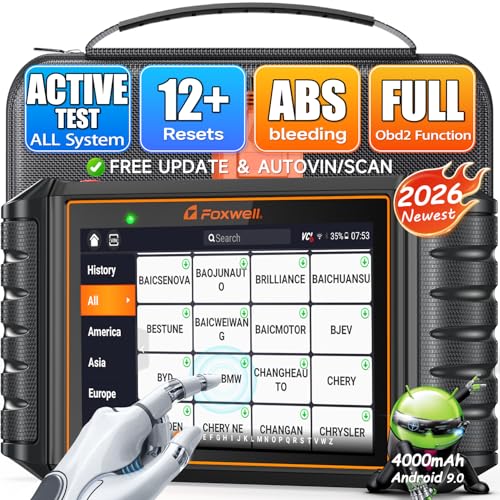
Foxwell GT60 Plus
GT60 Plus puts a large touchscreen on a tablet that reads every system and runs active tests. Home garage owners get a roomy display and wide free vehicle coverage. Coding depth stays behind the professional-grade tools in this group.
Pros
- Large, easy-to-read touchscreen
- Wide vehicle coverage included free
- Strong range of maintenance service resets
Cons
- Bulkier to store than compact tablets
- Coding options trail pro-grade competitors

XTOOL D8
XTOOL D8 focuses on bidirectional control and ECU coding at a price below flagship tools. Owners use it for brake bleeds, injector tests, and module coding. Full-system coverage spans a wide brand list beyond the basics.
Pros
- Strong bidirectional control for its price tier
- ECU coding available on many models
- Wide brand coverage for the cost
Cons
- Interface has a learning curve at first
- Function availability varies by vehicle
Autel MaxiCheck MX808S
MX808S brings Autel’s full-system scanning and common service resets to a lower price point. Budget-focused owners still get genuine all-system diagnostics, just with less depth than the MK808S. Coding functions stay minimal on this entry model.
Pros
- Affordable entry into full-system Autel diagnostics
- Handles the key service resets owners need
- Compact tablet size stays easy to store
Cons
- Coverage depth trails the MK808S
- Coding capability stays minimal
How they compare
| # | Model | Coverage | Best for | Score | Price |
|---|---|---|---|---|---|
| 1 | Autel MaxiCOM MK808S | All available systems | Best overall | 9.3 | Check price |
| 2 | Launch X431 V+ PRO 4.0 | Full system, wide brand list | Best premium | 9.2 | Check price |
| 3 | Ancel X6 | All available systems | Best value | 8.6 | Check price |
| 4 | Topdon Phoenix Lite 2 | Full system with topology map | Best for advanced coding | 9.0 | Check price |
| 5 | Foxwell GT60 Plus | All available systems | Best for full-system DIY | 8.7 | Check price |
| 6 | XTOOL D8 | Full system, wide brand list | Best bidirectional value | 8.9 | Check price |
| 7 | Autel MaxiCheck MX808S | All available systems | Best budget tablet | 8.0 | Check price |
Frequently asked questions
What is the difference between a diagnostic tablet and a code reader?
A code reader pulls basic engine trouble codes on a small screen. A diagnostic tablet scans every module, runs service resets, and often commands components through bidirectional tests.
What does bidirectional control mean on a scan tool?
Bidirectional or active tests let the tool command a part of the car, such as cycling the ABS pump or firing an injector. This confirms a component works instead of only reading a fault code.
Can a diagnostic tablet reset service and warning lights?
Yes, full-system tablets handle common resets like oil service, electronic parking brake, and steering angle calibration. Confirm the specific reset you need is listed for your vehicle before buying.
Which diagnostic tablet is best for a home garage?
A mid-range full-system tablet like the Autel MaxiCOM MK808S or Foxwell GT60 Plus covers most DIY repairs without paying for shop-level coding extras.
Is a professional coding tablet worth it for personal use?
For most home mechanics, no. Coding and programming depth on tools like the Launch X431 V+ PRO 4.0 mainly benefits shops handling repeat jobs across many vehicles.
Do diagnostic tablets work on every car brand?
Any OBD2-compliant vehicle can be read for basic codes, but full-system access and coding depend on the tool’s coverage for your specific make and year.
How much coding can a DIY-focused tablet actually do?
Entry and mid-range tablets handle common resets and some component coding, but advanced module programming usually stays limited to professional-grade units.
Do these tablets need a subscription after the first year?
Most include a period of free updates, then offer paid renewals for continued vehicle coverage. The tablet keeps working without renewal, but new vehicles and functions may not be added.
Can advanced coding damage a vehicle if done wrong?
Routine scanning and resets carry little risk. Coding and programming carry more risk if interrupted, so follow instructions closely and keep the battery charged during those procedures.
Are wireless diagnostic tablets better than wired ones?
A wireless VCI lets you move around the vehicle while scanning, which helps during bidirectional tests. Some owners still prefer a wired connection for a steadier link.
Our pick
The Autel MaxiCOM MK808S remains the diagnostic tablet most owners should start with, balancing broad coverage with easy menus. Shops and enthusiasts needing coding depth should look at the Launch X431 V+ PRO 4.0, while the Ancel X6 keeps DIY costs down. Confirm coverage for your specific vehicles and the exact functions you need before buying.