Chromebooks Compared for Battery Life and Speed
Acer’s Chromebook Plus 515 leads with a 15.6 inch full HD screen, a 12th generation Core i3, and 8 GB of memory. Lenovo’s Chromebook Duet 3 is the detachable pick for travel and reading. ASUS’s Chromebook Plus CX34 balances speed and portability best for everyday work.
Acer’s Chromebook Plus 515 is the strongest all-round pick here, with enough screen and memory to serve as a main computer. Lenovo’s Duet 3 covers travel and tablet-style reading, while the ASUS Chromebook Plus CX34 splits the difference for daily work. All seven models target clearly different buyers.
Shopping for a Chromebook is confusing because listings look alike while real performance ranges from an entry chip with 4 GB of memory to a certified Chromebook Plus machine with double that. We compared published specifications, screen and keyboard quality, and port layouts, then factored in what owners report about sustained speed and battery life.
What we recommend

Acer Chromebook Plus 515
A 15.6 inch full HD IPS panel, a 12th generation Core i3, and 8 GB of memory make this the least compromised machine in the group. Heavy tab use stays responsive where 4 GB models start reloading pages. Owners report the full size keyboard and number pad hold up well through long working sessions.
Pros
- Large panel suits spreadsheets and split screen work
- 8 GB of memory keeps a dozen tabs responsive
- Keyboard includes a full number pad
Cons
- Awkward size for laps and commutes
- eMMC storage trails the SSDs in Windows rivals

Lenovo Chromebook Duet 3
Detach the keyboard folio and the 11 inch 2K touchscreen works as a standalone tablet. Both the keyboard and the kickstand cover ship in the box rather than as extras. Fanless Snapdragon internals run silent, and owners report battery life that covers a full travel day.
Pros
- Keyboard and kickstand cover come included
- 2K panel is sharp for reading and video
- Silent fanless design stays cool
Cons
- 4 GB of memory limits open tabs
- Small keyboard cramps long typing sessions

ASUS Chromebook Plus CX34
Chromebook Plus certification pairs a 14 inch full HD screen with a Core i3 class chip and 8 GB of memory in a chassis light enough for daily carry. Ports are generous, with USB C on both sides so charging works from either direction. Speed per pound of laptop is why it takes the value slot.
Pros
- Certification unlocks offline and photo editing extras
- 14 inch size balances workspace and portability
- USB C charging on either side
Cons
- Plastic chassis flexes under firm pressure
- Screen brightness limits outdoor use

HP Chromebook 14a
Browsing, email, and streaming run comfortably on this light 14 inch machine, which keeps its ambitions modest. An entry level processor and 4 GB of memory mean it prefers a handful of tabs over heavy multitasking. Owners report the battery lasts through a school or work day, and the keyboard beats most rivals at this level.
Pros
- Comfortable keyboard for the class
- Light enough for everyday carry
- All-day battery on light workloads
Cons
- HD resolution looks soft beside full HD panels
- Many open tabs bring visible slowdown
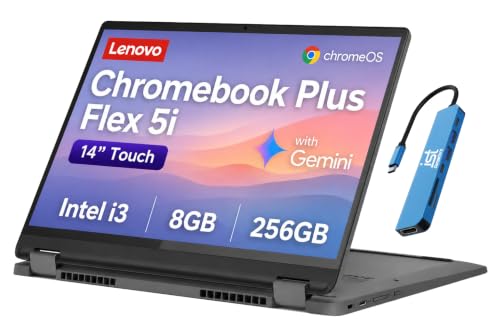
Lenovo IdeaPad Flex 5i Chromebook
A 360 degree hinge folds the 13.3 inch full HD touchscreen flat for tablet-style reading and stylus notes. Build quality feels sturdier than most convertibles in this class, and the hinge holds any angle. Students who annotate documents get the most from the form factor.
Pros
- Tablet, tent, and stand modes in one machine
- Touchscreen offers good contrast and response
- Hinge stays firmly at any angle
Cons
- Heavier than a real tablet when folded
- Stylus must be bought separately

Samsung Galaxy Chromebook Go
Around three pounds with a spill resistant keyboard, this 14 inch machine is built for people who move all day. Performance sits at the entry level, so documents, browsing, and video calls are the comfort zone. Owners report the thin profile disappears into a bag far more easily than a 15 inch laptop.
Pros
- Very light for a 14 inch machine
- Keyboard resists spills
- Battery stretches through light-use days
Cons
- Celeron chip strains under demanding web apps
- HD screen lacks detail for editing work
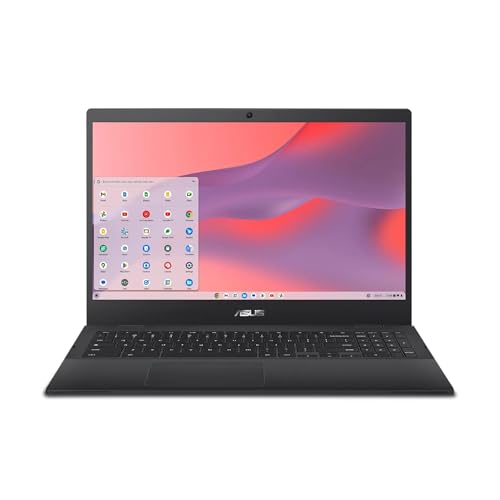
ASUS Chromebook CX1
Reinforced corners and a hinge rated for repeated opening target classroom abuse directly. Google Docs, Classroom, and streaming run without complaint on the Celeron chip, though multitasking is limited. A full HD panel is a rare inclusion at this durability-first level.
Pros
- Chassis survives daily student handling
- Full HD screen despite the entry chip
- Fanless design runs silently
Cons
- 4 GB of memory caps multitasking
- Speakers and webcam are basic
How to choose
What makes a Chromebook feel fast: memory or processor? Memory decides more than the chip name. A 4 GB machine reloads background tabs constantly once you pass roughly ten of them, while an 8 GB machine holds everything in place. Anyone keeping mail, calendar, documents, and music open all day should treat 8 GB as the floor. Processor class then determines how quickly heavy pages and video calls render on top of that.
What does Chromebook Plus certification actually mean? Chromebook Plus is a hardware certification with minimums for processor class, memory, storage, screen, and webcam quality. Certified models, including the Acer 515 and ASUS CX34 here, also unlock extra offline features and photo editing tools. Shoppers can use the badge as a filter that removes underpowered machines without reading every specification line.
Which screen size fits a desk, a lap, or a plane? A 15.6 inch model excels on a desk and frustrates everywhere else. Between 13 and 14 inches is the sweet spot for moving around a house or campus, and a detachable like the Duet 3 wins on trains and planes. Resolution matters as much as size, because full HD keeps text crisp while an HD panel at 14 inches looks visibly grainy.
What should you check before buying: ports, updates, and offline use? Confirm the listing shows USB C charging, and check for HDMI if an external monitor or projector is in your routine. Every Chromebook carries an automatic update expiration date measured from the platform launch, so a discounted older model may have fewer years of support left. Buyers who work without internet for long stretches should verify their key apps offer offline modes first.
Compared at a glance
| # | Model | Display | Best for | Score | Price |
|---|---|---|---|---|---|
| 1 | Acer Chromebook Plus 515 | 15.6 inch full HD IPS | Best overall | 9.4 | Check price |
| 2 | Lenovo Chromebook Duet 3 | 11 inch 2K touchscreen | Best for travel | 9.2 | Check price |
| 3 | ASUS Chromebook Plus CX34 | 14 inch full HD | Best value | 9.0 | Check price |
| 4 | HP Chromebook 14a | 14 inch HD | Best budget | 8.8 | Check price |
| 5 | Lenovo IdeaPad Flex 5i Chromebook | 13.3 inch full HD touchscreen | Best for note taking | 8.5 | Check price |
| 6 | Samsung Galaxy Chromebook Go | 14 inch HD | Best for portability | 8.3 | Check price |
| 7 | ASUS Chromebook CX1 | 14 inch full HD | Best for students | 8.0 | Check price |
Good to know
Can a Chromebook replace a Windows laptop?
For browsing, email, documents, video calls, and streaming, yes. Web apps and Android apps cover most daily needs. Native Windows software such as full desktop Adobe suites and most PC games will not run, so audit your must-have programs before switching.
Is 4 GB of RAM enough for a Chromebook?
Enough for light use with a handful of tabs. Multitaskers who run video calls beside documents or keep many tabs open should insist on 8 GB. That difference is the main reason the top picks here feel faster than the budget models.
What is the difference between a Chromebook and a Chromebook Plus?
Chromebook Plus is a certification with minimum requirements for processor, memory, storage, screen resolution, and webcam quality. Certified machines also gain extra software features. On a crowded listing page, the badge quickly identifies the faster hardware.
Do Chromebooks work without an internet connection?
Partly. Docs, Sheets, Slides, Gmail, and many Android apps offer offline modes that sync on reconnection. Streaming services and most web tools do not. Long stretches offline make a Chromebook a poor primary machine.
How long do Chromebooks get software updates?
Google publishes an automatic update expiration date for each model, counted from the platform launch rather than your purchase date. Recent models typically have many years remaining. Check that date before buying a heavily discounted older machine.
Is a touchscreen worth it on a Chromebook?
Worth it on convertibles and detachables like the Flex 5i and Duet 3, where the screen folds or separates for reading and notes. On a fixed clamshell, touch mostly adds weight, glare, and battery drain.
Can Chromebooks run Android apps?
Most current models install Android apps from the Google Play Store, covering games, streaming, and productivity tools. Performance tracks the processor and memory. Some phone-first apps scale awkwardly to a laptop screen.
How much storage does a Chromebook need?
Chrome OS is small and most files live in the cloud, so 64 GB works and 128 GB is comfortable. Heavy Android app users and video downloaders should choose 128 GB or add a microSD card where supported.
Which Chromebook is best for a student?
Durability and battery beat raw speed for classroom use, which favors the reinforced ASUS CX1. High schoolers juggling research tabs benefit from an 8 GB model like the Flex 5i, whose folding touchscreen also handles stylus notes.
The bottom line
Acer’s Chromebook Plus 515 is the machine to buy when a Chromebook will be your main computer, thanks to its screen space and 8 GB of memory. Lenovo’s Duet 3 wins for travel and reading, and the ASUS CX34 delivers the best mix of speed and portability in between. Budget models mostly sacrifice memory rather than build quality, and that is the compromise to weigh hardest.


