How to Pick a Coding Robot Kids Won’t Outgrow
Sphero BOLT is the robot that grows furthest, moving from finger-drawn paths to JavaScript inside one app. Learning Resources Botley 2.0 The Coding Robot teaches sequencing with no screen for ages five and up, and Wonder Workshop Dash Robot keeps primary schoolers engaged through block coding.
Sphero BOLT is the best coding robot for households that want one purchase to last years. A five year old drives it by drawing a path, an eight year old programs it with blocks, and a twelve year old writes JavaScript for it in the same app.
Stage matters more than brand with these toys. A robot pitched too old becomes a remote control car, while one pitched too young gets abandoned in a month. Real progression runs from screen free sequencing through block coding with loops and conditions to text based languages. We compared age fit, programming method, build durability, battery life and curriculum support, then weighed owner reports on app stability and whether each robot still comes out after the first month.
What matters most
How do you match a coding robot to your child’s age? Under about six, children learn sequencing best through physical inputs: buttons, tiles or command blocks with no screen involved. Between roughly six and ten, block based coding on a tablet introduces loops, conditions and variables in readable form. From ten upward, text languages like JavaScript and Python become approachable. Buying for the next stage rarely works, since the robot sits unused until the child grows into it, if interest survives that long.
Which coding robots grow with a child? Robots supporting several programming methods in one app stay meaningful for years instead of one school term. Sphero BOLT runs from finger drawing to JavaScript, and Makeblock mBot Neo moves from blocks to Python. That progression lets a child revisit the same device with new skills, which motivates far more than a replacement toy. Check specifically for a text coding mode, because block-only robots hit a hard ceiling.
How durable does a coding robot need to be? Expect drops from tables, collisions with skirting boards and the occasional foot. Sealed shells and rounded bodies, like the BOLT’s polycarbonate sphere, survive that treatment far better than kits with exposed boards and protruding sensors. For self assembly robots, confirm parts reattach easily after a fall. A broken robot with no obvious repair path is the fastest route to abandonment.
What should you check about apps before buying? Software determines whether the hardware stays useful. Verify the app runs on the tablet or phone you already own, whether the manufacturer still ships updates, and whether an account or subscription gates the full feature set. Recent update activity is the tell. Robots from companies that abandoned their apps become expensive paperweights, and battery-hungry models add running costs on top.
What we recommend

Sphero BOLT
Few robots span the whole learning arc, and this sealed rolling sphere does: draw a path with a finger, build block programs, then write JavaScript, all in one app. A programmable 8 by 8 LED matrix plus compass, gyroscope and light sensors feed genuinely varied projects. Polycarbonate construction shrugs off hard floors and surface water, though deep pile carpet defeats the rolling motion.
Pros
- Spans drawing through to text based coding
- Durable sealed shell survives hard use
- Sensor set enables genuinely varied projects
Cons
- Rolls poorly on deep pile carpet
- Cannot handle obstacles or steps

Learning Resources Botley 2.0 The Coding Robot
Buttons on a remote are the entire programming interface, so children who cannot yet read still build sequences, loops and if-then logic with no tablet involved. Included cards, tiles and obstacles turn practice into structured challenges. Both robot and remote run on disposable cells, and the deliberately simple concepts mean most children move past it within a couple of years.
Pros
- Teaches sequencing with no screen at all
- Works for pre readers
- Comes with a full set of challenge accessories
Cons
- Gets outgrown within a couple of years
- Consumes batteries quickly

Wonder Workshop Dash Robot
Personality is the feature here. Dash answers voice commands, dodges obstacles and reacts in ways that pull children back for another session, which separates a robot used weekly from one used once. Several apps ladder up from puzzle challenges to free form block coding. Floor space is a requirement, and the best accessories, like the launcher and brick connectors, sell separately.
Pros
- Engaging personality sustains interest
- Several apps covering different levels
- Rechargeable rather than battery hungry
Cons
- Best accessories cost extra
- Needs clear floor space to operate

Ozobot Evo
Ordinary markers become the first programming language, since optical sensors read colour sequences drawn on paper before a child ever opens the app. Block coding waits in the software for the next stage. Tabletop size suits classrooms and small homes where floor robots do not fit. Owners report the sensors are fussy about paper quality and marker width, and charge life runs short.
Pros
- Codes with markers before any screen
- Small enough for tabletop use
- Bridges paper coding into block coding
Cons
- Sensors are fussy about paper and markers
- Short battery life between charges

Makeblock mBot Neo
Assembly comes before programming, which adds mechanics and electronics to the lesson plan that finished robots skip. Block coding covers the early years, Python takes over later, and expansion ports accept extra sensors and modules as interest grows. Younger children need adult help with the build, and advanced projects assume upper primary patience and reading.
Pros
- Teaches building as well as coding
- Expandable with extra sensors
- Supports Python for older children
Cons
- Assembly needs adult help for younger users
- Advanced projects require patience
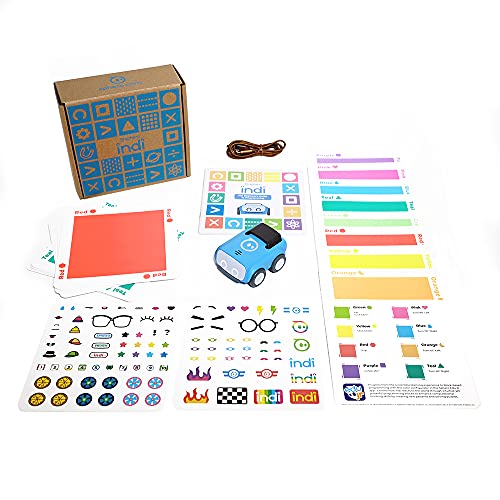
Sphero indi At-Home Learning Kit
Coloured tiles laid across the floor become the program, so a four year old codes by arranging a path on the carpet with no screen anywhere. Cause and effect turns physical and immediate. Simplicity is deliberate, which means children outgrow it faster than anything else here, and the tiles demand floor space plus a household that keeps track of pieces.
Pros
- Screen free coding for very young children
- Physical tiles make logic tangible
- Optional app extends it later
Cons
- Outgrown quickly by the age of six or seven
- Tiles need floor space and get lost

Matatalab Coding Set
Physical command blocks arranged on a control board form the program, so children see, touch and rearrange their code before pressing go. That concreteness suits kids who struggle with screen based instruction. A map and challenge cards give structure beyond free play. Many small blocks need careful storage, and the set costs more than most rivals aimed at the same ages.
Pros
- Programs are physical and rearrangeable
- Structured challenge cards included
- Suits children who dislike screen instruction
Cons
- Expensive for the age range it serves
- Many small pieces to keep together
How they stack up
| # | Model | Programming | Best for | Score | Price |
|---|---|---|---|---|---|
| 1 | Sphero BOLT | Draw, block coding and JavaScript | Best overall | 9.4 | Check price |
| 2 | Learning Resources Botley 2.0 The Coding Robot | Remote control step sequencing | Best screen free option | 9.2 | Check price |
| 3 | Wonder Workshop Dash Robot | Block coding across several apps | Best for primary school | 9.0 | Check price |
| 4 | Ozobot Evo | Colour code markers and block coding | Best for classroom use | 8.7 | Check price |
| 5 | Makeblock mBot Neo | Block coding and Python | Best for building and tinkering | 8.5 | Check price |
| 6 | Sphero indi At-Home Learning Kit | Physical colour tiles, plus optional app | Best for early years | 8.2 | Check price |
| 7 | Matatalab Coding Set | Physical command blocks on a control board | Best tangible coding | 8.0 | Check price |
Common questions
What age should a child start with a coding robot?
Around four or five for screen free robots that teach sequencing with buttons or tiles, since that is when children can plan a series of steps. Block coding suits six and up, and text languages become realistic around ten to twelve depending on reading confidence.
Do coding robots need a tablet?
Some do, some deliberately do not. Screen free models like Botley 2.0 and the Matatalab Coding Set use buttons or physical blocks, which suits younger children and screen-limited households. Block coding robots need a tablet or phone, so check app requirements against your devices first.
Can a coding robot actually teach programming?
It teaches the thinking underneath programming: breaking a goal into ordered steps, spotting repetition and handling conditions. Those skills transfer directly to real languages later. Continued interest, not the specific robot, decides whether a child goes on to write code.
How long do kids stay interested in a coding robot?
Screen free robots for four to six year olds typically hold attention for a year or two. Models spanning block and text coding stay relevant for several years, especially where new challenges, accessories or school projects keep giving reasons to return.
Is a coding robot worth it if school already teaches coding?
Usually yes, because classroom time on any single activity is short and a robot at home lets a child explore at their own pace. Matching the school’s block coding platform helps, since the robot then builds on familiar ground.
Do parents need to know coding to help?
No. Block environments are designed to be readable without experience, and most manufacturers publish lesson plans and challenge cards. Working through the first few challenges together is normally enough for the child to take over.
How is battery life on coding robots?
Rechargeable models like Dash and the BOLT give a session or two per charge, which fits the burst pattern of real use. Robots running on disposable cells, such as Botley 2.0, drain them quickly, so rechargeable cells are worth buying alongside.
Is a robot better than a coding app alone?
For younger children, clearly. A physical robot makes the result of a program visible in the room, and a wrong turn is instantly obvious. Older children comfortable with abstraction do fine in pure software environments too.
Which coding robot is best for a four year old?
Sphero indi and the Matatalab Coding Set both work at four, using tiles or command blocks instead of a screen. Botley 2.0 follows around five. All three trade depth for accessibility, so expect an upgrade within a few years.
The bottom line
Sphero BOLT is the clear choice for one robot that lasts, carrying a child from drawn paths to JavaScript in the same app. For a first robot at four or five, Learning Resources Botley 2.0 teaches sequencing without any screen. Primary aged children who need personality and structure to stay engaged do best with the Wonder Workshop Dash Robot.


