Top Travel Computer Cases That Keep Your Gear Safe
For most travelers, the Pelican 1495 Case stands out as the top pick. It offers military grade protection for a full size laptop and accessories. Its main advantage is unmatched durability in a compact form. However, it is heavier than soft sided cases and may not fit under all airline seats.
Traveling with a computer requires a case that can handle the rigors of transit. Whether you are a digital nomad, a business traveler, or a gamer, your gear deserves reliable protection. The right case balances security with ease of transport.
We have analyzed the most popular travel computer cases on the market. Our picks range from ultra rugged hard cases to lightweight sleeves. Each product is chosen for its ability to safeguard your device during flights, road trips, and daily commutes.
The best picks, ranked
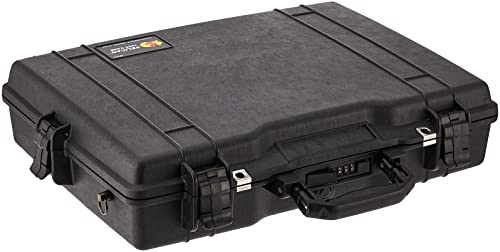
Pelican 1495 Case
The Pelican 1495 is a rugged hard case with customizable foam. It is watertight, crushproof, and dustproof. This case is ideal for photographers and professionals who need military grade protection.
Pros
- Exceptional impact resistance
- Customizable foam inserts
- Built to last a lifetime
Cons
- Heavy compared to soft cases
- May be too bulky for some

Amazon Basics 15.6 Inch Laptop Backpack
This Amazon Basics backpack offers a padded laptop compartment and multiple pockets. It is lightweight and fits under airline seats. A reliable choice for budget conscious travelers.
Pros
- Very affordable price point
- Lightweight and comfortable
- Multiple storage pockets
Cons
- Limited padding for heavy drops
- Not waterproof
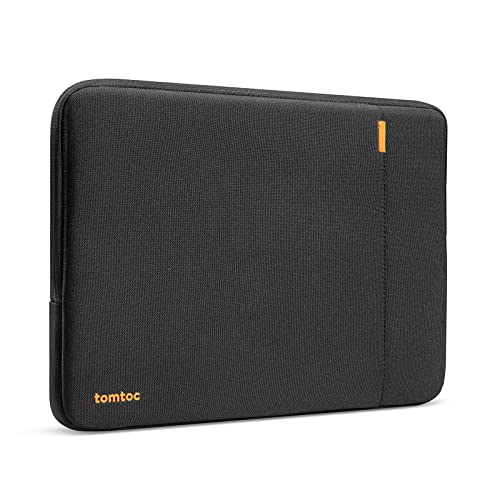
Tomtoc A13 15.6 Inch Laptop Sleeve
The Tomtoc A13 is a sleek, shock absorbing sleeve with a waterproof outer shell. It fits most 15.6 inch laptops and adds minimal bulk. Perfect for slipping into a travel backpack.
Pros
- Slim and lightweight
- Water resistant exterior
- Soft interior prevents scratches
Cons
- No shoulder strap
- Limited padding on sides

SwissGear 17 Inch Laptop Backpack
The SwissGear backpack features a dedicated 17 inch laptop compartment and many organizational pockets. It has a suspension system for comfort. Great for business trips and college.
Pros
- Roomy and well organized
- Comfortable padded straps
- Durable construction
Cons
- Larger footprint
- May not fit in some overhead bins

Case Logic 13.3 Inch Laptop Briefcase
This Case Logic briefcase is designed for up to 13.3 inch laptops. It has a padded handle and detachable shoulder strap. Its slim profile fits into larger bags.
Pros
- Professional appearance
- Padded laptop sleeve
- Versatile carrying options
Cons
- Small capacity
- Not for heavy travel

Veto Pro Pac Tech MCT
The Veto Pro Pac Tech MCT is a rugged bag with a hard bottom and many pockets. It can hold a laptop and tools. Its build quality is outstanding for field work.
Pros
- Excellent organization
- Rugged and durable
- Water resistant
Cons
- Expensive
- Heavy

Nomatic Navigator Backpack 15
The Nomatic Navigator backpack is a premium travel pack with a dedicated laptop compartment. It expands for extra space and has a sleek design. It includes a TSA friendly lay flat feature.
Pros
- Premium materials
- Expansion capability
- TSA friendly design
Cons
- High price point
- May be too compact for some
Compared at a glance
| # | Model | Interior dimensions | Best for | Score | Price |
|---|---|---|---|---|---|
| 1 | Pelican 1495 Case | 17.4 x 12.7 x 3.9 inches | Maximum protection for full size laptops | 9.4 | Check price |
| 2 | Amazon Basics 15.6 Inch Laptop Backpack | Up to 15.6 inches | Budget friendly everyday travel | 8.6 | Check price |
| 3 | Tomtoc A13 15.6 Inch Laptop Sleeve | 15.6 inches | Slim protection for a laptop in a bigger bag | 8.8 | Check price |
| 4 | SwissGear 17 Inch Laptop Backpack | Up to 17 inches | Carrying a large laptop with extra gear | 8.9 | Check price |
| 5 | Case Logic 13.3 Inch Laptop Briefcase | Up to 13.3 inches | Professional look with easy access | 8.2 | Check price |
| 6 | Veto Pro Pac Tech MCT | Up to 15 inches | Technicians who need tool storage | 9.0 | Check price |
| 7 | Nomatic Navigator Backpack 15 | Up to 15 inches | Versatile travel and everyday use | 9.2 | Check price |
How to pick the right one
Common questions
What size computer case do I need?
Measure your computer’s width, height, and depth. Compare these dimensions to the case’s interior dimensions. A case that is too small may not fit. A case that is too large allows the computer to slide around. Most cases list compatible laptop sizes in inches.
Are hard cases worth the extra weight?
Hard cases offer superior protection against impacts, water, and dust. They are ideal for fragile equipment or rough handling. The trade off is extra weight and bulk. If you travel frequently by air and need to carry your case long distances, a soft case may be more practical.
Can I use a travel case as a personal item on a plane?
Many soft cases and backpacks are designed to fit under airline seats. Check the dimensions against the airline’s personal item size limits. Hard cases may be larger and could be considered a carry on. Always verify with your airline before traveling.
How do I clean my computer case?
For fabric cases, use a soft brush to remove dirt and a damp cloth with mild detergent for stains. For hard cases, use soap and water. Let the case air dry completely before storing. Avoid using harsh chemicals that could damage the material.
What is the difference between a sleeve and a backpack?
A sleeve is a slim, padded cover that only holds the laptop. It is meant to be placed inside another bag. A backpack has its own straps and can carry the laptop along with other items. Backpacks offer more protection and convenience for travel.
Are there cases for gaming laptops?
Gaming laptops are often larger and heavier. Look for cases that support 17 inch laptops or larger. Some cases have extra padding for added protection. The SwissGear backpack and Pelican case can accommodate gaming laptops.
Do all cases have TSA approved locks?
No, only some cases have TSA approved locks. These allow security to open the case without damaging it. If you travel with a hard case, you may want one with TSA locks. Soft cases typically do not have locks.
What is the best way to pack a computer in a checked bag?
If you must check your computer, use a hard case with foam inserts. Place the computer in a padded sleeve before putting it in the case. Fill any empty space with clothing to prevent movement. However, it is always safer to carry your computer with you.
How much weight can these cases handle?
The weight capacity depends on the case’s construction and materials. Most soft cases can handle 15 to 20 pounds of gear. Hard cases can support more weight, but the overall weight becomes a factor. Check the product specifications for weight limits.
Are expensive cases worth the money?
Expensive cases often use higher quality materials and offer better protection. They may have more features like waterproofing or custom foam. If you travel frequently with expensive equipment, the investment can be worthwhile. For occasional use, a budget case may suffice.
Our take
For most travelers, the Pelican 1495 Case is the best choice because it provides unmatched protection for your computer. If you prefer a lightweight option that is easy to carry, the Tomtoc A13 sleeve is a great alternative. If you need to carry a lot of gear with your laptop, the SwissGear backpack offers the best balance of capacity and comfort. Choose based on your specific travel style and the level of protection you require.


