How to Pick a Computer Desk That Fits Your Setup
Sauder’s Beginnings Computer Desk wins on stability and a slide out keyboard shelf for typical home offices. SHW’s 55-Inch desk offers more surface for dual monitors at a similar price. Coleshome’s 47 Inch desk fits small bedrooms and dorms where a full width desk will not go.
A desk that holds a monitor, a laptop and paperwork without wobbling starts with the frame, not the finish. Sauder’s Beginnings Computer Desk balances stability and storage for most home setups. SHW’s 55-Inch model adds width for dual monitors, and Coleshome’s 47 Inch desk solves tight rooms.
Listings rarely mention the two details that matter most: real depth once a monitor stand sits on the surface, and how much a frame sways under normal typing. We compared published dimensions, weight ratings and leg geometry, then checked what owners report about long term wobble and assembly accuracy.
Before you buy
Why depth matters more than width Most buyers shop by width and discover later the surface is too shallow. A monitor stand alone can eat six to eight inches of depth before a keyboard even arrives. Aim for a working depth that leaves room for the keyboard, your forearms and the monitor base. A shallow desk works better with a monitor arm clamped to the rear edge instead of a stand.
Frame stability beats material choice A steel frame with cross bracing usually outperforms a thick wooden top for real world steadiness, since sway comes from the legs. Adjustable leveling feet, a rear crossbar and a stated weight capacity are the details worth checking. Four unbraced legs tend to develop a noticeable rock over time, especially on carpet.
Matching desk shape to your room L shaped desks earn their footprint when a genuine corner and two distinct tasks exist. Without a usable corner, they waste floor space and block walkways. A straight desk against the longest clear wall usually works better, with a small side cart adding storage instead.
Planning cable routing before assembly Grommet holes, a rear cable tray or a few adhesive clips change how a desk feels day to day. Desks without any of these are worth pairing with a clip on cable tray before building, since retrofitting after loading the desk is far more annoying. Keeping power bricks off the floor also makes cleaning underneath realistic.
The best picks, ranked

Sauder Beginnings Computer Desk
Engineered wood panels form the frame, paired with a slide out keyboard shelf and a small storage cubby. That combination covers most home office needs without extra accessories. Panels line up accurately during assembly, which is not guaranteed at this price point.
Pros
- Keyboard shelf frees up desktop depth
- Panels align reliably during assembly
- Neutral finish works in most rooms
Cons
- Heavy to relocate once fully assembled
- No dedicated cable tray built in
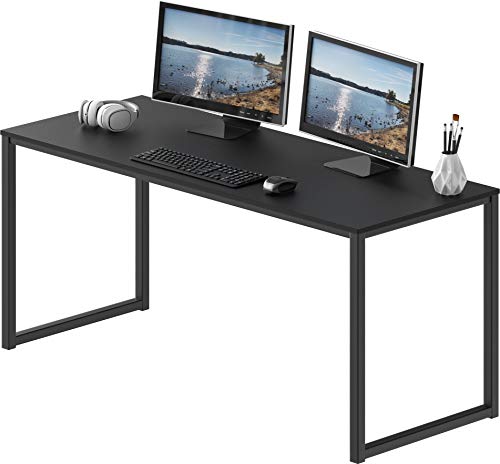
SHW Home Office 55-Inch Computer Desk
Fifty five inches of width fits a monitor, keyboard and notebook side by side. A steel frame carries the load instead of the top panel, so sag matters less than on all wood designs. Owners report a rear crossbar accessory cuts side to side movement further.
Pros
- Enough width for two monitors side by side
- Steel frame resists long term sagging
- Leveling feet handle uneven floors
Cons
- No drawers or built in shelving
- Some lateral flex under heavy typing

Coleshome 47 Inch Computer Desk
Under four feet wide, this fits bedrooms, dorms and rooms where a full size desk will not go. X shaped leg braces handle most of the stability work. The laminate top wipes clean easily after daily use.
Pros
- Fits narrow walls and alcoves
- Assembles quickly with few parts
- Light enough to reposition alone
Cons
- Limited depth for large monitor stands
- No storage included

Tribesigns L-Shaped Computer Desk
An L shape turns a dead corner into a second work zone, useful for splitting a monitor setup from paperwork or a second machine. The layout reverses so the return can sit on either side. Owners report the join between sections needs careful tightening during assembly.
Pros
- Creates two distinct work zones
- Reverses to fit either corner
- Grommet holes keep cables tidy
Cons
- Needs an actual corner to make sense
- Takes longer to assemble than a straight desk

Bestier L Shaped Gaming Desk with LED Lights
A carbon fiber style top pairs with a monitor riser shelf, a headphone hook and LED strips underneath. The riser does the real work, lifting a display to eye level without a separate stand. Owners report the LED controller is a nice extra rather than the main reason to buy.
Pros
- Monitor riser included at no extra cost
- Hooks and holders reduce desktop clutter
- Reversible orientation for either wall
Cons
- Styling will not suit every room
- LED strip draws power from a USB port

Mr IRONSTONE L-Shaped Desk 50.8 Inch
Each wing stays short enough to tuck into a bedroom corner that a full size L desk would overwhelm. Cross bracing under the frame keeps wobble in check for the size. The stated weight rating covers a monitor, tower and speakers without strain.
Pros
- Fits corners larger L desks cannot
- Cross bracing limits wobble at this size
- Adjustable feet correct uneven floors
Cons
- Shallow wings limit large accessories
- Laminate edges can chip if knocked
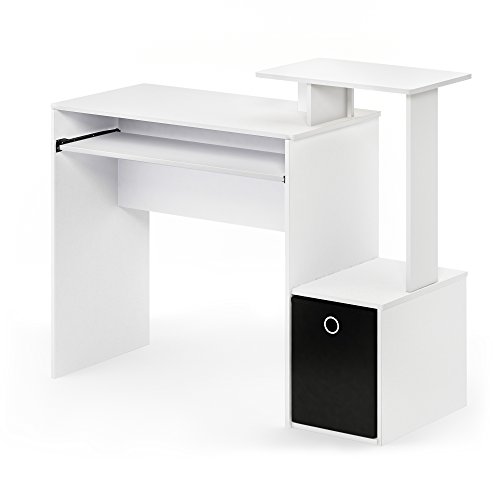
Furinno Econ Multipurpose Home Office Computer Writing Desk
A top, a side shelf stack and simple legs make up the entire structure, suited to a study nook or rental room. Assembly needs few tools, and one person can carry the finished desk alone. Owners report it works best as a laptop and study desk rather than a heavy workstation.
Pros
- Very small footprint for tight rooms
- Side shelves add storage without added width
- Light enough to move without help
Cons
- Modest weight capacity
- Not suited to dual monitor arms
Side by side
| # | Model | Surface style | Best for | Score | Price |
|---|---|---|---|---|---|
| 1 | Sauder Beginnings Computer Desk | Rectangular with keyboard shelf | Best overall | 9.4 | Check price |
| 2 | SHW Home Office 55-Inch Computer Desk | 55 inches | Best value | 9.2 | Check price |
| 3 | Coleshome 47 Inch Computer Desk | 47 inches | Best budget | 9.0 | Check price |
| 4 | Tribesigns L-Shaped Computer Desk | L shaped, reversible | Best for corners | 8.7 | Check price |
| 5 | Bestier L Shaped Gaming Desk with LED Lights | L shaped with monitor shelf | Best for gaming | 8.5 | Check price |
| 6 | Mr IRONSTONE L-Shaped Desk 50.8 Inch | 50.8 inches per side | Best compact L-shape | 8.2 | Check price |
| 7 | Furinno Econ Multipurpose Home Office Computer Writing Desk | Writing desk with side shelves | Best for small spaces | 8.0 | Check price |
Questions worth asking
What desk width works best for two monitors?
Around 55 to 60 inches is the comfortable minimum for two standard monitors plus a keyboard. Below that, both screens still fit, but the side space that makes daily use pleasant disappears.
Is an L shaped desk better than a straight desk?
Only with a real corner and two separate tasks to split apart. In an open room, an L shape often blocks movement, while a straight desk with a small storage cart covers the same surface area in less floor space.
How much weight can a home computer desk hold?
Most engineered wood desks list a distributed capacity that comfortably covers a monitor, a tower and peripherals. Check the stated figure directly rather than assuming, since a single heavy point load stresses a frame more than the same weight spread evenly.
Do I need a keyboard tray?
A tray helps when the desk sits high relative to your chair, lowering your hands to a neutral typing angle. If your forearms already sit roughly parallel to the floor while typing, a tray mostly just removes leg room.
How long does desk assembly usually take?
Simple straight desks are commonly reported at 20 to 40 minutes. L shaped models and anything with drawers routinely take an hour or more, and a second pair of hands speeds up squaring the panels.
Will a laminate desktop scratch easily?
Laminate resists everyday wear well but shows scratches from grit and sharp metal edges. A desk pad under the keyboard and mouse area handles most of the wear and stops mugs marking the surface.
Can I mount a monitor arm to any of these desks?
Clamp mounted arms need an accessible top edge that is thick enough to grip. Desks with a rear panel or a flush wall design may need a grommet mount instead, so check rear clearance before ordering an arm.
Is a desk with drawers worth buying?
Drawers add cost and weight, and they fix storage in one spot. A separate rolling drawer unit is often more flexible, cheaper to replace and easier to move when a room gets rearranged.
What is the best computer desk for a small bedroom?
A compact straight desk under 48 inches wide fits tight bedrooms and dorms without blocking a door or closet.
L shaped vs straight desk, which fits a home office better?
An L shape suits a genuine corner with two tasks to separate, such as a monitor setup and paperwork. A straight desk fits better along a single wall in most standard bedrooms.
Our pick
Sauder’s Beginnings Computer Desk remains the sensible default, pairing a keyboard shelf with reliable build quality in a normal size room. SHW’s 55-Inch desk gives dual monitor space on a steel frame for a similar price. Coleshome’s 47 Inch desk covers genuinely tight rooms without asking for extra floor space.



