Top Controller Cable Extensions for Serious Gamers
For most gamers, the UGREEN USB C Cable Extension 3.1 Gen 2 stands out as the top pick, offering robust build quality and high-speed data transfer, ideal for Xbox Series and PS5 controllers. Its main advantage is the braided nylon jacket and gold-plated connectors that ensure both durability and reliable connectivity. The main limitation is that it is a USB-C to USB-C extension, which may require an adapter for older controllers with micro-USB ports.
Long cable runs can be a lifesaver when your gaming setup is spread out or you prefer to sit farther from the screen. A good controller cable extension not only extends your reach but also maintains signal integrity, reducing lag and disconnects.
We looked at options that support high-speed data transfer, feature durable braided or nylon construction, and offer lengths that suit different room layouts. Here are our top picks for extending your controller’s reach.
What matters most
Our top picks
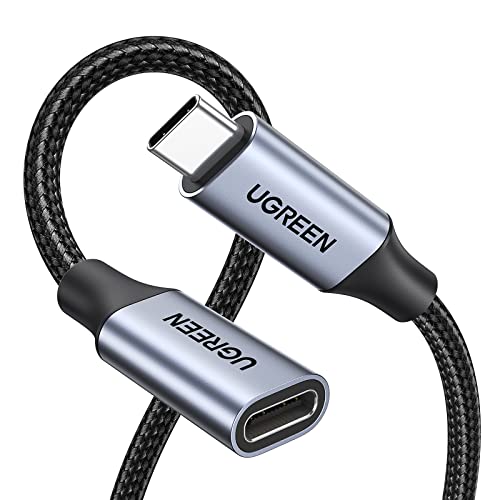
UGREEN USB C Cable Extension 3.1 Gen 2
This extension cable from UGREEN is built with a double-braided nylon jacket that resists tangling and wear. It supports USB 3.1 Gen 2 speeds up to 10Gbps, making it perfect for high-performance controllers. The gold-plated connectors ensure a stable connection, and the aluminum housing adds extra durability.
Pros
- High-speed data transfer
- Sturdy braided cable
- Reinforced connectors
Cons
- Only USB-C to USB-C
- May be stiff initially

Cable Matters USB 3.0 Extension Cable (USB-A to Micro-B)
If your controller uses micro-USB, this Cable Matters extension is a reliable choice. It extends the reach of your charging or data cable without signal loss. The cable is molded with strain relief and is available in various lengths. It supports USB 3.0 speeds, ensuring fast data sync.
Pros
- Compatible with many older controllers
- Available in multiple lengths
- Affordable price
Cons
- Not as durable as braided options
- Bulky connector

Amazon Basics USB 2.0 Extension Cable (A-Male to A-Female)
Amazon Basics offers a simple, no-frills USB-A extension that works with most controllers that use a standard USB-A connection. It provides a reliable extension for charging or data transfer, though it is limited to USB 2.0 speeds. The cable is flexible and comes in various lengths.
Pros
- Very affordable
- Works with any USB-A device
- Multiple lengths available
Cons
- Slower data transfer
- Not as durable

StarTech.com USB 3.0 Extension Cable (A to A, 6 ft)
StarTech.com is known for professional-grade cables, and this extension is no exception. It supports USB 3.0 speeds and is shielded to minimize interference, making it ideal for longer runs. The cable is thick and well-insulated, ensuring stable performance over extended distances.
Pros
- Excellent shielding
- High build quality
- Lifetime warranty
Cons
- Higher price
- Thick cable can be stiff
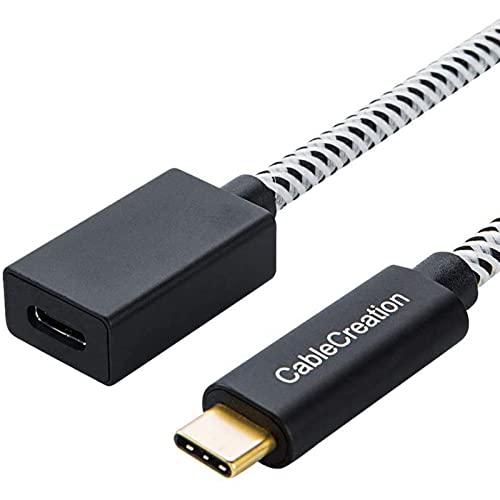
CableCreation USB C Extension Cable (USB-C to USB-C, 3.3 ft)
If you only need a short extension, this CableCreation USB-C extension is perfect. It supports USB 3.1 Gen 2 speeds and is braided for durability. The compact design makes it easy to carry and store, ideal for travel or desktop setups where you need just a bit more reach.
Pros
- Fast data transfer
- Compact and portable
- Durable braided cable
Cons
- Short length
- May be too short for some setups

C2G 6ft USB 3.0 Extension Cable (A to A)
C2G (Cables to Go) offers a reliable, high-quality USB 3.0 extension that ensures consistent data transfer. The cable is well-built with a rugged PVC jacket and is backward compatible with USB 2.0. It provides a solid choice for gamers who need a dependable extension without extra frills.
Pros
- Dependable performance
- Backward compatible
- Reasonable price
Cons
- Not braided
- Limited length options
Anker USB C Extension Cable (USB-C to USB-C, 3.3 ft)
Anker is a trusted brand in charging accessories, and this USB-C extension cable is no exception. It features a premium braided design with aluminum connectors, offering both style and durability. The cable supports USB 3.1 Gen 2 speeds and is backed by Anker’s reputation for quality.
Pros
- High-end construction
- Fast charging and data
- Compact length
Cons
- Shorter length
- Premium price
How they compare
| # | Model | Length | Best for | Score | Price |
|---|---|---|---|---|---|
| 1 | UGREEN USB C Cable Extension 3.1 Gen 2 | 6 feet | USB-C controllers on PS5 and Xbox Series | 9.4 | Check price |
| 2 | Cable Matters USB 3.0 Extension Cable (USB-A to Micro-B) | 10 feet | Older controllers with micro-USB | 9.0 | Check price |
| 3 | Amazon Basics USB 2.0 Extension Cable (A-Male to A-Female) | 6 feet | Budget-conscious gamers | 8.6 | Check price |
| 4 | StarTech.com USB 3.0 Extension Cable (A to A, 6 ft) | 6 feet | Long distances without signal loss | 8.9 | Check price |
| 5 | CableCreation USB C Extension Cable (USB-C to USB-C, 3.3 ft) | 3.3 feet | Short distance convenience | 8.2 | Check price |
| 6 | C2G 6ft USB 3.0 Extension Cable (A to A) | 6 feet | Reliable everyday performance | 8.8 | Check price |
| 7 | Anker USB C Extension Cable (USB-C to USB-C, 3.3 ft) | 3.3 feet | Premium build quality | 9.1 | Check price |
Frequently asked questions
Can I use any USB extension cable with my controller?
Yes, as long as the connector matches. Most controllers use USB-C, but some older ones use micro-USB. If your controller has a non-detachable cable, you’ll need a cable with a female USB-A or USB-C port that matches the end of your controller’s cable.
Will using an extension cable affect input lag?
No, extension cables do not add noticeable input lag. The signal travels at nearly the speed of light, and the cable’s length is too short to make a difference. What matters more is the quality of the cable and its shielding, which can affect signal integrity.
Do I need a USB 3.0 extension for my controller?
Usually not. Most controllers only require USB 2.0 speeds, so a USB 2.0 extension is sufficient. However, if you use your controller for PC gaming and need fast data transfer, or if you want to charge at higher speeds, USB 3.0 or higher is recommended.
Can I connect multiple extension cables together?
You can, but it is not recommended because each connection adds resistance and potential signal loss. Also, the total length might exceed USB spec limits, which is about 16 feet for USB 2.0 and 9 feet for USB 3.0. For longer distances, consider using an active extension cable or a USB hub.
Are braided cables better than PVC cables?
Braided cables are generally more durable and resistant to tangling and wear. They also look nicer. However, they can be stiffer and more expensive. For gaming, durability is important, so braided cables are often worth the extra cost.
Will an extension cable work with wireless controllers?
Yes, but only if the controller has a wired connection option. Many wireless controllers can be used wired via USB, and an extension cable will work to extend that connection. Just make sure the controller is set to wired mode if necessary.
Can I use a USB-C extension with a controller that has a USB-C port?
If your controller has a USB-C port, you can plug a USB-C to USB-C extension directly into it, but you’ll need a separate cable to go from the controller to the extension. If your controller has a detachable cable, you can use the extension between the controller and the original cable.
How do I know the length I need?
Measure the distance between your console or PC and where you sit. Add a few extra feet for flexibility. Standard lengths range from 3 to 10 feet. If you need more than 10 feet, consider a high-quality shielded cable to avoid signal degradation.
The bottom line
For most gamers, the UGREEN USB C Cable Extension 3.1 Gen 2 is the best choice because it offers a perfect balance of speed, durability, and compatibility with modern controllers. If you have an older controller with micro-USB, the Cable Matters USB 3.0 Extension Cable is your best bet. Avoid the Amazon Basics if you need fast data transfer, as it is limited to USB 2.0; instead, spring for the StarTech.com for longer distances or the Anker for premium build quality.



