Desk Shelves That Declutter Your Workspace
The top pick is the Mind Reader Monitor Stand, a sturdy steel frame with a spacious top shelf, ideal for users with limited desk space who need to elevate a monitor and store small items. Its main advantage is the versatile two-tier design, but the main limitation is that the lower shelf height may not fit larger keyboards.
A cluttered desk can kill productivity. A desk shelf lifts your monitor, creates storage underneath, and gives your workspace a cleaner look. We compared seven top-selling models to find the best for different needs.
From compact risers for small desks to heavy-duty stands for dual monitors, there is a shelf for every setup. We focused on build quality, stability, and how well they use vertical space.
The best picks, ranked
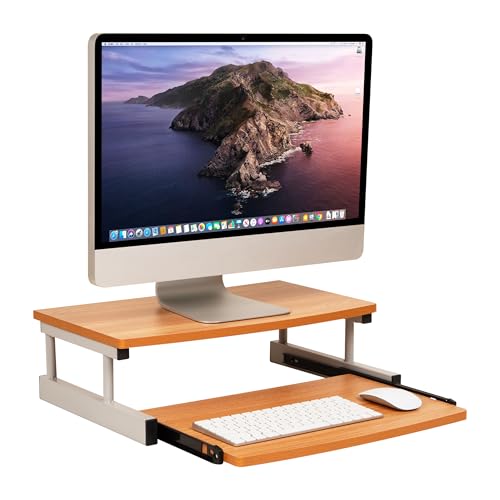
Mind Reader Monitor Stand with Slide-Out Keyboard Tray
This steel and plastic stand supports heavy monitors and includes a slide-out tray for keyboard and mouse. Its two-tier design gives you a shelf for notes and a hidden spot for your keyboard.
Pros
- Sturdy enough for large monitors
- Keyboard tray saves desk space
- Quick assembly without tools
Cons
- Keyboard tray may feel cramped for wide hands
- Plastic surface can scratch easily
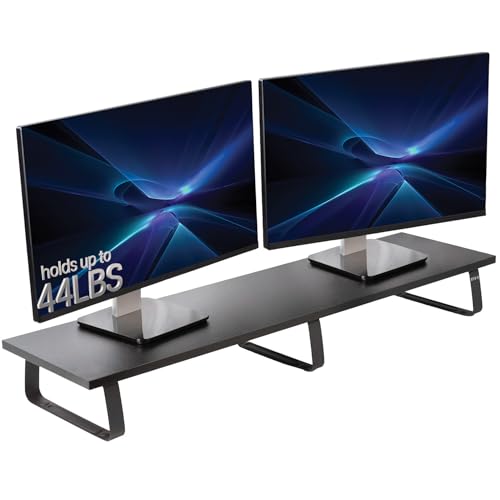
VIVO Dual Monitor Stand Desk Riser
A wide steel riser that holds two monitors side by side. The open bottom allows you to store your laptop or papers underneath, and the cable management holes keep wires tidy.
Pros
- Extra-long surface for two monitors
- High weight capacity
- Clean cable routing
Cons
- Too wide for small desks
- No height adjustment

Amazon Basics Adjustable Monitor Stand Riser
A simple, sturdy riser with adjustable height legs to suit your viewing angle. It holds one monitor and has a small shelf underneath for your keyboard or notepad.
Pros
- Adjustable height options
- Affordable price point
- Easy to clean surface
Cons
- Not for dual monitors
- Legs may wobble on uneven surfaces

BALOLO Dual Monitor Stand Riser with Drawer
This shelf includes a smooth-gliding drawer for pens, sticky notes, or small gadgets. The sturdy bamboo top adds a warm look to your desk, and the open compartment below holds a laptop or papers.
Pros
- Drawer keeps small items organized
- Eco-friendly bamboo material
- Supports two monitors
Cons
- Drawer may not fit larger items
- Bamboo can show water marks

HUANUO Monitor Stand Riser with USB Charging Hub
A sturdy steel and wood riser that includes a 4-port USB hub for charging your phone or connecting peripherals. It has a solid top for your monitor and a lower compartment for storage.
Pros
- Convenient USB hub on the front
- Stable and sturdy build
- Sleek modern design
Cons
- USB ports may not charge tablets fast
- Only holds one monitor

Mount-It! Adjustable Desk Monitor Stand
This shelf lets you adjust the height from 3.5 to 5.5 inches to bring your monitor to eye level. The strong aluminum construction supports heavy loads, and the open design offers flexible storage.
Pros
- Multiple height settings
- Lightweight but strong aluminum
- Stable even with heavy monitors
Cons
- More expensive than basic risers
- Only one shelf level

GreenForest Monitor Stand with Storage Shelves
A wide desk organizer that features two lower shelves for storing books, files, or decorative items. The sturdy particleboard construction is easy to assemble and fits most monitors.
Pros
- Two shelves offer ample storage
- Wide surface for multiple items
- Fits large monitors
Cons
- Particleboard may not be as durable as wood
- Assembly requires screwdriver
The lineup, side by side
| # | Model | Material | Best for | Score | Price |
|---|---|---|---|---|---|
| 1 | Mind Reader Monitor Stand with Slide-Out Keyboard Tray | Steel frame, plastic surface | All-in-one desk organization | 9.4 | Check price |
| 2 | VIVO Dual Monitor Stand Desk Riser | Steel, powder-coated finish | Dual monitor setups | 9.1 | Check price |
| 3 | Amazon Basics Adjustable Monitor Stand Riser | MDF wood, steel legs | Budget-friendly simplicity | 8.8 | Check price |
| 4 | BALOLO Dual Monitor Stand Riser with Drawer | Bamboo, steel drawer slides | Adding drawer storage | 8.9 | Check price |
| 5 | HUANUO Monitor Stand Riser with USB Charging Hub | Steel frame, wood top | Built-in USB ports | 9.0 | Check price |
| 6 | Mount-It! Adjustable Desk Monitor Stand | Aluminum alloy | Ergonomic height adjustment | 9.2 | Check price |
| 7 | GreenForest Monitor Stand with Storage Shelves | Particleboard | Extra storage shelves | 8.7 | Check price |
How to choose
Questions worth asking
What is a desk shelf used for?
A desk shelf raises your monitor to eye level, freeing up desk space underneath. It also helps organize your workspace by providing a designated spot for your monitor, keyboard, or other items.
How do I choose the right size desk shelf?
Measure your monitor’s width and depth, then add a few inches for comfort. Also consider your desk’s dimensions. For dual monitors, choose a shelf at least 36 inches wide. For a single monitor, 20 to 24 inches is usually enough.
Can a desk shelf hold an iMac or all-in-one computer?
Yes, but you need to check the weight capacity. Most iMacs weigh between 10 and 20 pounds, so a shelf with a capacity of 40 pounds or more will work. Ensure the shelf’s surface is wide enough to support the base.
Are desk shelves easy to assemble?
Most desk shelves require minimal assembly, often just attaching legs with screws or sliding them into place. Some models come fully assembled. Always read the product description for assembly requirements.
Do desk shelves work with standing desks?
Yes, desk shelves can be used on standing desks. The added height can help bring your monitor to eye level when the desk is raised. Ensure the shelf is stable and does not slide when you adjust the desk height.
What materials are best for a desk shelf?
Steel and aluminum are durable and can support heavy monitors. Wood and bamboo offer a warmer aesthetic but may be heavier. Particleboard is budget-friendly and comes in various finishes, though it is less durable than solid wood.
How much weight can a typical desk shelf hold?
Most desk shelves hold between 40 and 70 pounds. The exact capacity depends on the material and design. Always check the manufacturer’s specification before placing a heavy monitor or other equipment on the shelf.
Can I use a desk shelf for a laptop and monitor?
Yes, you can place both a laptop and a monitor on a wide shelf, but ensure the combined weight is within the shelf’s capacity. Alternatively, use the lower shelf to store the laptop when not in use.
Do desk shelves help with posture?
Yes, by raising your monitor to eye level, a desk shelf helps you maintain a neutral neck position. This can reduce strain on your neck and shoulders, improving your overall posture while working.
Are there any safety concerns with desk shelves?
Always ensure the shelf is on a stable, flat surface. Do not exceed the weight capacity. If the shelf has adjustable legs, tighten them properly. Keep cables organized to avoid tripping hazards.
Final word
For most people, the Mind Reader Monitor Stand is the best choice because it combines a sturdy build with a keyboard tray, making it a complete workspace solution. If you run a dual monitor setup, the VIVO Dual Monitor Stand offers the best stability and width. On a tight budget, the Amazon Basics riser is a reliable pick that does the job without extra frills.



