How to Pick a Stylus That Works With Fire Tablets
For most Fire tablet owners, the Adonit Mini 4 delivers the sharpest handwriting accuracy through its fine aluminum disc tip. The MEKO 2-in-1 Stylus Pen offers strong value with dual tips in one barrel. Budget shoppers do well with the Rejea 6-Pack, which spreads cost across six capacitive pens.
Fire tablets rely on capacitive touchscreens, so stylus choice changes how usable handwriting and sketching apps actually feel. Tip material and shape affect accuracy more than price alone on these screens.
Tip design varies widely between rubber, fiber and fine disc styles, even though the tablets themselves change little across generations. We compared listed specifications, tip materials and owner feedback across current Amazon listings to narrow the field to seven models.
The shortlist, ranked

Adonit Mini 4 Fine Point Stylus
The Mini 4 uses a 1.9mm aluminum disc tip that glides across glass with little friction. A pocket clip and compact 3.4-inch body make it easy to carry alongside a Fire HD 10. USB-C charging skips disposable batteries entirely.
Pros
- Fine disc tip supports precise note-taking
- Compact body fits a pocket or tablet case
- USB-C charging avoids replacement batteries
Cons
- Small size can feel light for larger hands
- Disc tip needs periodic cleaning to stay smooth

MEKO 2-in-1 Stylus Pen (2-Pack)
Each pen combines a soft rubber tip for touch navigation with a fine fiber tip for writing apps. Aluminum alloy construction keeps the barrel light without feeling flimsy. Two pens per pack cover a household running more than one Fire tablet.
Pros
- Dual-tip design covers browsing and writing
- Two-pack works well for shared tablets
- Lightweight aluminum body resists bending
Cons
- No rechargeable battery or active features
- Rubber tip wears faster than disc tips over time
Amoner 4-in-1 Stylus Pen
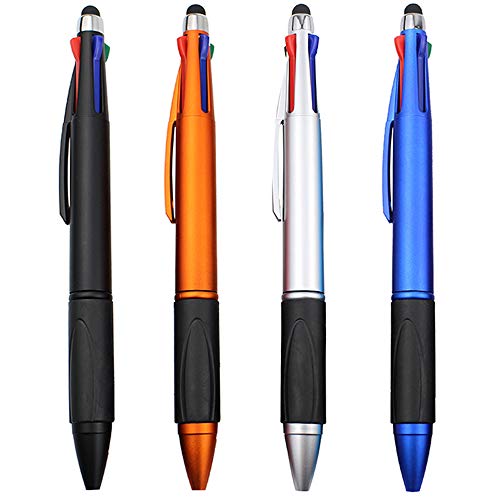
This pen pairs a ballpoint ink refill with a fiber stylus tip on opposite ends, and the set includes extra tips for different note styles. A metal clip attaches it to a notebook or tablet case. Anyone switching between paper and a Fire tablet during the day benefits most.
Pros
- Combines an ink pen and stylus in one tool
- Metal clip attaches securely to bags or cases
- Extra tips included for different note-taking styles
Cons
- Bulkier barrel than dedicated single-tip styluses
- Ink refill eventually needs replacement

StilGut Fine Tip Stylus
A 6mm fiber mesh tip gives more visual feedback than standard rubber tips during sketching. Leather wrapping on the aluminum barrel adds grip during longer sessions. At roughly 15 grams, it barely changes how a tablet case feels in hand.
Pros
- Fiber mesh tip shows the contact point clearly
- Leather-wrapped grip reduces slipping during use
- Very lightweight for extended writing sessions
Cons
- Fiber tip needs replacement more often than rubber
- Higher price per unit than multi-packs
Rejea Stylus Pen (6-Pack)
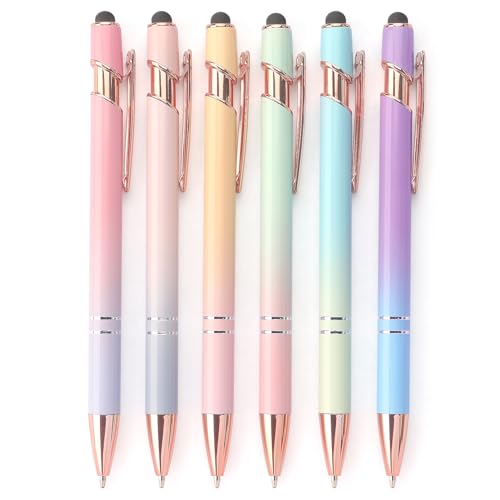
Six identical pens ship in one box, so a lost or misplaced stylus never derails a household. Soft rubber tips register reliably on Fire OS touchscreens without needing a battery. Aluminum shafts keep the per-unit cost low.
Pros
- Six pens reduce the cost of losing one
- No batteries or charging required
- Consistent tip response across capacitive screens
Cons
- Rubber tip is less precise than fine-point styles
- Included clip is plastic rather than metal

Two New Trend 2-in-1 Stylus Pen (10-Pack)
Ten pens arrive in assorted colors, each combining a rubber stylus tip with a ballpoint pen. Aluminum construction keeps every pen consistent despite the low per-unit cost. Classrooms and multi-tablet households get enough pens to hand one to everyone.
Pros
- Ten-pack supplies an entire classroom or family
- Assorted colors help identify individual pens
- Ballpoint end works on paper as well as screens
Cons
- Build quality varies slightly between individual pens
- Tips are not swappable or replaceable

MEKO 4-in-1 Stylus with LED Flashlight
Beyond the rubber stylus tip, this pen adds a ballpoint refill, an LED flashlight and a fold-out phone stand at the cap. Kids and casual users get one tool that handles homework, sketching and reading in dim light. Aluminum housing keeps the added features from feeling cheap.
Pros
- LED flashlight adds function beyond writing and touch input
- Fold-out stand props up a phone or small tablet
- Rubber tip works fine for casual sketching apps
Cons
- Extra features add bulk compared to slim styluses
- Flashlight battery is not user-replaceable
What to look for
What makes a stylus work well on a Fire tablet? Fire tablets, including the Fire HD 8 and Fire HD 10, use capacitive touchscreens rather than the pressure-sensitive digitizers found in devices like an iPad Pro or a Kindle Scribe. Any conductive tip that mimics a fingertip registers on the screen, but tip size and material change how precise that input feels. Rubber tips work fine for tapping icons and swiping through apps. Fiber and fine disc tips give sharper feedback for handwriting or sketching apps such as Squid or Infinite Painter.
Is there a difference between a passive and an active stylus? Active styluses like the Apple Pencil rely on Bluetooth pairing and pressure sensitivity that Fire OS does not support. Fire tablets instead pair with passive, capacitive styluses that work through simple electrical conductivity. Pressure sensitivity and palm rejection, common on dedicated drawing tablets, stay unavailable on stock Fire OS apps as a result. Buyers expecting behavior similar to the pen bundled with a Kindle Scribe should adjust expectations.
Which stylus fits note-taking, sketching or a shared household? Someone jotting quick notes in a browser or email app does fine with a basic rubber-tipped pen. Sketching or handwriting apps benefit more from a fine disc or fiber tip, since those designs shrink the gap between the visible tip and the actual contact point. Households with more than one Fire tablet, or classrooms issuing devices to several students, often do better with multi-packs instead of a single premium pen.
How do you keep a Fire tablet stylus working reliably? A stylus that stops registering usually has a dirty or worn tip rather than a defective tablet. Wiping the tip and screen with a microfiber cloth clears skin oils that reduce conductivity. Thick or low-quality screen protectors can also dull touch sensitivity, so a stylus that worked well before a protector was applied may need a firmer press afterward. Rubber tips wear down faster than fiber or disc tips with daily use.
Side by side
| # | Model | Tip type | Best for | Score | Price |
|---|---|---|---|---|---|
| 1 | Adonit Mini 4 Fine Point Stylus | 1.9mm aluminum disc tip | Best overall | 9.4 | Check price |
| 2 | MEKO 2-in-1 Stylus Pen (2-Pack) | Dual-ended rubber and fiber tips | Best value | 9.1 | Check price |
| 3 | Amoner 4-in-1 Stylus Pen | Ballpoint pen, fiber tip stylus, disc tip stylus | Best for note-taking | 8.8 | Check price |
| 4 | StilGut Fine Tip Stylus | 6mm fiber mesh tip | Best for sketching and drawing apps | 8.6 | Check price |
| 5 | Rejea Stylus Pen (6-Pack) | Soft rubber tip | Best budget | 8.4 | Check price |
| 6 | Two New Trend 2-in-1 Stylus Pen (10-Pack) | Rubber stylus tip with ballpoint pen | Best for classrooms and shared households | 8.2 | Check price |
| 7 | MEKO 4-in-1 Stylus with LED Flashlight | Stylus tip, ballpoint pen, LED flashlight, phone stand | Best for kids and casual use | 8.0 | Check price |
Good to know
Do stylus pens work on Fire tablets?
Yes. Fire tablets use capacitive touchscreens, so a stylus with a conductive rubber, fiber or disc tip designed for touchscreens registers, according to the product listings for these pens.
What is the best stylus for a Fire HD 10?
Based on the specifications compared here, a fine disc tip like the one on the Adonit Mini 4 offers sharper accuracy for handwriting on the larger Fire HD 10 screen than a standard rubber tip.
Can I use an Apple Pencil on a Fire tablet?
No. The Apple Pencil pairs exclusively with Apple’s digitizer hardware and Bluetooth protocol, which Fire OS does not support, so it will not function on a Fire tablet.
Are capacitive stylus pens accurate enough for handwriting?
Fine fiber and disc tips come closer to pen-like precision than thick rubber tips, though none match the pressure sensitivity of an active digitizer pen like the one bundled with a Kindle Scribe.
Do Fire tablet stylus pens need batteries?
Most passive styluses, including rubber and fiber tip models, need no battery at all. A few premium disc-tip pens include a rechargeable battery for added grip sensors, but that is the exception.
Is a stylus worth buying for a Fire tablet?
Owners report that a stylus helps most with handwriting apps, digital signatures and precise tapping in small menus, though everyday browsing works fine with a fingertip alone.
Which stylus tip works best for drawing apps on a Fire tablet?
Fiber mesh and fine disc tips give more visual feedback than rubber tips, which makes them better suited to sketching apps that reward finer line control.
Do stylus pens still work with a screen protector on a Fire tablet?
Most tempered glass protectors barely affect touch sensitivity, but thick plastic protectors can require a firmer press for the stylus tip to register consistently.
Single stylus vs multi-pack: which is the better buy?
A single premium pen like the Adonit Mini 4 suits one dedicated user who writes often. A multi-pack like the Rejea 6-Pack suits a shared household or classroom where pens go missing.
How long does a rechargeable stylus battery last on a Fire tablet?
Exact runtime depends on the model, but USB-C rechargeable styluses like the Adonit Mini 4 avoid the recurring cost of disposable batteries used in some active pens.
Our take
No single stylus fits every Fire tablet owner, since note-taking, sketching and shared-device use call for different tip designs. The Adonit Mini 4 suits handwriting-focused use, while multi-packs from MEKO and Rejea cover households or classrooms sharing several tablets. Matching tip type to the apps used most often matters more than any single spec.