Cameras That Hold Up for Long YouTube Takes
The Sony ZV-E10 is the best all round YouTube camera thanks to its flip screen, mic input and creator tools, the Fujifilm X-S20 records longest before overheating, and the Panasonic Lumix G7 is the budget workhorse. The Canon EOS R50 is the value pick.
The Sony ZV-E10 is our top overall pick for YouTube because a flip screen, a mic input and reliable face autofocus cover what a talking head channel needs. The Fujifilm X-S20 records the longest before heat becomes a problem, and the Panasonic Lumix G7 is the unlimited record budget workhorse.
YouTube is tricky because a long take needs a body that will not overheat, a screen you can see while you talk to the lens, and a mic input for clean audio, and plenty of cameras drop one of the three. We compared recording limits and heat behaviour, flip screen designs, mic connections, autofocus for a single subject and battery life.
What we recommend
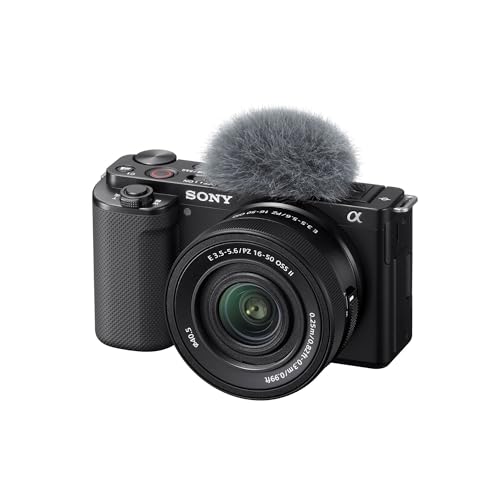
Sony ZV-E10
The ZV-E10 hits the core YouTube checklist in one affordable body, with a fully articulating screen that faces forward for talking to camera, a mic input plus a good built in directional mic, and dependable face autofocus that keeps you sharp. It is light and easy to set up on a desk or tripod. The one caution is heat, since long continuous 4K takes can trigger a warning, so it suits shorter segments best.
Pros
- Flip screen and mic input for the price
- Good built in mic plus external option
- Reliable face autofocus for talking heads
Cons
- Overheats in long continuous 4K
- Rolling shutter on quick movement

Fujifilm X-S20
The X-S20 is built to keep rolling, pairing a large battery with heat management that lets it record long takes where lesser bodies stop. A fully articulating screen faces forward for framing, and it has a mic input with headphone monitoring through the USB-C adapter. In body stabilisation smooths handheld pieces, making it a strong choice for creators who record long, uninterrupted segments.
Pros
- Long record times before heat
- Big battery for full sessions
- In body stabilisation for handheld
Cons
- Headphone monitoring needs the adapter
- Menus have a learning curve

Canon EOS R50
The R50 is the easiest way onto YouTube with clean 4K, a fully articulating screen, a mic input and Canon’s sticky subject autofocus that keeps a presenter in focus without fuss. The guided interface helps newcomers, and the colour needs little correction. It is a small body with a small battery, and long 4K takes can warm up, so plan power and breaks for extended shoots.
Pros
- Very easy to set up and shoot
- Reliable autofocus for presenters
- Flip screen and mic input included
Cons
- Small battery for long sessions
- Can overheat in extended 4K

Panasonic Lumix G7
The G7 is the budget pick that quietly outlasts pricier rivals on record time, with no internal limit and cooling that shrugs off long takes, plus a fully articulating screen and a mic input. Image quality in low light trails the newer bodies, but for a well lit desk setup filming long talking segments it is dependable and cheap. It is the camera to buy when uninterrupted record time matters more than the latest sensor.
Pros
- No recording time limit
- Handles heat on long takes
- Low cost with flip screen and mic input
Cons
- Weaker in low light
- Older autofocus than rivals
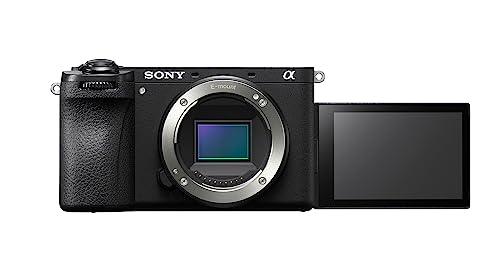
Sony a6700
The a6700 brings Sony’s latest subject tracking autofocus and oversampled 4K to an APS-C body with both a mic input and a headphone jack, so you can monitor audio while recording. The fully articulating screen faces forward, and in body stabilisation steadies handheld work. It is the pick for a creator who has outgrown an entry body and wants sharper autofocus and cleaner low light, at a higher price.
Pros
- Best autofocus in this list
- Headphone jack for monitoring
- In body stabilisation
Cons
- Higher price than entry bodies
- Can warm up in the longest 4K modes

Nikon Z30
The Z30 strips out the viewfinder to focus on content, giving you a front facing articulating screen, a deep comfortable grip and a mic input in a light body that is easy to set up alone. Clean 4K and simple controls make it a tidy talking head camera. Stabilisation is lens based rather than in body, and long 4K sessions can warm up, so pair it with a stabilised lens and watch record length.
Pros
- Comfortable grip and front screen
- Clean 4K and simple controls
- Mic input for better audio
Cons
- No in body stabilisation
- Can overheat in long 4K takes
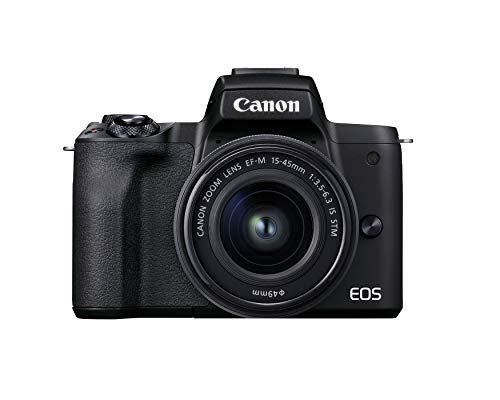
Canon EOS M50 Mark II
The M50 Mark II is a longtime beginner favourite for YouTube, with a flip out screen, a mic input, easy menus and flattering Canon colour that helps first videos look good with little effort. It is light and inexpensive with a small, capable range of lenses. Its 4K is cropped and its battery is small, and long takes can overheat, so it is best for shorter, well lit segments as a first camera.
Pros
- Very easy for beginners
- Flip screen and mic input included
- Flattering colour out of camera
Cons
- 4K is heavily cropped
- Small battery and heat on long takes
Before you buy
Overheating is the limit that catches people out The most common YouTube frustration is a camera that stops mid record with a heat warning, and it varies enormously by body. The Panasonic G7 and Fujifilm X-S20 are built to keep rolling, while entry mirrorless bodies like the ZV-E10, R50 and M50 Mark II can cut out during long continuous 4K. If your videos are long single takes, prioritise a body known to endure, or plan to break recordings into segments.
A mic input is non negotiable Audio is what viewers judge first, and a built in mic in a room with any echo will sound amateur. Every camera here has a mic input, which is the single most important audio feature, letting you add a shotgun or lavalier mic. A headphone jack, found on the a6700 and via adapter on the X-S20, is the next step up because it lets you catch audio problems before they ruin a take.
A flip screen you can actually see Filming yourself means the lens faces you, so you need a screen that faces you too. A fully articulating screen that swings out to the side and forward, which every pick here offers, is the most useful because it stays visible even with a mic mounted on top. Confirm the screen is not blocked by your microphone or cage, because a screen you cannot see defeats the purpose.
Autofocus and low light for a solo setup If you record alone, autofocus has to hold your face while you move and talk without hunting. The Sony a6700 and ZV-E10 and the Canon bodies track a single presenter reliably. Low light matters too if your room is dim, where the larger APS-C sensors beat the Micro Four Thirds G7. A bright lens and decent lighting reduce the demand on either, so budget for a key light alongside the camera.
Compared at a glance
| # | Model | Video | Best for | Score | Price |
|---|---|---|---|---|---|
| 1 | Sony ZV-E10 | 4K up to 30p | Best overall | 9.4 | Check price |
| 2 | Fujifilm X-S20 | 4K up to 60p | Best for long recording | 9.2 | Check price |
| 3 | Canon EOS R50 | 4K up to 30p | Best value | 9.0 | Check price |
| 4 | Panasonic Lumix G7 | 4K up to 30p | Best budget workhorse | 8.7 | Check price |
| 5 | Sony a6700 | 4K up to 60p oversampled | Best for advanced creators | 8.5 | Check price |
| 6 | Nikon Z30 | 4K up to 30p | Best for talking heads | 8.2 | Check price |
| 7 | Canon EOS M50 Mark II | 4K cropped, 1080p uncropped | Best for beginners | 8.0 | Check price |
Good to know
What is the most important feature for a YouTube camera?
A mic input and a flip screen, backed by a body that will not overheat on your typical take length. Clean audio and reliable framing matter more than resolution for most channels, and a camera that stops recording mid video is the worst outcome.
Which camera overheats the least?
The Panasonic Lumix G7 and Fujifilm X-S20, both built for long record times. The G7 has no internal recording limit, while entry bodies like the ZV-E10 and M50 Mark II can warn and stop during long continuous 4K.
Do all these cameras have a microphone input?
Yes, every camera here has a mic input, which is why they made the list. Only the Sony a6700 adds a full headphone jack for monitoring, with the Fujifilm X-S20 offering it through a USB-C adapter.
Is 4K necessary for YouTube?
Not required, but it gives cropping room and future proofing, and most viewers watch in high definition regardless. Note the Canon M50 Mark II crops its 4K heavily, so its 1080p mode is often the more practical choice on that body.
Which is best for a beginner starting a channel?
The Canon EOS R50 or M50 Mark II, both with guided menus, flip screens, mic inputs and flattering colour. The R50 is the newer and more capable body, while the M50 Mark II is cheaper and still very easy to use.
Can these record long talking head videos without stopping?
The Panasonic G7 and Fujifilm X-S20 handle long takes best. Others can stop on a heat warning in extended 4K, so for very long single takes either choose one of those or split the recording into shorter segments.
Do I need in body stabilisation for YouTube?
Not for tripod or desk filming, which is most talking head content. It helps for handheld or moving shots, where the Fujifilm X-S20 and Sony a6700 have it. For static setups, a tripod does the job for far less.
What is the best value option here?
The Canon EOS R50 for an easy modern body with strong autofocus, or the Panasonic Lumix G7 if unlimited record time on a budget matters most. The R50 is friendlier for beginners, while the G7 is the endurance workhorse.
The bottom line
The Sony ZV-E10 is the YouTube camera we would recommend to most creators, because a flip screen, a mic input and reliable face autofocus cover a talking head channel in one affordable body, as long as you keep takes reasonable to manage heat. Anyone recording long, uninterrupted segments should take the Fujifilm X-S20 or, on a budget, the Panasonic Lumix G7 for their record stamina. The Canon EOS R50 is the easiest value pick for a first channel.


