Top Gaming Cable Management Kits for a Clean Rig
The VELCRO Brand Cable Ties stand out as the top pick for gamers due to their reusable design and strong hold. They are ideal for anyone who frequently adjusts cables. Their main advantage is the soft, hook and loop material that won’t damage wires. However, they lack the aesthetic appeal of braided sleeves.
A messy tangle of cables can ruin the look of a powerful gaming PC and hinder airflow. Proper cable management not only improves aesthetics but also makes upgrades and cleaning easier. The right kit can streamline your setup, from the desk to the tower.
Gamers need cable solutions that are flexible, durable, and easy to adjust. Kits with a variety of ties, sleeves, and clips offer the most versatility. This roundup covers top-rated options that meet these needs, with a focus on real-world usability.
Before you buy
What we recommend

VELCRO Brand Cable Ties, 8 x 1/2 Inch, 100 Pack
A massive pack of soft, reusable ties that are gentle on cables. They are perfect for bundling wires inside a PC case or under a desk. The hook and loop material allows for infinite adjustments without damage.
Pros
- Reusable and adjustable
- Won’t crimp or damage cables
- Bulk pack offers great value
Cons
- Not as sleek as braided sleeves
- Can collect dust over time

NexiGo NX-KIT Cable Management Kit, 46 Pcs
This comprehensive kit includes braided sleeves, cable ties, and adhesive clips. It is designed to handle every cable in a gaming setup, from the monitor to the PC. The included scissors and cable routing tool simplify installation.
Pros
- Everything you need in one box
- Sleeves give a clean, professional look
- Adhesive clips stick well to most surfaces
Cons
- Sleeves are not cut to length
- Adhesive may weaken on textured surfaces

JOTO Cable Management Sleeve, 2 Pack (19.7 inch)
These expandable braided sleeves can hold multiple cables and keep them hidden. They are flexible and can be cut to the desired length. Ideal for the cables running from your PC to monitor and peripherals.
Pros
- Flexible and expandable
- Easy to cut for custom lengths
- Keeps cables dust-free
Cons
- Requires threading cables through
- Not suitable for very thick bundles
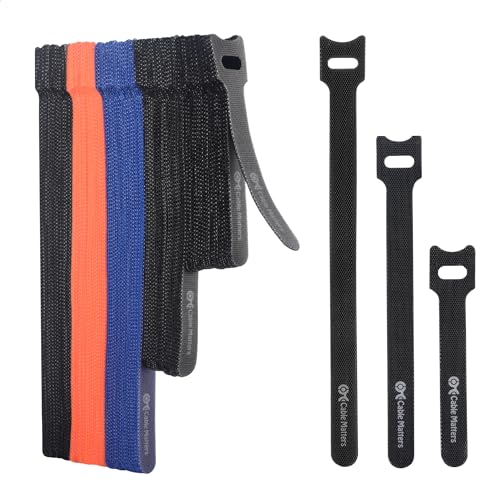
Cable Matters 40-Pack Cable Management Kit
A budget-friendly kit that includes zip ties, mounting bases, and adhesive clips. It is perfect for securing cables inside a PC case or behind a desk. The zip ties are strong and lock securely.
Pros
- Affordable and practical
- Multiple sizes of zip ties
- Mounting bases allow for secure placement
Cons
- Zip ties are not reusable
- Adhesive can lose grip over time

D-Line Cable Management Kit, 12 Pieces
This kit includes self-adhesive cable clips and a flexible wire duct. It is designed to hold cables neatly along walls, keeping them out of the way. The duct can be painted to match your decor.
Pros
- Keeps cables off the floor
- Wire duct can be painted
- Clips are easy to install
Cons
- Duct may be too rigid for tight corners
- Adhesive may not stick to rough walls

Vivo 3-Pack Cable Management Sleeve
These extra-long sleeves (16.4 feet) are perfect for bundling cables from your PC to the entire desk perimeter. They have a split design for easy insertion of cables. The durable fabric protects wires from abrasion.
Pros
- Very long, cut to any length
- Split design simplifies installation
- Sturdy fabric protects cables
Cons
- Thick sleeve may be bulky for tight spaces
- Only black color available

Uxcell 4mm Cable Wire Sleeve, 10 Pack
A pack of 10 small-diameter sleeves that are ideal for managing thinner cables. They are expandable and can be used for individual wires or small groups. The lightweight mesh keeps things flexible.
Pros
- Perfect for thin cables
- Flexible and lightweight
- Good value for the quantity
Cons
- Too small for thick power cables
- Not as durable as thicker sleeves
Compared at a glance
| # | Model | Length | Best for | Score | Price |
|---|---|---|---|---|---|
| 1 | VELCRO Brand Cable Ties, 8 x 1/2 Inch, 100 Pack | 8 inches | Reusable bundling and quick adjustments | 9.4 | Check price |
| 2 | NexiGo NX-KIT Cable Management Kit, 46 Pcs | 4 braided sleeves (various lengths) | All-in-one kit with sleeves and clips | 9.2 | Check price |
| 3 | JOTO Cable Management Sleeve, 2 Pack (19.7 inch) | 19.7 inches each | Concealing multiple cables along a desk or wall | 9.0 | Check price |
| 4 | Cable Matters 40-Pack Cable Management Kit | 20 pieces (4, 6, 8 inches) | Versatile fastening with zip ties and clips | 8.8 | Check price |
| 5 | D-Line Cable Management Kit, 12 Pieces | 10 pieces | Routing cables along walls and baseboards | 8.6 | Check price |
| 6 | Vivo 3-Pack Cable Management Sleeve | 16.4 feet each | Long cable runs for a clean under-desk look | 8.5 | Check price |
| 7 | Uxcell 4mm Cable Wire Sleeve, 10 Pack | 4mm (expands to 16mm) | Organizing thin cables like mouse and keyboard wires | 8.2 | Check price |
Common questions
How many cable ties do I need for a gaming PC build?
For a typical gaming PC build, you’ll need around 20 to 30 ties. However, it depends on the number of components. A kit with a variety of sizes is handy for different cable thicknesses.
Are velcro ties better than zip ties for cable management?
Velcro ties are better if you plan to modify your setup often because they are reusable and adjustable. Zip ties are permanent and must be cut off, which can risk scratching cables. For a permanent clean look, zip ties are fine.
Can cable sleeves interfere with airflow?
Sleeves that are too tight can compress cables and reduce airflow around them, but they don’t significantly affect overall case airflow. The main benefit is reduced clutter, which improves airflow around fans and components.
What is the best way to manage cables under a desk?
Use a combination of adhesive clips and a cable sleeve or tray. Run cables along the back edge of the desk, grouping them with a sleeve. This keeps them off the floor and easy to access.
Are expensive cable management kits worth it?
Expensive kits often include more pieces and higher quality materials like braided sleeves and strong adhesive. However, you can achieve a clean setup with a budget kit if you choose the right components. Consider your specific needs.
How do I remove adhesive cable clips without damaging my desk?
Use a hairdryer to heat the adhesive gently, then slowly peel the clip off. You can also use a plastic spudger. Any remaining adhesive can be removed with rubbing alcohol.
Can I use cable sleeves for monitor cables?
Yes, cable sleeves are excellent for monitor cables, especially if you have multiple cables running from your PC to the monitor. They keep them organized and reduce clutter on your desk.
Do cable management kits come with instructions?
Some kits include basic instructions, but many are straightforward. Most users figure out installation without guidance. If you need help, online tutorials can show you techniques.
What is the difference between a cable sleeve and a cable tray?
A cable sleeve wraps around cables to bundle them together, while a cable tray is a flat container that holds cables in place. Trays are often mounted under a desk, while sleeves are more flexible for routing.
Can I cut cable sleeves to a custom length?
Yes, most braided sleeves can be cut with scissors. The ends may fray, so use a lighter to seal the cut edge or apply heat shrink tubing for a clean finish.
Final word
For most gamers, the VELCRO Brand Cable Ties are the best choice due to their versatility and reusability. However, if you want a polished look with sleeves and clips, the NexiGo kit is a worthy investment. Ultimately, pick the kit that matches your cable types and aesthetic preferences.


