Graphing Calculators Worth Buying for School and Beyond
For most students the Texas Instruments TI-84 Plus CE leads on classroom approval and color display, the Casio fx-9750GIII wins on value, and the TI-Nspire CX II CAS suits advanced calculus users who need a computer algebra system built in.
The Texas Instruments TI-84 Plus CE is the safest all-round pick because it is accepted on most standardized tests and its rechargeable color screen reads well in any classroom. Budget shoppers do well with the Casio fx-9750GIII, while heavy math users lean toward the TI-Nspire CX II CAS.
Choosing a graphing calculator is tricky because exam boards restrict certain CAS models, and features that look great on paper may be banned in the room where you need them. We compared these picks on published specifications, exam-acceptance policies and what long-term owners report about battery life and menu speed.
What to look for
Confirm exam approval first Before anything else, check whether your test allows the model you want. CAS calculators like the TI-Nspire CX II CAS and TI-89 Titanium are barred from the ACT, while non-CAS units such as the TI-84 Plus CE and Casio fx-CG50 are broadly accepted. Buying the wrong type can leave you unable to use it on the day that matters most.
Color screen versus battery type Color backlit displays make graphs easier to read and help with 3D work, but they usually rely on rechargeable batteries you must remember to charge. Monochrome models often run for months on disposable AAAs. Decide whether readability or worry-free power matters more for your routine.
Match the calculator to your course A student finishing algebra and pre-calculus rarely needs a CAS, so a mid-range model is plenty. University calculus, differential equations and engineering benefit from symbolic algebra. Buying more calculator than your coursework requires can mean paying for menus you never open.
Consider the software ecosystem Texas Instruments has the deepest library of classroom programs and teacher support, which smooths group learning. Casio and NumWorks lean on built-in Python and cleaner menus. If your class shares files or your teacher demonstrates on a specific brand, matching that brand avoids friction.
What we recommend

Texas Instruments TI-84 Plus CE
The TI-84 Plus CE is the model most teachers assume you already own. It keeps the familiar TI-84 menu structure while adding a backlit color screen and a rechargeable battery, so it stays relevant from high school algebra through introductory college courses.
Pros
- Accepted on nearly every major exam
- Rechargeable so no constant battery swaps
- Huge library of school-ready programs
Cons
- No computer algebra system
- Slower processor than newer rivals

Casio fx-9750GIII
The Casio fx-9750GIII covers the core graphing, statistics and spreadsheet features students actually use while costing far less than the TI flagships. Owners report the icon menu is quick to learn even for first-time users.
Pros
- Strong feature set for the money
- Simple icon-based navigation
- Runs Python for coding classes
Cons
- Non-color display
- Fewer third-party programs than TI

Texas Instruments TI-Nspire CX II CAS
The TI-Nspire CX II CAS adds a full computer algebra system that solves and simplifies symbolic expressions, which suits university calculus and engineering coursework. Its document-style interface handles graphs, notes and data on shared pages.
Pros
- Symbolic algebra handles tough problems
- Sharp color screen and layout
- Rechargeable battery
Cons
- CAS banned on the ACT
- Steeper learning curve

Casio fx-CG50 PRIZM
The Casio fx-CG50 PRIZM pairs a high-resolution color screen with 3D graphing, letting students visualize surfaces and shapes that flat models cannot. It stays exam legal without a CAS, so it suits standardized testing.
Pros
- Bright high-resolution screen
- 3D graphing for visual learners
- No CAS restrictions on exams
Cons
- Uses disposable AAA batteries
- Menus differ from TI standard
Texas Instruments TI-84 Plus
The original monochrome TI-84 Plus remains a dependable choice when color is not a priority. It runs the same core functions students learn in class and often costs less than the CE edition, making it a practical hand-me-down.
Pros
- Lower cost than the CE
- Long battery life
- Familiar TI-84 layout
Cons
- Small monochrome screen
- No rechargeable option

NumWorks Graphing Calculator
The NumWorks calculator takes a clean, app-style approach with a lightweight body and native Python. Its layout feels closer to a phone than a legacy calculator, which owners say shortens the learning curve for newcomers.
Pros
- Intuitive modern menus
- Very light and slim
- Native Python for coding
Cons
- Smaller program ecosystem
- Exam mode acceptance varies by board
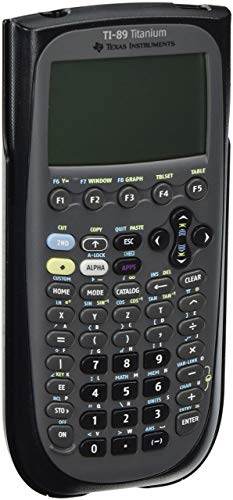
Texas Instruments TI-89 Titanium
The TI-89 Titanium is a long-running favorite for engineering and higher math thanks to its powerful CAS and unit-handling functions. It graphs 3D surfaces and solves symbolically, though it is not permitted on the ACT.
Pros
- Strong CAS and unit tools
- Handles advanced engineering math
- Proven long-term reliability
Cons
- Not allowed on the ACT
- Monochrome screen looks dated
How they stack up
| # | Model | Display | Best for | Score | Price |
|---|---|---|---|---|---|
| 1 | Texas Instruments TI-84 Plus CE | Color backlit 320×240 | Best overall | 9.4 | Check price |
| 2 | Casio fx-9750GIII | Monochrome 128×64 | Best value | 9.0 | Check price |
| 3 | Texas Instruments TI-Nspire CX II CAS | Color 320×240 | Best for advanced calculus | 9.2 | Check price |
| 4 | Casio fx-CG50 PRIZM | Color 384×216 | Best color display | 8.9 | Check price |
| 5 | Texas Instruments TI-84 Plus | Monochrome 96×64 | Best budget classic | 8.5 | Check price |
| 6 | NumWorks Graphing Calculator | Color 320×240 | Best modern interface | 8.6 | Check price |
| 7 | Texas Instruments TI-89 Titanium | Monochrome 160×100 | Best for engineering math | 8.3 | Check price |
Common questions
Which graphing calculator do most schools require?
Many math departments standardize on the Texas Instruments TI-84 family because teachers can project the same menus everyone sees. If your class has no specific rule, a TI-84 Plus CE is the safest default.
Are CAS calculators allowed on standardized tests?
It depends on the exam. The SAT and AP tests permit CAS models, but the ACT bans them. Non-CAS calculators such as the TI-84 Plus CE and Casio fx-9750GIII are accepted across all three.
Do I need a color screen?
A color screen is not required, but it makes multiple graphs and 3D surfaces easier to read. If budget is tight, a monochrome model like the TI-84 Plus still covers the core functions.
How long do graphing calculators last?
Owners commonly report a decade or more of use, since the hardware rarely changes. Buying a well-supported model means it can carry a student from high school through college.
Can these calculators run Python?
Yes, several can. The Casio fx-9750GIII, NumWorks and newer TI-84 Plus CE editions support Python, which helps in coding-focused classes.
Is a rechargeable model better than one using AAA batteries?
Rechargeable models save on battery costs and are convenient if you charge nightly. Disposable-battery models are handy when you cannot guarantee access to a charger, since spares are cheap and quick to swap.
What is the difference between the TI-84 Plus and TI-84 Plus CE?
The CE adds a color backlit screen, a rechargeable battery and a slimmer body. The original TI-84 Plus is monochrome and runs on disposable batteries, usually at a lower cost.
Can I use a graphing calculator on a phone instead?
Phone apps can graph, but most exams prohibit phones entirely. A dedicated calculator is the only option accepted in testing rooms, which is why students still buy standalone units.
The bottom line
For the widest classroom acceptance and an easy color screen, the Texas Instruments TI-84 Plus CE is the model most students should buy. Choose the Casio fx-9750GIII to save money without losing exam eligibility, and step up to the TI-Nspire CX II CAS only if your coursework truly needs symbolic algebra.