5 Indoor Security Cameras With Reliable Night Vision
Ring Indoor Cam (2nd Gen) leads for its manual privacy shutter and mature app. Wyze Cam v4 packs 2K video and local microSD recording into a lower price. TP-Link Tapo C210 suits anyone who wants pan and tilt coverage with no monthly subscription.
Ring Indoor Cam (2nd Gen) is the easiest camera to live with day to day, thanks to a shutter you can close by hand and an app shared across other Ring devices. Wyze Cam v4 packs 2K video and colour night vision into a far lower price. TP-Link Tapo C210 fits households that want everything saved to a card instead of a server.
Sticker specs rarely reveal what matters indoors: whether alerts fire on ceiling fans, whether useful features hide behind a monthly plan, and whether you can physically block the lens when you are home. We compared seven current models on sensor resolution, night vision, storage options and privacy hardware, then weighed what owners report about app stability over months of use.
The top picks, ranked

Ring Indoor Cam (2nd Gen)
A manual privacy cover blocks the lens and mutes the mic, solving the top objection to a bedroom or living room camera. Setup runs through the same Ring app used for doorbells and alarms, so Ring households get one timeline for every device. Owners report dependable motion alerts, though saved video history usually needs a paid plan.
Pros
- Manual cover physically blocks lens and mic
- Shares one app with other Ring devices
- Two way talk stays clear on both ends
Cons
- Video history requires a paid plan
- No microSD slot for local recording

Wyze Cam v4
2K capture and colour night vision arrive here at a fraction of premium camera prices. A microSD slot records continuously with no subscription, and cloud storage only becomes necessary for smart detection categories like package alerts. Owners report a real jump in image quality over earlier Wyze models, though the app can feel cluttered.
Pros
- 2K sensor with colour night vision
- Local microSD recording needs no subscription
- Built in spotlight and siren included
Cons
- Person and pet detection sit behind a plan
- App interface is busier than rivals

TP-Link Tapo C210
Sweeping 360 degrees horizontally, this pan and tilt model covers a whole open plan room from one mounting spot. Recording defaults to a microSD card, and TP-Link does not lock basic motion detection behind a subscription. Owners report the motorised head stays quiet enough for a bedroom hallway, and patrol mode earns its keep in larger spaces.
Pros
- Full room coverage from a single position
- No subscription needed to record
- Physical privacy mode tilts the lens away
Cons
- Motor noise is audible in a quiet room
- Notifications can lag on a weak WiFi signal

Blink Mini 2
Small enough to tuck onto a bookshelf unnoticed, this is the most compact camera in the lineup. A built in spotlight adds colour night footage and person detection, and an optional weatherproof adapter lets it move outdoors later. Owners call it a sensible entry point, though wired only power means finding a socket wherever it goes.
Pros
- Very small and easy to place discreetly
- Spotlight adds colour footage at night
- Optional adapter allows outdoor use
Cons
- Wired power only, no battery option
- Clip length shortens without a paid plan

Google Nest Cam (Indoor, Wired, 2nd Gen)
On device processing handles person, animal and vehicle detection here, so alerts keep working even if the internet drops. Cost runs higher than most rivals, and free event history is capped at three hours without Nest Aware. Owners report the fewest false triggers from pets or shadows of any camera in this group.
Pros
- Most accurate motion classification here
- Smart alerts work without a subscription
- Tight integration with Google Home
Cons
- Only three hours of free event history
- No local card storage option
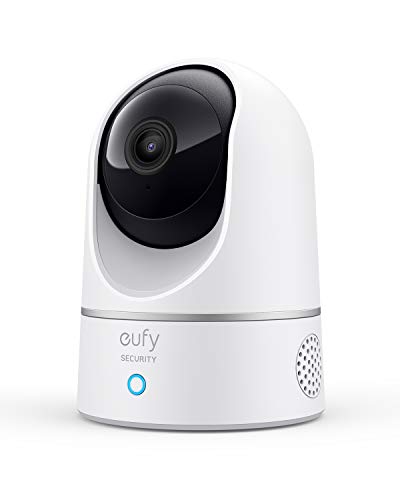
eufy Security Indoor Cam C120
Human and pet detection run locally here, and clips save straight to a microSD card with no monthly charge. A geofenced privacy mode switches the lens off automatically once your phone is home. Owners report sharp 2K daytime footage, with occasional reconnects needed after router changes.
Pros
- Local AI detection with no ongoing fees
- Geofenced privacy mode disables camera at home
- Sharp 2K daytime image quality
Cons
- MicroSD card not included in the box
- Occasional reconnection needed after network changes

Arlo Essential Indoor Camera (2nd Generation)
A motorised shutter closes automatically whenever the system switches to home mode, removing privacy from the list of things to remember. Dual band WiFi support helps in crowded apartment buildings where the 2.4GHz band gets saturated. Owners single out the automatic shutter as the standout feature, while nearly every recording feature depends on an Arlo Secure plan.
Pros
- Automatic shutter tied to home and away modes
- Dual band WiFi handles busy networks
- Colour night vision with built in light
Cons
- Most features require an Arlo Secure plan
- No local storage on the camera itself
Before you buy
How should I decide between cloud and local storage? Storage location is the biggest long term difference between these cameras. Cloud only models like Ring and Arlo give a tidy app timeline but stop keeping history once a plan lapses. Cameras with a microSD slot, including the Tapo C210, Wyze Cam v4 and eufy C120, keep recording regardless, though scrubbing back through a browser from anywhere gets harder. Decide which failure mode bothers you more, then shortlist from there.
Why does a physical privacy shutter matter more than a software toggle? A software switch that claims the camera is off still relies on trusting the firmware. A physical cover does not need that trust. Ring’s shutter closes manually, Arlo’s closes automatically in home mode, and the Tapo C210 rotates its lens into the housing. Bedrooms, nurseries and main living spaces call for a physical shutter as a requirement, not a bonus.
Which cameras handle low light without cheap looking footage? Nearly every camera claims night vision, but plain infrared differs sharply from colour night vision backed by a spotlight. Infrared produces a grey image that flags movement without identifying a face. Colour footage from the Wyze Cam v4, Blink Mini 2 and eufy C120 makes clothing and faces far easier to recognise. Check the quoted infrared range against the actual depth of the room being covered.
How do I match field of view to the shape of a room? A 130 degree lens in a corner covers a normal bedroom without trouble. A long open plan living and dining space needs a different approach, and that is where a pan and tilt model like the Tapo C210 earns its place, sweeping 360 degrees instead of relying on two fixed cameras. Hallways and entry points often benefit from a narrower, higher mounted lens that keeps faces sharp instead of stretching them toward the edges.
Compared at a glance
| # | Model | Resolution | Best for | Score | Price |
|---|---|---|---|---|---|
| 1 | Ring Indoor Cam (2nd Gen) | 1080p HDR | Best overall | 9.4 | Check price |
| 2 | Wyze Cam v4 | 2K QHD | Best value | 9.2 | Check price |
| 3 | TP-Link Tapo C210 | 2K 3MP | Best for local storage | 9.0 | Check price |
| 4 | Blink Mini 2 | 1080p | Best budget | 8.8 | Check price |
| 5 | Google Nest Cam (Indoor, Wired, 2nd Gen) | 1080p HDR | Best smart alerts | 8.6 | Check price |
| 6 | eufy Security Indoor Cam C120 | 2K | Best for no monthly fees | 8.3 | Check price |
| 7 | Arlo Essential Indoor Camera (2nd Generation) | 2K | Best privacy hardware | 8.0 | Check price |
Common questions
Do indoor security cameras need a monthly subscription?
Not always. Wyze Cam v4, TP-Link Tapo C210 and eufy C120 all record to a microSD card with no plan required. Ring, Arlo and Nest cameras work without one too, but they limit or remove saved history, leaving live view and alerts rather than a searchable timeline.
What resolution is enough for an indoor camera?
1080p shows clearly what happened in a normal sized room. 2K helps when you want to zoom into a face or read something across an open space. Higher resolution also eats more card space and upload bandwidth, so it is a trade off rather than a straight upgrade.
Can an indoor camera see through a window at night?
Poorly. Infrared light reflects off glass and washes the image into a bright haze. Watching outside calls for an outdoor rated camera, or turning infrared off and relying on external lighting instead.
Will an indoor camera keep recording if the internet goes down?
Models with a microSD card continue recording locally during an outage, though remote viewing stops until service returns. Cloud only cameras stop saving footage entirely. Nest Cam sits in between, since it buffers events on the device itself.
How do I stop pets from triggering constant alerts?
Look for pet or person classification rather than raw motion detection. Nest Cam handles this on the device, and eufy C120 runs local human and pet AI. On simpler cameras, drawing activity zones that exclude floor level does most of the work.
Are indoor cameras legal to use in a shared home or rental?
Rules vary by state and country, but recording private areas like bathrooms or bedrooms used by others is generally off limits. Audio recording tends to face tighter regulation than video. Check local rules, and tell housemates or guests a camera is present.
Do any of these cameras need a separate hub?
None of the seven require one for basic operation, since each connects directly over WiFi. Ring and Arlo can optionally join a wider alarm system, which is where a base station starts to matter.
How much microSD storage should I buy for continuous recording?
A 128GB card typically holds several days of continuous 2K footage before it starts overwriting, and 256GB roughly doubles that. Motion only recording stretches the same card to weeks. Choose a card rated for continuous write endurance rather than a standard photo card.
Which indoor camera works best without any monthly fees?
eufy C120 and Wyze Cam v4 both run local detection and record to a microSD card at no ongoing cost. Tapo C210 matches that setup with pan and tilt coverage. Ring, Arlo and Nest all limit history without a subscription.
Our take
Ring Indoor Cam (2nd Gen) remains the easiest overall choice, pairing a manual shutter with a mature app for anyone comfortable paying for saved video. Owners who want to keep footage without recurring costs should look at Wyze Cam v4 or TP-Link Tapo C210, both of which record locally to a card. Households chasing the fewest false alerts get the most from the wired Google Nest Cam.


