Learning Tablets Built for Kids, Not Just Locked Down
Amazon’s Fire HD 10 Kids tablet ranks first for its detailed parent dashboard and larger screen. The Fire 7 Kids is the budget entry point for younger children, while LeapFrog’s LeapPad Academy suits families wanting a closed, curriculum led experience.
For most families, Amazon’s Fire HD 10 Kids tablet is the sensible pick. The Fire 7 Kids covers younger children on a smaller outlay, and the LeapPad Academy suits parents who want a fully walled garden.
Hardware is usually the least important part of this decision. What decides whether a tablet gets used or ends up in a drawer is the parental dashboard, the content library and how well the case survives a drop. We compared these seven on control granularity, included learning material, screen size and protection, battery life and whether the tablet can grow with a child, using published specifications and what parents consistently report.
Before you buy
What makes a kids tablet’s parent dashboard good? Precision of control decides whether a kids tablet actually works in your house. Look for separate time limits by content type, so reading is not cut off alongside games, plus educational goal setting that requires learning before entertainment unlocks. Per child profiles and a bedtime cutoff matter too. A fast processor helps nothing if the device cannot be stopped at eleven at night.
What does the bundled subscription cost once it ends? Most kids tablets ship with a trial subscription to a content service, and that service is where the books, shows and games actually live. A tablet can feel suddenly empty once it lapses. Check the renewal cost before buying, note the date the trial ends, and decide in advance whether to continue it or move the child onto apps chosen separately.
How much does a rugged case and replacement cover matter? Children drop tablets, and a bundled bumper plus a no questions replacement promise removes most of the anxiety around handing over an expensive device. Budget for a genuinely rugged case with raised screen edges if buying a standard tablet instead, rather than a thin folio. Screen protectors are cheap insurance either way.
Which screen size suits your child’s age? Under about five, a seven inch tablet is easier to hold and less likely to end up dropped. Reading, drawing and following instructional video get far more comfortable on a larger screen from around six upward, and children stick with it longer. Weight matters too, since a heavy tablet in a chunky case gets propped up rather than held.
The top picks, ranked

Amazon Fire HD 10 Kids Tablet
A 10.1 inch screen sets this apart from the smaller Fire tablets, making reading and following along with drawing or video far easier. It ships with a chunky protective case, a worry free replacement promise and a trial of Amazon Kids Plus stocked with books, games and shows. Among this group, the parent dashboard offers the most detail.
Pros
- Screen size suits reading and video properly
- Very granular screen time and content controls
- Case and replacement cover included
Cons
- Kids Plus becomes a recurring cost after the trial
- App selection is limited to the Amazon Appstore

Amazon Fire 7 Kids Tablet
Same parental control system, lower outlay: the Fire 7 is the entry point, and its smaller body suits three to five year olds who struggle with a ten inch slab. Performance runs modest, so apps load slower than on the larger models. Spending less makes sense for a first tablet, given how often first tablets get broken.
Pros
- Easiest size for small hands to hold
- Full parental dashboard at the lowest cost
- Case and replacement cover included
Cons
- Slower than the HD models on demanding apps
- Small screen is cramped for reading
Amazon Fire HD 8 Kids Pro Tablet
Roughly six to twelve year olds are the target here, with a slimmer case that looks less babyish and a web browser limited to parent curated sites. Time limits and content filters carry over from the standard Fire Kids line, while older children get a bit more room to explore. An 8 inch screen strikes a reasonable balance for kids who carry it around.
Pros
- Styling older children will actually carry
- Parent approved browser and app request system
- Good balance of screen size and portability
Cons
- Slimmer case protects less than the younger version
- Still tied to the Amazon Appstore

LeapFrog LeapPad Academy Kids Tablet
Curriculum comes first and entertainment second on this tablet, which is exactly what some parents want. Levelled activities across maths, reading and problem solving sit inside the LeapFrog Academy programme, all within a closed system with no open app store. Limitation is the whole point, even though it trades away flexibility a Fire tablet offers.
Pros
- Content is built around a learning progression
- No general internet or open app store to police
- Rugged bumper designed for younger children
Cons
- Hardware feels slow next to mainstream tablets
- Children outgrow the content faster than the tablet

Contixo V10 Kids Tablet
Stylus, headphones and a case all ship in the box alongside preloaded educational apps and ebooks, making this a gift that needs nothing else. Android with Google Play access sits underneath a kid mode layer. Parents report the control layer works but trails Amazon’s dashboard in polish.
Pros
- Accessories included so nothing else is needed
- Full Google Play access for app choice
- Preloaded learning apps and ebooks
Cons
- Parental controls are less polished than Amazon’s
- Performance lags behind similarly sized tablets
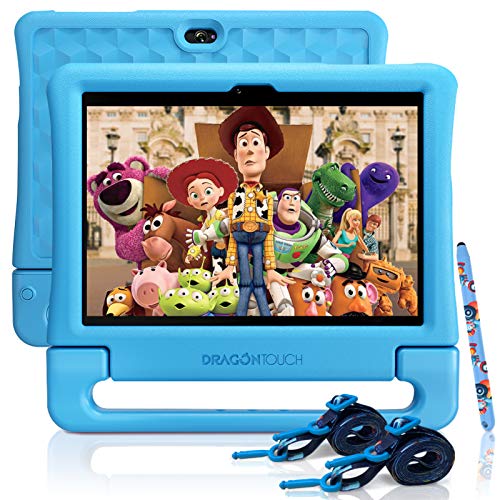
Dragon Touch KidzPad Y88X 10 Kids Tablet
A ten inch screen pairs with the Kidoz environment here, filtering apps and video into a child safe space with parent set limits. Pricing undercuts most ten inch kids tablets, and a silicone case with a stand comes included. Battery life and speed stay ordinary, suiting light use rather than demanding games.
Pros
- Large screen at a low outlay
- Kidoz environment filters apps and video
- Case with stand included
Cons
- Modest processor shows on heavier apps
- Screen brightness is limited outdoors

Samsung Galaxy Tab A9
Some families do better with a proper tablet running Samsung Kids mode, since the child gets a device that stays useful into secondary school instead of one outgrown within two years. A separate profile handles time limits and approved apps, exited with a parent PIN. A rugged case needs buying separately.
Pros
- Stays useful long after a kids tablet would not
- Better screen and performance than kids specific models
- Kids mode plus Family Link gives layered control
Cons
- No case or replacement cover in the box
- No bundled learning content
Side by side
| # | Model | Screen | Best for | Score | Price |
|---|---|---|---|---|---|
| 1 | Amazon Fire HD 10 Kids Tablet | 10.1 inch 1080p | Best overall | 9.4 | Check price |
| 2 | Amazon Fire 7 Kids Tablet | 7 inch | Best budget | 9.2 | Check price |
| 3 | Amazon Fire HD 8 Kids Pro Tablet | 8 inch HD | Best for older kids | 9.0 | Check price |
| 4 | LeapFrog LeapPad Academy Kids Tablet | 7 inch | Best for structured learning | 8.8 | Check price |
| 5 | Contixo V10 Kids Tablet | 10 inch | Best bundled extras | 8.6 | Check price |
| 6 | Dragon Touch KidzPad Y88X 10 Kids Tablet | 10 inch | Best value ten inch | 8.3 | Check price |
| 7 | Samsung Galaxy Tab A9 | 8.7 inch | Best to grow into | 8.0 | Check price |
Questions worth asking
What age is a learning tablet suitable for?
Most kids tablets target roughly three to twelve, with smaller models suiting three to six and larger ones from about six upward. Health bodies generally advise limited screen time for the youngest children, so check current guidance for your child’s age and treat the tablet as one activity among many.
Do kids tablets need a subscription to work?
The tablet functions without one, but the bundled content library usually does not. Amazon Kids Plus and LeapFrog Academy are subscription services included for an introductory period. Declining to renew is possible, with your own chosen apps loaded instead, though the experience becomes noticeably emptier.
Can screen time actually be limited on these tablets?
Yes, and this is the main reason to buy a kids model over a standard tablet. Controls typically include daily limits, separate allowances for reading versus games and video, bedtime cutoffs and a requirement to finish educational activity before entertainment unlocks.
Are kids tablets safe for browsing the internet?
Kids specific models either block browsing entirely or restrict it to a parent curated list of sites. Fire Kids Pro tablets add a parent approved browser, while LeapPad allows no open browsing at all. No filter is perfect, so supervision still matters.
Should you buy a kids tablet or a regular tablet?
A kids tablet bundles the case, the content and the controls into one purchase and works well under about eight. A standard tablet with a child profile and a rugged case lasts far longer and suits older children, at the cost of buying protection separately and skipping bundled learning content.
How long do kids tablet batteries actually last?
Manufacturers commonly state ten to thirteen hours, measured on light tasks like reading at moderate brightness. Video and games drain far faster, so plan on a real world figure closer to four to six hours of active use, less on older or cheaper models.
Do kids tablets come with damage protection built in?
Amazon’s Kids editions include a replacement promise for a set period, the strongest cover in this group. Other brands offer a standard manufacturer warranty covering faults rather than accidental damage, so a good case matters more with those.
Can multiple children share one kids tablet?
Yes. Most of these support multiple child profiles with their own time limits, content and progress, letting siblings at different ages share hardware without sharing settings. Check the maximum number of profiles if more than two children will use it.
The bottom line
Amazon’s Fire HD 10 Kids tablet is the one to buy for most households, since the parent dashboard is genuinely useful and the bigger screen means children read on it rather than only watching video. Choose the Fire 7 Kids for a lower cost first tablet, and consider the Samsung Galaxy Tab A9 for one device that lasts well past primary school.