Laminating Machines Ranked by Speed and Jam Control
The Scotch Thermal Laminator TL901X is our top overall pick for its fast warm up and reliable jam release. The Amazon Basics 9-Inch Thermal Laminator is the value choice for occasional home use, and the Fellowes Saturn 3i 125 is the best option for high volume classroom work.
The Scotch Thermal Laminator TL901X takes the top spot, with the Amazon Basics 9-Inch model and the Fellowes Saturn 3i 125 following for home and high volume use. All seven laminators below are currently sold on Amazon and cover craft projects, classroom materials and wide format signage.
Laminators are frustrating to compare because the listings emphasise warm up time while the real differences are roller count, supported pouch thickness and whether the machine has a working jam release. We compared published specifications, entry widths and pouch ratings, along with what owners report about bubbling, curling and long term reliability.
What matters most
Entry width decides what you can laminate Nine inches covers letter and A4 documents with room for the pouch seal, which is all most home and office users need. Twelve and a half or thirteen inches is required for tabloid sheets, large craft projects and classroom posters. Buying narrow is the most common regret in this category, because there is no workaround for a sheet that will not fit.
Pouch thickness is the specification people ignore Pouches are sold in mil ratings, typically three, five, seven and ten. Three mil is flexible and fine for documents. Five mil feels substantially sturdier and suits menus and reference cards. Seven and ten mil are rigid, suit signage and luggage tags, and require a machine rated for them. Feeding a thick pouch into a machine rated for three mil is the fastest way to a jam.
Rollers and warm up time affect the finish Two heated rollers are enough for thin document pouches. Four or more rollers apply pressure over a longer path, which is what keeps thick pouches flat instead of curling as they cool. Fast warm up matters mainly for batch work, where waiting several minutes each session adds up across a school term.
Feed technique prevents most problems Always feed the sealed edge of the pouch in first, keep the item centred with an even margin, and let the machine pull the pouch rather than pushing it. Use a carrier sheet if the manufacturer supplies one. Lay finished pouches flat to cool, since pulling them off a hot output tray while still soft is what causes wavy edges and lifting corners.
What we recommend

Scotch Thermal Laminator TL901X
The TL901X warms up in a few minutes, takes pouches up to nine inches wide and includes a release lever that lets you pull a misfeed back out instead of dismantling the machine. It handles the common three and five mil pouches without the wavy edges cheaper units produce. Owners report it stays consistent across long sessions of classroom work.
Pros
- Reliable jam release lever
- Consistent results across long runs
- Simple two setting operation
Cons
- Nine inch width limits larger craft sheets
- No cold laminating setting on this model
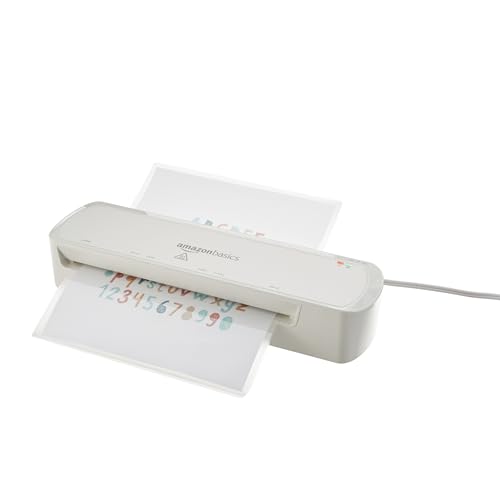
Amazon Basics 9-Inch Thermal Laminator
This is the straightforward option for laminating a few documents, recipe cards or photos a month. It takes standard letter sized pouches, has a jam release and warms up quickly enough for casual use. Sustained high volume work is where it shows its limits, since it needs pauses to keep temperature stable.
Pros
- Very approachable for occasional users
- Compact enough to store in a cupboard
- Includes a jam release despite the price level
Cons
- Struggles with continuous high volume runs
- Limited to thinner pouches

Fellowes Saturn 3i 125 Laminator
The Saturn 3i takes pouches up to twelve and a half inches wide and heats in about a minute, which is what makes a large batch of classroom material practical. It handles thicker pouches than the entry level machines and includes an indicator that confirms when it is ready. It is larger and heavier as a result.
Pros
- Very fast warm up for batch work
- Wide entry handles larger sheets
- Supports thicker pouches
Cons
- Takes significant desk space
- Heavier to move and store

Swingline GBC Fusion 1000L Laminator
The Fusion 1000L is aimed at shared office use, with a simple control layout and a jam release designed for people who did not read the manual. It takes letter sized pouches and produces clean, flat results on documents. It is not the machine for thick craft pouches or wide format work.
Pros
- Simple enough for shared office use
- Flat, bubble free document results
- Accessible jam release
Cons
- Limited to letter width
- No cold setting for heat sensitive items

Fellowes Jupiter 2 125 Laminator
The Jupiter 2 125 is built for continuous use and supports pouches up to ten mil, which covers rigid signage, luggage tags and heavy display cards. Its multiple roller design keeps thick pouches flat where two roller machines curl them. This is more machine than a home user needs.
Pros
- Handles the thickest common pouches
- Multiple rollers reduce curl on rigid work
- Built for continuous duty
Cons
- Large footprint and heavy
- Overspecified for occasional home projects

Apache AL13P 13-Inch Laminator
The AL13P takes sheets up to thirteen inches wide, which covers tabloid documents and larger craft sheets that a nine inch machine cannot accept. It offers adjustable temperature and supports a broad range of pouch thicknesses. Build quality is functional rather than premium, so treat it as a workshop tool.
Pros
- Accepts tabloid and oversized craft sheets
- Adjustable temperature for varied pouch types
- Four rollers give a flat finish
Cons
- Plain build quality and controls
- Needs a temperature test run for unfamiliar pouches

Crenova A4 Thermal Laminator
The Crenova is a small laminator for A4 and letter sized documents, aimed at occasional home projects and photographs. It warms up quickly and includes hot and cold settings, which helps with heat sensitive prints. The narrow entry and thin pouch limit define its scope.
Pros
- Cold setting suits heat sensitive prints
- Light enough to store anywhere
- Quick warm up for casual jobs
Cons
- Not suited to continuous batches
- Thin pouches only
Side by side
| # | Model | Entry width | Best for | Score | Price |
|---|---|---|---|---|---|
| 1 | Scotch Thermal Laminator TL901X | 9 inches | Best overall | 9.4 | Check price |
| 2 | Amazon Basics 9-Inch Thermal Laminator | 9 inches | Best value | 9.2 | Check price |
| 3 | Fellowes Saturn 3i 125 Laminator | 12.5 inches | Best for high volume | 9.0 | Check price |
| 4 | Swingline GBC Fusion 1000L Laminator | 9 inches | Best for office use | 8.8 | Check price |
| 5 | Fellowes Jupiter 2 125 Laminator | 12.5 inches | Best for thick pouches | 8.6 | Check price |
| 6 | Apache AL13P 13-Inch Laminator | 13 inches | Best for wide format | 8.3 | Check price |
| 7 | Crenova A4 Thermal Laminator | About 9 inches | Best budget | 8.0 | Check price |
Good to know
What size laminator do I need?
A nine inch machine handles letter and A4 documents, which covers most home and office work. Choose twelve and a half or thirteen inches if you laminate tabloid sheets, posters or large craft pieces. It is worth buying wider than you currently need, since the extra capacity costs less than a second machine.
What does mil mean on laminating pouches?
It describes the thickness of each side of the pouch. Three mil is flexible and suits documents, five mil is noticeably stiffer for menus and cards, and seven to ten mil is rigid enough for signage. Check that your machine supports the thickness before buying pouches in bulk.
Why are there bubbles in my laminated sheets?
The usual causes are feeding the machine before it reaches temperature, using a pouch thicker than the machine supports, or moving the sheet while it cools. Wait for the ready indicator, match the pouch to the rating, and lay the finished piece flat under a book while it cools.
Can I laminate photographs?
Yes, though heat can affect some inkjet prints and older photographs. Use a machine with a cold setting, such as the Crenova, or use cold laminating pouches. Test with a print you do not mind losing before committing anything irreplaceable.
How do I clear a jam?
Use the release lever if the machine has one, which pulls the rollers apart so the pouch can be withdrawn. Never try to force a jammed pouch through, and switch the machine off before reaching near the rollers. Machines without a release are far harder to recover, which is why the feature is worth prioritising.
Do laminators need cleaning?
Adhesive builds up on rollers over time and eventually causes streaks and sticking. Run a cleaning sheet through periodically, or a folded sheet of plain paper if the manufacturer recommends it. Never use liquid cleaners on heated rollers.
Can I laminate something twice for extra thickness?
It is not recommended. The outer pouch cannot bond properly to the smooth plastic of the first layer, so it tends to separate at the edges. Use a thicker pouch rating instead, which is what a machine supporting seven or ten mil is for.
Is a hot or cold laminator better?
Hot laminating gives a stronger, more durable seal and is what most machines here do. Cold laminating uses pressure sensitive adhesive and is the right choice for heat sensitive items such as thermal paper receipts, some inkjet prints and older photographs. Machines offering both settings give you the flexibility to choose per job.
The verdict
The Scotch Thermal Laminator TL901X is the machine most people should buy, because it is quick, consistent and easy to recover when something misfeeds. Step up to the Fellowes Saturn 3i 125 if you laminate in batches or need wider sheets, and to the Jupiter 2 125 if you work with rigid ten mil pouches. The Amazon Basics model is enough if laminating is an occasional job rather than a routine one.