Top Laser Printers for Home Use in 2025: Speed, Quality, and Value
The Brother HL-L2460DW is the top pick for most home users, offering a perfect balance of speed, print quality, and affordability. It prints up to 36 pages per minute and supports automatic duplex printing, making it ideal for busy households. However, it lacks a scanner and color capability, so if you need those features, consider an all-in-one model.
If you’re tired of smudged documents and expensive ink cartridges, a laser printer is a smart upgrade for your home office. Laser printers use toner powder that doesn’t dry out, so you can print sporadically without waste. They excel at crisp text and fast output, making them ideal for school projects, remote work, and everyday paperwork.
We compared the most popular home laser printers on the market, evaluating each for print quality, speed, ease of use, and long-term value. Whether you need a basic monochrome model or a color multifunction device, our list covers the best options available today.
The best picks, ranked

Brother HL-L2460DW Wireless Monochrome Laser Printer
This Brother printer is a workhorse for home offices, delivering fast prints and reliable performance. Owners report it’s easy to set up and the toner lasts a long time, making it a cost-effective choice. It prints on both sides automatically, saving paper and money.
Pros
- Fast printing speed
- Automatic duplex printing
- Compact design
Cons
- No scanner or color
- Limited paper tray capacity

HP Neverstop Laser 1000 Series Wireless Printer
The HP Neverstop is unique because you refill toner with a cartridge-free system, cutting costs significantly. It’s a simple monochrome printer that works well for basic home printing needs. Users like its small footprint and low cost per page, but note that the refill process can be a bit messy.
Pros
- Very low cost per page
- Compact and lightweight
- Easy wireless setup
Cons
- Manual duplex printing
- No automatic document feeder

Canon imageCLASS MF275dw All-in-One Laser Printer
This Canon combines printing, scanning, copying, and faxing in one device, perfect for home offices that need multiple functions. It offers fast print speeds and a 50-sheet automatic document feeder for easy multi-page scanning. Owners appreciate its reliable performance and clear text output.
Pros
- Versatile all-in-one functionality
- Large touchscreen display
- Automatic document feeder
Cons
- Higher upfront cost
- No color printing

Brother HL-L8360CDW Wireless Color Laser Printer
For those who occasionally need color prints, this Brother color laser printer produces vivid results at a fast speed. It has a massive paper capacity and supports mobile printing, making it a robust choice for busy households. Owners mention that toner replacement can be pricey, but the high yield cartridges reduce frequency.
Pros
- High-quality color output
- Fast color printing
- Expandable paper capacity
Cons
- Larger footprint
- High cost per color page
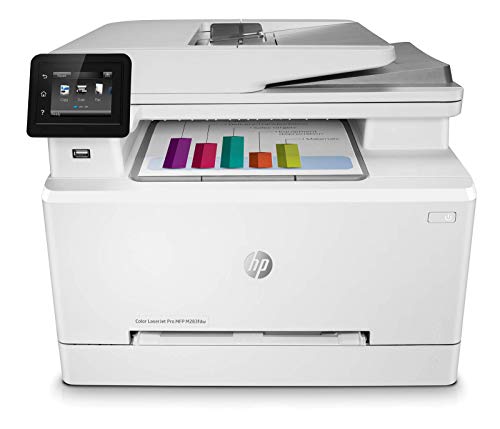
HP Color LaserJet Pro M283fdw All-in-One Wireless Printer
This HP all-in-one brings color printing, scanning, copying, and faxing in a compact design. It’s a good fit for home offices with limited space. Users report good print quality and easy mobile printing, though the touchscreen is small and the toner cartridges are costly.
Pros
- Compact all-in-one design
- Color printing and scanning
- Mobile printing support
Cons
- Average print speed
- Expensive toner cartridges

Brother MFC-L2750DW XL Wireless All-in-One Monochrome Laser Printer
This Brother model includes a high-yield toner cartridge in the box, giving you up to 3,000 pages right out of the gate. It offers printing, scanning, copying, and faxing, plus a 70-sheet auto document feeder. Owners love the low cost per page and dependable performance, making it ideal for busy home offices.
Pros
- High-yield toner included
- Fast printing speed
- Robust automatic document feeder
Cons
- Bulky design
- No color capability

Canon imageCLASS LBP6230dw Wireless Laser Printer
The Canon LBP6230dw is a straightforward monochrome laser printer that gets the job done without extra features. It’s compact, quiet, and offers automatic duplex printing. Users find it reliable for basic home printing, though it lacks scanning and copying abilities.
Pros
- Compact and lightweight
- Auto duplex printing
- Quiet operation
Cons
- No scanner or copier
- Low paper capacity (250 sheets)
Compared at a glance
| # | Model | Print Speed | Best for | Score | Price |
|---|---|---|---|---|---|
| 1 | Brother HL-L2460DW Wireless Monochrome Laser Printer | Up to 36 ppm | Overall Best for Home Offices | 9.4 | Check price |
| 2 | HP Neverstop Laser 1000 Series Wireless Printer | Up to 20 ppm | Budget-Friendly with Low Running Costs | 8.9 | Check price |
| 3 | Canon imageCLASS MF275dw All-in-One Laser Printer | Print, Copy, Scan, Fax | All-in-One for Home and Small Office | 9.1 | Check price |
| 4 | Brother HL-L8360CDW Wireless Color Laser Printer | Up to 31 ppm color and mono | High-Volume Color Printing | 9.0 | Check price |
| 5 | HP Color LaserJet Pro M283fdw All-in-One Wireless Printer | Print, Copy, Scan, Fax | Compact Color All-in-One for Small Spaces | 8.7 | Check price |
| 6 | Brother MFC-L2750DW XL Wireless All-in-One Monochrome Laser Printer | Print, Copy, Scan, Fax | High-Yield Toner for Heavy Use | 9.2 | Check price |
| 7 | Canon imageCLASS LBP6230dw Wireless Laser Printer | Up to 27 ppm | Simple Compact Monochrome Printing | 8.5 | Check price |
How to pick the right one
Frequently asked questions
Is a laser printer worth it for home use?
Yes, if you print mostly text documents. Laser printers offer faster speeds, sharper text, and lower cost per page than inkjet printers. Toner doesn’t dry out, so it’s ideal for occasional use. However, if you print photos frequently, an inkjet is better for color quality.
How long does laser printer toner last?
Toner cartridges can last between 1,500 to 3,000 pages, depending on the model and cartridge type. High-yield cartridges print more pages. Unlike ink, toner has a long shelf life and doesn’t dry out, so a printer that’s used occasionally can go months without needing replacement.
Can laser printers print on photo paper?
Yes, but the quality is typically lower than inkjet photo printing. Laser printers are designed for text and graphics, not high-gloss photos. If you need occasional color prints for presentations, a color laser is fine, but for photo albums, consider an inkjet.
Are color laser printers more expensive to maintain?
Yes, color laser printers use four toners (black, cyan, magenta, yellow), and each can be expensive. The cost per color page is higher than monochrome. However, if you print color only occasionally, you can save money by using monochrome for most documents.
What is the difference between a laser printer and an LED printer?
Both use toner and produce similar quality. The key difference is the light source: laser printers use a laser beam, while LED printers use an array of LEDs. LED printers have fewer moving parts, which can make them more reliable, but they are less common in home models.
Do laser printers need special paper?
No, they work with regular paper. For best results, use paper with a brightness rating of 90 or higher. Some laser printers support heavier paper and cardstock, but check the specifications for paper weight limits.
How do I connect a laser printer to my wireless network?
Most printers have a setup wizard that guides you through connecting to Wi-Fi. You can also use the WPS button on your router and printer to pair them quickly. After that, install the printer software on your computer to complete the setup.
What does auto duplex printing mean?
Auto duplex printing automatically prints on both sides of the paper without you having to manually flip pages. It saves paper and reduces bulk. It’s a convenient feature for double-sided documents and reports.
Is it better to choose a monochrome or color laser printer?
If you rarely print in color, a monochrome printer is cheaper, faster, and more cost-effective. If you need color for occasional charts or presentations, a color laser provides convenience but with higher running costs. Assess your usage to decide.
Can I print from my smartphone to a laser printer?
Yes, most modern laser printers support mobile printing via Apple AirPrint, Google Cloud Print, or manufacturer apps like Brother iPrint&Scan or HP Smart. These allow you to print from phones and tablets as long as they’re on the same Wi-Fi network.
Our pick
For most home users, the Brother HL-L2460DW is the clear winner, offering the best combination of speed, reliability, and value. If you need an all-in-one, the Canon imageCLASS MF275dw is a solid choice. For color printing, the Brother HL-L8360CDW delivers excellent quality, but be prepared for higher ongoing costs. Choose based on your specific needs for scanning, color, and budget.


