Microphone Boom Arms Compared by Reach, Load, and Mount
Rode’s PSA1+ balances reach and cable routing for most home studio setups. Streamers who need cabling hidden on camera get more from the Blue Compass, while podcasters running heavier dynamic mics gain stability from the Heil Sound PL-2T. Rankings below weigh weight capacity, reach, and mount type.
Rode’s PSA1+ is the strongest all-around boom arm, built around an internal cable channel and a 900g weight rating that covers most podcasting and streaming mics. It costs more than budget scissor arms and needs a firm desk edge for the clamp to seat. Streamers wanting cabling fully hidden on camera should look at the Blue Compass instead.
Published weight capacity, arm reach, mount hardware, and cable routing varied widely across listings from Rode, Blue, Heil Sound, Gator Frameworks, Elgato, InnoGear, and Neewer. Owner feedback on spring tension and long-term sag under heavier mics also shaped where each arm ranked.
The best picks, ranked

Rode PSA1+
Rode’s PSA1+ upgrades the original PSA1 with a reinforced internal spring and a redesigned cable clip. Steel construction supports podcasting and broadcast microphones up to 900g. A desk clamp or bolt-through base works with most standard desk thicknesses.
Pros
- Internal cable channel keeps XLR wire hidden from view
- Steel spring holds arm position without drooping over time
- Compatible with most desk-mount podcasting microphones
Cons
- Mics near the 900g limit need extra tension adjustment
- No built-in USB or XLR pass-through electronics

Blue Compass Premium Desktop Boom Arm
Blue Compass routes cable directly through the arm body, so USB or XLR wire runs from base to mic clip without exposed cord. One-handed spring tension adjustment lets a streamer reposition the arm mid-broadcast. Its desk clamp mounts to tables up to about 2.5 inches thick.
Pros
- Cable stays fully hidden inside the arm body
- One-handed height and angle adjustment mid stream
- Sturdy enough for on-camera broadcast setups
Cons
- Bulkier profile can crowd a small desk
- Internal channel limits use with thicker XLR cables
Heil Sound PL-2T
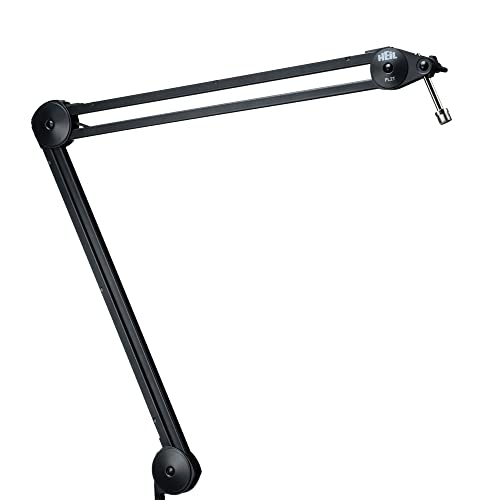
Heil’s PL-2T telescoping boom extends from about 13 to 20 inches, giving room to reposition heavier broadcast mics such as the Heil PR-40. Steel arm and desk clamp are built for daily studio use rather than occasional streaming. Cable routes along the arm using included clips.
Pros
- Telescoping design adapts to different mic distances
- Rated for heavy dynamic broadcast microphones
- Steel build holds up under daily studio use
Cons
- No internal channel, so wire stays visible
- Larger footprint than compact desk-clamp streaming arms

Gator Frameworks Deluxe Desk-Mounted Boom Arm (GFW-MIC-BCBM1000)
This two-section steel boom from Gator Frameworks reaches close to 39 inches fully extended, covering wide desk setups. Spring-loaded joints rate for heavier broadcast microphones combined with a shock mount. A desk clamp or bolt-through base handles thicker studio desks.
Pros
- Long reach covers wide desks or multi-mic setups
- Handles heavier mic and shock mount combinations
- Bolt-through option suits permanent studio installs
Cons
- Takes up more desk space when fully extended
- Cable clips leave wire partly exposed

Elgato Wave Mic Arm LP
The Wave Mic Arm LP sits low across the desk instead of arcing overhead, staying out of webcam framing. Cable routes underneath the desk through the clamp base rather than through the arm. Height adjusts up to about 15.7 inches without crossing the camera shot.
Pros
- Low profile stays out of the camera frame
- Under-desk routing hides cable without a boom channel
- Sturdy spring holds heavier condenser mics steady
Cons
- Shorter reach than full boom arms limits positioning
- Under-desk clamp needs open space below the desktop

InnoGear Adjustable Microphone Boom Arm
InnoGear’s boom arm uses full metal construction at a lower cost than premium broadcast arms. The two-segment arm extends to about 24 inches and rotates through a wide range of motion. A foam-lined clamp fits most cardioid condenser microphones.
Pros
- Lower cost than name-brand broadcast arms
- Full metal build resists sagging under standard condenser mics
- Wide rotation range fits varied desk layouts
Cons
- Twist-tie cable management looks less tidy than internal channels
- Spring tension needs periodic re-tightening with heavier mics

Neewer NB-35 Suspension Boom Scissor Arm
The NB-35 scissor-style suspension arm spans close to 34.8 inches, extending further than most low-cost competitors. Spring tension adjusts via a top-mounted screw, and the arm rotates 360 degrees at the base. Both a desk clamp and a bolt-through mount ship in the box.
Pros
- Longest reach among the budget-tier arms here
- Includes both clamp and bolt-through mounting hardware
- 360 degree base rotation for flexible placement
Cons
- Cable ties leave wire visible along the arm
- Spring needs frequent readjustment near its weight limit
Side by side
| # | Model | Weight capacity | Best for | Score | Price |
|---|---|---|---|---|---|
| 1 | Rode PSA1+ | Up to 900g (2 lbs) | Best overall | 9.4 | Check price |
| 2 | Blue Compass Premium Desktop Boom Arm | Up to 1kg (2.2 lbs) | Best for streaming | 9.2 | Check price |
| 3 | Heil Sound PL-2T | Up to 5 lbs | Best for podcasting | 9.0 | Check price |
| 4 | Gator Frameworks Deluxe Desk-Mounted Boom Arm (GFW-MIC-BCBM1000) | Up to 4.4 lbs (2kg) | Best heavy-duty weight capacity | 8.7 | Check price |
| 5 | Elgato Wave Mic Arm LP | Up to 2kg (4.4 lbs) | Best low-profile desk clamp | 8.5 | Check price |
| 6 | InnoGear Adjustable Microphone Boom Arm | Up to 3.3 lbs (1.5kg) | Best value | 8.2 | Check price |
| 7 | Neewer NB-35 Suspension Boom Scissor Arm | Up to 2.2 lbs (1kg) | Best budget | 8.0 | Check price |
Before you buy
What to look for in a microphone boom arm Weight capacity determines which microphones an arm can hold without drooping over time. Condenser mics like the Blue Yeti weigh under a pound, while dynamic broadcast mics such as the Shure SM7B exceed a pound once a shock mount is attached. Reach affects how far the mic can travel from base to a seated speaker’s mouth. Mount type matters too: desk clamps suit rented spaces, while bolt-through mounts hold steadier in permanent studio setups.
Best setups for heavy dynamic microphones Dynamic broadcast mics add real weight once a shock mount and pop filter attach. Both the Gator Frameworks GFW-MIC-BCBM1000 and Heil Sound PL-2T rate for these heavier combinations, using thicker steel arms and stronger internal springs. Lighter arms rated near 1kg can sag within weeks under this load. Anyone running a Shure SM7B or Electro-Voice RE20 should prioritize weight rating over reach or cost.
Fitting a boom arm on a small or shared desk Small desks limit how much clamp base and swing radius a boom arm can occupy. The Elgato Wave Mic Arm LP sits low across the desk surface instead of arcing overhead, keeping it clear of a webcam frame. InnoGear’s shorter 24 inch reach also suits compact desks better than arms extending past 30 inches. Shared desks benefit from clamp mounts that remove cleanly, unlike bolt-through hardware.
Cable management and on-camera appearance Exposed XLR or USB cable can look cluttered on a streaming setup visible to viewers. Arms like the Blue Compass and Rode PSA1+ route cable through an internal channel, keeping it hidden from base to mic clip. Budget arms such as the Neewer NB-35 rely on external clips instead, costing less but leaving cable visible along the arm. Anyone streaming on camera should weigh internal routing against the extra cost it usually carries.
Common questions
What weight capacity does a microphone boom arm need?
Most desk boom arms hold between 1kg and 2kg (2.2 to 4.4 lbs), though ratings vary by spring strength and arm thickness. The Gator Frameworks GFW-MIC-BCBM1000 rates up to 4.4 lbs, while lighter arms like the Neewer NB-35 top out near 2.2 lbs. Check the rating against your mic plus shock mount weight combined.
How do I mount a boom arm to a desk without drilling?
A desk clamp mount grips the edge of the table and tightens with a screw knob, requiring no holes. Most arms in this list, including the Rode PSA1+ and Blue Compass, ship with a clamp base as standard. Desk thickness usually needs to fall between about 0.4 and 2.5 inches for the clamp to seat securely.
Which boom arm works best for streaming on camera?
The Blue Compass routes cable internally and adjusts with one hand, which suits streamers repositioning mid-broadcast. The Elgato Wave Mic Arm LP is a strong alternative for anyone who wants the arm to stay below the camera frame entirely.
Can a boom arm hold a heavy mic like the Shure SM7B?
Yes, but only arms rated near 2kg or higher handle an SM7B with a shock mount reliably. The Heil Sound PL-2T and Gator Frameworks GFW-MIC-BCBM1000 both meet that threshold. Lighter arms rated under 1kg tend to sag within weeks under this specific mic.
Boom arm vs desktop mic stand: which is better for podcasting?
A boom arm frees up desk space by swinging the mic in from the side rather than sitting in front of the keyboard. A desktop stand costs less and needs no clamp, but it takes up room directly on the desk surface. Podcasters recording long sessions generally prefer a boom arm for easier repositioning.
How do I hide the cable on a microphone boom arm?
Arms like the Rode PSA1+ and Blue Compass run cable through an internal channel from the base to the mic clip. Budget arms such as the InnoGear and Neewer NB-35 use external clips instead, so cable stays visible unless you add your own sleeve.
Is a low-profile boom arm worth it for video calls?
A low-profile arm like the Elgato Wave Mic Arm LP keeps the mic out of the camera frame during video calls. Standard boom arms arc higher and can cross into the shot unless angled carefully. Anyone on camera daily benefits more from the low-profile design than the extra reach of a standard arm.
What desk thickness works with a clamp-mount boom arm?
Most clamp mounts, including those on the Rode PSA1+ and Gator Frameworks arm, fit desks between roughly 0.4 and 2.5 inches thick. Thicker studio desks or glass tables may need the bolt-through mounting option some arms include instead.
Do boom arms work on standing or sit-stand desks?
Most desk clamp mounts grip a fixed edge, so height changes on a sit-stand desk move the whole arm with the desktop. A bolt-through mount, like the option on the Rode PSA1+ or Gator Frameworks arm, stays anchored the same way. Reach and mic position shift slightly whenever desk height changes, so recheck the angle after adjusting.
Final word
Rode’s PSA1+ remains the strongest overall pick for anyone recording podcasts or voiceovers regularly, thanks to internal cable routing and a 900g rating. Streamers broadcasting on camera should choose the Blue Compass for hidden cabling, or the Elgato Wave Mic Arm LP when keeping the arm out of frame matters more than reach. Anyone running a heavier dynamic mic like the SM7B should skip the budget options and pick the Heil Sound PL-2T or Gator Frameworks GFW-MIC-BCBM1000 instead.