Compact Power: Top Mini PCs with USB-C for 2025
The ASUS PN53 is our top pick for most people, offering a strong balance of performance and portability with dual USB-C ports supporting Power Delivery and DisplayPort. Its main advantage is the Ryzen 7 processor, which handles everyday tasks and light gaming smoothly. The main limitation is the lack of a dedicated GPU, so gamers should consider a model with discrete graphics.
Mini PCs have become popular for their space-saving design and energy efficiency. With the rise of USB-C, these compact computers now offer versatile connectivity, allowing you to connect to monitors, docks, and peripherals with a single cable. But not all USB-C ports are created equal, so choosing the right mini PC requires careful consideration.
In this roundup, we compare seven of the best mini PCs with USB-C. Whether you need a powerful workstation for coding, a compact media center, or a budget-friendly machine for office tasks, we have options that fit various needs and budgets.
Before you buy
The shortlist, ranked
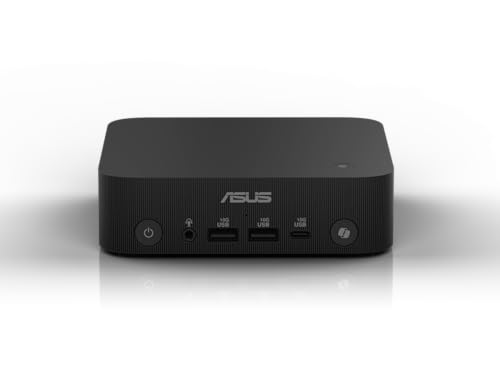
ASUS PN53 Mini PC
The ASUS PN53 is a well-rounded mini PC that delivers strong performance from its AMD Ryzen 7 processor. It features two USB-C ports with DisplayPort Alt Mode and Power Delivery, making it easy to connect to a single USB-C monitor. Its compact design fits neatly on a desk or behind a monitor, and it runs quietly even under load.
Pros
- Powerful Ryzen 7 CPU
- Full-featured USB-C ports
- Quiet operation
Cons
- No dedicated GPU
- Slightly bulky compared to others

Intel NUC 13 Pro Arena Canyon Mini PC
Intel’s NUC 13 Pro delivers solid performance with a 13th-gen Core i7 processor. Its USB-C port supports Thunderbolt 4, offering lightning-fast data transfer and support for high-resolution displays. The build quality is premium, and the compact chassis is easy to mount. It is a reliable workhorse for office tasks and light content creation.
Pros
- Thunderbolt 4 support
- Excellent build quality
- Strong multi-core performance
Cons
- Premium price
- Single USB-C port

Minisforum EliteMini HX90G
Minisforum’s EliteMini HX90G stands out with its dedicated AMD Radeon RX 6600M graphics. This makes it capable of playing many modern games at 1080p with decent settings. It has one USB-C port that supports data and DisplayPort, but not power delivery. The cooling system is effective, but the fan can get loud under heavy loads.
Pros
- Dedicated GPU for gaming
- Powerful Ryzen 9 CPU
- Great performance per dollar
Cons
- Loud fan noise
- USB-C lacks power delivery

Apple Mac Mini (M2, 2023)
For those invested in Apple’s ecosystem, the Mac Mini with M2 chip offers exceptional performance and energy efficiency. It includes two USB-C ports with Thunderbolt 2 support, allowing high-speed data and video. The unified memory architecture delivers snappy performance for creative tasks. However, it has a higher starting price and limited upgradeability.
Pros
- Silent operation
- Excellent energy efficiency
- Seamless Apple ecosystem integration
Cons
- Limited ports on base model
- Not upgradeable after purchase

Beelink SER5 Pro 5800H
The Beelink SER5 Pro offers impressive value with its Ryzen 7 5800H processor at a budget price. It includes one USB-C port that supports data and DisplayPort, ideal for connecting a modern monitor. The metal body helps with heat dissipation, but the fans can be audible during intensive tasks. It is a great choice for everyday computing and light productivity.
Pros
- Affordable price
- Solid performance
- Compact design
Cons
- Single USB-C port
- Fan noise under load

GEEKOM Mini IT11
GEEKOM Mini IT11 is a versatile mini PC with an Intel Core i7-1165G7 processor. It offers a USB-C port with DisplayPort Alt Mode, but no power delivery. Its standout feature is the 2.5-inch SATA bay, allowing additional storage expansion. The unit is easy to open and upgrade, making it ideal for tinkerers and those needing extra storage.
Pros
- Expandable storage
- Good connectivity
- Easy to upgrade
Cons
- Older processor
- No power delivery on USB-C

Acemagic AM06 Pro
The Acemagic AM06 Pro is designed for quiet operation, featuring a fanless cooling system with a Ryzen 5 processor. It has two USB-C ports, both supporting data and DisplayPort. The lack of moving parts makes it completely silent, perfect for noise-sensitive environments. However, performance is moderate, and the storage is limited to M.2 SATA SSD.
Pros
- Completely silent
- Fanless design
- Dual USB-C ports
Cons
- Moderate performance
- SATA storage only
The lineup, side by side
| # | Model | Processor | Best for | Score | Price |
|---|---|---|---|---|---|
| 1 | ASUS PN53 Mini PC | AMD Ryzen 7 5800H (8 cores) | Best Overall for Most Users | 9.4 | Check price |
| 2 | Intel NUC 13 Pro Arena Canyon Mini PC | Intel Core i7-1360P (12 cores) | Best for Business and Productivity | 9.1 | Check price |
| 3 | Minisforum EliteMini HX90G | AMD Ryzen 9 5900HX (8 cores) | Best for Light Gaming | 8.9 | Check price |
| 4 | Apple Mac Mini (M2, 2023) | Apple M2 chip (8-core CPU) | Best for macOS Ecosystem | 9.0 | Check price |
| 5 | Beelink SER5 Pro 5800H | AMD Ryzen 7 5800H (8 cores) | Best Budget Option | 8.5 | Check price |
| 6 | GEEKOM Mini IT11 | Intel Core i7-1165G7 (4 cores) | Best for Expandability | 8.3 | Check price |
| 7 | Acemagic AM06 Pro | AMD Ryzen 5 5625U (6 cores) | Best for Silent Operation | 8.0 | Check price |
Common questions
What is a mini PC?
A mini PC is a small form-factor computer that packs core components into a compact chassis. They are often used as desktop replacements, media centers, or thin clients.
Can a mini PC with USB-C power my laptop?
Some mini PCs have USB-C ports with Power Delivery, which can supply power to connected devices. However, the wattage may not be sufficient to charge a laptop, so check the specs.
How do I know if a USB-C port supports video output?
Look for DisplayPort Alt Mode support in the specifications, or check the product manual. Many mini PCs list this feature explicitly.
Are mini PCs upgradeable?
Many mini PCs allow upgrading RAM and storage via SODIMM slots and M.2 drives. Some have limited access, so check the design before purchase.
Can I use a mini PC as a gaming PC?
Yes, but for more demanding games, you need a model with a dedicated GPU. Some mini PCs have discrete graphics, but they are rare and more expensive.
What is the difference between USB-C and Thunderbolt?
Thunderbolt is a faster protocol that uses the USB-C connector. It offers higher data transfer speeds and supports daisy-chaining devices. Not all USB-C ports are Thunderbolt.
How much RAM do I need in a mini PC?
For basic tasks, 8GB is sufficient. For multitasking and light creative work, 16GB is recommended. Gaming and heavy workloads may require 32GB.
Do mini PCs come with an operating system?
Many mini PCs come with Windows 11 pre-installed, but some are barebones. Check the product listing to see if an OS is included.
What is the advantage of a fanless mini PC?
Fanless mini PCs run silently and have no moving parts, which reduces dust buildup and potential mechanical failures. They are ideal for quiet environments.
Can I mount a mini PC to the back of a monitor?
Most mini PCs come with VESA mount brackets, allowing you to attach them to compatible monitors or walls, saving desk space.
Our take
For most users, the ASUS PN53 is the best all-around mini PC with USB-C. It offers a powerful processor, dual full-featured USB-C ports, and a reasonable price. If you need Thunderbolt speed and are in the Apple ecosystem, the Mac Mini is a great choice. Gamers should look at the Minisforum HX90G for its dedicated graphics. For budget-conscious buyers, the Beelink SER5 Pro provides solid value.


