Monitor Stands That Lift Your Screen and Declutter Your Desk
For most people, the HUANUO Single Monitor Stand is the top pick because it offers gas-spring adjustability, solid construction, and easy installation at a reasonable cost. Its main limitation is that it only supports one monitor, so dual-screen users will need a different model.
A monitor stand is more than a simple riser. It helps align your screen with your natural line of sight, reducing neck and eye strain during long work sessions. Many models also free up valuable desk space by lifting the monitor off the surface.
Choosing the right stand depends on your monitor’s weight and VESA pattern, your desk setup, and how much adjustability you need. Some stands offer gas-spring arms for effortless movement, while others provide sturdy fixed platforms. We compared the most popular options to help you decide.
The best picks, ranked

HUANUO Single Monitor Stand
This gas-spring arm supports monitors from 17 to 32 inches and up to 19.8 pounds. It offers smooth height and tilt adjustments with a wide range of motion. Users report that the clamp and grommet mounts are easy to install and the cable management keeps things tidy.
Pros
- Smooth gas-spring adjustments
- Easy tool-free height changes
- Integrated cable management clips
Cons
- Clamp may not fit very thick desks
- Arm can wobble if not tightened fully

VIVO Dual Monitor Stand Desk Mount
VIVO’s dual arm stand holds two monitors up to 27 inches each, with independent height and tilt adjustments. The heavy-duty C-clamp provides a secure fit, and the integrated cable management hides wires. Owners note that the gas springs are a bit stiff initially but loosen up over time.
Pros
- Independent arm movement
- Sturdy steel construction
- Cable management channels
Cons
- Requires a solid desk for clamp mount
- Adjustment knobs can be hard to reach

Amazon Basics Adjustable Monitor Arm
A simple and affordable gas-spring arm from Amazon Basics. It fits monitors up to 32 inches and 22 pounds. The arm offers tilt and swivel adjustments but limited height range. Many users find it a great entry-level option for ergonomic setup.
Pros
- Low cost
- Easy to assemble
- Good basic range of motion
Cons
- Height adjustment requires loosening knob
- Plastic parts in the base

Ergotron LX Desk Monitor Arm
Ergotron is known for high-quality, durable arms. The LX supports up to 34 inches and 25 pounds. Its patented constant force technology allows smooth movement with minimal effort. Users praise its solid metal construction and 10-year warranty.
Pros
- Premium build quality
- Effortless adjustments
- Excellent warranty
Cons
- Expensive
- Cable management is basic

Mount-It! Single Monitor Arm
This heavy-duty arm from Mount-It! can handle monitors up to 32 inches and 33 pounds. It features a gas spring that supports heavy loads with ease. The arm includes a USB port for convenience. Owners appreciate the sturdy clamp and smooth height adjustments.
Pros
- High weight capacity
- USB port on base
- Stable clamp
Cons
- Arm is bulky
- May require additional tools for some desks
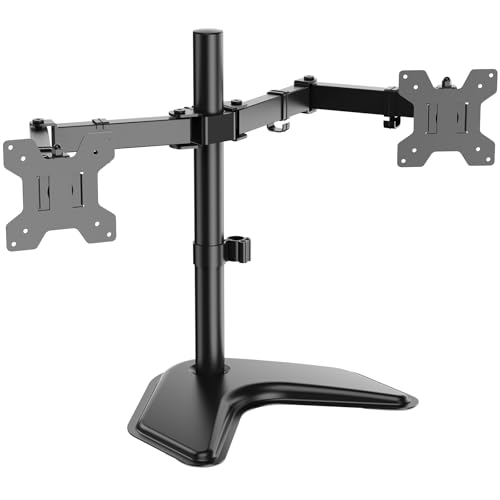
WALI Free Standing Monitor Stand
A freestanding desk mount with a heavy steel base, ideal for desks that cannot accommodate clamps. It supports a single monitor up to 27 inches and 22 pounds. The stand offers height adjustment via a pole with multiple spring-loaded positions.
Pros
- No desk drilling needed
- Stable base
- Easy height changes
Cons
- Takes up more desk space
- Limited tilt compared to arms

Ergoguys Multiple Monitor Stand
This modular system from Ergoguys can hold two or more monitors using separate arms that attach to a central pole. Each arm moves independently, and the pole allows height adjustment. It’s a versatile choice for users who frequently rearrange their screens.
Pros
- Modular design
- Arms move independently
- Good for small monitors
Cons
- Lower weight capacity
- Pole may be too short for tall users
How to choose
The lineup, side by side
| # | Model | Screen size | Best for | Score | Price |
|---|---|---|---|---|---|
| 1 | HUANUO Single Monitor Stand | 17 to 32 inches | Best overall for most users | 9.4 | Check price |
| 2 | VIVO Dual Monitor Stand Desk Mount | Up to 27 inches each | Best for dual monitors | 9.2 | Check price |
| 3 | Amazon Basics Adjustable Monitor Arm | Up to 32 inches | Budget-friendly basic arm | 8.8 | Check price |
| 4 | Ergotron LX Desk Monitor Arm | Up to 34 inches | Premium build and long lifespan | 9.1 | Check price |
| 5 | Mount-It! Single Monitor Arm | Up to 32 inches | Heavy or oversized monitors | 8.9 | Check price |
| 6 | WALI Free Standing Monitor Stand | Up to 27 inches | Desks without clamp or grommet holes | 8.6 | Check price |
| 7 | Ergoguys Multiple Monitor Stand | Up to 24 inches per arm | Flexible multi-monitor setups | 8.4 | Check price |
Frequently asked questions
What is a VESA pattern and why does it matter?
VESA is a standard mounting hole pattern on the back of monitors. Common patterns are 75×75 and 100×100 millimeters. You must match the stand’s VESA compatibility to your monitor’s pattern for a secure fit.
Can I use a monitor stand with a laptop?
Some monitor arms have optional laptop trays, but most stands are designed for VESA-compatible monitors. If you use a laptop, consider a separate laptop arm or a riser with a tray.
Will a monitor stand work with an ultrawide monitor?
Yes, if the ultrawide monitor has a VESA pattern and weighs less than the stand’s capacity. Check the arm’s weight limit as ultrawides can be heavy, especially curved models.
How do I know if my desk can support a clamp mount?
Clamp mounts work best on solid wood or metal desks that are not too thick (usually up to 3 inches). If your desk has a hollow core or is made of glass, avoid clamps and choose a freestanding stand.
Do monitor stands improve posture?
Yes, by allowing you to position your screen at eye level, you can maintain a neutral neck position. This reduces strain on your cervical spine and may decrease fatigue.
Can I adjust the height of a monitor arm without tools?
Gas spring arms often allow tool-free height adjustments, while fixed arms may require a hex key or knob. Check the product specifications for ease of adjustment.
Are monitor arms compatible with all monitor brands?
As long as the monitor has a VESA mount pattern and falls within the weight limit, it should be compatible. Most brands from Dell to LG support VESA mounting, but some lower-end models may not.
How much desk space do monitor stands save?
Most stands free up the area directly under the monitor, allowing you to place papers or a keyboard underneath. Freestanding bases still take up some space, while clamp arms leave the desk entirely clear.
Our take
For most users, the HUANUO Single Monitor Stand offers the best balance of adjustability, build quality, and value. If you need dual monitors, the VIVO Dual Monitor Stand is the way to go. Those with heavy or oversized screens should consider the Mount-It! arm for its higher weight capacity. Budget-conscious buyers will find the Amazon Basics arm a solid choice.


