One Charger for Every Device: Multi Port Picks Ranked
The Anker Prime 250W GaN Charging Station leads for sheer capacity and desk-friendly layout. The UGREEN Nexode 100W 4-Port GaN Charger is the value pick, balancing laptop-class output with a compact body. For tight budgets, the Baseus 65W GaN5 Pro 4-Port Charger covers phones, tablets and a thin laptop.
If you want one brick to handle a laptop, a phone and a pair of earbuds, the Anker Prime 250W GaN Charging Station has the headroom for it, while the UGREEN Nexode 100W 4-Port GaN Charger covers the same jobs in a much smaller package and the Baseus 65W GaN5 Pro keeps costs down.
Multi port chargers are tricky because the headline wattage on the box is almost never what each port delivers once every socket is occupied. We compared published power-sharing tables, port counts, USB-C versus USB-A mixes, plug design and reported heat behaviour, then ranked the seven chargers below on how predictably they split power under real multi-device loads.
Our top picks

Anker Prime 250W GaN Charging Station
With 250W across six ports, this is the rare charger that can run two laptops and still have room for phones and a tablet. The display showing live per-port draw removes most of the guesswork about power sharing. It is a desk fixture rather than a travel piece, but it replaces an entire power strip of adapters.
Pros
- Enough total power for two laptops plus accessories
- Live wattage display shows what each port is actually getting
- Six ports covers a whole desk from one outlet
Cons
- Too large and heavy for a travel bag
- Attached power cable takes up desk space

UGREEN Nexode 100W 4-Port GaN Charger
One hundred watts across four ports is the sweet spot for most people, and this one keeps the body small enough to travel. Owners report it charges a 13 inch laptop at close to full speed with a phone attached. The foldable prongs are a small detail that matters if it lives in a bag.
Pros
- Laptop-class output in a genuinely portable body
- Sensible port mix for mixed device households
- Foldable prongs survive bag life
Cons
- Power drops noticeably once all four ports are loaded
- Runs warm under sustained full load

Baseus 65W GaN5 Pro 4-Port Charger
Sixty five watts is plenty for a phone, a tablet and a thin-and-light laptop, and this is one of the smallest bricks offering it with four ports. Based on specifications it prioritises the first USB-C port, so plug your laptop there. A practical choice for a second charger by the bed or in a bag.
Pros
- Very small for a four-port charger
- Handles a thin laptop plus two phones
- Foldable plug and light weight suit travel
Cons
- Not enough total power for a large laptop under load
- Per-port output falls sharply with four devices attached

Belkin BoostCharge Pro 4-Port GaN Charger 108W
Belkin builds this around a strong primary USB-C port, which is what you want if a laptop is the main job and phones are secondary. The safety certifications and warranty are more thorough than most, which matters when a charger sits unattended. It is bulkier than the UGREEN for similar output.
Pros
- Strong single-port output for demanding laptops
- Thorough safety certification and warranty backing
- Stable performance when ports are mixed
Cons
- Larger than rivals at the same wattage
- Only one USB-A port for older accessories
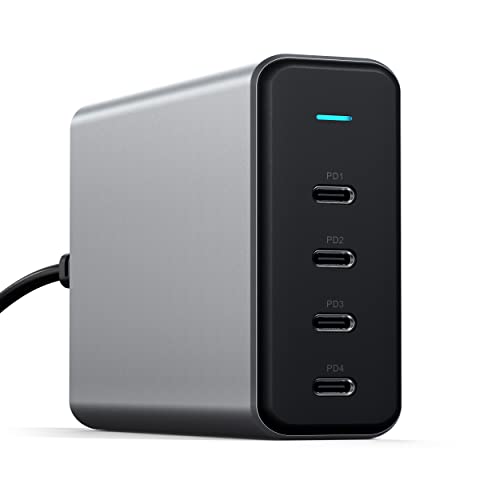
Satechi 165W USB-C 4-Port GaN Charger
All four ports are USB-C and the total is high enough to run two laptops without either dropping to trickle speed. That all-C layout is a plus for modern gear and a nuisance if you still own USB-A cables. The metal housing sheds heat well and looks the part next to a monitor.
Pros
- Runs two laptops at usable speeds
- All USB-C layout suits current devices
- Metal body helps with heat
Cons
- No USB-A port for older cables
- Detachable cable adds another thing to lose

Anker 737 Charger GaNPrime 120W
One hundred and twenty watts in something you can close your hand around is the main argument here. The dynamic power allocation shifts wattage between ports as devices fill up, which suits a hotel room where everything charges overnight. Three ports is the ceiling, so it is not a desk hub replacement.
Pros
- High wattage in a very compact brick
- Reallocates power automatically as devices finish
- Foldable prongs and light weight for travel
Cons
- Only three ports total
- Gets warm when pushed near its ceiling
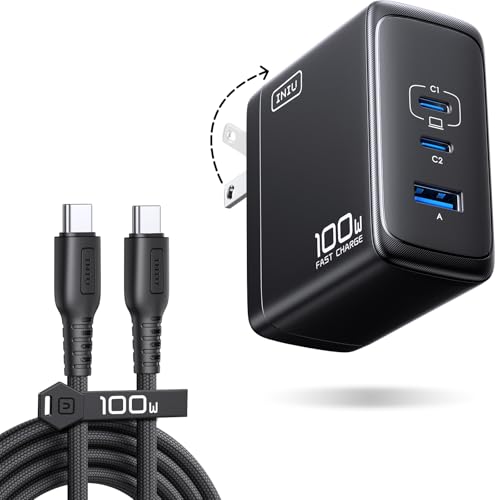
INIU 100W 4-Port GaN Fast Charger
The port mix leans towards phones and tablets rather than a single power-hungry laptop, which fits a household where four people need a top-up at once. Owners report steady output across all four ports rather than one dominant socket. Build quality is plainer than the premium options but the fundamentals hold up.
Pros
- Even power split suits several phones at once
- Includes a usable cable in the box
- Good port count for the outlay
Cons
- Primary port is weaker than laptop-focused rivals
- Plainer build and finish than premium brands
What matters most
Total wattage is not per-port wattage The number printed on the box is the sum available across every port, and almost every charger reallocates it the moment a second device is plugged in. A 100W charger might give a laptop the full amount alone, then drop it to 65W when a phone joins. Look for the power distribution table in the listing or manual, because that table tells you what happens in the situation you will actually be in.
Why GaN matters for size and heat Gallium nitride switches more efficiently than the older silicon designs, which means less waste heat and a smaller body for the same output. In practice that is the difference between a brick that blocks two outlets and one that sits neatly in a power strip. Every charger ranked here uses GaN, and it is the single most useful spec to filter on when comparing similar wattages.
Matching port mix to the devices you own Count your cables before you count the ports. An all USB-C charger is the forward-looking choice but it strands anything with a USB-A cable, and a lot of accessories, older headphones and battery packs still ship that way. A mix of three USB-C and one USB-A covers most households today, while a two-and-two split works better if half your gear is a few years old.
Travel considerations beyond wattage Foldable prongs are the difference between a charger that survives a bag and one that tears the lining. Weight and shape matter too, since a wide brick can block the second socket on a hotel nightstand. If you cross borders, check whether the charger accepts 100 to 240 volt input, which all the models here do, so you only need a plug adapter rather than a converter.
The lineup, side by side
| # | Model | Total output | Best for | Score | Price |
|---|---|---|---|---|---|
| 1 | Anker Prime 250W GaN Charging Station | 250W | Best overall | 9.4 | Check price |
| 2 | UGREEN Nexode 100W 4-Port GaN Charger | 100W | Best value | 9.2 | Check price |
| 3 | Baseus 65W GaN5 Pro 4-Port Charger | 65W | Best budget | 9.0 | Check price |
| 4 | Belkin BoostCharge Pro 4-Port GaN Charger 108W | 108W | Best for laptops | 8.8 | Check price |
| 5 | Satechi 165W USB-C 4-Port GaN Charger | 165W | Best for desk setups | 8.6 | Check price |
| 6 | Anker 737 Charger GaNPrime 120W | 120W | Best for travel | 8.3 | Check price |
| 7 | INIU 100W 4-Port GaN Fast Charger | 100W | Best for families | 8.0 | Check price |
Questions worth asking
Can one charger safely power a laptop and a phone at the same time?
Yes. Multi port chargers negotiate power with each device using USB Power Delivery, and the charger will not push more than a device requests. The only real consequence is that the laptop may charge more slowly while the phone is attached.
How many watts do I actually need?
A phone is happy with 20 to 30W, a tablet around 30 to 45W, a thin laptop 45 to 65W and a larger laptop 90 to 100W. Add up the devices you charge simultaneously and pick a charger with a comfortable margin above that total.
Does a higher wattage charger damage a phone?
No. The device requests the power level it wants, so a 100W charger delivers the same safe amount to a phone as a small 20W adapter. Higher wattage only matters when the device can accept it.
Is GaN worth paying more for?
For a multi port charger, generally yes. GaN designs run cooler and pack the same output into a noticeably smaller body, which is exactly what you want from a brick handling several devices at once.
Why does my laptop charge slower when other ports are in use?
Chargers share a fixed total budget. When a second or third device connects, the controller reallocates wattage, usually reducing the primary port. Check the manufacturer power distribution table to see the exact split.
Do I need special cables to hit the advertised speeds?
Often yes. Anything above 60W requires a USB-C cable rated for 100W or 240W with an E-marker chip. A cheap charging cable will quietly cap your speeds no matter how capable the charger is.
Are USB-A ports still worth having?
If you own older headphones, battery packs or accessories, yes. USB-A ports are slower but they save you buying replacement cables for gear that works perfectly well otherwise.
Can I use these chargers overseas?
All seven accept 100 to 240 volt input, so a simple plug shape adapter is enough. You do not need a voltage converter, which is the bulky and failure-prone alternative.
Final word
For a desk that has to feed everything at once, the Anker Prime 250W GaN Charging Station has headroom no rival here matches, and the live wattage display takes the mystery out of power sharing. Most people will be better served by the UGREEN Nexode 100W 4-Port GaN Charger, which covers a laptop and two phones in something that still travels. The Baseus 65W GaN5 Pro 4-Port Charger is the sensible second charger if a large laptop is not part of the equation.


