Smart Notebooks That Actually Sync Your Scribbles
The Rocketbook Core is our top pick for most people. It offers reusable pages that wipe clean with a damp cloth and free cloud uploads to Google Drive, Dropbox, and more. Its main limitation is that it requires Pilot FriXion pens, which can smudge if you touch them too soon.
Smart notebooks bridge the gap between the tactile joy of writing and the convenience of digital storage. They let you keep your handwritten notes, sketches, and ideas organized without needing to type everything out.
We compared seven popular models to help you choose. Whether you want a reusable notebook or one that preserves your original paper, there’s a smart notebook that fits your workflow.
What we recommend
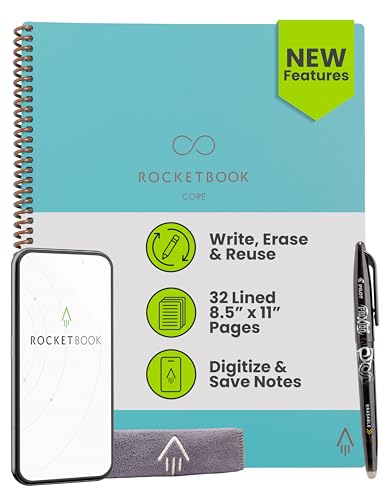
Rocketbook Core
The Rocketbook Core is a classic reusable smart notebook. Its synthetic pages wipe clean with water, and the free app scans your notes and sends them to your favorite cloud services. Owners report that the pages feel smooth and the binding lies flat. The main drawback is that you must use Pilot FriXion pens, which erase with heat, so leaving it in a hot car can ruin your notes.
Pros
- Reusable, so you save paper
- Free cloud integrations
- Smart titles and symbols for organization
Cons
- Requires Pilot FriXion pens
- Pages are not as thick as regular paper

Moleskine Smart Writing Set
The Moleskine Smart Writing Set pairs a paper notebook with a smart pen that captures your strokes as you write. It feels like writing on real paper, and the pen stores up to 1000 pages of notes before you need to sync. The app transcribes your handwriting and syncs with your devices. However, it is pricey, and you need to buy replacement notebooks specifically from Moleskine.
Pros
- Real paper feel
- Live capture and transcription
- Large storage capacity
Cons
- Expensive
- Requires proprietary notebooks
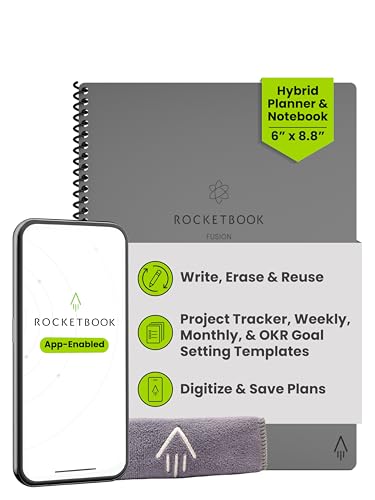
Rocketbook Fusion
The Rocketbook Fusion offers a mix of reusable planner pages and standard dot grid pages, all in one notebook. It includes a calendar and task list templates that you can reuse, and the app lets you assign different destinations to different page icons. Users like the flexibility, but some find the page count limited at 42 pages.
Pros
- Built-in planner templates
- Reusable and erasable
- 7 included symbols for quick actions
Cons
- Fewer pages than standard Core
- Planner layout may not suit everyone
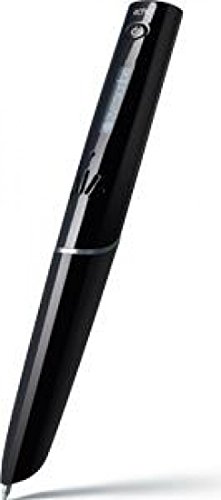
Livescribe Smartpen A6 Notebook
The Livescribe Smartpen A6 Notebook uses dot paper to capture your handwriting and audio simultaneously. It records what you hear and links it to your notes, so you can tap a word to play back the audio from that moment. The notebook is compact, but the pen is bulky and you must use Livescribe’s special dot paper.
Pros
- Audio recording synced to notes
- Compact size
- Good for lectures and meetings
Cons
- Proprietary paper required
- Pen is larger than typical

Wacom Bamboo Slate
The Wacom Bamboo Slate is a smartpad that lets you write on any paper placed on its surface. The included smartpen captures your strokes, and when you’re done, you press a button to send the page to the app. It’s portable and works with up to 50 pages of notes stored internally. However, the app’s OCR is not always accurate, and the device adds bulk to your bag.
Pros
- Works with any paper
- Store up to 100 pages offline
- Slim design
Cons
- Needs to be carried separately
- OCR transcription can be imperfect
Moleskine Smart Notebook (with smartpen)
This is the Moleskine Smart Writing Set’s notebook sold separately, designed to work with the Pen+ Ellipse. It has the iconic Moleskine cover and high quality paper. If you already own the pen, you can buy additional notebooks. It lacks the built-in transcription of the full set, but it’s perfect for expanding your smart writing system.
Pros
- Classic Moleskine quality
- Replacement notebooks available
- Smooth writing experience
Cons
- Requires expensive smartpen
- No app included on its own

Ion Audio Smartpen with Notebook
The Ion Audio Smartpen with notebook is an affordable alternative that records audio and syncs to your notes. It comes with a notebook and includes 2GB of internal storage. While it works well for basic note-taking, the app is less polished and the build quality feels less premium compared to others.
Pros
- Low cost
- Audio recording
- Comes with a full-size notebook
Cons
- App can be buggy
- Limited cloud integration
Before you buy
Compared at a glance
| # | Model | Sizes | Best for | Score | Price |
|---|---|---|---|---|---|
| 1 | Rocketbook Core | Letter, Executive, Mini | Best for reusable pages with cloud sync | 9.4 | Check price |
| 2 | Moleskine Smart Writing Set | Large (13 x 21 cm) | Best for a premium writing feel with live digitization | 9.1 | Check price |
| 3 | Rocketbook Fusion | Letter, Executive | Best for combining planner and reusable notebook | 9.0 | Check price |
| 4 | Livescribe Smartpen A6 Notebook | A6 (pocket size) | Best for audio recording with notes | 8.6 | Check price |
| 5 | Wacom Bamboo Slate | A5 or A4 | Best for digitizing on the go with any paper | 8.3 | Check price |
| 6 | Moleskine Smart Notebook (with smartpen) | Large (13 x 21 cm) | Best for a classic Moleskine feel with smart features | 8.5 | Check price |
| 7 | Ion Audio Smartpen with Notebook | 8.5 x 11 inches | Best for budget-conscious students | 8.0 | Check price |
Good to know
Do I need to use special pens with smart notebooks?
Yes, most smart notebooks require specific pens. Reusable ones like Rocketbook need Pilot FriXion pens, while paper-based systems come with their own branded smartpen.
Can smart notebooks convert handwriting to text?
Many smart notebooks offer handwriting recognition in their companion apps. The accuracy varies by product and your handwriting style. Some apps let you search your handwritten notes as if they were text.
Are smart notebooks worth the cost?
If you take a lot of handwritten notes and want to keep them organized digitally, they can be worth it. They save paper and time. However, the upfront cost is higher than a regular notebook, so consider your usage frequency.
How many pages can a smart notebook store?
Reusable notebooks typically have a fixed number of physical pages, but since you can erase them, you can write infinitely. Paper-based systems store a limited number of pages in the pen’s memory, usually from 100 to 1000 pages.
Can I share my notes with others?
Yes, most smart notebook apps let you export notes as PDF or image files and share them via email, messaging, or cloud services. Some even allow real-time collaboration through shared links.
Do smart notebooks work without a phone or computer?
Paper-based smartpens have internal storage, so you can write without a device and sync later. Reusable notebooks require the app to scan pages, so you need a phone or tablet with a camera.
How do I clean a reusable smart notebook?
Use a damp cloth or the included microfiber cloth. The pages are waterproof and can be wiped clean with water. Avoid using harsh chemicals or submerging the notebook.
What is the battery life of smartpens?
Smartpens typically last for several hours of active use. Most charge via USB and can last for days on standby. Check the product specifications for exact battery capacity.
Our pick
The Rocketbook Core is the best smart notebook for most people because it provides a reusable, affordable, and versatile solution with excellent cloud integration. For those who prefer the feel of real paper and need audio recording, the Livescribe Smartpen A6 Notebook is a strong alternative. If you have a larger budget and want a premium writing experience, the Moleskine Smart Writing Set is worth the investment.