Top Smart Notepads for Digital Note Taking in 2026
The Rocketbook Smart Reusable Notebook is the top pick for most people because it offers a low cost per use and simple cloud syncing. Its main limitation is the need for a special pen and frequent wiping. For a paper-like writing feel, the reMarkable 2 is a premium alternative that stores thousands of notes digitally.
Smart notepads bridge the gap between traditional paper and digital organization. They let you write naturally while automatically converting your notes into digital files.
Whether you are a student, a professional, or a creative, there is a smart notepad that fits your workflow. This roundup highlights seven top models across various price points and features.
How to pick the right one
Our top picks
Rocketbook Smart Reusable Notebook
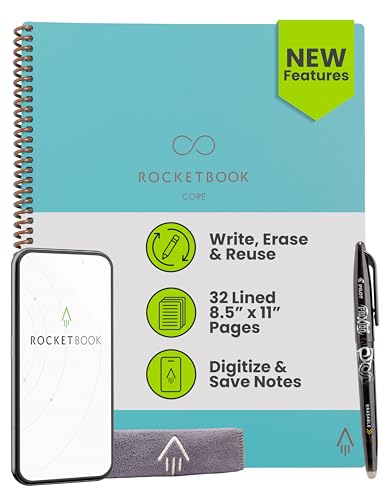
The Rocketbook Smart Reusable Notebook is a spiral-bound notebook with special pages that you can wipe clean. Write with the included Pilot Frixion pen, then use the Rocketbook app to scan and send your notes to cloud services like Google Drive, Evernote, and Dropbox. When the pages are full, microwave the notebook or wipe with a damp cloth to reset it. Users report it is durable and saves money over time compared to paper notebooks.
Pros
- Reusable and eco-friendly
- Easy cloud sharing via app
- Affordable initial cost
Cons
- Requires special pens and wiping
- No offline digital storage

reMarkable 2
The reMarkable 2 is a dedicated e-ink tablet designed for distraction-free writing. Its surface feels remarkably close to paper, and the low-latency stylus provides a responsive experience. You can organize notes into folders, convert handwriting to text, and even read and annotate PDFs. While it lacks a backlight, it excels at replicating the feel of ink on paper.
Pros
- Exceptional writing feel
- Focused, distraction-free environment
- Converts handwriting to text
Cons
- Pricey with subscription features
- No color display or backlight
Amazon Kindle Scribe
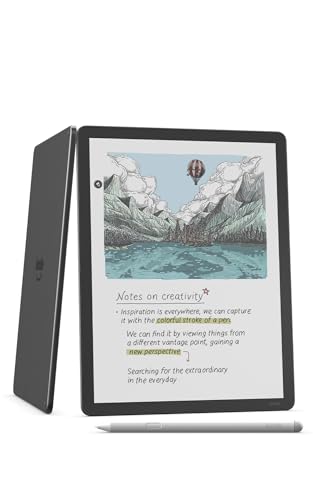
The Kindle Scribe is a large e-reader with note-taking capabilities. It offers a 10.2 inch display and integrates seamlessly with your Kindle library, allowing you to jot notes in books. The writing feel is decent, though not as paper-like as the reMarkable. It includes a basic pen and offers many organizational features within the Kindle ecosystem.
Pros
- Large e-reader with note features
- Access to Amazon bookstore
- Long battery life
Cons
- Writing feel not as refined
- Limited app compatibility

Moleskine Smart Writing Set
The Moleskine Smart Writing Set combines a classic paper notebook with a smart pen that captures everything you write. The pen uses a camera to track your strokes and syncs via Bluetooth to the Moleskine Notes app. You can write on paper and get a digital copy in real time. Owners appreciate the familiar Moleskine quality, but note the pen needs charging and the paper is not reusable.
Pros
- Real paper writing experience
- Sleek, classic design
- Transcribes handwriting to text
Cons
- Paper not erasable or reusable
- Pen must be charged

Wacom Bamboo Slate
The Wacom Bamboo Slate is a smartpad that lets you write on any paper placed on its surface. It captures your handwriting and converts it to digital text via the app. It is compact and lightweight, making it a great choice for on-the-go note capture. However, the writing area is limited to the pad size, and you must use the included pen.
Pros
- Use any paper
- Portable and affordable
- Converts to text
Cons
- Limited capture area
- Requires regular pen or stylus

Lenovo Smart Paper
The Lenovo Smart Paper is a 10.3 inch e-ink tablet that aims to replace paper notebooks. It offers a smooth writing experience with a textured screen, and includes features like cloud sync, document annotation, and voice recording. It supports multiple file formats and has a generous storage capacity. Some users find the interface less intuitive than competitors.
Pros
- Large storage capacity
- Voice recording and playback
- Cloud integration
Cons
- Higher price point
- Interface can be clunky

Supernote A6 X2
The Supernote A6 X2 is a compact e-ink tablet focused on note-taking and reading. It features a unique writing feel that many users compare to gel pens, and it offers excellent organization tools like keywords and links. The device runs on Android, allowing for some app flexibility, and it has a long battery life. It is smaller than many rivals, which makes it highly portable.
Pros
- Compact and portable
- Intuitive file organization
- Android-based for app access
Cons
- Smaller writing area
- Requires learning curve for features
The lineup, side by side
| # | Model | Page Count | Best for | Score | Price |
|---|---|---|---|---|---|
| 1 | Rocketbook Smart Reusable Notebook | 36 pages (18 sheets) | Budget-friendly reusable notes with cloud sync | 9.2 | Check price |
| 2 | reMarkable 2 | 10.3 inch e-ink | Premium paper-like writing experience | 9.5 | Check price |
| 3 | Amazon Kindle Scribe | 10.2 inch e-ink | Reading and note-taking combined | 8.8 | Check price |
| 4 | Moleskine Smart Writing Set | Large ruled notebook | Traditional notebook feel with digital sync | 8.5 | Check price |
| 5 | Wacom Bamboo Slate | A5 or A4 sizes | Simple digital capture on any paper | 8.2 | Check price |
| 6 | Lenovo Smart Paper | 10.3 inch e-ink | Advanced note organization for professionals | 8.9 | Check price |
| 7 | Supernote A6 X2 | 7.8 inch e-ink | Distraction-free writing in a compact size | 8.7 | Check price |
Common questions
Can smart notepads replace paper notebooks?
For many users, yes. They offer the convenience of digital storage and searchability while retaining a natural writing experience. However, some people still prefer the tactile feel of paper. Smart notepads are ideal for those who want to reduce paper clutter and easily share notes.
Is handwriting to text conversion accurate?
Accuracy depends on the device and your handwriting. Most modern smart notepads use advanced recognition that works well for print and cursive. Some allow you to edit the converted text. It is not always perfect, but it improves over time.
Do I need an internet connection to use a smart notepad?
Most devices allow local note-taking without internet. Syncing to cloud services requires Wi-Fi or cellular. Some tablets offer offline functionality, but you will need an internet connection to back up or share notes.
Are there subscription costs?
Some devices include basic features for free, while advanced features like cloud storage or handwriting recognition may require a subscription. For example, reMarkable offers a Connect subscription for additional storage and syncing. Always check the pricing model before buying.
Can I use a smart notepad to read and annotate PDFs?
Yes, many e-ink tablets like the reMarkable 2 and Kindle Scribe allow you to import PDFs and write directly on them. This is useful for reviewing documents or academic papers. Some smart pens also support PDF annotation through their apps.
How long does the battery last?
Battery life varies. E-ink tablets typically last from two to twelve weeks on a single charge, depending on usage. Smart pens have shorter battery life, often requiring daily or weekly charging. Check the specifications for each model.
Are smart notepads durable?
Most are built with quality materials, but e-ink screens can be fragile if dropped. It is advisable to use a protective case. Reusable notebooks are sturdy but the pages may wear over time. Handle with care to ensure longevity.
Which smart notepad is best for students?
For students, the Rocketbook is budget-friendly and lightweight, while the Kindle Scribe is great for reading textbooks and note-taking. The reMarkable 2 offers a distraction-free environment, but at a higher cost. Consider your budget and whether you need to read textbooks.
The verdict
For most users, the Rocketbook Smart Reusable Notebook is the clear winner due to its low cost and versatility. If you prefer a premium writing experience and have the budget, the reMarkable 2 is the best choice for a paper-like feel. For avid readers, the Kindle Scribe is an excellent option. Ultimately, choose based on your primary use case and budget.