Choosing a PC VR Headset: Clarity, Comfort, Tracking
The Meta Quest 3 is the most practical PC VR headset for most people thanks to pancake lens clarity and flexible wired or wireless PC connection. The Valve Index still leads on tracking precision and controller feel, while Pimax Crystal Light targets simulator players who want maximum resolution.
If you want one PC VR headset that covers gaming, simulators and general use, the Meta Quest 3 is the most sensible starting point, with the Valve Index still ahead on tracking and controller feel and the Pimax Crystal Light aimed squarely at simulator players chasing clarity.
PC VR is confusing to shop for because two headsets with similar resolution figures can feel completely different depending on lens type, sweet spot size and how the image reaches your PC. We compared published panel specifications, lens designs, tracking methods, refresh rates and connection requirements, then weighed what owners report about comfort past the one hour mark and how much extra hardware each system really needs.
What to look for
Lens type matters more than resolution Two headsets can claim the same per eye resolution and look very different, because pancake and glass aspheric lenses keep the image sharp across a wide area while older Fresnel lenses concentrate clarity in a narrow sweet spot with visible glare rings. If you are constantly adjusting a headset to find the clear spot, that is a lens problem, not a panel problem. For most buyers, lens quality is the upgrade you feel first.
Tracking system shapes your room Inside out tracking uses cameras on the headset and needs no external hardware, which makes setup fast and portable. Lighthouse base stations mount in corners of the room and deliver the most precise tracking, particularly when controllers move behind your back or close to your body. Decide whether precision or convenience matters more, because it determines what you install in your space.
Check what your PC can actually drive High resolution headsets are demanding in a way flat screen benchmarks do not prepare you for, since the GPU renders two high resolution views at a high refresh rate. A headset that outruns your graphics card produces stutter and reprojection artefacts that feel worse than a lower resolution running smoothly. Match the headset to the PC you own, not the one you intend to build.
Comfort decides how much you use it Weight distribution, facial interface material and strap design determine whether a session ends after twenty minutes or two hours. Halo style headbands transfer weight to the forehead and back of the head rather than the cheekbones, which most people find more comfortable. Budget for a strap upgrade on headsets that ship with a basic elastic band, because it is the cheapest comfort improvement available.
The top picks, ranked

Meta Quest 3 512GB
Pancake lenses give the Quest 3 a wide clear sweet spot without the sharp falloff older Fresnel headsets suffer from, and it connects to a PC over a cable or wirelessly on a good network. Inside out tracking means no base stations to mount. Owners report the colour passthrough also makes it far easier to use in a normal room.
Pros
- Clear edge to edge image
- Works wired or wireless to a PC
- No external sensors to install
Cons
- Wireless PC play needs a strong dedicated network
- Stock strap needs upgrading for long sessions
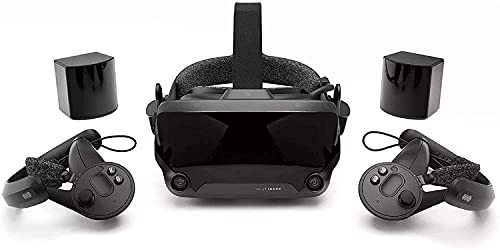
Valve Index VR Kit
Lighthouse base station tracking remains the most precise system available, which matters in games that demand fast, accurate hand movement. The Index controllers track individual fingers and strap to your hands so you can open your grip without dropping them. Based on specifications the high refresh modes are still competitive with much newer hardware.
Pros
- Most precise tracking in this group
- Finger tracking controllers
- Excellent off ear audio
Cons
- Base stations require mounting and space
- Fresnel lenses show more glare than pancake designs

Meta Quest 3S
The 3S keeps the processor and controllers of the Quest 3 while using Fresnel lenses and a lower resolution panel, which is where the savings come from. For PC VR that means a slightly smaller sweet spot but the same tracking and the same connection options. Owners report it is the most accessible way into PC VR without base stations.
Pros
- Lowest barrier to entry for PC VR
- Same tracking system as Quest 3
- Wired and wireless PC options
Cons
- Smaller lens sweet spot than pancake designs
- Lower panel resolution for text heavy sims

HTC VIVE Pro 2
The Pro 2 pairs a high resolution panel with one of the widest fields of view in consumer PC VR, which improves immersion in cockpit games. It uses Lighthouse tracking, so it shares the Index’s precision and its setup requirements. Based on specifications it demands a capable graphics card to drive the panel at its higher refresh modes.
Pros
- Very wide field of view
- High resolution for cockpit instruments
- Precise base station tracking
Cons
- Needs a powerful graphics card
- Base stations and controllers add to the setup
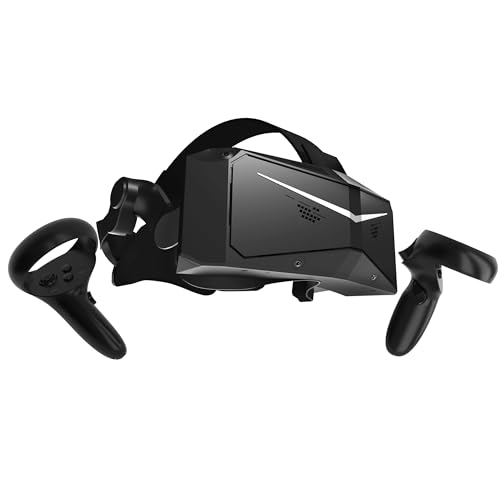
Pimax Crystal Light
Crystal Light strips out the standalone hardware of the full Crystal to focus purely on PC use, with very high per eye resolution and glass aspheric lenses. Sim racers and flight sim players choose it because reading distant labels and instruments is where resolution actually pays off. Owners report it demands a strong PC and patience with setup software.
Pros
- Highest clarity for instrument reading
- Glass lenses reduce distortion
- Focused on PC performance
Cons
- Requires a high end graphics card
- Software setup is less polished than rivals

HTC VIVE Focus Vision
Focus Vision works as a standalone headset and connects to a PC over DisplayPort for full quality PC VR, which is a combination few headsets offer. It adds eye tracking and a hot swappable battery aimed at longer sessions. Based on specifications the DisplayPort link avoids the compression that USB and wireless connections introduce.
Pros
- Uncompressed DisplayPort PC link
- Eye tracking supports foveated rendering
- Battery swaps without ending a session
Cons
- Heavier than consumer headsets
- Positioned as a business focused device

PlayStation VR2 with PC Adapter
The official PC adapter opens PS VR2 up to SteamVR, bringing its OLED panels and genuinely deep blacks to PC gaming. Contrast is the standout, especially in dark space and horror titles where LCD headsets look grey. Owners report that some console features such as haptics and eye tracking do not carry across to PC.
Pros
- Deepest blacks and contrast here
- Comfortable halo style headband
- Adapter enables SteamVR use
Cons
- Several console features are lost on PC
- Requires buying the adapter separately
How they compare
| # | Model | Lenses | Best for | Score | Price |
|---|---|---|---|---|---|
| 1 | Meta Quest 3 512GB | Pancake with wide sweet spot | Best overall | 9.4 | Check price |
| 2 | Valve Index VR Kit | Lighthouse base stations | Best for tracking precision | 9.2 | Check price |
| 3 | Meta Quest 3S | Fresnel | Best value | 9.0 | Check price |
| 4 | HTC VIVE Pro 2 | High resolution dual panel | Best for wide field of view | 8.7 | Check price |
| 5 | Pimax Crystal Light | Very high per eye resolution | Best for simulators | 8.5 | Check price |
| 6 | HTC VIVE Focus Vision | DisplayPort to PC or standalone | Best for mixed use | 8.2 | Check price |
| 7 | PlayStation VR2 with PC Adapter | OLED with HDR on console | Best OLED image | 8.0 | Check price |
Common questions
Do I need a powerful PC for VR?
You need more than for flat screen gaming at the same settings, because the GPU renders two views at a high refresh rate. Higher resolution headsets raise that requirement sharply, so check the recommended specification before choosing a sim focused headset.
Can a standalone headset work as a PC VR headset?
Yes. The Quest 3 and Quest 3S connect over a USB cable or wirelessly, and the VIVE Focus Vision uses DisplayPort. Wired connections avoid compression, while wireless play needs a strong dedicated network to look its best.
Is base station tracking still better?
For precision, yes. Lighthouse tracking handles fast movement and controllers hidden from headset cameras more reliably. Inside out tracking has closed most of the gap for general use and is far simpler to set up.
What resolution do I need for sim racing or flight?
These are the genres where resolution genuinely matters, because you are reading distant signage and small instruments. Headsets with very high per eye resolution and glass lenses are aimed at exactly this use, provided your graphics card can drive them.
Are wireless PC VR connections good enough?
They can be excellent on a dedicated router with a clear line of sight, but they always involve video compression. Players sensitive to compression artefacts or latency generally prefer a cable, especially in competitive games.
How important is field of view?
Wider fields of view increase immersion and reduce the sense of looking through goggles. It matters most in cockpit games where peripheral vision fills with the interior of a car or aircraft.
Does OLED still beat LCD in VR?
For contrast, yes. OLED panels produce genuinely black blacks, which transforms dark scenes. LCD panels typically offer higher resolution and no risk of burn in, so the choice depends on the content you play.
Do I need to buy extra accessories?
Often yes. Budget for a comfort strap on headsets with basic headbands, a link cable if you plan wired play, and base stations plus controllers where the headset does not include them in the box.
The verdict
The Meta Quest 3 is the PC VR headset most people should buy because its pancake lenses deliver clarity across the whole view, it works wired or wireless, and it needs no base stations. Choose the Valve Index if tracking precision and controller feel matter most, or the Pimax Crystal Light if you fly and race in VR and own the graphics card to drive it. The Quest 3S remains the easiest way to find out whether PC VR suits you at all.
You might also need
Which VR Headset Works Best for Sweaty Workouts?
Gaming Headset vs Earbuds: Which Is Better for You?

Choosing a Laser Printer: Mono, Color or All in One
