PCIe Wi-Fi Cards Compared by Chipset, Bands and Bluetooth
TP-Link Archer TXE75E leads this group on Wi-Fi 6E throughput, a magnetic antenna base and Bluetooth 5.3. ASUS PCE-AX58BT balances price against driver reliability for most desktop builds. GIGABYTE GC-WBAX210 brings 6GHz access to a tighter budget through its Intel AX210 chipset.
TP-Link Archer TXE75E tops this comparison on tri-band throughput and a magnetic antenna that clears case interference. ASUS PCE-AX58BT counters with steadier drivers and a bundled low-profile bracket. GIGABYTE GC-WBAX210 brings 6GHz channel access within reach of a smaller budget.
Most motherboards, when they include Wi-Fi at all, sit an antenna inches from a metal case and a graphics card that blocks half the signal. Moving that antenna onto a cable is why upgraded desktops often out-perform laptops on the same network. We compared chipset generation, supported bands, Bluetooth version and included brackets, then weighed owner reports of driver stability across Windows and Linux.
Our top picks

TP-Link Archer TXE75E
Tri-band AXE5400 hardware adds a 6GHz channel on top of 2.4GHz and 5GHz, easing congestion in apartment buildings packed with routers. A magnetic antenna base lets you reposition the antenna away from a metal case for a clearer line of sight. Bluetooth 5.3 pairs controllers and headsets without a separate USB dongle.
Pros
- 6GHz channel skips crowded neighbor networks
- Magnetic antenna base improves signal placement
- Bluetooth 5.3 covers modern peripherals directly
Cons
- Requires a 6E-capable router to use 6GHz
- Costs more than Wi-Fi 6 only cards

ASUS PCE-AX58BT
ASUS pairs an AX3000 dual-band chipset with drivers owners describe as stable through repeated Windows updates. A low-profile bracket ships in the box, useful for small-form-factor cases without extra purchases. Bluetooth 5.0 already covers most keyboards, mice and headsets in a typical household.
Pros
- Drivers hold up well through Windows updates
- Low-profile bracket included at no extra cost
- Bluetooth 5.0 covers common peripherals
Cons
- Lacks a 6GHz band for future routers
- Antenna base is plastic rather than magnetic
GIGABYTE GC-WBAX210
Intel’s AX210 chipset powers this card, reaching Wi-Fi 6E speeds and 6GHz channels below the price of most tri-band rivals. Two dipole antennas screw onto a small bracket instead of a magnetic puck. Bluetooth 5.2 stays current enough for wireless controllers and earbuds.
Pros
- 6GHz support at a lower price point
- Intel chipset carries mature driver support
- Bluetooth 5.2 handles current-generation peripherals
Cons
- Antennas run smaller than premium rivals
- Missing a magnetic antenna base

TP-Link Archer TX3000E
TP-Link tunes this AX3000 card for lower latency under sustained load, a detail competitive gamers notice over long sessions. Dual antennas adjust position independently, helping in cases pushed against a wall. Bundled software includes a signal-strength utility for aiming antennas correctly.
Pros
- Tuned for lower latency during gaming sessions
- Adjustable dual antennas reach weak signal spots
- Signal utility simplifies antenna placement
Cons
- No 6GHz band on this model
- Bundled software interface feels dated
Fenvi FV-AXE3000
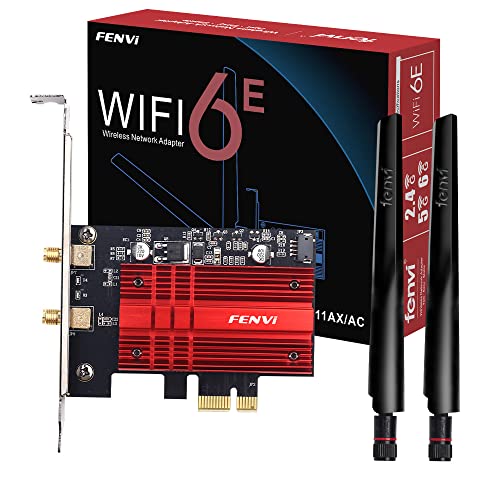
Fenvi squeezes tri-band Wi-Fi 6E support into a budget card using a compact Intel-based module and simpler antenna hardware. Streaming to several devices at once stays smooth, since the added 6GHz capacity spreads the load. No low-profile bracket ships in the box, which limits case compatibility.
Pros
- 6GHz band spreads load across multiple devices
- Priced below most 6E competitors
- Bluetooth 5.2 pairs modern accessories reliably
Cons
- Ships without a low-profile bracket
- Lesser-known brand for long-term driver support
EDUP EP-9603AX
A metal heatsink covers the chipset here, keeping temperatures down during long downloads, unusual at this price point. Two antennas connect through standard RP-SMA cables, so swapping in larger third-party antennas later stays simple. Bluetooth support tops out at version 5.1.
Pros
- Heatsink keeps chipset cool under sustained load
- RP-SMA antennas allow later upgrades
- Lowest price point in this comparison
Cons
- No 6GHz band available
- Driver updates arrive less frequently than rivals

ASUS PCE-AX3000
ASUS shrinks the card body to fit mini-ITX and slim desktop cases where clearance runs tight. A low-profile bracket comes standard rather than sold separately. Wi-Fi 6 speeds and Bluetooth 5.0 cover typical desktop needs, though 6GHz support is absent.
Pros
- Compact body fits tight mini-ITX cases
- Low-profile bracket included as standard
- Reliable ASUS driver track record
Cons
- No 6GHz band for newer routers
- Antennas run smaller than full-size cards
What to look for
What a PCIe Wi-Fi card actually fixes A desktop tower usually sits on the floor or tucked under a desk, both poor spots for wireless signal. Onboard motherboard antennas, when present, sit inches from a metal case and a graphics card. Routing that antenna onto a cable through a PCIe card lifts it above the desk, closer to a clear line of sight to the router.
Wi-Fi 6 vs Wi-Fi 6E vs Wi-Fi 7, which matters now Wi-Fi 6 cards cover 2.4GHz and 5GHz, enough bandwidth for most homes today. Adding the 6GHz band through Wi-Fi 6E only helps when the router also broadcasts it and nearby 5GHz traffic runs heavy. Wi-Fi 7 cards exist but demand a matching router to show any benefit, so a 6E card is the better value right now for most buyers.
How antenna placement changes real-world speed Placement often matters more than chipset generation on a spec sheet. A magnetic antenna base lets you set the antenna away from the case, closer to a clear path toward the router. Fixed dipole antennas screwed directly to the bracket stay trapped behind the tower, which is why a desk against an exterior wall can benefit more from a repositionable antenna than a faster chipset.
Bluetooth, brackets and driver stability for small cases Bundled Bluetooth on most PCIe cards saves buying a separate dongle for a controller or headset. Small cases need a low-profile bracket, and some brands sell that bracket separately rather than including it. Owner reports on driver stability through Windows updates matter as much as the throughput number printed on the box.
How they stack up
| # | Model | Wi-Fi standard | Best for | Score | Price |
|---|---|---|---|---|---|
| 1 | TP-Link Archer TXE75E | Wi-Fi 6E, AXE5400 | Best overall | 9.4 | Check price |
| 2 | ASUS PCE-AX58BT | Wi-Fi 6, AX3000 | Best value | 9.1 | Check price |
| 3 | GIGABYTE GC-WBAX210 | Wi-Fi 6E, AX210 chipset | Best for 6GHz on a budget | 8.9 | Check price |
| 4 | TP-Link Archer TX3000E | Wi-Fi 6, AX3000 | Best for gaming rigs | 8.7 | Check price |
| 5 | Fenvi FV-AXE3000 | Wi-Fi 6E, AXE3000 | Best for multi-device streaming | 8.5 | Check price |
| 6 | EDUP EP-9603AX | Wi-Fi 6, AX3000 | Best budget | 8.2 | Check price |
| 7 | ASUS PCE-AX3000 | Wi-Fi 6, AX3000 | Best for small form factor PCs | 8.0 | Check price |
Questions worth asking
Is a PCIe Wi-Fi card better than a USB adapter?
Generally yes, since a PCIe card connects directly to the motherboard bus and usually carries larger antennas than a USB dongle. USB adapters still make sense for laptops or whenever opening a case is not practical.
Do I need Wi-Fi 6E, or is Wi-Fi 6 enough?
Wi-Fi 6 covers most homes without a 6E router already installed. The 6GHz band only helps once your router broadcasts it and nearby 5GHz congestion is slowing things down.
Can I install a PCIe Wi-Fi card myself?
Yes, it slots into an open PCIe x1 slot much like a small expansion card. Power down the PC, ground yourself, seat the card, screw in the bracket, then attach the antenna and install drivers.
Which PCIe Wi-Fi card works best for gaming?
TP-Link Archer TX3000E is tuned for lower latency under load, which competitive players notice more than raw throughput. Wired Ethernet still beats any wireless card when the lowest possible latency matters most.
Do PCIe Wi-Fi cards include Bluetooth?
Most current cards do, ranging from Bluetooth 5.0 to 5.3 depending on the model. Checking the version matters if you plan to pair a modern headset or controller expecting a newer standard.
Will a PCIe Wi-Fi card fit a small form factor PC?
Only if it ships with or supports a low-profile bracket, and ASUS PCE-AX3000 includes one as standard. Confirm slot clearance in a mini-ITX case before ordering, since full-height brackets will not fit.
How much faster is a PCIe card than onboard Wi-Fi?
Speed gains depend more on antenna placement than the card itself. Moving an antenna away from a metal case and graphics card commonly recovers signal strength that onboard chips lose to interference.
PCIe Wi-Fi card vs mesh router, which fixes dead zones better?
A mesh router extends coverage across an entire house, while a PCIe card only improves the single desktop it is installed in. For one problem PC near a router, a card is the cheaper fix.
What Wi-Fi standard should I buy in 2026?
Wi-Fi 6E offers the best balance of price and future-proofing for anyone with a compatible router already in place. Wi-Fi 7 remains a smaller upgrade for most homes until routers and devices supporting it become common.
Final word
Choose TP-Link Archer TXE75E when the router already supports Wi-Fi 6E and future-proofing matters most. ASUS PCE-AX58BT remains the safer buy for most desktops, trading the 6GHz band for driver stability owners rarely complain about. Budget builders should look at GIGABYTE GC-WBAX210, which brings 6GHz access down near the price of standard Wi-Fi 6 cards.