Portable Laser Pointers That Actually Deliver
The Logitech R800 is the top pick for presenters thanks to its wireless range, green laser visibility, and intuitive controls. Its main limitation is the higher price, but the reliability justifies it for frequent speakers.
A laser pointer is a small tool that makes a big difference in presentations, classrooms, and even playtime with pets. The market is crowded with options ranging from cheap pen-style pointers to advanced presentation remotes. We compared seven currently popular models to help you find the best portable laser pointer for your specific use.
Each product was evaluated based on its specifications, user feedback, and intended purpose. We focused on real-world usability, such as button layout, battery performance, and visibility in various lighting conditions. Our goal is to cut through the marketing and give you honest recommendations.
The shortlist, ranked

Logitech R800 Professional Presenter
The Logitech R800 is a top-tier presenter that combines a bright green laser with a long-range wireless remote. It features a slide control with vibration alert, making it ideal for large venues. The green laser is up to four times more visible than red lasers, ensuring your point is seen even on bright screens.
Pros
- Long wireless range
- Vibration alerts for timing
- Bright green laser
Cons
- Higher price point
- Receiver is required

KNORVAY Laser Pointer Rechargeable
This KNORVAY model offers a solid aluminum body and a bright green laser at a budget-friendly price. It comes with a USB charging cable and a slide control for presentations. Users praise its sturdy feel and easy operation, making it a great everyday carry for educators and business pros.
Pros
- Rechargeable battery
- Durable construction
- Affordable price
Cons
- No wireless remote
- Button placement may be awkward for some

DOGEARS 2 Pack Laser Pointer
This two-pack of red laser pointers is perfect for pet play. The compact design fits in a pocket, and the on-off switch prevents accidental activation. Owners report that their cats love chasing the dot, and the durable plastic withstands drops.
Pros
- Two pointers for backup
- Simple switch
- Low cost
Cons
- Red laser less visible outdoors
- Not suitable for presentations

Skywin Wireless Presenter with Laser Pointer
The Skywin presenter includes a red laser, slide control, and a built-in rechargeable battery. It also functions as a mouse, making it versatile for navigating presentations. The ergonomic design fits comfortably in hand, and the USB receiver stores inside the device.
Pros
- Multiple functions
- Rechargeable
- Compact storage
Cons
- Red laser less visible in bright rooms
- Setup requires software for full features

Geekper 2 in 1 Laser Pointer Pen
The Geekper combines a laser pointer with a ballpoint pen, making it a practical choice for those who take notes during presentations. It features a red laser and a comfortable grip. The pen refills are easy to find, and the aluminum body is lightweight.
Pros
- Pen and pointer in one
- Professional look
- Lightweight
Cons
- Red laser is basic
- No remote control
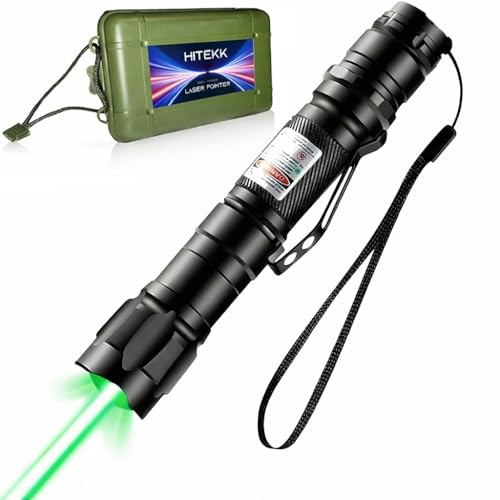
AUGSUN Green Laser Pointer
The AUGSUN green laser pointer is designed for outdoor use, with a beam that is visible at night for pointing out stars and constellations. It comes with a battery and a carrying case. The beam is bright, but caution is advised as it is not a toy.
Pros
- Very bright beam
- Long distance visibility
- Includes case
Cons
- Requires careful handling
- Not for indoor presentations
VANZON Laser Pointer Presentation Remote
This VANZON presenter offers a red laser and basic slide controls at an entry-level price. It runs on two AAA batteries and has a compact design. Users say it works well for small meetings and classrooms, though the range is shorter than pricier models.
Pros
- Very affordable
- Simple setup
- Good for small rooms
Cons
- Shorter range
- Red laser less visible
How to choose
How they compare
| # | Model | Laser Color | Best for | Score | Price |
|---|---|---|---|---|---|
| 1 | Logitech R800 Professional Presenter | Green | Frequent presenters who need reliable wireless control | 9.4 | Check price |
| 2 | KNORVAY Laser Pointer Rechargeable | Green | Professionals and teachers who want a durable metal pointer | 9.0 | Check price |
| 3 | DOGEARS 2 Pack Laser Pointer | Red | Pet owners who need a safe, fun laser for cats and dogs | 8.8 | Check price |
| 4 | Skywin Wireless Presenter with Laser Pointer | Red | Presenters who want an all-in-one remote with multiple features | 8.7 | Check price |
| 5 | Geekper 2 in 1 Laser Pointer Pen | Red | Teachers and lecturers who need a multifunctional tool | 8.5 | Check price |
| 6 | AUGSUN Green Laser Pointer | Green | Stargazers and outdoor enthusiasts who need a high-visibility beam | 8.3 | Check price |
| 7 | VANZON Laser Pointer Presentation Remote | Red | Budget-conscious buyers who want a simple remote with laser | 8.2 | Check price |
Frequently asked questions
What is the best laser pointer for a teacher?
For teachers, the KNORVAY Laser Pointer Rechargeable is a great choice because it is durable, rechargeable, and affordable. Its green laser is visible in bright classrooms, and the metal body withstands daily use.
Are green laser pointers better than red?
Green lasers are more visible to the human eye, up to four times brighter than red lasers, making them better for large rooms or outdoor use. However, red lasers are cheaper and sufficient for small indoor presentations.
Can I use a laser pointer for my cat?
Yes, but use a low-powered red laser pointer specifically designed for pets. The DOGEARS 2 Pack is a safe and affordable option. Avoid shining the laser directly into your pet’s eyes.
What is the range of a typical presentation remote?
Most presentation remotes have a range of 30 to 100 feet. The Logitech R800 offers up to 100 feet, while budget models like the VANZON have about 30 feet. Choose based on the size of your venue.
Do laser pointers require batteries?
Yes, most use AAA batteries, but many modern models have built-in rechargeable batteries. For example, the KNORVAY and Skywin models are rechargeable via USB, which saves money over time.
Is it safe to point a laser pointer at a screen?
Yes, as long as the laser is low-powered and you do not point it at people. Avoid reflective surfaces, as the beam can bounce back. Use a laser with a power output under 5 mW for safety.
Can I use a laser pointer for stargazing?
Yes, a high-powered green laser like the AUGSUN is ideal for pointing out stars. Ensure it is legal in your area and use caution not to shine it at aircraft or people.
What is the difference between a laser pointer and a presentation remote?
A laser pointer only emits a laser dot. A presentation remote includes a laser but also has buttons to control slides, and sometimes a mouse. The Skywin is an example of a full-featured remote.
How do I know if a laser pointer is FDA compliant?
Look for a label indicating the class (Class 2 or 3R) and power output. Reputable brands like Logitech and KNORVAY provide this information. Avoid unbranded products with no safety labels.
Our take
The Logitech R800 Professional Presenter is the best portable laser pointer overall for serious presenters, thanks to its reliable wireless range and bright green laser. If you need a budget-friendly option for classroom or office use, the KNORVAY Laser Pointer Rechargeable offers excellent value. For pet owners, the DOGEARS 2 Pack is the safest and most fun choice. Choose based on your primary need: Logitech for professional presentations, KNORVAY for everyday teaching, and DOGEARS for play.
You might also need

Wireless Car Amplifiers That Actually Deliver Clean Sound

7 Desk Organisers That Actually Keep Clutter Off Your Desk

Best Portable Access Points for Reliable Wi Fi on the Go
