Top Premium Laptops for Discerning Users
The Apple MacBook Pro 14-inch M3 Max stands out as the top pick for creative professionals who demand maximum performance in a portable form, offering exceptional CPU and GPU power, but its premium price and limited port selection may give some pause.
Choosing a premium laptop is about more than just power. It is about craftsmanship, display brilliance, and a seamless experience. These machines are investments for those who work, create, and play without compromise.
We have curated a list of the finest premium laptops available today, each excelling in different areas. From ultraportables to workstations, this guide will help you find the perfect match for your lifestyle.
Our top picks

Apple MacBook Pro 14-inch M3 Max
The 14-inch MacBook Pro with the M3 Max chip is a powerhouse for video editing, 3D rendering, and software development. Its Liquid Retina XDR display is stunning, and the build is top tier, though battery life suffers under heavy load.
Pros
- Exceptional performance for demanding tasks
- Outstanding display with ProMotion
- Superb build quality and trackpad
Cons
- Very expensive
- Limited port selection (only Thunderbolt)

Dell XPS 16 (2024)
The Dell XPS 16 combines a sleek aluminum chassis with the latest Intel Core Ultra processors and NVIDIA GeForce RTX 40 series graphics. It offers a gorgeous 4K OLED display and a comfortable keyboard, making it ideal for both work and play.
Pros
- Stunning OLED display
- Powerful performance with dedicated GPU
- Excellent keyboard and trackpad
Cons
- Battery life is average
- Can run warm under load

Lenovo ThinkPad X1 Carbon Gen 12
The ThinkPad X1 Carbon is legendary for its keyboard and durability. The Gen 12 model features Intel Core Ultra processors, a 14-inch 2.8K OLED display, and military-grade toughness, all in a 2.4-pound package.
Pros
- Lightweight and durable
- Best-in-class keyboard
- Long battery life
Cons
- Integrated graphics only
- Pricey for the specs
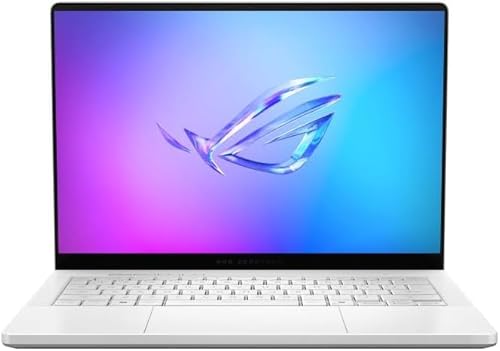
ASUS ROG Zephyrus G14 (2024)
Packing an AMD Ryzen 9 and RTX 4070, the Zephyrus G14 is a compact 14-inch powerhouse. Its 3K OLED display is vivid, and the magnesium alloy chassis keeps it light, though fan noise can be noticeable.
Pros
- Excellent gaming performance in a small size
- Beautiful OLED panel
- Good selection of ports
Cons
- Battery life is shorter under gaming
- Fans get loud under load

Microsoft Surface Laptop Studio 2
The Surface Laptop Studio 2 features a unique pull-forward display that transitions from laptop to studio mode. It has a vibrant 14.4-inch touchscreen and powerful internals, including an RTX 4050, making it a creative workhorse.
Pros
- Innovative hinge design
- Great for drawing with Surface Pen
- Solid performance
Cons
- Heavier than some competitors
- Battery life is below average

Razer Blade 16 (2024)
The Razer Blade 16 is a gaming laptop that looks like a professional machine. It offers a 16-inch dual-mode mini-LED display (4K 120Hz or FHD 240Hz), an Intel Core i9, and RTX 4090 graphics, delivering desktop-level gaming.
Pros
- Exceptional gaming performance
- Sleek and premium build
- Innovative dual-mode display
Cons
- Very expensive
- Runs hot and loud

HP Spectre x360 16 (2024)
The HP Spectre x360 16 offers a convertible design with a stunning OLED display and powerful audio from Bang & Olufsen. It is equipped with Intel Core Ultra 7 and an RTX 4050, making it versatile for work and entertainment.
Pros
- Great display and sound
- Versatile 2-in-1 form
- Good port selection
Cons
- A bit heavy for a 2-in-1
- Battery life could be better
Before you buy
How they compare
| # | Model | Processor | Best for | Score | Price |
|---|---|---|---|---|---|
| 1 | Apple MacBook Pro 14-inch M3 Max | Apple M3 Max (16-core CPU, 40-core GPU) | Creative professionals needing raw power | 9.6 | Check price |
| 2 | Dell XPS 16 (2024) | Intel Core Ultra 7 155H | Windows users wanting premium build and performance | 9.3 | Check price |
| 3 | Lenovo ThinkPad X1 Carbon Gen 12 | Intel Core Ultra 7 155U | Business travelers seeking durability and lightweight | 9.1 | Check price |
| 4 | ASUS ROG Zephyrus G14 (2024) | AMD Ryzen 9 8945HS | Gamers and creators who want portability with power | 9.0 | Check price |
| 5 | Microsoft Surface Laptop Studio 2 | Intel Core i7-13800H | Artists and designers who need a versatile form factor | 8.8 | Check price |
| 6 | Razer Blade 16 (2024) | Intel Core i9-14900HX | Gamers who want a premium aesthetic with top performance | 8.7 | Check price |
| 7 | HP Spectre x360 16 (2024) | Intel Core Ultra 7 155H | Multimedia enthusiasts who want a 2-in-1 with great audio | 8.5 | Check price |
Frequently asked questions
What is the best premium laptop for video editing?
The Apple MacBook Pro 14-inch with M3 Max is widely regarded as the best for video editing due to its powerful GPU and optimized software like Final Cut Pro. Its high-performance cores and media engine handle 4K and 8K footage smoothly.
Are premium laptops worth the extra cost?
Yes, for those who value build quality, display accuracy, and performance. Premium laptops use higher-grade materials, offer better screens and keyboards, and often have superior customer support. However, mid-range laptops can suffice for basic tasks.
How long do premium laptops typically last?
With proper care, a premium laptop can last 5 to 7 years or more. Their components are often more robust, and they receive longer software support. Upgrading RAM or storage is possible in some models, extending their usable life.
What is the difference between OLED and Mini-LED displays?
OLED displays have self-emissive pixels, providing true blacks and infinite contrast, but can suffer from burn-in. Mini-LED uses a backlight with many small zones, offering high brightness and HDR performance without burn-in risk, though with some blooming.
Can I use a premium laptop for gaming?
Many premium laptops come with dedicated GPUs and can handle modern games at high settings. The Razer Blade 16 and ASUS ROG Zephyrus G14 are excellent choices. However, they may run louder and hotter than gaming-specific laptops.
Which premium laptop has the best battery life?
The Apple MacBook Pro 14-inch and Lenovo ThinkPad X1 Carbon are known for excellent battery life, often exceeding 10 hours on a single charge. Windows laptops with Intel Core Ultra processors also offer improved efficiency.
Is a 2-in-1 premium laptop as good as a traditional laptop?
Yes, 2-in-1s like the HP Spectre x360 offer flexibility for touch and pen use, as well as tent and tablet modes. They are slightly heavier but provide great value for artists and presenters. Performance is comparable to traditional laptops.
How much RAM and storage do I need in a premium laptop?
For most users, 16GB RAM and 512GB SSD are sufficient. For heavy multitasking, creative work, or gaming, consider 32GB RAM. Storage needs vary, but 1TB offers a comfortable buffer for large files and applications.
Our take
If you are a creative professional who requires the utmost performance and have the budget, choose the Apple MacBook Pro 14-inch M3 Max. For Windows users who want a balance of power and portability, the Dell XPS 16 is an excellent choice. Gamers should opt for the Razer Blade 16 or ASUS ROG Zephyrus G14. Business travelers will appreciate the Lenovo ThinkPad X1 Carbon. Ultimately, the best laptop aligns with your specific tasks and preferences.


