Top Tier Mini PCs That Punch Above Their Size
The Apple Mac mini with M4 chip is the top pick for most people who want a premium mini PC, thanks to its outstanding performance per watt, silent operation, and macOS ecosystem. Its main limitation is the lack of upgradeability and limited ports, but for everyday productivity, creative work, and media consumption, it delivers an unmatched experience.
Premium mini PCs offer desktop-level power in a footprint that fits in the palm of your hand. They are ideal for professionals, creators, and enthusiasts who value space and aesthetics without compromising performance.
With advances in processor technology, these compact computers now rival traditional towers. We have selected seven models that stand out for their build quality, performance, and features, ensuring you get the best value for your investment.
How to pick the right one
Our top picks

Apple Mac mini with M4 chip
The latest Mac mini features Apple’s M4 chip, delivering exceptional single-core and multi-core performance. It supports up to three displays and offers a silent, fanless design for quiet operation. With macOS, it provides a seamless experience for creative software and productivity apps.
Pros
- Outstanding performance per watt
- Silent operation
- Compact and elegant design
Cons
- Limited upgradeability
- Fewer ports than some rivals

Intel NUC 14 Pro
Powered by Intel Core Ultra processors, the NUC 14 Pro offers robust performance and comprehensive security features. Its tool-less chassis allows easy access to memory and storage, making upgrades simple. It includes a wide array of ports including Thunderbolt 4 and 2.5GbE.
Pros
- Easy internal upgrades
- Strong security features
- Reliable business performance
Cons
- Integrated graphics not for gaming
- Price can escalate with options

ASUS ROG NUC 970
The ROG NUC packs an Intel Core Ultra 9 processor and an NVIDIA GeForce RTX 4070 GPU into a compact chassis. It delivers desktop-class gaming performance with support for 4K gaming and VR. Its aggressive design and customizable RGB lighting appeal to gamers.
Pros
- High-end gaming performance
- RTX graphics for ray tracing
- Compact but powerful
Cons
- Runs louder under load
- Premium price tag

Minisforum EliteMini AI370
Featuring the AMD Ryzen AI 9 HX 370 processor with built-in NPU, this mini PC is optimized for AI tasks and efficient multitasking. It includes dual 2.5GbE ports and supports up to four displays, making it suitable for developers and power users.
Pros
- Powerful AI acceleration
- Plenty of memory and storage
- Dual Ethernet for networking
Cons
- Design is utilitarian
- No Thunderbolt support
Apple Mac mini with M4 Pro chip
The Mac mini with M4 Pro chip offers even more CPU and GPU cores, making it ideal for video editing, software development, and complex simulations. It supports up to three displays and provides faster memory bandwidth. A serious step up for demanding workflows.
Pros
- Exceptional multi-core performance
- Supports three displays
- Future-proof with Thunderbolt 5
Cons
- Higher cost
- Still limited upgradeability

Intel NUC 13 Pro
The NUC 13 Pro offers solid performance with Intel Core i7 processors and supports up to 64GB of RAM. It includes a variety of ports, including Thunderbolt 4 and 2.5GbE, and is known for its reliability and wide driver support. A great choice for those who want a dependable workhorse.
Pros
- Reliable performance
- Broad compatibility
- Lower price point
Cons
- Older architecture
- DDR4 memory not as fast
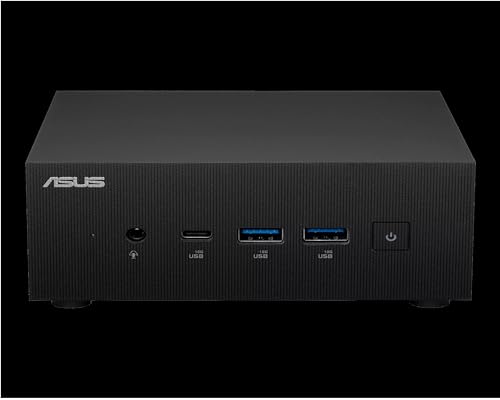
ASUS ExpertCenter PN65
The ExpertCenter PN65 is a business-focused mini PC with Intel Core Ultra processors and vPro support for enhanced security. It offers dual LAN ports and a range of I/O options. Its compact design and comprehensive management features make it easy to deploy in corporate environments.
Pros
- vPro for remote management
- Dual LAN ports
- Robust build quality
Cons
- Average graphics performance
- Limited upgradeability compared to some
Compared at a glance
| # | Model | Processor | Best for | Score | Price |
|---|---|---|---|---|---|
| 1 | Apple Mac mini with M4 chip | Apple M4 chip with 10-core CPU | Best overall for macOS users and creative pros | 9.5 | Check price |
| 2 | Intel NUC 14 Pro | Intel Core Ultra 7 165H | Best for business and professional use | 9.2 | Check price |
| 3 | ASUS ROG NUC 970 | Intel Core Ultra 9 185H | Best for gaming and graphics-intensive tasks | 9.0 | Check price |
| 4 | Minisforum EliteMini AI370 | AMD Ryzen AI 9 HX 370 | Best for AI workloads and multitasking | 8.8 | Check price |
| 5 | Apple Mac mini with M4 Pro chip | Apple M4 Pro with 12-core CPU | Best for professionals needing extra performance | 9.1 | Check price |
| 6 | Intel NUC 13 Pro | Intel Core i7-1360P | Best for legacy compatibility and affordability | 8.5 | Check price |
| 7 | ASUS ExpertCenter PN65 | Intel Core Ultra 5 125H | Best for small business and office use | 8.3 | Check price |
Frequently asked questions
Are mini PCs as powerful as desktop towers?
Yes, modern premium mini PCs often match or exceed the performance of traditional towers, especially with the latest processors and graphics. They are ideal for most tasks except for extreme gaming or heavy rendering that require full-size GPUs.
Can I game on a mini PC?
Some mini PCs come with discrete graphics like the NVIDIA RTX 4070, which can handle modern games at high settings. Others with integrated graphics are fine for esports and older titles. Check the specifications for gaming capabilities.
How do I upgrade memory or storage in a mini PC?
Many mini PCs have accessible panels that allow you to replace RAM modules and M.2 SSDs. Refer to the user manual for instructions. Some models, like the Intel NUC, are designed for easy upgrades, while others have soldered components.
What is the power consumption of a mini PC?
Mini PCs consume significantly less power than desktops, often between 15W and 90W under load. This makes them energy-efficient and cost-effective to run continuously.
Can I use a mini PC as a home server or for virtualization?
Absolutely. Many mini PCs are used as home servers, media centers, or virtualization hosts due to their low power draw and sufficient performance. Models with multiple Ethernet ports are particularly suited for networking tasks.
How many displays can I connect?
Premium mini PCs typically support two to four displays, depending on the model and port configuration. For example, the Mac mini supports up to three displays, while some Windows mini PCs with USB4 or Thunderbolt can drive four.
Are mini PCs reliable?
Yes, mini PCs are generally reliable, especially those from established brands. They have fewer moving parts than desktops, and solid-state storage improves durability. Good thermal design ensures longevity.
What is the difference between NUC and other mini PCs?
Intel NUC is a specific line of mini PCs known for their compact size and customization options. Other brands like ASUS and Minisforum offer similar products with varying features, performance, and price points.
Do mini PCs come with an operating system?
Some come with Windows pre-installed, while others may be barebones, requiring you to add memory, storage, and an OS. Apple’s Mac mini includes macOS. Check the listing to see what is included.
Can I use a mini PC for 4K video editing?
Yes, many premium mini PCs with powerful CPUs and sufficient RAM can handle 4K video editing. For smooth playback and rendering, look for models with dedicated graphics or advanced integrated GPUs.
Our pick
For the majority of users, the Apple Mac mini with M4 chip delivers the best combination of performance, efficiency, and user experience, making it our top recommendation. If you need maximum gaming performance, the ASUS ROG NUC is the clear choice. For business environments, the Intel NUC 14 Pro offers reliability and management features that are hard to beat.


