Premium Tablets That Justify Their Price Tag
The Apple iPad Pro 13-inch M4 is the top premium tablet for most people because it combines a stunning Ultra Retina XDR display with the powerful M4 chip and a vast app ecosystem. Its main limitation is the high cost of accessories like the Magic Keyboard and Apple Pencil Pro, which pushes the total price even higher.
Premium tablets have evolved into powerful devices that can replace laptops for many tasks. With prices often exceeding current price it’s essential to choose one that fits your specific workflow.
From the iPad Pro’s pro-grade performance to the Samsung Galaxy Tab S9 Ultra’s massive screen, we break down the best options available today. Our selections are based on specifications, expert reviews, and user feedback.
Our top picks

Apple iPad Pro 13-inch (M4)
The iPad Pro with the M4 chip delivers desktop-class performance in a thin and light design. The Ultra Retina XDR display is stunning, and the Apple Pencil Pro adds new creative possibilities. Battery life is solid, but the accessory costs add up quickly.
Pros
- Exceptional performance for video editing and 3D design
- Outstanding display with high brightness
- Excellent app ecosystem for artists and professionals
Cons
- Magic Keyboard and Apple Pencil sold separately
- iPadOS limits some desktop workflows

Samsung Galaxy Tab S9 Ultra
The Galaxy Tab S9 Ultra features a massive 14.6-inch AMOLED display, making it ideal for watching movies and running multiple apps side by side. The included S Pen is a bonus, and the Snapdragon 8 Gen 2 chip handles demanding tasks effortlessly. Its size can be unwieldy for travel.
Pros
- Gorgeous, immersive AMOLED display
- S Pen included with low latency
- Dex mode for desktop-like multitasking
Cons
- Large and heavy at 1.6 pounds
- Android tablet app optimization still lags

Microsoft Surface Pro 9
The Surface Pro 9 runs full Windows 11, so you can use all your desktop software. The 13-inch PixelSense display is sharp, and the Intel Evo platform delivers reliable performance. It is a true 2-in-1, but the keyboard is not included, and battery life is average.
Pros
- Runs full Windows software
- Great build quality with a versatile kickstand
- Thunderbolt 4 for fast data transfer
Cons
- Keyboard and Surface Slim Pen are extra
- Fan can be audible under load

Apple iPad Air 11-inch (M2)
The iPad Air now features the M2 chip, bringing fast performance and support for the Apple Pencil Pro. The 11-inch Liquid Retina display is bright and colorful. It lacks the ProMotion 120Hz refresh rate and the display is not as advanced as the Pro, but it offers a great balance of power and price.
Pros
- Powerful M2 chip for the price
- Supports the latest Apple Pencil Pro
- Lighter and more portable than the Pro
Cons
- No ProMotion or HDR display
- Only two speakers versus four on the Pro
Samsung Galaxy Tab S9+
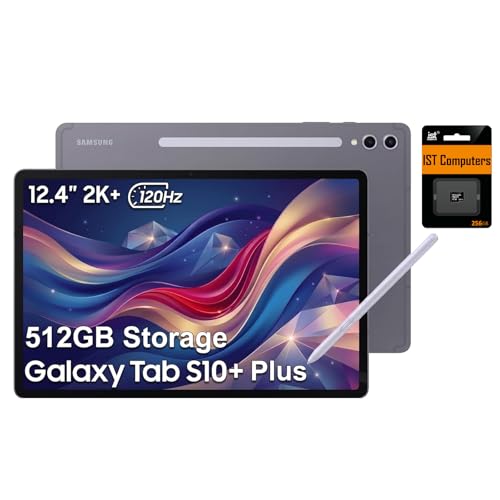
The Galaxy Tab S9+ offers a 12.4-inch AMOLED display with a smooth 120Hz refresh rate. The S Pen is included and works flawlessly for drawing and note-taking. Its Snapdragon 8 Gen 2 chip ensures smooth performance, and the tablet has an IP68 rating for water resistance. Battery life is good but not best in class.
Pros
- Excellent S Pen experience with low latency
- Beautiful AMOLED screen
- IP68 water and dust resistance
Cons
- Android apps not always optimized for tablets
- Battery life could be longer

Apple iPad Pro 11-inch (M4)
The 11-inch iPad Pro packs the same M4 power as its bigger sibling but in a more portable form. It is lighter and easier to hold for reading and gaming. The display is not as bright as the 13-inch model, but it is still excellent. It offers a great balance for those who want pro performance in a smaller size.
Pros
- Compact and lightweight
- Same M4 chip as the 13-inch model
- Great for travel and one-handed use
Cons
- Smaller screen may limit multitasking
- Battery life is shorter than the 13-inch due to size

Lenovo Tab Extreme
The Lenovo Tab Extreme offers a 14.5-inch OLED display with a 120Hz refresh rate, making it a fantastic choice for streaming and split-screen work. It includes a stylus and a kickstand in the box, adding value. The MediaTek Dimensity 9000 chip provides solid performance for everyday tasks. Its software update policy is not as long as competitors.
Pros
- Large OLED screen with high refresh rate
- Stylus and kickstand included
- Lower price than Samsung’s Ultra
Cons
- Software updates may be less frequent
- Performance not as high as Snapdragon 8 Gen 2
The lineup, side by side
| # | Model | Display | Best for | Score | Price |
|---|---|---|---|---|---|
| 1 | Apple iPad Pro 13-inch (M4) | 13-inch Ultra Retina XDR (Tandem OLED) | Creative professionals and power users | 9.6 | Check price |
| 2 | Samsung Galaxy Tab S9 Ultra | 14.6-inch Dynamic AMOLED 2X, 120Hz | Android users who want a large screen for media and multitasking | 9.2 | Check price |
| 3 | Microsoft Surface Pro 9 | 13-inch PixelSense Flow, 120Hz | Business users needing a full Windows laptop replacement | 9.0 | Check price |
| 4 | Apple iPad Air 11-inch (M2) | 11-inch Liquid Retina (LED) | Users who want iPad Pro features at a lower price | 9.0 | Check price |
| 5 | Samsung Galaxy Tab S9+ | 12.4-inch Dynamic AMOLED 2X, 120Hz | Creatives who prefer Android and need a high-quality S Pen experience | 8.8 | Check price |
| 6 | Apple iPad Pro 11-inch (M4) | 11-inch Ultra Retina XDR (Tandem OLED) | Portability without sacrificing performance | 9.2 | Check price |
| 7 | Lenovo Tab Extreme | 14.5-inch OLED, 120Hz | Media consumption and multitasking on a budget compared to rivals | 8.6 | Check price |
How to choose
Common questions
What is the best premium tablet for drawing?
The iPad Pro with the Apple Pencil Pro is widely regarded as the best for drawing due to its low latency, precise pressure sensitivity, and a vast range of professional art apps. Samsung’s Galaxy Tab S9 series also offers an excellent S Pen experience, but many artists prefer the iPad’s app ecosystem.
Can a premium tablet replace a laptop?
Yes, for many users. The iPad Pro with a Magic Keyboard and the Surface Pro 9 can handle most laptop tasks, from word processing to photo editing. However, if you rely on specialized desktop software that lacks a tablet version, a Windows tablet like the Surface Pro is the only option that runs full applications.
Is it worth buying a tablet with an OLED display?
OLED displays offer superior contrast, deeper blacks, and more vibrant colors than standard LCDs. This makes a significant difference when watching movies or editing photos. Premium tablets from Samsung and Lenovo use OLED panels, while Apple uses Tandem OLED on the iPad Pro. The improvement in visual quality is worth it for media enthusiasts and creative professionals.
How much storage do I need on a premium tablet?
For most people, 256GB is sufficient, especially if you stream content and use cloud storage. If you download large videos or work with high-resolution files, consider 512GB or more. Some tablets, like the Galaxy Tab S9 Ultra, offer expandable storage, which can be a cost-effective way to increase capacity.
Are premium tablets good for gaming?
Yes, premium tablets have powerful processors that can handle many popular games. The iPad Pro’s M4 chip and the Galaxy Tab S9’s Snapdragon 8 Gen 2 deliver high frame rates in mobile games. However, the game library is less extensive than on PCs or consoles. For casual gaming, these tablets are excellent.
What is the difference between the iPad Air and iPad Pro?
The iPad Pro offers a better display with ProMotion (120Hz) and Tandem OLED, more powerful M4 chip, additional RAM, and support for Thunderbolt. The iPad Air has the M2 chip, a standard 60Hz display, and uses a more limited USB-C port. For heavy creative work, the Pro is worth the extra cost; for general use, the Air is often sufficient.
Do premium tablets come with a stylus?
It varies. Samsung includes the S Pen with its Galaxy Tab S9 series. Lenovo includes a stylus with the Tab Extreme. Apple sells the Apple Pencil separately. Microsoft’s Surface Slim Pen is also sold separately. Check the bundle to see what is included before purchasing.
How long do premium tablet batteries last?
Most premium tablets offer between 10 and 15 hours of mixed usage. The Galaxy Tab S9 Ultra can last up to 14 hours of video playback, while the iPad Pro is rated for 10 hours. Actual battery life depends on screen brightness, tasks performed, and connectivity. For all-day use, any of these tablets should suffice.
Which tablet has the best screen for outdoor use?
The iPad Pro’s Ultra Retina XDR display has a peak brightness of 1,600 nits in HDR, making it highly visible in bright sunlight. The Samsung Galaxy Tab S9 Ultra also has a bright AMOLED screen with 1,750 nits peak brightness. Both are excellent for outdoor use, but the iPad Pro has a slight edge in anti-reflective coating.
Is it better to buy a tablet with a cellular connection?
If you need internet access without Wi-Fi, a cellular model is convenient, but it adds cost and requires a data plan. Most users rely on Wi-Fi and can tether to their phone when needed. Consider your lifestyle; if you travel frequently or work on the go, cellular may be worth it.
The verdict
For most people, the Apple iPad Pro 13-inch (M4) is the best premium tablet because it combines top-tier performance with the most versatile app ecosystem. However, if you need a full Windows experience, the Microsoft Surface Pro 9 is the clear choice. For Android fans who prioritize entertainment, the Samsung Galaxy Tab S9 Ultra offers an unmatched display. Buy the iPad Pro for creativity and general use, the Surface Pro for business productivity, and the Galaxy Tab S9 Ultra for media consumption.