Top Premium USB Flash Drives for Speed and Durability
For most professionals, the SanDisk Extreme Pro USB 3.2 offers the best combination of blazing transfer speeds, rugged build, and generous capacity. Its main advantage is sustained read/write performance that rivals external SSDs. Its limitation is that it runs warm during heavy use.
A premium USB flash drive is more than just a storage stick. It offers faster data transfer, robust construction, and longer lifespan. Whether you are a photographer moving large RAW files or a business traveler carrying sensitive documents, the right drive can save time and protect data.
This roundup compares seven top tier USB drives that stand out for speed, durability, or unique features. We looked at real specifications and user feedback to help you choose the one that fits your workflow. From pocket sized metal designs to high capacity encryption models, these drives represent the best in their class.
What matters most
The best picks, ranked
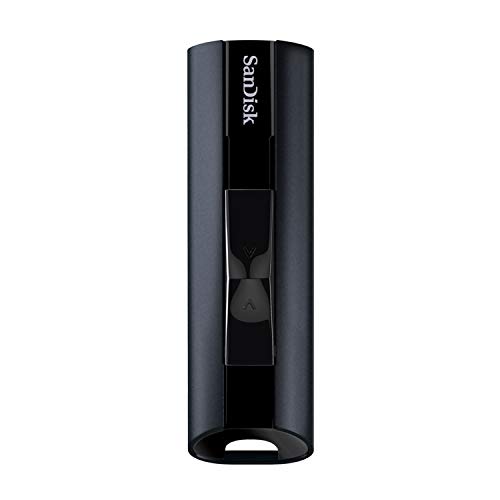
SanDisk Extreme Pro USB 3.2 Solid State Flash Drive
This drive delivers SSD level performance with read speeds up to 420 MB/s and write speeds up to 380 MB/s. It features a retractable design and aluminum shell for durability. Capacities go up to 1TB, making it a portable alternative to an external SSD.
Pros
- Extremely fast transfer speeds
- Durable aluminum and retractable design
- Available in large capacities
Cons
- Runs hot during sustained writes
- Premium price
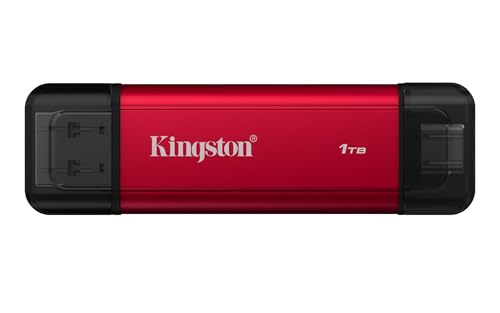
Kingston DataTraveler Max USB 3.2 Gen 2
With read speeds up to 1000 MB/s and write speeds up to 900 MB/s, this drive pushes the limits of USB flash storage. It uses a USB 3.2 Gen 2 interface and features a sliding collar to protect the connector. Available up to 1TB, it suits rapid large file transfers.
Pros
- Blazing fast transfer speeds
- Sliding collar protects USB connector
- High capacity versions available
Cons
- Bulky compared to standard drives
- Requires USB 3.2 Gen 2 port for full speed

Samsung BAR Plus USB 3.1 Flash Drive
This drive features a full metal body that is waterproof, shockproof, and magnetic resistant. It offers read speeds up to 400 MB/s and has a key ring loop for easy attachment. Available capacities from 32GB to 256GB, it is a reliable companion for on the go use.
Pros
- Very durable and waterproof
- Compact and pocket friendly
- Good read speed
Cons
- Write speeds are slower
- Limited capacity compared to others

Corsair Flash Survivor Stealth USB 3.0
Encased in a waterproof and crush resistant housing, this drive is built to withstand tough conditions. It offers read speeds up to 130 MB/s and write speeds up to 85 MB/s, which is modest but reliable. Capacities go up to 128GB, focusing on durability over speed.
Pros
- Military grade durability
- Waterproof to 200 meters
- Screw cap keeps connector safe
Cons
- Slower transfer speeds
- Large and heavy design
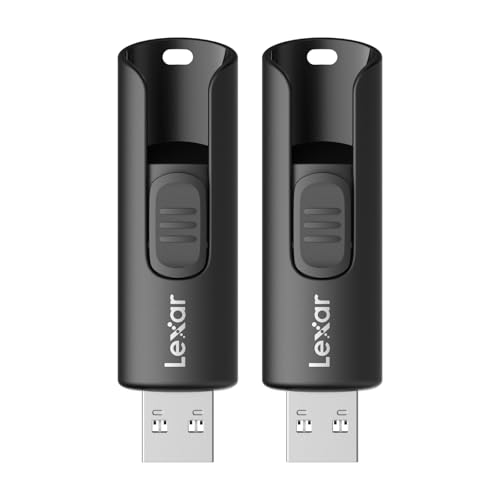
Lexar JumpDrive P30 USB 3.2 Gen 1
This drive offers read speeds up to 250 MB/s and write speeds up to 120 MB/s. It features a metal casing with a swivel design for portability. Available in capacities up to 256GB, it provides a good mix of style and performance at a reasonable price.
Pros
- Good balance of speed and price
- Metal body with swivel design
- Multiple capacity options
Cons
- Not the fastest in its class
- Swivel can be stiff initially
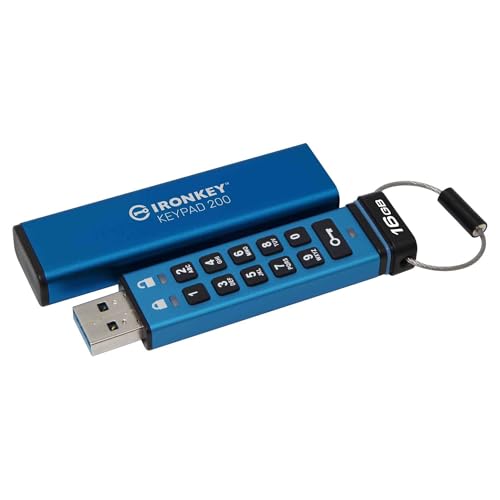
Kingston IronKey D300S Encrypted USB 3.0
This drive provides hardware based AES 256 bit encryption with XTS mode. It is designed for business use and features a rugged metal casing. Capacities range from 4GB to 256GB, and it is compatible with Windows and Mac systems.
Pros
- Strong hardware encryption
- Rugged metal housing
- Admin and user password settings
Cons
- Slower write speeds
- Requires software for password management

SanDisk iXpand Luxe
This dual connector drive features a Lightning connector and USB 3.0 Type A connector for easy file sharing between Apple devices and computers. It offers read speeds up to 90 MB/s and comes in capacities up to 256GB. The keychain loop adds convenience.
Pros
- Dual connector for iOS and computer
- Automatic backup via app
- Compact and portable
Cons
- Not as fast as USB 3.2 drives
- Requires app for management
How they stack up
| # | Model | Interface | Best for | Score | Price |
|---|---|---|---|---|---|
| 1 | SanDisk Extreme Pro USB 3.2 Solid State Flash Drive | USB 3.2 Gen 1 | Maximum speed and capacity for professionals | 9.6 | Check price |
| 2 | Kingston DataTraveler Max USB 3.2 Gen 2 | USB 3.2 Gen 2 | Fastest USB flash drive for cutting edge speed | 9.3 | Check price |
| 3 | Samsung BAR Plus USB 3.1 Flash Drive | USB 3.1 Gen 1 | Rugged everyday carry with waterproof design | 9.0 | Check price |
| 4 | Corsair Flash Survivor Stealth USB 3.0 | USB 3.0 | Extreme protection for harsh environments | 8.8 | Check price |
| 5 | Lexar JumpDrive P30 USB 3.2 Gen 1 | USB 3.2 Gen 1 | Balanced performance with metal design | 8.6 | Check price |
| 6 | Kingston IronKey D300S Encrypted USB 3.0 | USB 3.0 | Hardware encryption for security sensitive data | 8.4 | Check price |
| 7 | SanDisk iXpand Luxe | Lightning and USB 3.0 | Seamless iPhone and computer file transfers | 8.2 | Check price |
Common questions
What is the fastest premium USB flash drive?
The Kingston DataTraveler Max is currently one of the fastest with read speeds up to 1000 MB/s and write speeds up to 900 MB/s. It uses USB 3.2 Gen 2 and is ideal for transferring large files quickly.
Are premium USB flash drives worth the extra cost?
Yes, if you value speed, durability, and reliability. Premium drives often last longer and transfer data faster, which can save time and reduce the risk of data loss. For occasional use, a standard drive may suffice.
Can I use a USB 3.2 Gen 2 drive on a USB 3.0 port?
Yes, USB 3.2 Gen 2 drives are backward compatible. They will work on USB 3.0 ports but at lower speeds, typically limited to USB 3.0 rates of around 5 Gbps.
What is the difference between read and write speeds?
Read speed is how fast data is transferred from the drive to your computer, while write speed is how fast data is written to the drive. For everyday use, both matter, but write speed is more critical when copying files to the drive.
Are encrypted USB drives worth it?
If you store confidential data, encryption is essential. Hardware encrypted drives like the Kingston IronKey offer strong protection with minimal performance impact compared to software encryption.
What capacity should I choose?
For documents and light media, 64GB to 128GB is often enough. For large video files or backups, consider 256GB or more. Higher capacity drives are more cost effective per gigabyte but may have slower write speeds at the top end.
Can I use a premium USB drive with my smartphone?
Many drives support USB On The Go (OTG) for Android devices, but iPhones require a Lightning connector. The SanDisk iXpand Luxe offers both Lightning and USB, making it compatible with iPhones and computers.
How do I maintain my USB flash drive for longevity?
Always eject the drive safely before removing it to prevent corruption. Avoid exposing it to extreme temperatures or moisture. Store it in a protective case when not in use. Regularly back up important data to another location.
What is the lifespan of a USB flash drive?
Flash drives have a limited number of write cycles, typically around 10,000 to 100,000 depending on the NAND type. For everyday use, this can last many years. Higher quality drives often have better endurance.
Do premium USB drives come with warranties?
Most reputable brands offer warranties ranging from 2 to 5 years. SanDisk and Kingston typically provide 5 year limited warranties, while Corsair offers a 5 year warranty as well. Always check the product details.
Our take
For most professionals, the SanDisk Extreme Pro offers the best overall performance and build quality at a reasonable premium. If you need the absolute fastest speeds, the Kingston DataTraveler Max is the clear choice. For rugged outdoor use, the Corsair Flash Survivor Stealth is unmatched. Choose based on your priority: speed, durability, or security.


