Top Printers for Home and Office Use
The HP OfficeJet Pro 9015e is our top pick for most home offices, offering fast printing, automatic duplexing, and a user-friendly touchscreen. Its main advantage is the low cost per page with optional high-yield ink, though it lacks an automatic document feeder for scanning multiple pages unattended.
Printers are essential for many households and businesses, but choosing the right one can be overwhelming. With so many models on the market, it’s important to focus on your specific needs, whether that’s high-volume printing, crisp documents, or vibrant photos.
In this roundup, we’ve analyzed top-rated printers based on specifications, user reviews, and brand reputation. We’ve compared features like print speed, resolution, connectivity options, and running costs to help you make an informed decision.
What we recommend

HP OfficeJet Pro 9015e All-in-One Printer
The HP OfficeJet Pro 9015e is a reliable all-in-one that delivers fast print speeds and impressive color output. It supports mobile printing and has a 250-sheet paper tray. Owners report easy setup and consistent performance.
Pros
- Fast printing for its class
- Auto-duplexing saves paper
- High-yield ink options reduce cost
Cons
- No ADF for multi-page scanning
- Ink cartridges may be pricey

Brother HL-L2350DW Wireless Laser Printer
This compact monochrome laser printer is a workhorse for high-volume text printing. It offers duplex printing, a 250-sheet tray, and a low cost per page. Users appreciate its reliability and straightforward design.
Pros
- Very low cost per page
- Compact and sturdy build
- Automatic duplexing
Cons
- No color printing
- Limited to basic printing functions

Canon PIXMA TR8620a All-in-One Printer
The Canon PIXMA TR8620a is a feature-packed all-in-one with an automatic document feeder, fax capabilities, and a large touchscreen. It produces quality photos and documents. Owners mention the five-ink system yields vibrant colors.
Pros
- ADF for multi-page jobs
- Excellent photo quality
- Versatile media handling
Cons
- Slower print speeds
- Ink replacement can be costly

Epson EcoTank ET-2760 Wireless All-in-One
The Epson EcoTank ET-2760 uses refillable ink tanks instead of cartridges, dramatically lowering printing costs. It includes a scanner and copier. Users report saving hundreds on ink over time, though initial cost is higher.
Pros
- Extremely low cost per page
- High-yield ink bottles included
- Good print quality
Cons
- Slow printing speed
- Small paper tray

HP LaserJet Pro M404dn
The HP LaserJet Pro M404dn is a single-function monochrome laser printer built for speed and durability. It prints up to 40 ppm and handles heavy workloads. It lacks wireless connectivity, but network printing via Ethernet is reliable.
Pros
- Very fast printing
- Robust build quality
- Low cost per page
Cons
- No Wi-Fi
- No scanning or copying
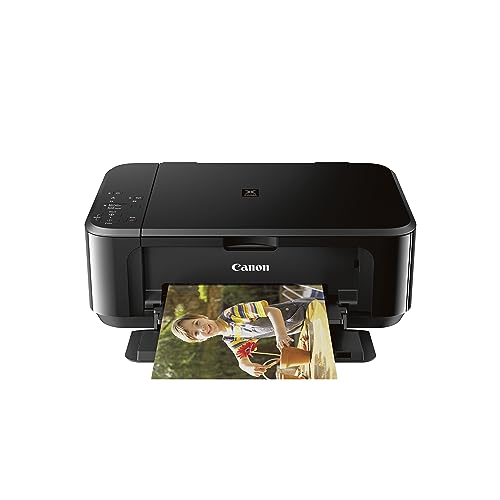
Canon PIXMA MG3620 Wireless Inkjet Printer
The Canon PIXMA MG3620 is an affordable all-in-one for light-duty printing, scanning, and copying. It offers decent quality for documents and photos. Users find it easy to set up and use, though print speeds are modest.
Pros
- Affordable price point
- Compact design
- Wireless printing
Cons
- Slow printing
- High ink replacement costs

Brother MFC-J1010DW Wireless Color Inkjet
The Brother MFC-J1010DW packs fax, scan, copy, and print into a small footprint. It has a 20-sheet ADF and Wi-Fi connectivity. Owners note it’s space-saving and reliable for basic tasks, but ink cartridges are small.
Pros
- Includes fax and ADF
- Compact size
- Touchscreen interface
Cons
- Small ink cartridges
- Average print speed
Side by side
| # | Model | Print Speed | Best for | Score | Price |
|---|---|---|---|---|---|
| 1 | HP OfficeJet Pro 9015e All-in-One Printer | 22 ppm black, 18 ppm color | Home offices needing a versatile all-in-one | 9.4 | Check price |
| 2 | Brother HL-L2350DW Wireless Laser Printer | 32 ppm | Budget-friendly monochrome printing | 9.2 | Check price |
| 3 | Canon PIXMA TR8620a All-in-One Printer | 15 ppm black, 10 ppm color | Family use with frequent scanning and copying | 9.0 | Check price |
| 4 | Epson EcoTank ET-2760 Wireless All-in-One | 10.5 ppm black, 5 ppm color | High-volume printing with low running costs | 9.1 | Check price |
| 5 | HP LaserJet Pro M404dn | 40 ppm | Small offices needing fast monochrome printing | 8.8 | Check price |
| 6 | Canon PIXMA MG3620 Wireless Inkjet Printer | 9.9 ppm black, 5.7 ppm color | Basic home printing and occasional photos | 8.5 | Check price |
| 7 | Brother MFC-J1010DW Wireless Color Inkjet | 12 ppm black, 10 ppm color | Compact all-in-one with fax and ADF | 8.3 | Check price |
What matters most
Frequently asked questions
What is the difference between inkjet and laser printers?
Inkjet printers apply liquid ink and are better for color and photo printing, while laser printers use toner powder and excel at fast, low-cost text printing.
How much does it cost to print a page on average?
Cost per page varies widely. Standard inkjet cartridges may cost 10 to 20 cents per page, while high-yield or laser toner can be under 5 cents. EcoTank models can be as low as 1 cent per page.
Do I need an all-in-one printer or a single-function printer?
If you scan, copy, or fax regularly, an all-in-one is convenient. If you only print, a single-function printer is usually more affordable and compact.
What is the best printer for photos?
For high-quality photos, look for an inkjet printer with multiple ink colors, like the Canon PIXMA series. They typically produce better color accuracy and detail.
Can I print from my smartphone or tablet?
Yes, most modern printers support mobile printing via Wi-Fi. Look for Apple AirPrint, Mopria, or proprietary apps like HP Smart or Canon PRINT.
How long do printer inks last?
Ink cartridges can last months if used regularly. In sealed packaging, they have a shelf life of about two years. Print at least once a week to prevent clogging.
What is an automatic document feeder (ADF)?
An ADF lets you load multiple pages for scanning or copying without manual placement. It’s useful for multi-page documents.
Are wireless printers secure?
Use secure Wi-Fi networks and enable WPA2 encryption. Most modern printers offer firmware updates and support secure printing protocols.
How do I reduce printing costs?
Use draft mode for everyday prints, print in grayscale when color isn’t needed, and choose printers with high-yield ink or toner options. Consider refillable ink tank models for the lowest cost.
What should I do if my printer prints blank pages?
Blank pages often result from clogged printheads or empty ink. Run the printhead cleaning cycle, check ink levels, and ensure the paper is loaded correctly.
The bottom line
For most users, the HP OfficeJet Pro 9015e offers the best balance of speed, features, and print quality, making it our top recommendation. If you print high volumes at minimal cost, the Epson EcoTank ET-2760 is a smarter long-term investment. For text-only printing, the Brother HL-L2350DW is unbeatable for value.


