Top Professional Tablets for Work and Creativity
The Apple iPad Pro 12.9-inch (M2) stands out as the top professional tablet for creative professionals, offering exceptional performance and a stunning display. Its main advantage is the powerful M2 chip and the Apple Pencil hover feature, which enhances precision. However, its main limitation is the high cost, especially when adding the Magic Keyboard and Apple Pencil.
Professional tablets have evolved from content consumption devices to powerful tools for design, engineering, and business. With high-resolution displays, desktop-class processors, and precision styluses, they can replace laptops for many tasks. Choosing the right one depends on your operating system preference, software needs, and portability requirements.
This roundup compares seven leading tablets based on specifications, user feedback, and suitability for various professional tasks. We focus on real-world performance, stylus accuracy, and productivity features to help you make an informed decision.
The top picks, ranked
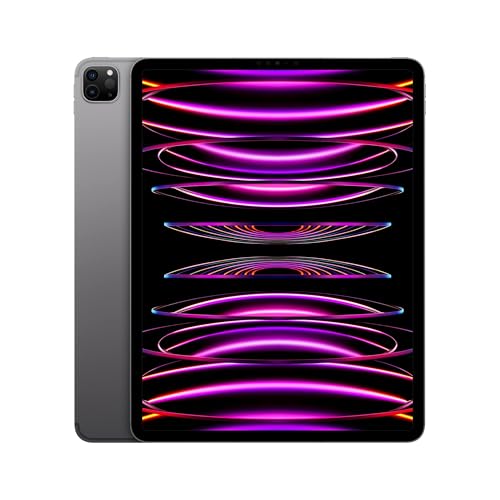
Apple iPad Pro 12.9-inch (M2)
The iPad Pro with M2 chip delivers desktop-class performance in a tablet. Its Liquid Retina XDR display with mini-LED offers exceptional brightness and contrast, ideal for photo and video editing. The Apple Pencil hover feature adds new precision levels. It runs iPadOS, which has become more capable with Stage Manager and external display support.
Pros
- Outstanding performance and graphics
- Best-in-class display for color accuracy
- Excellent stylus support with low latency
Cons
- Expensive when adding accessories
- iPadOS still limits some desktop workflows

Microsoft Surface Pro 9
The Surface Pro 9 runs full Windows 11, giving access to all desktop software including Office, AutoCAD, and Adobe Creative Suite. Its 13-inch PixelSense display is vibrant, and the built-in kickstand offers flexibility. With Intel 12th-gen processors, it handles demanding tasks. The detachable keyboard and Surface Slim Pen 2 provide a laptop-like experience.
Pros
- Full Windows compatibility
- Versatile kickstand and keyboard
- Good performance for productivity
Cons
- Battery life is shorter than ARM rivals
- Keyboard and pen sold separately

Samsung Galaxy Tab S9 Ultra
The Galaxy Tab S9 Ultra boasts a massive 14.6-inch AMOLED display, perfect for split-screen multitasking and media. It comes with the S Pen included, which is great for note-taking and drawing. The Snapdragon 8 Gen 2 processor ensures smooth performance. DeX mode provides a desktop-like interface when connected to a monitor.
Pros
- Huge, beautiful AMOLED display
- S Pen included, saving cost
- Excellent multitasking with DeX
Cons
- Large size may hinder portability
- Android apps not optimized for tablet
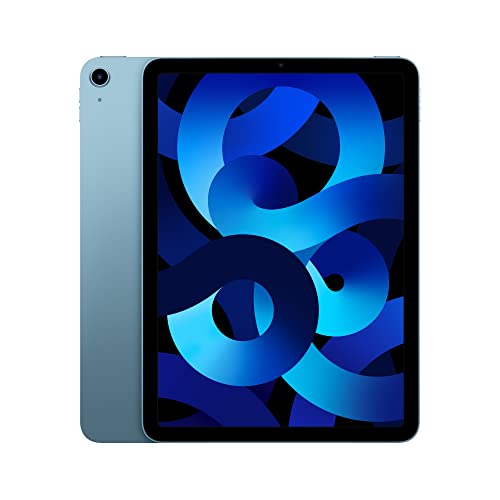
Apple iPad Air 5th Generation
The iPad Air (5th gen) features the M1 chip, delivering powerful performance at a more accessible price than the iPad Pro. It supports the 2nd generation Apple Pencil and Magic Keyboard. The 10.9-inch Liquid Retina display is bright and sharp. It is an excellent choice for note-taking, drawing, and light video editing.
Pros
- M1 chip offers great performance
- Lighter and more portable than Pro
- Supports all key accessories
Cons
- 64GB base storage is limited
- No ProMotion or mini-LED

Lenovo Tab P12 Pro
The Lenovo Tab P12 Pro features a 12.6-inch AMOLED display with a 120Hz refresh rate, making it great for media and art. It includes the Lenovo Precision Pen 3, which offers low latency. The Snapdragon 870 processor is capable for most tasks. It also has a built-in kickstand and can be used with an optional keyboard.
Pros
- Vibrant AMOLED display
- Included stylus with good pressure sensitivity
- Built-in kickstand for hands-free use
Cons
- Performance trails flagship tablets
- Updates may be slower

Microsoft Surface Go 3
The Surface Go 3 is a compact 10.5-inch tablet that runs full Windows. It is ideal for professionals who need a light device for note-taking, email, and Office apps. With an Intel Pentium Gold or Core i3 processor, it handles basic tasks well. The kickstand and keyboard cover make it a versatile mini-laptop.
Pros
- Extremely portable and light
- Full Windows compatibility
- Affordable entry point
Cons
- Performance is limited for heavy tasks
- Battery life is average

Samsung Galaxy Tab S8
The Galaxy Tab S8 offers a 11-inch LCD display with a 120Hz refresh rate that is responsive for the included S Pen. It is powered by the Snapdragon 8 Gen 1 processor, ensuring smooth multitasking. The tablet is well-suited for note-taking, sketching, and running Android productivity apps. Its compact size makes it easy to carry.
Pros
- S Pen included
- High refresh rate for smooth drawing
- Good performance for the price
Cons
- LCD screen not as vibrant as AMOLED
- Updates may not be as frequent as iPad
How to pick the right one
Compared at a glance
| # | Model | Display | Best for | Score | Price |
|---|---|---|---|---|---|
| 1 | Apple iPad Pro 12.9-inch (M2) | 12.9-inch Liquid Retina XDR, 2732×2048, ProMotion | Creative professionals needing maximum performance and display quality | 9.6 | Check price |
| 2 | Microsoft Surface Pro 9 | 13-inch PixelSense, 2880×1920, 120Hz | Professionals needing full Windows desktop in a tablet | 9.3 | Check price |
| 3 | Samsung Galaxy Tab S9 Ultra | 14.6-inch AMOLED, 2960×1848, 120Hz | Android users wanting a large screen for multitasking | 9.1 | Check price |
| 4 | Apple iPad Air 5th Generation | 10.9-inch Liquid Retina, 2360×1640 | Budget-conscious professionals who want Apple ecosystem | 9.0 | Check price |
| 5 | Lenovo Tab P12 Pro | 12.6-inch AMOLED, 2560×1600, 120Hz | Multimedia creators and note-takers on Android | 8.8 | Check price |
| 6 | Microsoft Surface Go 3 | 10.5-inch PixelSense, 1920×1280 | Lightweight tasks and portability | 8.5 | Check price |
| 7 | Samsung Galaxy Tab S8 | 11-inch TFT, 2560×1600, 120Hz | Note-takers and diagramming on a standard size | 8.6 | Check price |
Frequently asked questions
Can professional tablets replace laptops?
For many tasks, yes. Tablets like the iPad Pro and Surface Pro can handle word processing, spreadsheets, presentations, and even creative work. However, for specialized software that requires a full desktop OS, a Windows tablet is necessary.
What is the best tablet for drawing and note-taking?
The iPad Pro with Apple Pencil is often considered the best for drawing due to its low latency and excellent app support. For Android users, the Samsung Galaxy Tab S9 Ultra with S Pen is a close second.
Do I need a keyboard for professional work?
If you do a lot of typing, a keyboard is helpful. Most tablets support detachable keyboards, but they often cost extra. Consider your typing needs before purchasing.
How much storage do I need?
For professional use, aim for at least 256GB. If you work with large files, consider models with 512GB or 1TB, or use cloud storage.
Are Windows tablets better for business?
Windows tablets like the Surface Pro 9 are ideal if you use Windows-only software. They provide a familiar desktop environment and compatibility with office applications.
What is the difference between iPad Air and iPad Pro?
The iPad Pro has a better display (mini-LED), ProMotion, more RAM, and a newer M2 chip. The iPad Air has an M1 chip and a standard LCD. The Pro is for professionals needing top performance.
Can I use a tablet for video editing?
Yes, tablets like the iPad Pro and Surface Pro 9 can handle 4K video editing with apps like LumaFusion or Adobe Premiere Rush. The performance is sufficient for most projects.
Which tablet has the best battery life?
Apple iPads generally offer excellent battery life, often lasting 10 hours or more. Android tablets like the Galaxy Tab S9 also provide long battery life. Windows tablets may have shorter battery life.
The verdict
For most professionals, the Apple iPad Pro 12.9-inch (M2) is the best choice due to its superior display, performance, and stylus experience. If you require full Windows compatibility, choose the Microsoft Surface Pro 9. For Android enthusiasts on a budget, the Galaxy Tab S8 offers great value. Ultimately, assess your specific workflow to select the tablet that aligns with your needs.