Robot Building Kits That Spark Young Inventors
For most kids, the LEGO Boost Creative Toolbox stands out as the top pick, balancing versatility with engaging coding challenges. It suits children aged 7 to 12 who enjoy building and want a taste of programming without a screen-heavy experience. Its main strength is the variety of models you can create from one set, but it does require a tablet or smartphone for the companion app, which some parents may limit.
Robotics kits are a fantastic way to introduce kids to STEM concepts through hands-on play. They teach problem-solving, logic, and fine motor skills while keeping children engaged for hours.
With so many options on the market, choosing the right one can be overwhelming. Our guide breaks down the best kits for various age groups and learning goals, so you can pick one that will truly inspire your child.
The best picks, ranked

LEGO Boost Creative Toolbox
This 847-piece set lets kids build five different models: a robot, a cat, a guitar, a rover, and an auto-builder. The accompanying app uses block-based coding to bring creations to life. Owners report that the instructions are clear and the app is intuitive, though it requires a compatible tablet or phone.
Pros
- Multiple builds from one set
- High-quality LEGO durability
- Engaging app with step-by-step guidance
Cons
- Requires a tablet or smartphone
- App can be glitchy on some devices

Makeblock mBot Robot Kit
The mBot is a two-wheeled robot that kids assemble in about 15 minutes with a screwdriver. It offers three control modes: obstacle avoidance, line following, and manual control via remote. Coding is available through Scratch or Arduino, making it a great stepping stone to text-based programming.
Pros
- Teaches real programming languages
- Fast assembly time
- Expandable with sensors and parts
Cons
- Only one model to build
- Requires separate batteries and screwdriver (included)
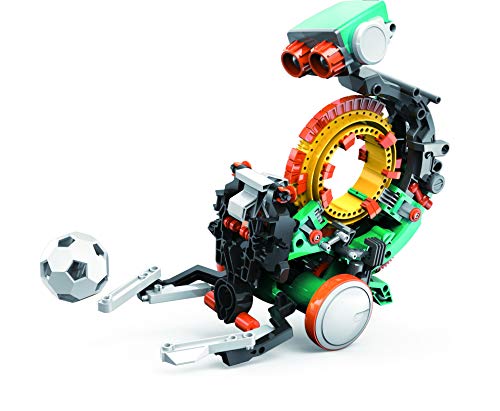
Snap Circuits Teach Tech Mech 5
Mech 5 is a mechanical coding robot that introduces coding concepts without any screens or apps. Kids snap coding buttons into the robot’s head to program it to move, roll, turn, and more. It has 30 pieces and is simple enough for young children to build with minimal help.
Pros
- Teaches basic coding logic without screens
- Durable and easy to handle
- Clear instructions for young kids
Cons
- Limited to pre-programmed actions
- Not as many features as pricier kits

Sphero BOLT
Sphero BOLT is a programmable robotic ball with a 8×8 LED matrix that displays real-time data. It uses the Sphero Edu app for drawing, block-based, and text coding. It is waterproof and has a long battery life, but it is not a traditional build-your-own kit; rather, it is a ready-to-code robot.
Pros
- Advanced coding options including JavaScript
- Interactive LED matrix
- Durable and waterproof
Cons
- No actual building involved
- Requires a tablet or phone for full features

4M Doodling Robot
This small kit allows kids to build a robot that doodles on its own. It uses a vibration motor to create random patterns. It is simple, inexpensive, and perfect for a quick project or a gift. However, it is not programmable and has limited replay value.
Pros
- Very affordable
- Quick and easy assembly
- Introduces basic mechanical concepts
Cons
- Not programmable
- Small pieces may be a choking hazard for very young kids
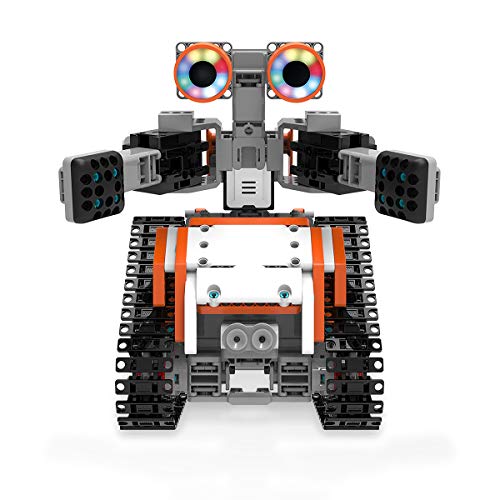
UBTECH Jimu Robot Builder Kit
Jimu Robot kits are known for their compatibility with LEGO bricks, allowing kids to expand their creations. This kit includes over 300 pieces, servo motors, and a controller. The Jimu app provides step-by-step instructions and block coding. It is a bit pricey but offers a unique building experience.
Pros
- LEGO-compatible for endless creativity
- Smooth and responsive servos
- App has detailed 3D instructions
Cons
- Higher price point
- Some users report app connectivity issues

Thames & Kosmos Robotics Workshop
This kit is a full robotics course, with a 96-page manual that teaches kids how to build and program ten different robots. It includes a Bluetooth module and a programming app. It is ideal for older kids who want a deep dive into robotics, though it is complex and may require adult assistance.
Pros
- Extensive manual with STEM lessons
- Variety of robots to build
- Teaches both mechanical and programming skills
Cons
- Complex assembly may frustrate younger users
- Requires batteries and occasional troubleshooting
How they stack up
| # | Model | Pieces | Best for | Score | Price |
|---|---|---|---|---|---|
| 1 | LEGO Boost Creative Toolbox | 847 | Best overall for ages 7 to 12 | 9.4 | Check price |
| 2 | Makeblock mBot Robot Kit | ~50 | Best for learning real coding | 9.1 | Check price |
| 3 | Snap Circuits Teach Tech Mech 5 | 30 | Best for younger kids (5-7) | 8.8 | Check price |
| 4 | Sphero BOLT | 1 (ready-made) | Best for advanced coding enthusiasts | 8.6 | Check price |
| 5 | 4M Doodling Robot | ~10 | Best budget-friendly intro | 8.2 | Check price |
| 6 | UBTECH Jimu Robot Builder Kit | 350+ | Best for LEGO-compatible building | 8.4 | Check price |
| 7 | Thames & Kosmos Robotics Workshop | 200+ | Best for comprehensive learning | 8.7 | Check price |
What matters most
Questions worth asking
What is the best robot kit for a 6-year-old?
The Snap Circuits Teach Tech Mech 5 is ideal for ages 5-7 because it uses large pieces and simple button coding. It is safe and fun, introducing basic logic without screens.
Are robot kits suitable for girls?
Absolutely. Robotics is for everyone. Many kits come in neutral colors and focus on creativity. The LEGO Boost and Makeblock mBot are popular with all kids.
Do these kits require a smartphone or tablet?
Some do, like the LEGO Boost and Sphero BOLT. Others, like the Snap Circuits Mech 5, are screen-free. Check the product specifications to see if an app is required.
How much adult supervision is needed?
For younger kids, adult help is needed for assembly and reading instructions. Older kids can often build independently, but may need help with troubleshooting or app setup.
Can these kits be used for homeschooling?
Yes, many are designed for educational use. The Thames & Kosmos Robotics Workshop includes a detailed manual that can serve as a curriculum for teaching robotics and programming.
What is the difference between a robot kit and a coding toy?
A robot kit typically requires some assembly and building, while a coding toy is often ready to use and focuses purely on programming. This guide focuses on kits that involve building.
Are expensive kits worth the price?
Higher-priced kits often offer more pieces, better quality, and more advanced features. If your child is deeply interested in robotics, they may be worth it. For a casual introduction, a budget option like the 4M Doodling Robot can be enough.
What batteries do these robots need?
Battery requirements vary. The Makeblock mBot uses a 3.7V rechargeable battery (sold separately). The Sphero BOLT has a built-in rechargeable battery. Others may use AA or AAA batteries. Always check the product listing.
Can kids build these robots without reading?
Most kits rely on illustrated instructions. For non-readers, picture-based steps are helpful. However, some app-based instructions require reading. For pre-readers, a kit like the Snap Circuits Mech 5 uses visual color coding.
How long does assembly take?
It depends on the kit. The 4M Doodling Robot can be assembled in 15 minutes. The LEGO Boost may take 2-3 hours. The Makeblock mBot takes about 15 minutes. The Thames & Kosmos kit can take several hours per model.
Our take
For a blend of fun, learning, and value, the Makeblock mBot is the best choice for children aged 8 and up who are ready to dive into real coding. It offers a genuine introduction to both Scratch and Arduino, and its expandable design grows with your child’s skills. If you have a younger child or prefer a screen-free option, the Snap Circuits Mech 5 is an excellent starter that builds a strong foundation in coding logic.