Robot Building Kits for Young Makers
The Makeblock mBot Robot Kit is our top pick for most beginners. It offers a balance of build complexity, coding options, and durability. Its main advantage is the easy drag-and-drop coding software, while its main limitation is that it requires a separate Bluetooth dongle for wireless control.
Robot building kits are a fantastic way to introduce children to STEM learning. They combine hands-on construction with basic engineering and coding principles. Choosing the right starter kit can spark a lifelong interest in technology.
We compared popular kits from leading brands to help you find the perfect match. Our selection includes options for various ages and skill levels, from simple snap-together bots to programmable robots. Each kit offers a unique building experience.
The top picks, ranked

Makeblock mBot Robot Kit
The Makeblock mBot is a classic entry-level robot kit. It uses aluminum parts and a simple screwdriver assembly, making it durable and easy to build. Kids can control it via remote or program it using Scratch-like block coding.
Pros
- Excellent build quality with aluminum parts
- Teaches both block coding and Arduino
- Expandable with sensors and modules
Cons
- Remote control requires a separate dongle
- Bluetooth version costs more

LEGO Boost Creative Toolbox
LEGO Boost combines classic LEGO bricks with motors and sensors. It includes instructions for five models, including a cat and a rover. The accompanying app offers guided coding challenges that are perfect for beginners.
Pros
- Endless creative possibilities with LEGO bricks
- App provides step-by-step instructions
- High quality sensors and motors
Cons
- Requires a tablet or smartphone
- App may be outdated on some devices

Sphero BOLT Coding Robot
Sphero BOLT is a programmable robot ball with a built-in LED matrix. It is more focused on coding than building, but it offers a robust learning experience. The Sphero Edu app supports block and text coding.
Pros
- Durable and waterproof design
- Advanced sensors for programming
- Excellent app with many activities
Cons
- No physical building aspect
- Battery life could be longer
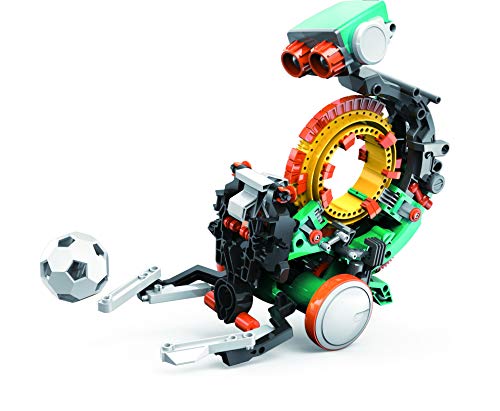
Snap Circuits Teach Tech Mech 5
The Snap Circuits Teach Tech Mech 5 is a mechanical robot that introduces gear and lever systems. It doesn’t require programming, making it an ideal first kit. The build teaches basic mechanical principles.
Pros
- Teaches mechanical engineering without screens
- Affordable price point
- Clear instructions
Cons
- No coding or electronics
- Limited reusability

4M Doodling Robot
The 4M Doodling Robot is a simple vibration-powered bot that draws patterns. It’s inexpensive and quick to assemble, making it a great introduction to robotics. Kids can experiment with different pens and surfaces.
Pros
- Very low cost
- Fast assembly for impatient kids
- Encourages creativity with art
Cons
- Not programmable
- Limited educational depth

Thames & Kosmos Robotics Workshop
Thames & Kosmos Robotics Workshop is a comprehensive kit that lets kids build up to 10 different robots. It includes a control unit and sensors. The manual explains real-world robotics concepts.
Pros
- High educational value
- Multiple building projects
- Detailed manual with experiments
Cons
- More expensive
- Requires careful organization

ELECFREAKS micro:bit Smart Robot Car
This kit uses a micro:bit as the brain. It includes a car chassis and various modules like ultrasonic sensors. It’s ideal for kids who want to combine physical building with programming in MakeCode or Python.
Pros
- Uses popular micro:bit platform
- Expandable with additional sensors
- Teaches real coding languages
Cons
- Requires separate micro:bit
- Small screws may be tricky for younger kids
How they compare
| # | Model | Assembly Time | Best for | Score | Price |
|---|---|---|---|---|---|
| 1 | Makeblock mBot Robot Kit | About 30 minutes | Best Overall Starter | 9.4 | Check price |
| 2 | LEGO Boost Creative Toolbox | 847 pieces | Best for LEGO Fans | 9.2 | Check price |
| 3 | Sphero BOLT Coding Robot | No, ready to use | Best for Coding Education | 9.0 | Check price |
| 4 | Snap Circuits Teach Tech Mech 5 | About 2 hours | Best for Mechanical Understanding | 8.8 | Check price |
| 5 | 4M Doodling Robot | 15 minutes | Best for Quick Fun | 8.5 | Check price |
| 6 | Thames & Kosmos Robotics Workshop | 10 different robots | Best for Advanced Beginners | 9.1 | Check price |
| 7 | ELECFREAKS micro:bit Smart Robot Car | 45 minutes | Best for Micro:bit Enthusiasts | 8.7 | Check price |
How to pick the right one
Common questions
What is the best robot building kit for a 7 year old?
The LEGO Boost Creative Toolbox is suitable for ages 7 and up. It uses LEGO bricks that are familiar and easy to handle. The app offers guided instructions and coding challenges that are appropriate for young learners.
Do robot kits require a smartphone or tablet?
Not all. Some kits, like the Makeblock mBot, can be controlled via remote or programmed on a computer. Others, like LEGO Boost and Sphero BOLT, require a compatible tablet or smartphone for the app. Check the requirements before buying.
Can these kits be used for classroom STEM education?
Yes, many robot kits are used in classrooms. Kits like Sphero BOLT and Makeblock offer educational resources for teachers. They align with curriculum standards and can be used for group activities.
How long does it take to build a typical robot kit?
It varies. Simple kits like the 4M Doodling Robot take about 15 minutes. More complex kits like the Thames & Kosmos Robotics Workshop can take several hours. It also depends on the child’s age and experience.
Are replacement parts available for robot kits?
For major brands like LEGO, Makeblock, and Sphero, you can often find spare parts on their websites or through Amazon. For less common brands, it may be harder to find replacements.
What age is appropriate for advanced robot kits?
Advanced kits that involve soldering or text-based programming are typically suitable for ages 12 and up. The Thames & Kosmos Robotics Workshop is recommended for 10 and up, but some kits are designed for teens.
Do these kits need batteries?
Yes, most robot kits require batteries. Some use AA batteries, others use rechargeable batteries or include battery packs. The product description will specify the type and number needed.
Can these kits be built multiple times?
Most can be rebuilt, but once assembled, some are not meant to be taken apart frequently. Snap Circuits and LEGO kits are easy to rebuild, while glued or screwed parts may be more permanent.
Our pick
For a well-rounded starter kit that offers both building and coding, choose the Makeblock mBot Robot Kit. It provides excellent value and a solid foundation for learning robotics. If your child loves LEGO, the LEGO Boost Creative Toolbox is a fantastic alternative with endless creative potential.


