Scrapbooking Tools That Speed Up Every Layout
The Fiskars SureCut Deluxe Craft Paper Trimmer is the tool that improves every page, since square cuts fix most layout problems. The Scotch ATG 714 applies adhesive faster than any tape runner, and the Cricut Explore 3 takes over once you want repeatable custom shapes.
Start with the Fiskars SureCut Deluxe Craft Paper Trimmer, because most pages that look amateurish are pages with slightly crooked cuts, and a trimmer with a cut line guide removes that problem for good. Add the Scotch ATG 714 adhesive applicator once you are mounting a lot of photos, since it is dramatically faster than a handheld tape runner. The Cricut Explore 3 is the upgrade that matters when you want titles and shapes you cannot buy.
The difficulty in kitting out a craft space is that scrapbooking has an enormous accessory market and most of it gets used twice. The tools that stay on the desk are the ones that solve a problem you hit on every single layout, which is usually cutting straight, sticking things down invisibly and making holes or shapes repeatably. We compared accuracy, speed, versatility and archival safety, then weighed those against what crafters report about which purchases they still reach for years later.
The best picks, ranked
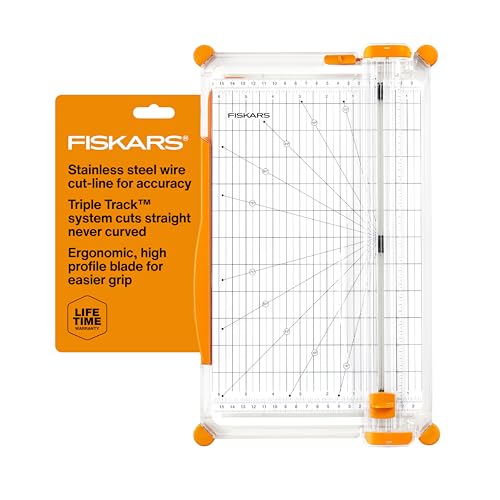
Fiskars SureCut Deluxe Craft Paper Trimmer
The wire cut line shows exactly where the blade will travel, which removes the guesswork that causes a photo mat to end up a hair off square. The swing out arm supports twelve inch paper so long sheets do not sag mid cut, and replacement blades are easy to find. It is a rotary trimmer, so it slices cleanly through cardstock and photo paper without the tearing a guillotine can cause on thin sheets.
Pros
- Cut line wire makes placement obvious
- Swing arm supports full sheets
- Replacement blades widely available
Cons
- Takes up permanent desk space
- Blade dulls faster on thick chipboard

Scotch ATG 714 Adhesive Applicator
This is a trigger operated transfer tape gun borrowed from framing and packaging, and once you have used one, handheld tape runners feel slow. A squeeze lays a clean line of adhesive with no wrinkling and no wet time. Refills are inexpensive in bulk, though the gun itself is a real outlay and it only handles permanent bonds rather than repositionable ones.
Pros
- Far faster than handheld tape runners
- Clean line with no wrinkling
- Refills are cheap in quantity
Cons
- Permanent bond only, no repositioning
- Higher upfront cost than a tape runner
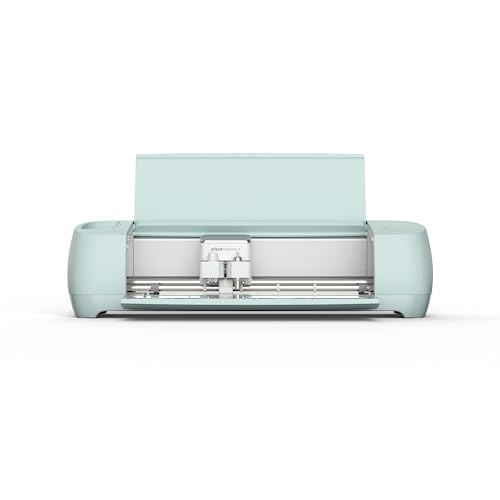
Cricut Explore 3 Cutting Machine
A cutting machine changes what is possible on a page, since titles, intricate borders and shapes can be cut from your own cardstock instead of bought as embellishments. The Explore 3 cuts faster than earlier models and handles matless material for long cuts. The software subscription and the learning curve are genuine considerations, and it is the wrong first purchase for someone still building basic skills.
Pros
- Cuts custom titles and shapes precisely
- Fast compared with earlier machines
- Handles a wide material range
Cons
- Software has a real learning curve
- Full library access needs a subscription

Tonic Studios Tim Holtz Guillotine Comfort Trimmer
Where a rotary trimmer struggles with chipboard, book board and stacked cardstock, this guillotine goes through them without complaint thanks to a long steel blade and a sprung safety guard. Measurements are marked clearly and the base is heavy enough to stay put. It is bulky, and a guillotine gives slightly less precise placement than a cut line wire on very thin paper.
Pros
- Cuts thick material a rotary trimmer cannot
- Sturdy base stays still during a cut
- Guard covers the blade between cuts
Cons
- Large and heavy on a small desk
- Slightly less precise on thin paper

We R Memory Keepers Crop-A-Dile Eyelet and Snap Punch
This punches through cardstock, chipboard, metal and even thin plastic with far less hand effort than a standard punch, then sets eyelets and snaps with the same tool. The long reach lets you punch well inside a page rather than only near an edge. Two hole sizes cover most eyelets, and the leverage design is genuinely easier on hands than squeezing a basic punch.
Pros
- Punches tough materials with little effort
- Sets eyelets and snaps in the same tool
- Long reach for interior placement
Cons
- Only two hole sizes
- Bulky to store in a drawer

Sizzix Big Shot Plus Die Cutting Machine
A manual die cutter presses shapes out with a hand crank and needs no electricity, software or subscription, which is exactly why many crafters prefer it to a computer controlled machine. The Plus size accepts wider dies including twelve inch platforms. It also embosses. The limitation is that you can only cut shapes you own dies for, so the collection grows over time.
Pros
- No software, subscription or power needed
- Cuts and embosses in the same machine
- Works with dies from many brands
Cons
- Limited to the dies you own
- Heavy and needs a sturdy surface

Xyron Creative Station Lite
Feed a die cut, a photo or a piece of patterned paper through the hand crank and it comes out backed with adhesive, ready to peel and place. There is no heat, no power and no wet glue to buckle paper. Cartridges are the ongoing cost and the five inch width limits it to smaller embellishments rather than full page backing.
Pros
- Turns any cut piece into a peel and stick element
- No heat or wet glue to warp paper
- Cartridge options for permanent or repositionable
Cons
- Cartridge refills add up over time
- Narrow feed limits it to small pieces
Compared at a glance
| # | Model | Type | Best for | Score | Price |
|---|---|---|---|---|---|
| 1 | Fiskars SureCut Deluxe Craft Paper Trimmer | Rotary paper trimmer | Best overall | 9.4 | Check price |
| 2 | Scotch ATG 714 Adhesive Applicator | Trigger adhesive transfer gun | Best adhesive tool | 9.2 | Check price |
| 3 | Cricut Explore 3 Cutting Machine | Electronic cutting machine | Best cutting machine | 9.0 | Check price |
| 4 | Tonic Studios Tim Holtz Guillotine Comfort Trimmer | Guillotine trimmer | Best for thick materials | 8.8 | Check price |
| 5 | We R Memory Keepers Crop-A-Dile Eyelet and Snap Punch | Punches holes and sets eyelets | Best hole punch | 8.6 | Check price |
| 6 | Sizzix Big Shot Plus Die Cutting Machine | Manual die cutting and embossing | Best manual die cutting | 8.3 | Check price |
| 7 | Xyron Creative Station Lite | Cold adhesive applicator | Best for sticker making | 8.0 | Check price |
What to look for
Rotary or guillotine trimmer Rotary trimmers use a circular blade in a track and give clean, accurate cuts on paper, cardstock and photos, with a cut line guide that shows exactly where the blade lands. Guillotines use a long hinged blade and handle far thicker material such as chipboard or several sheets stacked. Most scrapbookers use a rotary trimmer daily and reach for a guillotine occasionally. If you can only have one, make it rotary.
Adhesive choice is not trivial Wet glue buckles paper, glue sticks let go over time and cheap tape yellows and bleeds through photos. Look for acid free and photo safe on anything touching a photograph, because acidic adhesive will discolour the image over years. Tape runners suit small work, adhesive guns like the ATG suit volume, and glue dots or foam squares handle embellishments and dimension. Keep at least one repositionable option for laying out a page before committing.
Archival safety in plain terms Acid free means the material will not become acidic and attack what it touches, and lignin free matters for paper because lignin breaks down and yellows. Photo safe generally indicates a product has passed testing for direct contact with photographs. These labels matter most for the album pages, page protectors and adhesives, and matter least for decorative elements that never touch an image. If the whole point is preserving photographs, spending slightly more on archival page protectors is the single best use of money.
Buy tools for problems you actually have The most common mistake is buying a cutting machine or a large die collection before the basics are in place. Owners report that a good trimmer, a reliable adhesive, a bone folder and a sharp pair of scissors carry most layouts, and that specialised punches and machines come into their own only once you know your own style. Add tools as specific frustrations appear rather than in anticipation of them.
Questions worth asking
What tools does a scrapbooking beginner need?
A paper trimmer, an acid free adhesive, sharp scissors, a bone folder and a ruler cover almost everything early on. Add page protectors and an album suited to your paper size. Cutting machines, punch collections and die sets are worth adding once you know which shapes you keep wanting.
Do I need a Cricut for scrapbooking?
No. It expands what you can make, particularly custom titles and intricate cuts, but plenty of excellent layouts use only a trimmer and hand cut elements. If you are unsure, a manual die cutter like the Sizzix Big Shot Plus gives shape cutting without software or a subscription.
What adhesive is safe for photographs?
Anything labelled acid free and photo safe. Photo corners are the most conservative choice because they hold the photo without adhesive touching it at all, which also means the photo can be removed later. Avoid ordinary office tape and rubber cement entirely.
Rotary trimmer or guillotine?
Rotary for everyday paper, cardstock and photos, because the cut line guide gives accuracy and the blade leaves a clean edge. Guillotine for chipboard, book board and stacked sheets. Serious crafters often own both, and if you only buy one, a rotary trimmer is the more useful.
How often should I change trimmer blades?
When cuts start tearing rather than slicing, or when the blade skips at the end of a stroke. Frequency depends entirely on material, since chipboard dulls a rotary blade far faster than paper. Keeping a spare cartridge on hand avoids abandoning a project mid page.
What is a bone folder used for?
Creasing folds crisply and burnishing adhesive down without leaving fingerprints or shine. It is inexpensive, lasts indefinitely and makes card and pocket page work noticeably neater. Plastic versions work as well as real bone for most purposes.
Is digital scrapbooking a substitute for physical tools?
It is a different craft rather than a replacement. Digital layouts avoid all consumable costs and can be printed as photo books, while physical scrapbooking gives texture, dimension and the tactile process many people do it for. Some crafters combine both by printing digital elements and cutting them out.
How do I store all these tools?
Keep the trimmer and adhesive within arm’s reach of your working surface and everything else in labelled drawers or a rolling cart, since a tool you have to unpack is a tool you stop using. Store adhesive cartridges away from heat, and keep blades in their guards to protect both the edge and your fingers.
Our take
The Fiskars SureCut Deluxe Craft Paper Trimmer is the tool to buy first, because accurate straight cuts improve every layout regardless of style. Pair it with the Scotch ATG 714 if you mount enough photos to care about speed, and hold off on a Cricut Explore 3 until you know exactly what you want it to cut. Tools bought to solve real frustrations get used, and tools bought in anticipation usually do not.