Smart Door Levers That Make Entry Effortless and Secure
For most homes, the Schlage Encode Plus Smart Lever is the top choice. It combines built-in Wi-Fi, Apple Home Key support, and a sturdy build, making it ideal for tech-savvy users who want seamless integration. Its main limitation is the premium price, but the features justify the cost for many.
Smart door levers replace traditional handles with keyless entry, letting you lock and unlock via keypad, app, or voice assistant. They are perfect for interior doors, rental units, or side entries where a full deadbolt is overkill.
We analyzed specifications and owner reviews to identify the best options across different needs. Our picks range from budget-friendly to premium, with clear strengths for each scenario.
What to look for
The shortlist, ranked

Schlage Encode Plus Smart Lever
This lever from Schlage offers built-in Wi-Fi, no hub required, and supports Apple Home Key, allowing you to tap your iPhone or Apple Watch to unlock. It also works with Amazon Alexa and Google Assistant. Owners appreciate the solid metal construction and smooth operation, though installation can be a bit tricky for some.
Pros
- No hub needed for remote access
- Apple Home Key support for tap-to-unlock
- Built-in alarm and tamper resistance
Cons
- Higher price point
- Requires careful alignment during install

August Wi-Fi Smart Lock Pro (with Connect)
August’s smart lock kit turns your existing deadbolt into a smart lock, and this version includes a lever handle for those who need a full lever setup. It features Wi-Fi and Bluetooth, works with Alexa, Google Assistant, and Apple HomeKit, and offers auto-lock and unlock when you come and go. Owners love that they can keep their existing keys, but note the lever’s appearance may not match all door styles.
Pros
- Preserves your existing exterior key
- Simple DIY installation without replacing entire lock
- Auto-unlock based on geofencing
Cons
- Keypad is an extra purchase
- Lever design may feel bulky

Yale Assure Lock 2 Lever with Wi-Fi
Yale’s Assure Lock 2 Lever combines a sleek lever handle with a built-in Wi-Fi module, allowing remote access without an extra hub. It works with Amazon Alexa, Google Assistant, and Apple HomeKit (via the Yale Access app). Users praise the easy installation and responsive touchscreen keypad. Some note the battery life is shorter when Wi-Fi is enabled frequently.
Pros
- Built-in Wi-Fi, no extra hub
- Responsive backlit keypad
- Supports voice assistants
Cons
- Wi-Fi drains battery faster
- No fingerprint reader

Kwikset Halo Smart Lock (Lever)
The Kwikset Halo lever offers built-in Wi-Fi and works seamlessly with Amazon Alexa for voice control and routines. It also supports keyless entry via a backlit keypad and has a physical key override. Owners report that the lock is solid and easy to install, but the app interface could be more polished.
Pros
- Native Alexa integration
- Simple keypad entry
- Keyed override for emergencies
Cons
- No HomeKit support
- App sometimes lags
Ultraloq U-Bolt Pro with Lever Handle
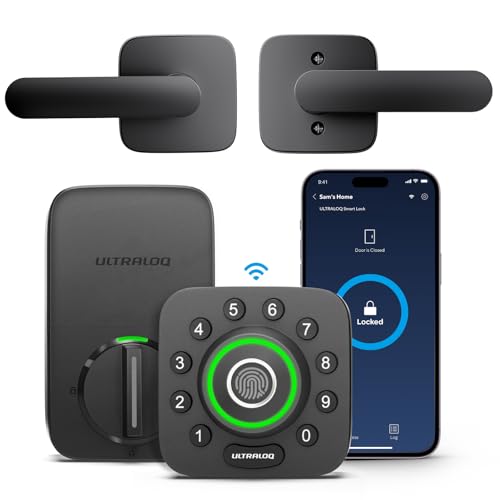
The Ultraloq U-Bolt Pro is known for its fingerprint reader, but this version comes with a lever handle for those who prefer a lever style. It offers five ways to unlock: fingerprint, keypad, app, mechanical key, and shake to unlock. It works with Amazon Alexa and Google Assistant, but the fingerprint sensor requires a bit of practice for accurate placement.
Pros
- Multiple entry options
- Fingerprint recognition is fast
- Weather-resistant design
Cons
- Wi-Fi bridge sold separately for remote access
- Shake feature can be finicky

Samsung SmartThings Push Pull Lever Lock
This Samsung lever lock is designed to work with SmartThings and includes Z-Wave and Zigbee radios, making it a great choice for existing SmartThings setups. It features a sleek push-pull design and a touchscreen keypad. Owners like the modern look and reliable performance, but note it requires a SmartThings hub for remote access.
Pros
- Works with SmartThings ecosystem natively
- Backlit touchscreen
- Auto-lock feature
Cons
- Requires SmartThings hub for full features
- Bulky design on door

Eufy Security Smart Lock Touch & Wi-Fi (Lever)
Eufy’s smart lock with lever handle includes a built-in fingerprint sensor and a video doorbell, making it a unique combo. It supports Wi-Fi and Bluetooth, works with Alexa and Google Assistant, and offers a 1080p camera with night vision. Owners appreciate the all-in-one security, but the price is higher and the lever may feel less robust than traditional locks.
Pros
- Integrated video doorbell
- Fingerprint unlock is convenient
- No monthly fees for video
Cons
- Higher price for the features
- Battery life may be shorter due to camera
Side by side
| # | Model | Connectivity | Best for | Score | Price |
|---|---|---|---|---|---|
| 1 | Schlage Encode Plus Smart Lever | Wi-Fi, Bluetooth, Apple Home | Best Overall with Apple Home Key | 9.4 | Check price |
| 2 | August Wi-Fi Smart Lock Pro (with Connect) | Wi-Fi, Bluetooth | Best Retrofit for Existing Deadbolt | 9.0 | Check price |
| 3 | Yale Assure Lock 2 Lever with Wi-Fi | Wi-Fi, Bluetooth | Best Value with Wi-Fi | 8.8 | Check price |
| 4 | Kwikset Halo Smart Lock (Lever) | Wi-Fi (2.4 GHz only) | Best for Alexa Users | 8.6 | Check price |
| 5 | Ultraloq U-Bolt Pro with Lever Handle | Fingerprint, Keypad, App, Key, Shake | Best for Multiple Access Methods | 8.5 | Check price |
| 6 | Samsung SmartThings Push Pull Lever Lock | Z-Wave, Zigbee, Bluetooth | Best for SmartThings Hubs | 8.3 | Check price |
| 7 | Eufy Security Smart Lock Touch & Wi-Fi (Lever) | Fingerprint, Keypad, App, Key | Best for Fingerprint and Video | 8.1 | Check price |
Common questions
Can I use a smart lever on an interior door?
Yes, smart levers are great for interior doors like offices, pantries, or bedrooms. They offer keyless entry and can be controlled remotely, but they typically do not have a deadbolt, so security may be less than an exterior door.
Do smart levers require a hub?
Many smart levers have built-in Wi-Fi or Bluetooth, so they do not need a separate hub. However, some models like the Samsung SmartThings lever use Z-Wave or Zigbee and require a compatible hub for remote access and integration.
Are smart levers as secure as smart deadbolts?
Smart levers offer convenience but may not provide the same level of physical security as a deadbolt. Deadbolts are typically more resistant to forced entry. For exterior doors, consider a smart deadbolt or a lever with a deadbolt feature.
How do I install a smart lever?
Installation usually involves removing the existing lever and mounting the new one with screws. Most kits include a template and instructions. You need a screwdriver and possibly a drill. Ensure the door thickness and backset match the new lock’s specifications.
What happens if the battery dies?
Most smart levers have a low-battery warning and a physical key override. Some also have a backup power option like a 9V battery terminal on the exterior. Always keep a key handy for emergencies.
Can I control a smart lever remotely?
If the lever has built-in Wi-Fi or you connect it to a hub, you can control it from anywhere using the manufacturer’s app. This allows you to lock or unlock, grant access, and receive notifications.
Do smart levers work with voice assistants?
Many smart levers support Amazon Alexa or Google Assistant, allowing voice commands like ‘lock the door.’ Some also work with Apple HomeKit for Siri control, depending on the model.
What is the difference between a smart lever and a smart deadbolt?
A smart lever is a handle with a latch, typically used on interior doors or doors without existing deadbolts. A smart deadbolt is a separate locking mechanism that goes above the handle. Deadbolts offer stronger security and are more common on exterior doors.
Can I use my existing key with a smart lever?
Some smart levers allow you to rekey the physical cylinder to match your existing keys. However, many come with their own keys. Check the product specifications for rekeying options.
Are smart levers weather-resistant?
For exterior use, look for levers with an IP rating or weather-resistant materials. Some are rated for outdoor use, but prolonged exposure to rain or extreme temperatures can affect performance. Consider a cover if needed.
The verdict
If you want the best overall experience with Apple Home Key and Wi-Fi, go with the Schlage Encode Plus Smart Lever. For a budget-friendly option that still includes Wi-Fi, choose the Yale Assure Lock 2 Lever. If you need a fingerprint sensor and video, the Eufy Security Smart Lock is your best bet.