Hub or No Hub: Picking a Smart Water Sensor
Govee’s WiFi Water Leak Detector fits most homes, since it skips a hub and still sounds a loud local alarm. YoLink’s Smart Water Sensor suits larger properties thanks to its long range LoRa link. Wyze’s Leak Sensor multi-pack keeps cost down, though it still needs a separate hub.
Govee’s WiFi Water Leak Detector leads here because it connects straight to a router and still triggers a 100 decibel alarm. It fits most single family homes running standard 2.4GHz WiFi. Its limitation: a 5GHz-only network locks it out entirely.
Connectivity, not appearance, decides whether a leak sensor earns its spot in a bathroom or basement. We compared hub requirements, radio range, battery type and alarm volume across current Amazon listings, weighing owner feedback on false alarms along the way.
Our top picks
Govee WiFi Water Leak Detector
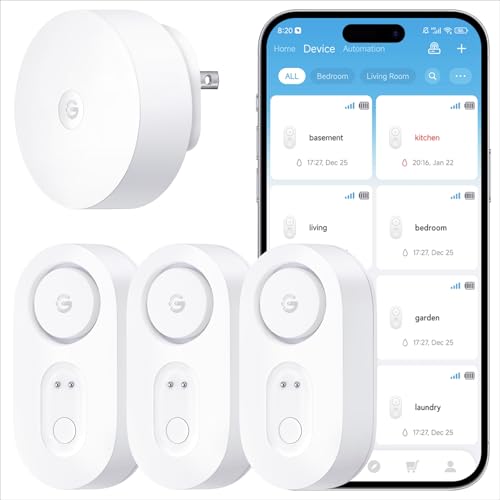
This detector joins a 2.4GHz WiFi network directly, skipping the hub most competitors require. A 100 decibel siren sounds on the spot while the Govee Home app pushes a phone alert. Two AAA batteries keep it running for roughly a year under typical use. Metal probe contacts on the base trigger the alarm once they touch standing water.
Pros
- Sets up without any separate hub or bridge
- Loud onboard siren backs up the phone alert
- Runs on standard home WiFi from any room
Cons
- Only joins 2.4GHz networks, not 5GHz-only WiFi
- Probe sits on the floor, missing leaks inside walls

YoLink Smart Water Sensor
YoLink links this sensor to its own hub over LoRa radio instead of WiFi. That connection reaches roughly a quarter mile line of sight, letting one hub cover a large house, garage and basement together. The same hub also folds additional YoLink sensors into a single dashboard. A replaceable long-life battery keeps the unit reporting for extended stretches.
Pros
- Signal reaches detached garages and distant basements
- One hub supports many additional YoLink sensors
- Keeps reporting through router or WiFi outages
Cons
- Requires buying or already owning the YoLink Hub
- Hub needs its own power and network connection
Wyze Leak Sensor
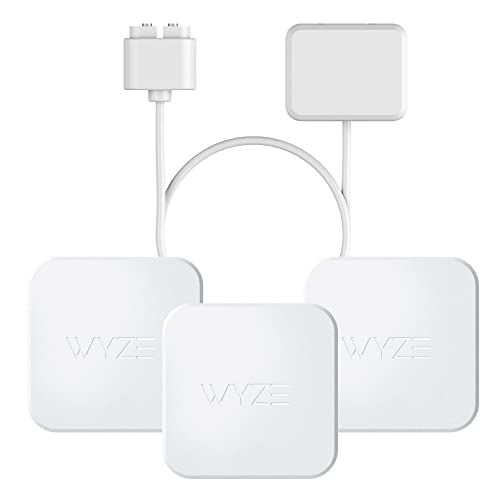
Wyze sells this sensor in multi-packs, cutting the cost per room compared with single-unit kits. Bluetooth links it to a Wyze Sensor Hub, which then routes alerts through the Wyze app. Owners report setup taking only a few minutes per sensor. A replaceable coin-cell battery powers each unit.
Pros
- Lower per-sensor cost when bought in multi-packs
- Small, low profile design tucks into tight spaces
- Shares one app with other Wyze smart devices
Cons
- Needs the separate Wyze Sensor Hub to function
- Bluetooth range falls short of WiFi or LoRa

Samsung SmartThings Water Leak Sensor
This sensor speaks Zigbee, joining an existing SmartThings hub rather than connecting to WiFi directly. Placement inside the SmartThings app lets it trigger routines, including shutting a connected water valve. A replaceable CR2 battery keeps it running without any WiFi dependency. Bottom-mounted moisture contacts sit flush against the floor.
Pros
- Integrates directly with existing SmartThings automations
- Pairs with a smart shutoff valve for auto response
- Compact design tucks under sinks and appliances
Cons
- Only useful for households already running a SmartThings hub
- No standalone WiFi mode for non-SmartThings homes

Aqara Water Leak Sensor
Aqara routes this sensor over Zigbee through an Aqara Hub, which then bridges to Apple HomeKit, Google Home or Amazon Alexa. Its puck-shaped body measures under 1.5 inches wide, small enough to sit behind a toilet or under a dishwasher. A CR2032 coin cell powers the sensor through extended standby periods.
Pros
- Works with Apple Home once paired through an Aqara Hub
- Small footprint fits behind toilets and under appliances
- Coin-cell power cuts down on battery swaps
Cons
- Apple Home support depends on the Aqara Hub staying online
- Zigbee range shrinks through thick masonry walls

D-Link mydlink Water Sensor Starter Kit (DCH-S1621KT)
D-Link bundles this WiFi sensor with a compact wall-plug hub, so the kit installs without joining a separate smart home ecosystem. That plug-in hub doubles as a WiFi extender for the sensor’s signal. The mydlink app pushes alerts and can also email or text a backup contact.
Pros
- Included plug-in extender avoids buying a separate hub
- Alerts reach email or text, not just the app
- Costs less than most hub-based sensor kits
Cons
- Extender must stay within WiFi range of the router
- Fewer expansion options than Zigbee or Z-Wave ecosystems
Fibaro Flood Sensor
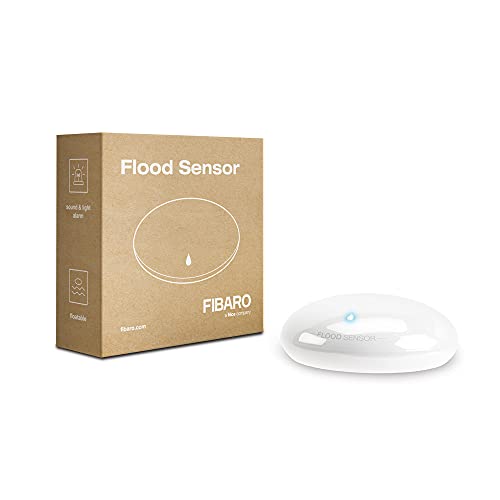
Fibaro runs this sensor on Z-Wave, joining an existing controller like Home Assistant or a Fibaro Home Center. Its rounded body floats and tips as water rises, triggering the alarm even without full contact. A built-in temperature sensor doubles as a freeze warning for nearby pipes.
Pros
- Floating design catches rising water, not just puddles
- Doubles as a freeze-warning temperature sensor
- Works with any Z-Wave certified controller
Cons
- Needs a Z-Wave hub, incompatible with WiFi-only setups
- CR123A batteries cost more than standard AA or AAA cells
Before you buy
How a smart water sensor actually detects a leak Two metal contacts on the base complete a circuit once water bridges them. That trigger fires a local alarm and sends a signal onward, either straight to a router or through a dedicated hub. From there the alert reaches a phone app, which is the real payoff when nobody is home to hear the siren. Response speed depends on the connectivity type chosen, not on the unit’s price.
WiFi versus hub based connectivity Direct WiFi sensors, like Govee’s, join a router the same way a smart plug does, skipping extra hardware. Hub based options such as Zigbee, Z-Wave and LoRa route through a dedicated bridge instead. That bridge often stretches range and battery life further, since those radios sip less power than WiFi. Homes already running SmartThings, Aqara or a Z-Wave controller gain the most from picking a matching sensor.
Best setups for basements and utility rooms Basements flood slowly, so a floor level sensor near the water heater or sump pump catches trouble early. Fibaro’s floating body goes a step further, tipping over as water rises instead of waiting for full contact. A second sensor near a washing machine supply line covers another common leak source. Long battery life matters most in a basement, since nobody checks it daily.
Smart water sensors for renters and small apartments Renters generally want a sensor that skips permanent wiring or a bulky hub. A standalone WiFi unit, such as Govee’s detector or the D-Link kit, installs with double sided tape and no drilling. Multi-pack options like the Wyze Leak Sensor let a small apartment cover a kitchen, bathroom and water heater closet without much cost. Moving out later just means unplugging the hub and taking every sensor along.
How they compare
| # | Model | Connectivity | Best for | Score | Price |
|---|---|---|---|---|---|
| 1 | Govee WiFi Water Leak Detector | Direct WiFi (2.4GHz), no hub | Best overall | 9.4 | Check price |
| 2 | YoLink Smart Water Sensor | LoRa radio to YoLink Hub (hub required) | Best for whole-home coverage | 9.1 | Check price |
| 3 | Wyze Leak Sensor | Bluetooth to Wyze Sensor Hub (hub required) | Best value | 8.8 | Check price |
| 4 | Samsung SmartThings Water Leak Sensor | Zigbee to SmartThings Hub (hub required) | Best for SmartThings households | 8.5 | Check price |
| 5 | Aqara Water Leak Sensor | Zigbee to Aqara Hub (hub required) | Best for Apple Home and Aqara setups | 8.3 | Check price |
| 6 | D-Link mydlink Water Sensor Starter Kit (DCH-S1621KT) | WiFi via included plug-in extender (kit-based) | Best budget | 8.1 | Check price |
| 7 | Fibaro Flood Sensor | Z-Wave to compatible hub (hub required) | Best for Z-Wave systems | 8.0 | Check price |
Common questions
How does a smart water leak sensor work?
A moisture sensing contact on the sensor’s base completes a circuit once it touches water. That trigger sounds a local alarm and pushes a phone alert over WiFi, Zigbee, Z-Wave or LoRa.
Do smart water sensors need a separate hub?
Some do, some don’t. WiFi models like the Govee detector connect directly to a router, while Zigbee, Z-Wave and LoRa sensors need a compatible hub such as SmartThings, Aqara or YoLink.
Which smart water sensor covers the longest range?
YoLink’s Smart Water Sensor claims the longest reach, up to roughly a quarter mile from its hub over LoRa radio, useful for a detached garage or a sprawling basement.
Can a water sensor shut off my home’s water automatically?
Not on its own. Pairing a sensor with a smart shutoff valve, something SmartThings and several Z-Wave setups allow, lets a routine close the valve once water is detected.
Is WiFi or Zigbee the better choice for a leak sensor?
WiFi sensors skip extra hardware but tend to drain batteries faster. Zigbee and Z-Wave sensors sip less power and extend range through a mesh, at the cost of needing a hub.
How long do batteries last in a leak sensor?
Battery life depends on the radio protocol and how often the sensor reports in. Low power radios like Zigbee, Z-Wave and LoRa generally outlast a direct WiFi connection between changes.
Are smart water sensors worth buying for a rental?
Standalone WiFi sensors or Bluetooth multi-packs suit renters well, since neither needs drilling and both move easily to a new address.
What is the best smart water sensor for a basement?
A floor level or floating sensor placed near the water heater, sump pump and washing machine hose covers the most common basement leak points. Fibaro’s floating design and Govee’s direct WiFi model both fit that placement.
Can a leak sensor work with Apple HomeKit or Alexa?
Aqara’s Water Leak Sensor bridges to Apple HomeKit, Google Home and Amazon Alexa once paired through an Aqara Hub. Samsung’s SmartThings sensor reaches Alexa and Google Home through its own hub as well.
Our take
Govee’s WiFi Water Leak Detector remains the pick for most households, given its hub-free setup and loud onboard alarm. Owners already running a SmartThings or Aqara hub should match their existing ecosystem instead, since those sensors slot straight into routines already built. Anyone covering a detached garage or a large property gains more from YoLink’s long range LoRa link.