Which Stream Deck Alternative Fits Your Setup?
Razer Stream Controller X leads this group, pairing 15 LCD keys with standalone USB operation. TourBox Elite fits video and photo editors who need physical dials for scrubbing timelines. Loupedeck Live S delivers similar button and dial control at a lower cost for streamers on a budget.
Razer Stream Controller X leads this lineup for streamers who want dedicated LCD keys outside Elgato’s ecosystem. Its aluminum frame and 15 keys hold up to daily use well. Software support still trails Stream Deck’s plugin library, limiting some advanced automations.
Dials, touch strips, and LCD keys overlap in function once you start comparing pads side by side. We weighed button counts, software compatibility with OBS and Adobe apps, and each manufacturer’s listed build materials.
What we recommend

Razer Stream Controller X
Fifteen customizable LCD keys sit inside an anodized aluminum faceplate, connecting to a PC over USB without a background app for basic key presses. Owners report smooth integration with OBS Studio and Twitch Studio through Razer’s software. Multi-action key folders let one deck cover several show segments.
Pros
- Bright, glare-resistant LCD keys
- Aluminum build feels sturdier than plastic rivals
- Folders enable multi-page macro layouts
Cons
- Fewer third-party plugins than Elgato’s marketplace
- No touch strip or rotary dial included

TourBox Elite
A knob, dial, and scroll wheel replace the button grid here, built for scrubbing timelines in DaVinci Resolve, Premiere Pro, and Lightroom. USB-C or Bluetooth handles the connection, and a companion app maps each control per software title. Rubberized top plating resists fingerprint smudging during long editing sessions.
Pros
- Tactile dials speed up color grading and scrubbing
- Works wired or wireless
- Profiles switch automatically with the active app
Cons
- Steeper learning curve than button-only pads
- Not built around Stream Deck style icon grids
Loupedeck Live S
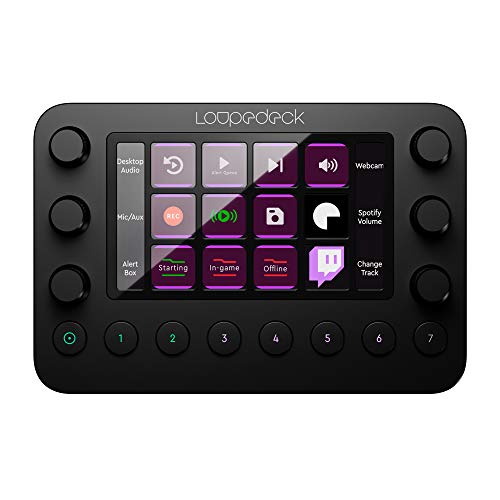
This model trims the touch strip from the original Live, keeping 15 customizable buttons and two rotary dials in a smaller footprint. USB-C handles the connection, with software linking to OBS, Twitch Studio, and Adobe Creative Cloud. Plastic construction keeps weight down on desks already crowded with a keyboard and mic.
Pros
- Smaller footprint than the full-size Live model
- Dials add scene volume control without extra buttons
- Icon labels update live on each key
Cons
- No touch strip, unlike the larger Loupedeck Live
- Plastic build feels less premium than metal rivals
AJAZZ AKP153
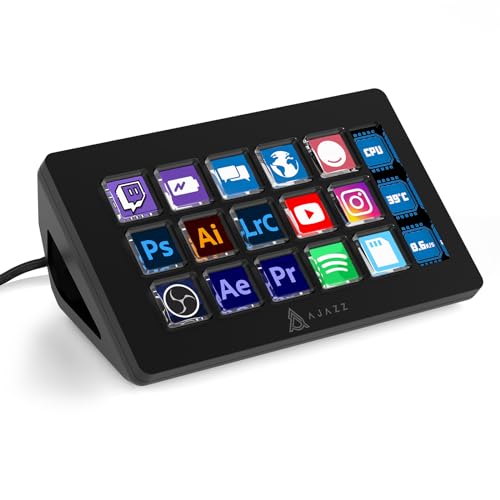
Fifteen mini LCD keys line a compact plastic shell here, aimed at streamers who want programmable icons without Elgato pricing. AJAZZ’s own software handles setup, supporting app launches, media keys, and basic OBS scene switching. Power draws over USB-C, so no separate brick is needed.
Pros
- Lower cost than name-brand alternatives
- Bus powered with no extra adapter
- Icons customizable per key
Cons
- Fewer software integrations than Loupedeck or Razer
- Key travel feels mushier than pricier pads
Monogram Creative Console CC Pro
Dial, Orbiter, and Keys modules snap together magnetically on a desk mat, splitting the console into separate pieces. Photo editors turn the Orbiter ring to adjust exposure and color sliders directly inside Lightroom Classic and Capture One. Modules connect over USB and rearrange without tools as desk space allows.
Pros
- Modular layout adapts to different desk sizes
- Orbiter ring suits fine color and exposure adjustments
- Strong integration with Adobe photo tools
Cons
- Costs more once all three modules are purchased
- Less suited to OBS scene switching than dedicated stream pads

Mirabox N4
A rotary knob dedicated to volume or scene brightness joins 15 LCD keys here, aimed at streamers running OBS Studio. USB-C handles the connection, and bundled software assigns hotkeys, launches apps, and switches between key pages. A metal top plate sits over a plastic base to keep cost down.
Pros
- Rotary knob simplifies volume and scene brightness control
- Multiple key pages expand total macro count
- Priced below most metal-bodied rivals
Cons
- Companion software updates less often than major brands
- Knob only controls one function at a time

Behringer X-Touch Mini
Eight rotary encoders, one fader, and 24 backlit buttons pack into this compact MIDI controller, which streamers repurpose for Voicemeeter and OBS audio mixing. A layer switch doubles available functions across two banks, so one small unit handles two sets of assignments. USB handles both power and connection, and any MIDI-compatible DAW or streaming software works with it.
Pros
- Fader gives finer audio control than button-based pads
- Dual-layer banks double available assignments
- Works with any MIDI-compatible streaming or DAW software
Cons
- Requires third-party mapping software like Voicemeeter or Bome MIDI Translator
- Not designed for icon-based macro launching
The lineup, side by side
| # | Model | Keys | Best for | Score | Price |
|---|---|---|---|---|---|
| 1 | Razer Stream Controller X | 15 LCD buttons | Best overall | 9.4 | Check price |
| 2 | TourBox Elite | Knob, dial, scroll wheel, and buttons | Best for video editing | 9.2 | Check price |
| 3 | Loupedeck Live S | 15 customizable keys | Best value | 8.9 | Check price |
| 4 | AJAZZ AKP153 | 15 mini LCD buttons | Best budget | 8.6 | Check price |
| 5 | Monogram Creative Console CC Pro | Dial, Orbiter, Keys | Best for photo editing | 8.4 | Check price |
| 6 | Mirabox N4 | 15 LCD buttons plus 1 rotary knob | Best for OBS scene control | 8.2 | Check price |
| 7 | Behringer X-Touch Mini | 8 rotary encoders, 1 fader, 24 buttons | Best for audio mixing control | 8.0 | Check price |
Before you buy
What Makes a Good Stream Deck Alternative Software integration matters more than raw button count. A 15-key pad with weak OBS support does less than a smaller pad with solid plugins. Build material affects longevity too, since the aluminum faceplates on the Razer Stream Controller X and Behringer X-Touch Mini outlast plastic housings under daily presses. Connection type plays a role as well. USB-C models draw power straight from a PC, while Bluetooth options like TourBox Elite free up desk space for tighter setups.
Buttons vs Dials: Matching Layout to Your Workflow Grid-style LCD keys suit streamers switching OBS scenes, since icons on the Mirabox N4 or AJAZZ AKP153 make scene names easy to spot at a glance. Video and photo editors tend to prefer dial-heavy consoles instead. A single knob on the TourBox Elite or Monogram Creative Console scrubs a timeline or adjusts exposure with more precision than repeated button taps. Hybrid picks like the Loupedeck Live S split the difference with buttons plus two rotary dials.
How Much Software Compatibility Really Matters Every listing mentions OBS support, but depth varies by brand. Razer and Loupedeck publish dedicated plugins for Twitch Studio and Adobe Creative Cloud, according to their product listings. Budget pads like the AJAZZ AKP153 rely on simpler macro software with fewer built-in integrations. MIDI-based options such as the Behringer X-Touch Mini need separate routing software, like Voicemeeter or Bome MIDI Translator, to talk to streaming apps. That extra setup step suits users already comfortable with audio routing.
Which Pad Fits Your Budget and Desk Space Budget-conscious streamers get the most function per unit from the AJAZZ AKP153 or Mirabox N4, both positioned below the metal-bodied options here. Photo and video professionals working in Lightroom or DaVinci Resolve should prioritize TourBox Elite or the Monogram Creative Console for dial precision. Anyone mixing live audio alongside a webcam feed gains more from the Behringer X-Touch Mini’s faders than from any icon-based grid. Desk space favors the compact Loupedeck Live S over larger multi-module setups.
Questions worth asking
What is the best Stream Deck alternative for streamers?
Razer Stream Controller X ranks highest here, thanks to 15 LCD keys and an aluminum frame that holds up under repeated presses during live shows.
Are Stream Deck alternatives cheaper than the official Elgato Stream Deck?
Several options, including the AJAZZ AKP153 and Mirabox N4, typically list below Elgato pricing on Amazon. Checking current listings before buying still pays off, since pricing shifts over time.
Can a MIDI controller replace a Stream Deck for OBS scene control?
Yes. Devices like the Behringer X-Touch Mini trigger OBS scenes and audio mixing through software such as Voicemeeter. Setup takes more configuration than a plug-and-play button pad, though.
Which control pad works best for video editing?
TourBox Elite suits video editing best among these options, since its knob and dial scrub timelines and adjust color grades more precisely than a flat button grid.
Do Stream Deck alternatives work with OBS Studio?
Most do. Razer, Loupedeck, Mirabox, and AJAZZ all list OBS Studio compatibility through their companion software, according to each listing.
What is the best budget Stream Deck alternative?
AJAZZ AKP153 stands out as the most affordable pick here, offering 15 mini LCD keys in a plastic shell without the metal build of pricier rivals.
TourBox Elite vs Loupedeck Live S: which is better for editors?
TourBox Elite favors editors who want dedicated dials for scrubbing and color work. Loupedeck Live S suits users who prefer buttons with just two dials for lighter editing tasks.
Is a rotary knob pad better than a button-only macro pad?
Rotary knobs excel at continuous adjustments like volume or exposure. Button-only pads, like the AJAZZ AKP153, work better for discrete actions such as launching apps or switching scenes.
What is the best control pad for live audio mixing?
Behringer X-Touch Mini handles live audio mixing best here, with 8 rotary encoders and a fader that give finer control than any button grid on this list.
The verdict
Razer Stream Controller X earns the overall recommendation, pairing 15 durable LCD keys with an aluminum frame and straightforward OBS integration for most streamers. Video and photo editors who spend hours scrubbing timelines should look at TourBox Elite or the Monogram Creative Console instead, since their dials handle fine adjustments a flat button grid cannot replicate. Streamers focused on live audio mixing get more precise control from the Behringer X-Touch Mini’s faders than from any button-based pad here.