Which Streaming Microphone Suits Your Setup Best?
The Shure MV7+ leads for its hybrid USB and XLR output plus strong off axis rejection in untreated rooms. The Elgato Wave:3 is the smartest value for streamers who want built in mixing software, and the Logitech Blue Yeti stays the easiest plug and play starting point.
If you want one microphone that grows with your channel, the Shure MV7+ is the pick, with the Elgato Wave:3 close behind for value and the Logitech Blue Yeti as the simplest starting point.
Streaming mics are tricky because the spec sheet rarely predicts how a mic sounds in a normal bedroom with a fan running and a mechanical keyboard nearby. We compared pickup patterns, connection type, onboard controls and mounting flexibility, and weighed what owners consistently report about background noise and boom arm compatibility.
What we recommend

Shure MV7+ Hybrid USB/XLR Dynamic Microphone
The MV7+ is a dynamic microphone with a tight cardioid pattern, which is why it stays quiet on room noise that would swamp a condenser. It carries both USB C and XLR outputs, so the same mic works with a laptop today and an audio interface later. Onboard touch controls handle gain, monitor mix and mute without leaving your scene.
Pros
- Rejects room noise better than most streaming condensers
- Hybrid output means it survives a gear upgrade
- Real time denoiser and tone shaping built in
Cons
- Needs close mic technique to sound full
- Heavier than plastic USB mics, so a sturdy arm matters

Elgato Wave:3 USB Condenser Microphone
The Wave:3 pairs a clear cardioid condenser capsule with Elgato’s Wave Link mixing app, which lets you route game, chat and mic audio into separate channels. Its Clipguard circuit drops the level automatically when you shout, which owners report saves a lot of ruined clips. The capacitive mute button on top is silent, unlike a physical switch.
Pros
- Wave Link handles multi source mixing without a hardware mixer
- Clipguard prevents distortion on loud reactions
- Compact desk stand that clears most monitors
Cons
- Condenser pattern picks up more keyboard and room noise
- USB only, so no path to an XLR chain

Logitech for Creators Blue Yeti USB Microphone
The Yeti remains the default first streaming mic because it works the moment you plug it in and needs no driver hunting. Four selectable patterns cover solo streaming, two person interviews and round table recording from one body. Owners report the built in stand is heavy enough to stay put, though it does transmit desk thumps.
Pros
- Four patterns cover almost any recording layout
- No setup beyond plugging in the cable
- Zero latency headphone monitoring on the body
Cons
- Picks up desk vibration without a shock mount
- Bulky footprint on a small desk

RODE NT-USB+ Condenser Microphone
The NT-USB+ uses an internal 32 bit float converter and RODE’s Aphex processing, so you get compression and noise gating applied before the signal reaches your streaming software. The included pop filter mounts directly to the body rather than clamping to an arm. It reads as slightly warmer than most USB condensers, which suits speech more than singing.
Pros
- Onboard DSP cleans up audio before it hits OBS
- 32 bit float recording makes clipping recoverable
- Pop filter and stand included in the box
Cons
- Software required to change the processing settings
- Sensitive enough to need a quiet room

HyperX QuadCast S USB Condenser Microphone
The QuadCast S ships with a built in shock mount and an anti vibration cradle, which handles the desk bumps that trip up other condensers. Tap to mute on the top plate is genuinely silent, and the RGB ring doubles as a visual mute indicator you can see in peripheral vision. Four polar patterns are switchable with a rear dial.
Pros
- Integrated shock mount removes a separate purchase
- Mute indicator is obvious at a glance
- Gain dial sits on the underside where it is easy to reach
Cons
- RGB adds cost that non gamers will not use
- Cardioid pattern is wider than a dynamic mic
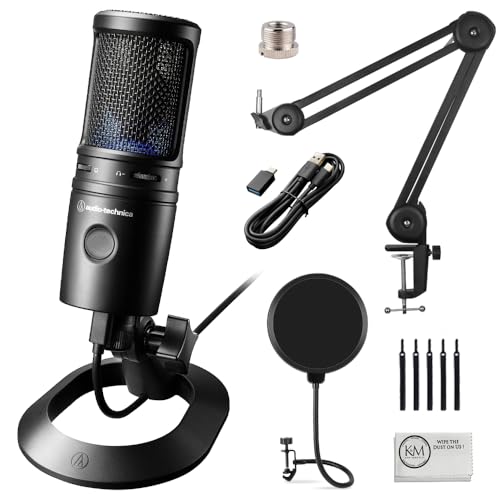
Audio-Technica AT2020USB-X Cardioid Condenser Microphone
Audio-Technica’s AT2020 capsule has been a podcast staple for years, and the USB-X version adds a headphone jack, mix control and a touch mute. It is a straightforward microphone with no software layer, which some streamers prefer because there is nothing to break mid stream. Based on specifications it handles high sound pressure levels well for a condenser.
Pros
- Proven capsule with a neutral, uncoloured voice tone
- Works without installing any companion app
- Sturdy metal body that resists desk knocks
Cons
- Tripod stand is short for seated use
- No onboard noise processing

Razer Seiren V3 Mini USB Microphone
The Seiren V3 Mini is aimed at cramped desks and travel bags, standing barely taller than a coffee mug. It has a built in limiter to catch peaks and a tap to mute top plate with an LED ring. Sound quality will not match the larger mics here, but for a first stream on a shared desk it is a sensible starting point.
Pros
- Takes very little desk space
- Built in limiter stops harsh clipping
- Tap to mute with a clear LED indicator
Cons
- No headphone jack for direct monitoring
- Thin low end compared with full size mics
Compared at a glance
| # | Model | Capsule type | Best for | Score | Price |
|---|---|---|---|---|---|
| 1 | Shure MV7+ Hybrid USB/XLR Dynamic Microphone | Dynamic | Best overall | 9.4 | Check price |
| 2 | Elgato Wave:3 USB Condenser Microphone | Condenser | Best value | 9.2 | Check price |
| 3 | Logitech for Creators Blue Yeti USB Microphone | Condenser, three capsule | Best for beginners | 9.0 | Check price |
| 4 | RODE NT-USB+ Condenser Microphone | Condenser | Best for voice clarity | 8.8 | Check price |
| 5 | HyperX QuadCast S USB Condenser Microphone | Condenser, three capsule | Best for gaming setups | 8.6 | Check price |
| 6 | Audio-Technica AT2020USB-X Cardioid Condenser Microphone | Condenser | Best budget condenser | 8.3 | Check price |
| 7 | Razer Seiren V3 Mini USB Microphone | Condenser | Best compact pick | 8.0 | Check price |
What to look for
Dynamic or condenser for your room This is the decision that matters most. Condenser mics are more sensitive and capture more detail, which also means they capture your air conditioner, your keyboard and the street outside. Dynamic mics like the Shure MV7+ hear far less of the room, so if you stream from an untreated bedroom with hard walls, a dynamic will sound cleaner with no acoustic panels at all. Choose a condenser only if your space is reasonably quiet and soft furnished.
USB, XLR or both USB mics connect straight to a computer and need nothing else, which is why they dominate streaming. XLR mics need an interface or mixer but give you room to grow into better preamps and processing. A hybrid mic with both outputs costs more upfront and saves you buying twice if you expect to build out a studio chain later. If you are certain you will stay on one machine with one mic, USB alone is fine.
Mounting matters more than people expect A microphone sitting on a desk stand picks up every keystroke and mouse click through the desk surface. A boom arm with a shock mount moves the mic off the desk and puts it closer to your mouth, which improves your voice to room ratio in two ways at once. Check the thread size on any mic you buy, since some need an adapter, and confirm your arm is rated for the mic weight because heavier metal bodies droop on cheap arms.
Onboard controls and monitoring Reaching for a software slider mid stream is awkward, so physical or touch controls for gain, mute and headphone mix are worth prioritising. Silent mute is a real feature, since a clicky switch is audible on the recording. Zero latency headphone monitoring lets you hear yourself without the delay that makes speaking feel strange, and a monitor mix dial lets you balance your own voice against game audio.
Questions worth asking
Do I need an audio interface for a streaming microphone?
Not if you buy a USB microphone. Every USB mic here has its own converter and headphone amp built in, so it connects straight to your computer. You only need an interface if you choose an XLR mic or want to run multiple microphones at once.
Why does my microphone pick up my keyboard so much?
Usually because it is a condenser sitting on a desk stand. Two changes fix most of it, moving to a boom arm with a shock mount so vibration does not travel through the desk, and getting closer to the mic so you can lower the gain. A dynamic microphone with a tight cardioid pattern is the bigger fix.
Is a cardioid pattern enough for a solo streamer?
Yes, cardioid is the correct choice for one person speaking into the front of the mic. Omnidirectional and stereo patterns exist for room recording and interviews, and using them for solo streaming just adds room noise you do not want.
Should I buy a pop filter separately?
If your mic does not include one, yes. Plosive bursts from P and B sounds create thumps that no amount of software processing removes cleanly. Some mics here ship with an integrated filter, and a foam windscreen is a workable substitute for the rest.
What is the difference between the Shure MV7+ and a plain USB condenser?
The MV7+ is dynamic, so it hears much less of your room, and it carries an XLR output alongside USB. A USB condenser captures more detail but also more background noise, and it locks you into USB only.
How close should I be to the microphone?
For dynamic mics, roughly a hand width from the grille, and closer for a fuller tone. Condensers work at a slightly greater distance because they are more sensitive. Owners report that most thin sounding stream audio comes from sitting too far back and compensating with high gain.
Do these microphones work with OBS and Streamlabs?
All of them appear as standard audio input devices, so any streaming or recording software picks them up without special drivers. Companion apps from Elgato and RODE add mixing and processing on top but are not required for basic capture.
Is a more expensive microphone actually going to sound better?
Up to a point. Moving from a cheap mic to a solid one is a clear improvement, but past that, room treatment, mic placement and gain staging change your sound far more than spending more. A mid priced dynamic in a treated corner beats an expensive condenser in a bare room.
Our take
The Shure MV7+ is the microphone most streamers should buy, because it is forgiving in a normal untreated room and works on both USB and XLR as your setup changes. The Elgato Wave:3 makes more sense if software mixing is the feature you want most, and the Logitech Blue Yeti is still the easiest way to start without thinking about any of this.


