Trackball Mice That Save Your Wrist and Boost Precision
The Logitech MX Ergo stands out as the top overall trackball mouse. It combines a precise 8-degree adjustable hinge with a responsive 3800 DPI sensor. Owners report excellent comfort for long work sessions, but its high price is a drawback.
Trackball mice keep your hand still while your thumb or fingers roll the ball. This reduces arm and shoulder strain compared to traditional mice.
We compared popular models to help you choose. Consider whether you prefer thumb or finger control, and think about wireless versus wired setups.
Our top picks

Logitech MX Ergo Wireless Trackball Mouse
The MX Ergo features a precision sensor with adjustable DPI. Its 20-degree adjustable hinge lets you customize the angle for optimal wrist posture. It works on almost any surface and lasts up to 4 months on a charge.
Pros
- Excellent ergonomic design
- Precision tracking on many surfaces
- Long battery life
Cons
- High price
- Thumb control may not suit everyone

Kensington Expert Wireless Trackball Mouse
The Kensington Expert features a 55mm ball for precise control. Its four programmable buttons and scroll ring are handy for productivity. The wireless version offers both Bluetooth and 2.4GHz connectivity.
Pros
- Smooth scrolling ring
- Allows multiple connection methods
- Suitable for larger hands
Cons
- Steep learning curve
- Scroll ring can feel stiff

Logitech ERGO M575 Wireless Trackball
The ERGO M575 offers a comfortable thumb-operated design at a lower price. It uses Logitech’s precision sensor and can connect via Bluetooth or a USB receiver. Users can switch between two connected devices.
Pros
- Affordable price
- Long battery life
- Multiple device pairing
Cons
- Lower DPI compared to high-end models
- Non-adjustable angle

Kensington SlimBlade Pro Trackball Mouse
The SlimBlade Pro uses a 55mm ball with a unique twist-to-scroll action. Its optical sensor tracks movement for precise control. It connects via USB cable or Bluetooth, and offers a wired mode for low latency.
Pros
- Very precise tracking
- Dual connectivity options
- Unique scroll function
Cons
- Ball can be heavy
- No adjustable angle
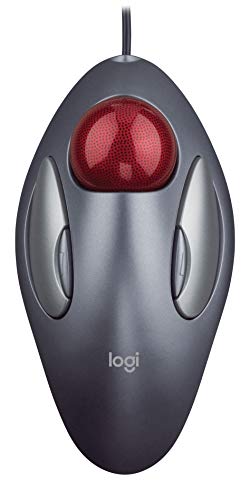
Logitech TrackMan Marble
The TrackMan Marble is a wired finger-operated trackball with a simple design. It has no buttons on the ball, but two large buttons on the body. Its small footprint is ideal for compact workspaces.
Pros
- Low cost
- Simple plug-and-play
- Compact size
Cons
- No scroll wheel
- Wired only

Elecom M-XT3DRBK Wireless Trackball Mouse
The Elecom M-XT3DRBK is a wireless thumb trackball that operates on 2.4GHz. It has six buttons, including a function button for customization. The ball is made of artificial ruby for smooth movement.
Pros
- Many programmable buttons
- Smooth ball movement
- Wireless convenience
Cons
- Shape may feel bulky
- Software needed for full customization

Kensington Orbit Wireless Trackball with Scroll Ring
The Kensington Orbit features a 40mm ball and an integrated scroll ring. It operates on one AA battery with Bluetooth. Its compact size fits easily in a laptop bag.
Pros
- Compact and portable
- Comfortable scroll ring
- Simple setup
Cons
- No adjustable DPI
- Limited button options
How they stack up
| # | Model | Sensor | Best for | Score | Price |
|---|---|---|---|---|---|
| 1 | Logitech MX Ergo Wireless Trackball Mouse | 3800 DPI laser | Best overall for ergonomic comfort and adjustable angle | 9.4 | Check price |
| 2 | Kensington Expert Wireless Trackball Mouse | 55mm | Best finger-operated trackball for large hands | 9.0 | Check price |
| 3 | Logitech ERGO M575 Wireless Trackball | 1000 DPI optical | Best budget-friendly thumb trackball | 8.8 | Check price |
| 4 | Kensington SlimBlade Pro Trackball Mouse | 55mm | Best for precise cursor control | 8.6 | Check price |
| 5 | Logitech TrackMan Marble | Wired USB | Best for small hands and simple use | 8.2 | Check price |
| 6 | Elecom M-XT3DRBK Wireless Trackball Mouse | 2.4GHz wireless | Best for wireless flexibility and customization | 8.0 | Check price |
| 7 | Kensington Orbit Wireless Trackball with Scroll Ring | 40mm | Best for travel and small desks | 8.1 | Check price |
What matters most
Common questions
What is a trackball mouse?
A trackball mouse has a stationary body with a ball that you roll with your thumb or fingers to move the cursor. This design reduces arm movement and can increase comfort.
How do I clean a trackball mouse?
Remove the ball and clean it with a soft cloth. Use compressed air to blow dust from the socket. Clean the sensors gently with a cotton swab dipped in alcohol.
Are trackball mice good for gaming?
Some gamers use trackballs for genres like strategy or MMO games. They offer precise control and reduce hand fatigue. However, they may not suit fast-paced FPS games.
What is the difference between thumb and finger trackballs?
Thumb trackballs use the thumb to roll the ball. Finger trackballs use the index, middle, or ring fingers. Thumb models are more common, but finger models can be more precise for some users.
Do trackball mice require a mousepad?
No, trackball mice do not need a mousepad because the ball is rolled by your hand. They work on any flat surface, including desks and couches.
Can trackball mice help with wrist pain?
Yes, trackballs can reduce wrist and shoulder strain because they keep your hand stationary. They are often recommended for people with repetitive strain injuries. However, ergonomic design varies by model.
Are trackball mice wireless?
Many trackball mice are wireless, using Bluetooth or a USB receiver. Some models are wired. Wireless models offer more flexibility but require batteries or charging.
Which trackball mouse is best for large hands?
The Kensington Expert Wireless is often praised for its larger ball and spacious design. It suits users with larger hands. The Logitech MX Ergo also offers a comfortable grip for many hand sizes.
What is DPI and why does it matter?
DPI stands for dots per inch, indicating how far the cursor moves per inch of ball movement. Higher DPI means faster movement. For precise work, a mid-range DPI like 1000 is often sufficient.
Can I use a trackball mouse with a laptop?
Yes, trackball mice are compatible with laptops via USB or Bluetooth. They are good for travel because they don’t require a flat surface to move on.
Our pick
For most users, the Logitech MX Ergo is the best choice due to its adjustable ergonomics and precision. If you prefer a finger-operated trackball, the Kensington Expert Wireless offers excellent control. Budget-conscious buyers should consider the Logitech ERGO M575, which delivers solid performance at a lower cost.


