Pro-Grade VR Headsets for Serious Work and Play
For most professionals, the Meta Quest 3 offers the best balance of standalone convenience and high-quality visuals at a reasonable cost. Its main limitation is that it requires a Facebook account for setup. For the absolute highest fidelity, the Varjo Aero stands out but at a premium price.
Virtual reality has moved beyond gaming into architecture, medicine, engineering, and training. Professionals need headsets that offer crisp visuals, accurate tracking, and all-day comfort. The market offers several options, each with unique strengths.
We compared the leading headsets based on specifications, user feedback, and industry reputation. Our goal is to help you choose a device that fits your professional workflow and budget.
Before you buy
Resolution Higher resolution means clearer text and finer details. For professional work like 3D modeling or reading data, look for a headset with at least 2000×2000 pixels per eye.
Field of View A wider field of view increases immersion and reduces the ‘binocular’ effect. Most headsets offer around 110 degrees, but some go higher. Consider what you need for your tasks.
Tracking System Inside-out tracking uses cameras on the headset, offering easy setup. External base stations provide more precise tracking but require extra hardware. Professionals often prefer the accuracy of base stations.
Comfort and Ergonomics Long sessions require a comfortable headset. Look for balanced weight distribution, good padding, and adjustable straps. A heavy headset can cause neck strain.
What we recommend

Meta Quest 3
The Meta Quest 3 is a standalone headset with impressive passthrough mixed reality. It offers high-resolution displays and a comfortable design, making it versatile for both productivity and immersive experiences.
Pros
- Wireless and portable
- Excellent value for the features
- Vast content library
Cons
- Requires Meta account
- Battery life limited
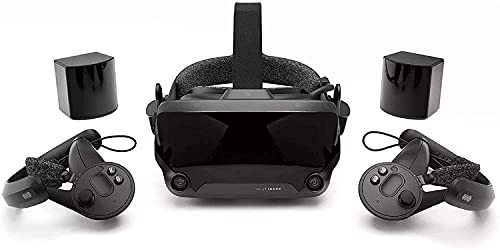
Valve Index
The Valve Index is known for its exceptional tracking and industry-leading 144Hz refresh rate. Its finger-tracking controllers offer natural interaction, making it popular for research and development.
Pros
- Superb tracking precision
- High refresh rate reduces motion blur
- Comfortable and adjustable
Cons
- Requires PC with strong GPU
- Base stations need setup

HTC Vive Pro 2
The HTC Vive Pro 2 delivers a sharp 5K resolution and a 120-degree field of view. It is a premium headset designed for detailed visual work, such as CAD modeling and simulation.
Pros
- High resolution for crisp text
- Wide field of view
- Modular design
Cons
- Heavier than some competitors
- Requires base stations

Varjo Aero
The Varjo Aero is a professional headset with human-eye resolution and advanced optics. It is used in aviation, automotive design, and research where clarity is paramount.
Pros
- Outstanding resolution
- Excellent color accuracy
- Adjustable IPD and eye relief
Cons
- Very expensive
- Requires high-end PC and base stations
Pimax Crystal
The Pimax Crystal offers a massive 140-degree field of view and high-resolution displays. It is a niche product for those who need maximum immersion, such as flight simulators.
Pros
- Very wide FOV
- Sharp visuals
- Modular tracking options
Cons
- Heavy and bulky
- Setup can be complex
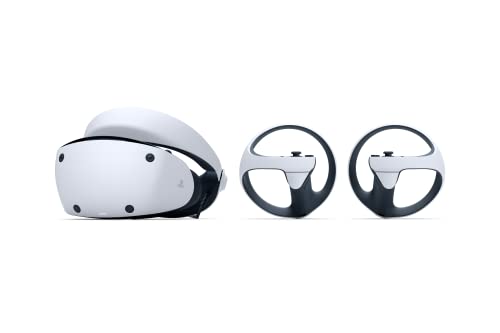
Sony PlayStation VR2
The PSVR 2 is designed for the PlayStation 5, offering OLED displays and haptic feedback. It is a cost-effective option for professionals who already own a PS5 and need a high-quality VR system.
Pros
- Beautiful OLED colors
- Excellent haptic feedback
- Simple setup
Cons
- Requires PS5 console
- Limited compatibility with PC
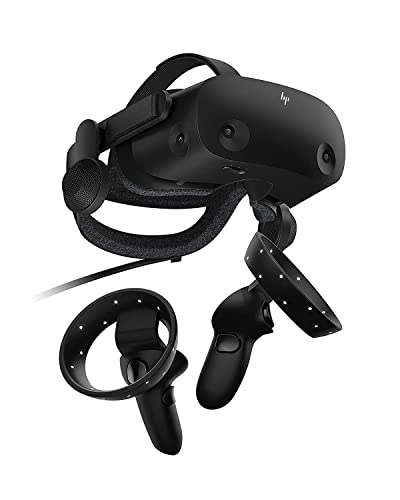
HP Reverb G2
The HP Reverb G2 offers high-resolution displays at a lower price point. It is a solid choice for professionals who need clarity without breaking the bank, though it is discontinued by HP, it is still available from some retailers.
Pros
- Sharp visuals
- Comfortable for long sessions
- Good price for the resolution
Cons
- Discontinued (limited support)
- Tracking not as robust as base stations
Side by side
| # | Model | Display | Best for | Score | Price |
|---|---|---|---|---|---|
| 1 | Meta Quest 3 | Dual LCD, 2064×2208 per eye | Best overall for professionals | 9.4 | Check price |
| 2 | Valve Index | Dual LCD, 1440×1600 per eye | Best for precise tracking and high refresh rate | 9.2 | Check price |
| 3 | HTC Vive Pro 2 | Dual RGB LCD, 2448×2448 per eye | Best for high-resolution display with wide FOV | 9.0 | Check price |
| 4 | Varjo Aero | Dual mini-LED, 2880×2720 per eye | Best for enterprise-grade visual fidelity | 8.8 | Check price |
| 5 | Pimax Crystal | Dual QLED, 2880×2880 per eye | Best for ultra-wide field of view | 8.5 | Check price |
| 6 | Sony PlayStation VR2 | Dual OLED, 2000×2040 per eye | Best for professionals using PS5 or creative content | 8.3 | Check price |
| 7 | HP Reverb G2 | Dual LCD, 2160×2160 per eye | Best budget professional option | 8.0 | Check price |
Good to know
What do I need to run a professional VR headset?
Most high-end PC VR headsets require a powerful computer with a dedicated GPU, at least 16GB RAM, and compatible ports. Check each headset’s requirements.
Can I use these headsets for non-gaming tasks?
Absolutely. Many are used for architectural visualization, medical training, engineering reviews, and virtual meetings.
Are wireless headsets as good as wired ones?
Wireless headsets offer freedom of movement but may have lower fidelity or shorter battery life. For stationary professional tasks, wired headsets can be more reliable.
What is the best headset for architectural visualization?
The Varjo Aero and Pimax Crystal offer excellent clarity and wide FOV, making them ideal for detailed architectural walkthroughs.
Do these headsets require base stations?
Some do, like the Valve Index and HTC Vive Pro 2. Others use inside-out tracking, such as the Quest 3 and HP Reverb G2.
Can I use prescription lenses in VR headsets?
Many manufacturers offer prescription lens inserts, and some headsets have adjustable IPD. Check compatibility.
How important is refresh rate for professional use?
A higher refresh rate reduces motion sickness and provides smoother visuals, which is important during long sessions or when viewing moving objects.
What about software support and updates?
Major brands like Meta, Valve, and HTC provide regular updates. Some discontinued models may not receive new features.
Can I use a VR headset for remote collaboration?
Yes, applications like Spatial and Horizon Workrooms allow multiple users to meet in virtual spaces. The Quest 3 is particularly strong in this area.
What is the lifespan of a VR headset?
Typically 3-5 years with careful use. Technological advancements may make older models obsolete sooner, but basic functionality persists.
Final word
For most professionals, the Meta Quest 3 is the smartest choice due to its balance of performance, portability, and price. If you require absolute maximum resolution and have the budget, the Varjo Aero is the ultimate tool, but be prepared for a significant investment. For those who prioritize precision and refresh rate, the Valve Index remains a solid contender.



