Webcams for Sharper Meetings and Cleaner Streams
The Logitech C920s HD Pro Webcam remains our top pick for reliable 1080p, wide software support and a privacy shutter. The Elgato Facecam MK.2 is the choice for streaming quality, and the Anker PowerConf C200 is the value option for daily meetings.
The Logitech C920s HD Pro Webcam still leads this roundup because it does the unglamorous things well, namely consistent exposure in ordinary room light, universal compatibility with every meeting platform and a physical privacy shutter. The Elgato Facecam MK.2 is the pick when image quality for streaming is the priority, and the Anker PowerConf C200 covers everyday calls at a lower cost with a usefully adjustable field of view.
Webcam shopping is confused by resolution marketing, since a 4K sensor in poor light produces a worse picture than a good 1080p sensor with a bright lens. Field of view, autofocus behaviour and how the camera handles a window behind you matter far more day to day. We compared sensor and lens performance in typical indoor light, resolution and frame rate options, field of view, autofocus, built in microphones and mounting, then weighed those against what owners report about hunting focus and washed out faces on video calls.
What we recommend

Logitech C920s HD Pro Webcam
The C920 line has been the default recommendation for years because it works everywhere without drivers and produces a clean, correctly exposed 1080p image in normal room lighting. The s revision adds a sliding privacy shutter, which removes the need for tape over the lens. It is not the sharpest camera here, but it is the most consistently unproblematic.
Pros
- Works on every platform without setup
- Consistent exposure in ordinary room light
- Physical privacy shutter included
Cons
- Limited to 30fps at 1080p
- Struggles in genuinely dim rooms

Elgato Facecam MK.2
Elgato builds this for people who want to control the image rather than accept what the camera decides, with fixed focus and full manual exposure, white balance and ISO through its software. The result is a picture that does not shift mid stream when you move. Fixed focus means you must set your seating distance once, which suits a streaming desk more than a laptop.
Pros
- Image stays locked with no hunting or shifting
- Genuinely useful manual controls
- Smooth 60fps for motion
Cons
- No built in microphone
- Fixed focus needs a consistent seating position

Logitech Brio 4K Pro Webcam
The Brio pairs a 4K sensor with selectable fields of view, so you can frame tightly on your face or open up to include a whiteboard. It also supports Windows Hello face login. Getting the most from it needs decent lighting, since a high resolution sensor exaggerates noise when the room is dim.
Pros
- Selectable field of view for different setups
- Genuine 4K capture for recording
- Face login support on Windows
Cons
- Needs good lighting to justify the resolution
- Most meeting platforms cap you at 1080p anyway
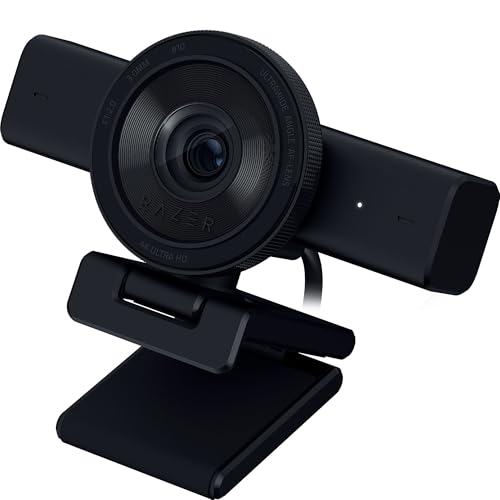
Razer Kiyo Pro
Razer fitted a larger sensor with a bright lens here specifically to handle rooms that are not brightly lit, which is the single most common cause of a poor webcam picture. It holds usable frame rates in dim conditions where smaller sensors turn grainy. The wide field of view is generous, which is useful in a small room and less so if your background is untidy.
Pros
- Clearly the best low light performer here
- Smooth 60fps at 1080p
- Adjustable field of view
Cons
- Wide setting captures a lot of background
- Bulky compared with slim meeting cameras

Anker PowerConf C200
Anker delivers 2K capture, dual microphones with noise reduction and switchable fields of view at a price that undercuts the established names. It is a strong everyday meeting camera. Owners report the image is a little more processed looking than the Logitech cameras, which is a fair trade at the cost.
Pros
- 2K capture and field of view choices for the money
- Dual microphones handle voice well
- Integrated privacy cover
Cons
- Image processing looks slightly artificial
- Software is less mature than Logitech’s

Insta360 Link
The Link sits on a motorised gimbal that physically tracks you around the room, and it can flip down to shoot a desk surface for showing documents or hardware. That makes it genuinely useful for teaching and demonstrations. It is the most expensive camera here and the tracking occasionally follows the wrong subject in a busy room.
Pros
- Physical tracking keeps you framed while moving
- Desk view mode is excellent for demonstrations
- Gesture control avoids reaching for software
Cons
- Highest cost in this group
- Tracking can lock onto the wrong person

NexiGo N60 Webcam
NexiGo covers the basics of 1080p capture with a privacy cover and a built in microphone at the low end of the market. In good light it is entirely acceptable for meetings. It has fixed focus and a small sensor, so dim rooms and close up detail are where it visibly gives ground to the pricier cameras.
Pros
- Lowest cost route to reliable 1080p
- Privacy cover included as standard
- Plug and play on all platforms
Cons
- Fixed focus limits close up sharpness
- Noticeably noisy in low light
Before you buy
Lighting beats resolution every time The most common cause of a bad video call picture is a window behind the speaker and nothing in front. Any webcam will underexpose a face lit from behind. Put a light source in front of you, even a bright screen or a cheap desk lamp bounced off a wall, and a mid range camera will comfortably outperform an expensive one in a dark room. Fix the lighting before you spend on hardware.
Field of view and what is behind you Wide angle lenses capture more of the room, which is helpful for two people at a desk and unhelpful when it reveals a kitchen. Around 65 to 78 degrees frames a single person naturally. Ninety degrees and above starts to distort faces at close range and includes far more background. Cameras with switchable fields of view give you the choice rather than committing you.
Autofocus, fixed focus and hunting Autofocus is convenient on a laptop where distance varies, but it can hunt distractingly when you move your hands or shift in your chair. Fixed focus cameras are locked at a typical desk distance, which eliminates hunting entirely and suits streamers who sit in the same place. If your camera hunts constantly, most software lets you disable autofocus and set it manually.
Microphones, mounting and privacy Built in webcam microphones are convenient and universally worse than even a cheap dedicated microphone, because they sit far from your mouth and pick up the whole room. If audio matters, budget separately for it. Check the mount fits your monitor’s bezel and whether the camera also takes a tripod thread. A physical privacy shutter is worth having, since software indicators are not a guarantee.
How they compare
| # | Model | Resolution | Best for | Score | Price |
|---|---|---|---|---|---|
| 1 | Logitech C920s HD Pro Webcam | 1080p at 30fps | Best overall | 9.4 | Check price |
| 2 | Elgato Facecam MK.2 | 1080p at 60fps | Best for streaming | 9.2 | Check price |
| 3 | Logitech Brio 4K Pro Webcam | 4K at 30fps, 1080p at 60fps | Best for detail | 9.0 | Check price |
| 4 | Razer Kiyo Pro | 1080p at 60fps | Best for low light | 8.8 | Check price |
| 5 | Anker PowerConf C200 | 2K at 30fps | Best value | 8.6 | Check price |
| 6 | Insta360 Link | 4K at 30fps | Best for presenting | 8.3 | Check price |
| 7 | NexiGo N60 Webcam | 1080p at 30fps | Best budget | 8.0 | Check price |
Frequently asked questions
Is a 4K webcam worth it for video calls?
For calls, usually not. Most meeting platforms compress video to 720p or 1080p regardless of what your camera captures, so the extra resolution is discarded. A 4K sensor is worth it if you record locally, crop in post, or want a tighter framing from a wide sensor.
Why does my webcam look worse than my phone camera?
Phones use much larger sensors, better processing and far more computing power on the image. Webcams are constrained by size, USB bandwidth and cost. Improving your lighting closes most of the gap, since sensor size matters most when light is scarce.
Do I need a webcam if my laptop has one?
Built in laptop cameras use very small sensors and sit at an unflattering angle. An external webcam at eye level with a larger sensor is a noticeable improvement, particularly on older laptops. If you are on calls daily it is one of the cheapest quality upgrades available.
What field of view is best for one person?
Around 65 to 78 degrees frames a single speaker naturally without much background. Wider settings suit two people sharing a desk or a room camera, but they include more of your surroundings and introduce mild distortion close to the lens.
Should I use the webcam’s built in microphone?
It works, but it is the weakest part of any webcam. The microphone sits a long way from your mouth and picks up keyboard noise and room echo. A basic headset or a desk microphone will sound clearly better for very little cost.
Do webcams need drivers?
Standard webcams are UVC compliant and work without drivers on Windows, macOS, Linux and ChromeOS. Manufacturer software is optional and usually adds manual exposure, field of view switching and firmware updates rather than being required for basic operation.
How do I stop my webcam from constantly refocusing?
Disable autofocus in the manufacturer’s software or your meeting app’s advanced video settings and set focus manually for your seating distance. Hunting is usually triggered by hand movement in frame or by a busy background competing for focus.
Is a privacy shutter necessary?
It is a simple, reliable safeguard that costs nothing extra on most cameras. Software indicators depend on the operating system reporting correctly. A physical shutter is a guarantee, which is why most current webcams include one.
The verdict
For most people the Logitech C920s HD Pro Webcam remains the sensible purchase because it is consistent everywhere and adds a privacy shutter to a proven design. Streamers who want a locked, controllable image should take the Elgato Facecam MK.2 and pair it with a separate microphone. If your room is dim and you cannot change that, the Razer Kiyo Pro and its larger sensor will do more for your picture than any resolution upgrade.


