Wi Fi Extenders That Actually Fix the Dead Zone
The TP-Link RE705X leads for its Wi-Fi 6 radios and OneMesh roaming, which stops a phone clinging to a weak signal. The NETGEAR Nighthawk EAX15 is the better fit on an existing Netgear network, and the TP-Link RE315 covers one stubborn room for far less.
The TP-Link RE705X is the extender to buy for most homes because its Wi-Fi 6 radios have enough headroom to rebroadcast a fast connection instead of halving it, and OneMesh keeps one network name so devices hand over cleanly. The NETGEAR Nighthawk EAX15 makes more sense if your router is already a Netgear model that supports its mesh mode, and the TP-Link RE315 handles a single problem room without spending much.
Extenders are frustrating to shop for because the box advertises a speed the unit will almost never deliver in the place you need it, since a repeater has to receive and resend on the same airwaves. Placement halfway between the router and the dead zone matters more than the model number. We compared radio generation, whether the unit supports true mesh roaming with your router, ethernet port speed for wired backhaul, and how clearly each one tells you it is badly placed, then weighed those against what owners report about dropouts and repeat setup.
The top picks, ranked

TP-Link RE705X AX3000 Wi-Fi 6 Range Extender
The RE705X has the spare capacity that cheaper extenders lack, so a fast fibre or cable connection still arrives usable at the far end of the house. OneMesh support means it shares the router network name where the router supports it, which removes the manual switching that makes older extenders annoying. Four external antennas make placement more forgiving than a compact plug in unit.
Pros
- Enough throughput to extend a fast connection
- OneMesh keeps a single network name
- External antennas help in awkward placements
Cons
- Bulky in a crowded outlet strip
- Mesh roaming needs a compatible TP-Link router

NETGEAR Nighthawk EAX15 AX1800 Wi-Fi 6 Mesh Extender
If your router is a recent Netgear, the EAX15 pairs into the same network name and behaves closer to a mesh node than a repeater. Wi-Fi 6 radios keep the rebroadcast respectable and the gigabit port lets you hang a console or television off it. The Nighthawk app makes setup quick, though it pushes account creation harder than some owners like.
Pros
- Clean handover on compatible Netgear routers
- Gigabit port for a wired device at the far end
- Straightforward guided setup
Cons
- App pushes account signup during setup
- Runs warm in an enclosed space

TP-Link RE550 AC1900 Wi-Fi Range Extender
The RE550 is a Wi-Fi 5 unit, but three external antennas and a strong 5 GHz radio give it reach that some newer compact models cannot match. It works well as a mid point relay in a long or awkwardly shaped house. Choose it over the Wi-Fi 6 models only if your devices are older or your internet plan is modest.
Pros
- Long reach for its class
- Signal indicator makes placement obvious
- Gigabit port included
Cons
- Wi-Fi 5 rather than Wi-Fi 6
- Large footprint blocks nearby outlets

TP-Link RE315 AC1200 Mesh Wi-Fi Extender
For a single weak room, a garden office or a garage, the RE315 does the job without complication. It is a compact plug in unit with an ethernet port and OneMesh support, so it can still share the router network name on compatible hardware. Throughput is limited, which matters for streaming in high resolution but rarely for browsing and video calls.
Pros
- Inexpensive fix for one problem room
- Compact plug in design
- OneMesh support on compatible routers
Cons
- Ethernet port is not gigabit
- Limited headroom for fast connections

ASUS RP-AX56 AX1800 Wi-Fi 6 Range Extender
Owners running an ASUS router can add the RP-AX56 as an AiMesh node rather than a dumb repeater, which is a meaningful difference in how devices roam. It also includes an audio output for streaming to powered speakers, an unusual extra. Outside the ASUS ecosystem it is a competent but less compelling buy.
Pros
- Joins an ASUS AiMesh network properly
- Wi-Fi 6 radios at a sensible outlay
- Audio jack for streaming to speakers
Cons
- Best features need an ASUS router
- Web interface is dense for beginners
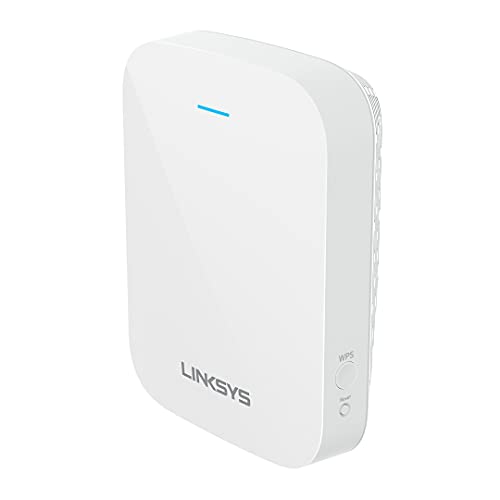
Linksys RE7310 AX1800 Wi-Fi 6 Extender
Linksys keeps the RE7310 deliberately plain, with WPS pairing and a spot finder light that tells you whether the unit is too far from the router. Wi-Fi 6 radios and a gigabit port cover the basics. It lacks the mesh integration of the TP-Link and ASUS units, so expect to manage a separate network name in some setups.
Pros
- Easy setup with a physical WPS button
- Spot finder light guides placement
- Works with any brand of router
Cons
- No true mesh roaming
- Fewer configuration options than rivals

NETGEAR EX3700 AC750 Wi-Fi Range Extender
The EX3700 is the sensible choice when the goal is a usable signal on a patio or in a spare room and nothing more. It is small, cheap and reliable at low demand, with a fast ethernet port for a printer or smart hub. Do not expect it to carry high resolution streaming or a household of devices.
Pros
- Lowest outlay of the group
- Small enough to leave in place unnoticed
- Fine for browsing, calls and smart devices
Cons
- Throughput drops sharply under load
- Separate network name to manage
Side by side
| # | Model | Standard | Best for | Score | Price |
|---|---|---|---|---|---|
| 1 | TP-Link RE705X AX3000 Wi-Fi 6 Range Extender | Wi-Fi 6 AX3000 | Best overall | 9.4 | Check price |
| 2 | NETGEAR Nighthawk EAX15 AX1800 Wi-Fi 6 Mesh Extender | Wi-Fi 6 AX1800 | Best for Netgear networks | 9.2 | Check price |
| 3 | TP-Link RE550 AC1900 Wi-Fi Range Extender | Wi-Fi 5 AC1900 | Best for large homes | 9.0 | Check price |
| 4 | TP-Link RE315 AC1200 Mesh Wi-Fi Extender | Wi-Fi 5 AC1200 | Best value | 8.8 | Check price |
| 5 | ASUS RP-AX56 AX1800 Wi-Fi 6 Range Extender | Wi-Fi 6 AX1800 | Best for AiMesh setups | 8.6 | Check price |
| 6 | Linksys RE7310 AX1800 Wi-Fi 6 Extender | Wi-Fi 6 AX1800 | Best simple setup | 8.3 | Check price |
| 7 | NETGEAR EX3700 AC750 Wi-Fi Range Extender | Wi-Fi 5 AC750 | Best budget | 8.0 | Check price |
Before you buy
Placement beats specifications An extender can only rebroadcast what it receives, so a unit plugged into the dead zone itself will faithfully repeat a weak signal. The rule is to place it roughly halfway between the router and the problem area, where it still gets two or three solid bars. Every model here has a signal indicator for exactly this reason, and moving the unit one outlet closer to the router often does more than upgrading the hardware.
Why extenders halve your speed A traditional repeater listens on the same radio it transmits on, so it spends half its airtime receiving and half resending. That is the honest explanation for the gap between the number on the box and what a speed test shows. Dual band models with a dedicated backhaul band, or units with enough Wi-Fi 6 headroom, reduce the penalty rather than eliminating it. If you can run an ethernet cable to the extender, do it, because wired backhaul removes the problem entirely.
Mesh roaming versus a second network name Basic extenders create their own network, so your phone stays glued to the weak original signal until you switch by hand. Mesh capable extenders such as the OneMesh and AiMesh models share one name and hand devices over automatically. This only works when your router supports the same system, so check the compatibility list before buying rather than assuming the feature applies.
When to stop extending and replace the router If you need two extenders, or the house is large and built with dense walls, a proper mesh system will behave better than a chain of repeaters. Extenders are a targeted fix for one or two weak areas. Owners report the most disappointment when a single unit is asked to cover a whole floor it was never designed to reach, so be honest about the size of the problem before choosing.
Questions worth asking
Will a Wi Fi extender increase my internet speed?
No. An extender spreads existing coverage into areas the router cannot reach, but it cannot exceed the speed arriving from your provider. In the extended area you will typically see a fraction of the speed available near the router.
Where exactly should I plug in the extender?
About halfway between the router and the weak area, in a spot where the extender still receives a strong signal. Every model here has an indicator light or app reading for this. Avoid placing it behind furniture, inside a cabinet or next to a microwave.
Do I need a Wi Fi 6 extender if my router is older?
Not necessarily, but a Wi-Fi 6 extender has more headroom and will still work with an older router, so it is a reasonable buy if you plan to upgrade the router later. If your plan is slow and your devices are old, a Wi-Fi 5 model like the RE550 is enough.
Why do my devices stay on the weak signal instead of switching?
Because basic extenders broadcast a separate network name and phones hold onto a connection until it becomes unusable. Mesh capable extenders paired with a compatible router share one name and hand devices over automatically, which fixes this.
Can I connect the extender to my router with an ethernet cable?
Yes, and it is the best possible setup. Running a cable to the extender gives it wired backhaul, so the wireless radios are used only for the devices around it and the usual speed penalty disappears. Several models here can operate as a wired access point.
Will any extender work with any router?
For basic extending, yes. Every model here works with any brand of router. The mesh roaming features are the exception, since OneMesh needs a TP-Link router and AiMesh needs an ASUS router that supports it.
Is an extender better than a mesh system?
For one or two weak spots, an extender is cheaper and simpler. For whole home coverage in a large or thick walled house, a mesh system handles roaming and backhaul far better. Owners report the most frustration when a single extender is asked to do a mesh system job.
Do extenders need their own power outlet?
Yes, and plug in models occupy the outlet directly, which can block the socket next to it. Desktop style units use a power adapter instead. Based on specifications, plug in models are the easier choice for a hallway and desktop units suit a shelf or media cabinet.
The verdict
The TP-Link RE705X is the safest recommendation because it has the throughput to make extending worthwhile and OneMesh keeps the network tidy on compatible routers. Netgear owners should look at the Nighthawk EAX15 first for the same reasons within their own ecosystem. If the problem is one room and the budget is small, the TP-Link RE315 solves it without fuss.