External Drives That Keep Your Console Library Loaded
The WD_BLACK P10 Game Drive leads for console owners who want maximum capacity per dollar in a rugged shell. The Samsung T7 Shield is the pick when you want fast SSD loading and drop resistance, and the Seagate Expansion Portable is the simple high capacity option.
If you want one external drive that works on both PlayStation and Xbox without fuss, the WD_BLACK P10 Game Drive is the safest starting point, with the Samsung T7 Shield for speed and the Seagate Expansion Portable for raw capacity.
Console storage is confusing because the rules differ by platform: an external drive can run older generation games directly but usually only archives current generation titles, and marketing speeds rarely match what a console USB port delivers. We compared spec sheets, published interface limits and patterns in owner feedback, weighting sustained transfer behaviour, enclosure build and long term reliability over peak numbers.
What we recommend

WD_BLACK P10 Game Drive
The P10 is built specifically around console use, with a shock resistant aluminium topped shell and capacities that go well past what most internal drives offer. It plugs into PS5 and Xbox Series consoles over USB 3.2 Gen 1 and is recognised without extra software. Owners report it as the drive they stop thinking about, which is the whole point of an archive disk.
Pros
- Huge capacity ceiling for a portable drive
- Rugged casing survives shelf and bag life
- Recognised by both console families without setup
Cons
- Mechanical drive speeds cannot run current generation titles
- Audible spin up in a quiet room

Samsung T7 Shield Portable SSD
The T7 Shield wraps an NVMe SSD in a grippy rubberised body rated for water and dust ingress, which makes it a genuinely portable option for taking a library to a friend’s house. Transfer rates over USB 3.2 Gen 2 are several times what any mechanical drive manages, so moving a large title back to internal storage takes a fraction of the time. Based on specifications it is the fastest all round pick here.
Pros
- Very fast archive and restore transfers
- Sealed rubberised shell tolerates travel
- No moving parts and completely silent
Cons
- Costs far more per terabyte than a hard drive
- Console USB ports cap the peak speed it can reach

Seagate Expansion Portable Hard Drive
Seagate’s Expansion line is the plain, unbranded workhorse of console storage, and that is exactly why it sells so well. There is no gaming livery or bundled software, just a bus powered drive that formats in a couple of minutes and holds a very large backlog. Owners report it as the sensible choice when the drive lives permanently behind the TV.
Pros
- Excellent capacity for the outlay
- Simple plug and format setup
- Compact enough to sit behind a console
Cons
- Plastic shell feels less solid than rivals
- Short bundled cable limits placement

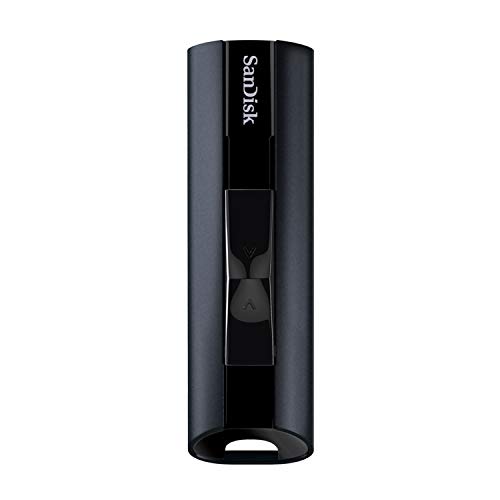
SanDisk Extreme Portable SSD
The Extreme Portable is the smallest drive in this group by a clear margin, with a carabiner loop moulded into the silicone body so it can clip to a bag. It is fast enough that restoring an archived game feels closer to copying a file than waiting on a download. The trade off is that capacity tops out lower than the mechanical options.
Pros
- Genuinely pocketable footprint
- Silicone shell absorbs knocks and drops
- Fast enough to make archiving painless
Cons
- Higher cost per terabyte than hard drives
- Needs an adapter for older Type-A console ports

WD My Passport Portable Hard Drive
My Passport is aimed at general computer backup, which turns out to be useful if the same drive needs to serve a console and a laptop. It carries hardware encryption and backup utilities on the PC side while still formatting cleanly for console archiving. Owners report it as a tidy compromise for households that share one drive.
Pros
- Works equally well as a computer backup disk
- Wide capacity range including very large sizes
- Slim profile fits a media cabinet
Cons
- Bundled software is irrelevant for console duty
- Glossy finish shows fingerprints

Crucial X9 Pro Portable SSD
The X9 Pro is an anodised aluminium slab barely thicker than a stack of cards, and the metal body doubles as a heatsink so sustained transfers hold their pace better than plastic bodied rivals. It is a good fit if the drive stays plugged in permanently and you want something that disappears behind the console. Capacity choices are narrower than the hard drive options.
Pros
- Metal shell helps sustained write speeds
- Very low profile behind a console
- Quiet and cool in continuous use
Cons
- Fewer capacity tiers to choose from
- No ruggedised outer coating

Toshiba Canvio Basics Portable Hard Drive
Canvio Basics strips everything back to a bus powered drive in a matte plastic case, and for archiving a backlog that is all most people need. It formats to console requirements in minutes and asks nothing else of you. Owners report it as the drive to buy when the budget matters more than the badge.
Pros
- Lowest outlay of the drives ranked here
- Matte finish hides marks well
- Simple setup with no software required
Cons
- Slowest transfers in this group
- Basic casing offers little shock protection
How they compare
| # | Model | Drive type | Best for | Score | Price |
|---|---|---|---|---|---|
| 1 | WD_BLACK P10 Game Drive | Portable hard drive | Best overall | 9.4 | Check price |
| 2 | Samsung T7 Shield Portable SSD | Portable NVMe SSD | Best for speed | 9.2 | Check price |
| 3 | Seagate Expansion Portable Hard Drive | Portable hard drive | Best value | 9.0 | Check price |
| 4 | SanDisk Extreme Portable SSD | Portable SSD | Best for portability | 8.8 | Check price |
| 5 | WD My Passport Portable Hard Drive | Portable hard drive | Best for mixed console and PC use | 8.6 | Check price |
| 6 | Crucial X9 Pro Portable SSD | Portable SSD | Best compact SSD | 8.3 | Check price |
| 7 | Toshiba Canvio Basics Portable Hard Drive | Portable hard drive | Best budget | 8.0 | Check price |
Before you buy
Understand what an external drive can and cannot run This is the single point that causes the most disappointment. On both current consoles you can store current generation games on an external USB drive, but you must move them back to internal storage before they will launch. Older generation titles, including backwards compatible libraries, generally run directly from the external drive. That means a mechanical hard drive is a perfectly good archive for a large backlog, while an SSD mainly buys you a faster move back onto the console.
Match capacity to your actual backlog, not to the biggest number Modern titles routinely run to a hundred gigabytes or more, so a one terabyte drive holds fewer games than the number suggests. If you play a rotating handful of live service titles, two terabytes is comfortable. If you collect and want everything installed and ready, four terabytes upward stops the constant delete and redownload cycle. Buying one size up is usually cheaper per terabyte than buying twice.
Interface speed matters less than the marketing implies Console USB ports do not always run at the maximum rate a drive supports, so a drive rated for very high sequential throughput will often be limited by the port rather than the media. A mechanical drive on USB 3.2 Gen 1 is generally saturating the disk, not the cable. That is why we weighted enclosure build and capacity more heavily than headline transfer figures when ranking these.
Think about where the drive will physically live A drive that sits permanently behind a console wants a low profile body, a cable long enough to reach without strain and a case that does not rattle. A drive that travels wants a sealed rubberised shell and no moving parts. Buying the ruggedised option for a drive that never leaves the shelf is money spent on protection you will not use, and buying the slim metal option for a bag is asking for a bent connector.
Common questions
Can I play PS5 or Xbox Series games directly from an external drive?
Not for current generation titles. Both platforms let you store them externally but require you to move them back to internal storage before launching. Older generation and backwards compatible games generally do run straight from the external drive.
Does an SSD make my games load faster on a console?
Only for titles that are allowed to run from external storage, and even then the gain is modest because the console USB port limits throughput. The real benefit of an SSD is much faster archiving and restoring when you shuffle games on and off internal storage.
Do I need to format the drive before using it?
Yes. The console will prompt you to format the drive for game storage on first connection, and that erases anything already on it. Copy off any files you care about first.
Can one drive be shared between a PlayStation and an Xbox?
Not simultaneously in game storage mode. Each console formats the drive to its own scheme, so moving it between platforms means reformatting and losing the stored games. Buy separate drives if you use both regularly.
Is a powered desktop drive better than a portable one?
Desktop drives offer more capacity for the money but need a mains adapter and take up more space. For console use the portable bus powered format is usually more practical, and both consoles supply enough power over USB to run one reliably.
How long will an external hard drive last?
Owners commonly report several years of light console duty, since an archive drive spends most of its life idle rather than under constant load. Treat any single drive as impermanent though, because game data can be redownloaded but save data should be backed up to cloud storage.
Does the USB cable that comes in the box matter?
It does. Bundled cables are often short and some third party replacements are charge only and carry no data. If you need more reach, buy a data rated cable of the correct standard rather than adding an unpowered hub.
Should I buy the largest drive I can afford?
Generally yes, because cost per terabyte falls as capacity rises and console games keep growing. The exception is if you want the speed of an SSD, where stepping down one capacity tier to afford solid state storage is often the better trade.
The verdict
For most console owners the WD_BLACK P10 Game Drive is the right answer, because the job is archiving a big backlog cheaply in a case that survives real life. Spend more on the Samsung T7 Shield only if you regularly shuffle games back and forth and want that wait cut down, or save with the Seagate Expansion Portable if the drive will simply sit behind the TV.